
Easytry123 Easytry2094
Easytry123 Replacement Remote Control User Manual
For Samsung HW-J450/ZA, PS-WJ651, PS-WJ470/ZA, HW-J6502, HW-J650 Audio Soundbar Systems
1. Introducere
This manual provides instructions for the Easytry123 replacement remote control, designed for use with various Samsung audio soundbar systems. This remote control offers basic functionality for compatible models. Please note that as a replacement unit, it may not support all advanced functions of the original remote control.
Modele compatibile:
- Samsung HW-J450/ZA
- Samsung PS-WJ651
- Samsung PS-WJ651/ZA
- Samsung PS-WJ470/ZA
- Samsung HW-J6502
- Samsung HW-J650
2. Configurare
2.1 Instalarea bateriei
The remote control requires batteries for operation. Batteries are not included with the remote control and must be purchased separately. This remote typically uses standard Lithium batteries.
- Localizați compartimentul bateriei de pe spatele telecomenzii.
- Remove the battery compartment cover by sliding or gently prying it open.
- Insert the new batteries, ensuring the correct polarity (+ and -) as indicated inside the compartment.
- Puneți la loc capacul compartimentului bateriei până când se fixează în siguranță cu un clic.

Figure 1: Remote control with battery compartment open.
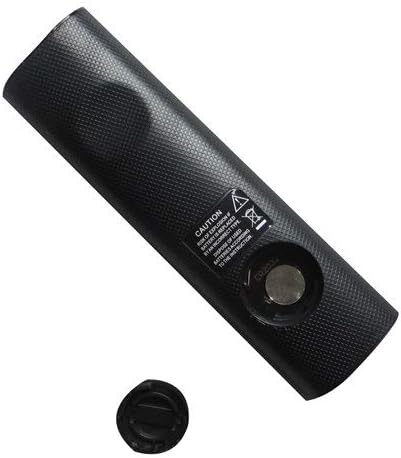
Figure 2: Remote control showing the battery cap detached.
2.2 Utilizare inițială
This remote control utilizes infrared (IR) technology. No complex pairing or programming is typically required. Once batteries are installed, point the remote directly at your Samsung soundbar system and begin operation.
3. Instrucțiuni de utilizare
The remote control features 15 buttons for various functions. While specific button labels may vary, common functions include:
- Putere: Turns the soundbar system on or off.
- Volum sus/jos: Reglează nivelul de ieșire audio.
- Mut: Dezactivează ieșirea audio.
- Intrare/Sursă: Cycles through available audio input sources (e.g., HDMI, Optical, Bluetooth).
- Butoane de navigare: Used for menu navigation (if supported by the soundbar and remote).
- Comenzi de redare: Play, Pause, Skip (if controlling a connected media device).
For optimal performance, ensure a clear line of sight between the remote control and the soundbar's IR receiver. The maximum effective range is approximately 10 meters (33 feet).
4. Întreținere
4.1 Înlocuirea bateriei
Replace batteries when the remote control's response becomes inconsistent or stops working. Always replace all batteries at the same time with new ones of the same type. Do not mix old and new batteries, or different types of batteries.
4.2 Curățare
To clean the remote control, wipe it with a soft, dry cloth. Do not use liquid cleaners, abrasive pads, or chemical solvents, as these can damage the remote's surface or internal components.
4.3 Depozitare
Depozitați telecomanda într-un loc răcoros și uscat, ferit de lumina directă a soarelui și de temperaturi extreme. Dacă telecomanda nu va fi utilizată pentru o perioadă lungă de timp, se recomandă scoaterea bateriilor pentru a preveni scurgerile.
5. Depanare
- Telecomanda nu răspunde:
- Verificați dacă bateriile sunt introduse corect, cu polaritatea corespunzătoare.
- Înlocuiți bateriile cu altele noi.
- Ensure there is a clear line of sight between the remote and the soundbar's IR receiver. Remove any obstructions.
- Make sure you are within the effective operating range (approximately 10 meters).
- Unele funcții nu funcționează:
- As a replacement remote, it may not support all advanced or specific functions of the original equipment. This is normal for universal or replacement remotes.
- Verify that your soundbar model is listed as compatible in the Introduction section.
6. Specificații
| Caracteristică | Caietul de sarcini |
|---|---|
| Marca | Easytry123 |
| Numele modelului | Easytry2094 |
| Tehnologia de conectivitate | infraroșu (IR) |
| Cantitate de butoane | 15 |
| Tip controler | Buton de control |
| Raza maximă | 10 metri |
| Tip baterie | Litiu (nu este inclus) |
| Culoare | Negru |
| Dispozitive compatibile | Samsung Audio Soundbar Systems (specific models listed) |
7. Garanție și asistență
For warranty information and customer support, please refer to the seller or retailer from whom you purchased this product. Specific warranty terms and support channels are typically provided at the point of sale.
Ask a question about this manual
Ask about setup, troubleshooting, compatibility, parts, safety, or missing instructions. Manuals+ will review the question and use this page’s manual context to help answer it.