
1. Introducere
The Snakebyte GAME:PAD 4S Wireless controller is designed to provide a seamless and immersive gaming experience on your PlayStation 4 console. This manual provides essential information on setting up, operating, maintaining, and troubleshooting your new gamepad.

Figura 1: Față view of the Snakebyte GAME:PAD 4S Wireless Controller in blue camo.
2. Caracteristici cheie
- Lag-Free Wireless Connectivity: Utilizes Bluetooth technology for a responsive and uninterrupted gaming experience on Sony PlayStation 4.
- Immersive Dual Vibration: Equipped with dual vibration motors that provide haptic feedback, making in-game actions feel more realistic.
- Control precis: Features twin analog joysticks and responsive trigger buttons for accurate and precise gameplay.
- Integrated Audio Jack: Includes a 3.5mm headphone jack for connecting headsets, allowing for in-game audio and communication.
- LED Status Home Button: A central LED-illuminated home button indicates controller status.
- Design ergonomic: Crafted for comfort during extended gaming sessions, reducing hand fatigue.
- Senzori de miscare: Built-in accelerometer and gyroscope enable motion-sensing gameplay for enhanced immersion.
3. Configurare și conectare
3.1 Initial Pairing with PlayStation 4
- Asigurați-vă că consola PlayStation 4 este pornită.
- Connect the Snakebyte GAME:PAD 4S Wireless controller to the PS4 using the supplied micro-USB cable.
- Press the PS button (Home button) on the controller. The controller will automatically pair with the console.
- Once paired, you can disconnect the USB cable, and the controller will maintain its wireless connection.

Figure 2: Controller connected via micro-USB for initial pairing and charging.
3.2 Încărcarea controlerului
To charge the controller, connect it to your PlayStation 4 console or a USB power adapter using the provided micro-USB cable. The LED on the home button will indicate charging status. A full charge typically takes approximately 2 hours and provides about 7-8 hours of playtime.
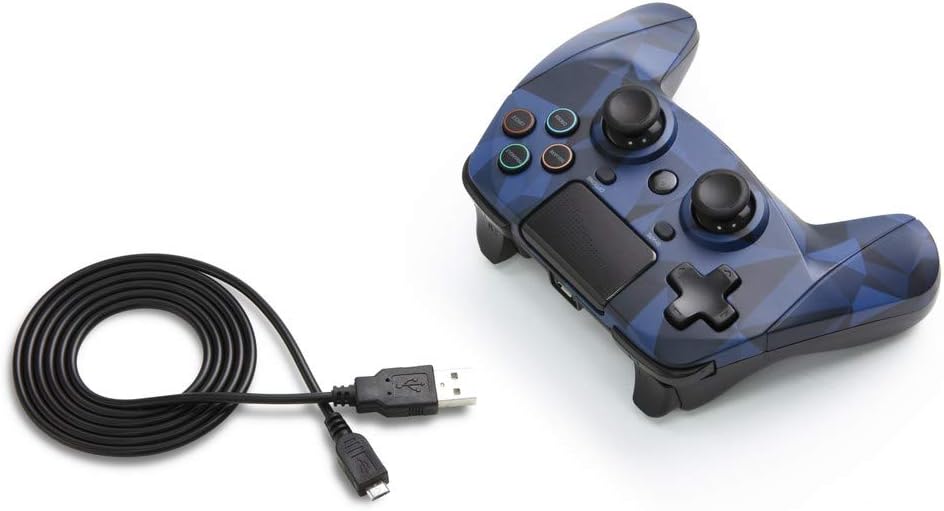
Figure 3: The Snakebyte GAME:PAD 4S Wireless Controller shown with its included micro-USB charging cable.
4. Instrucțiuni de utilizare
4.1 Dispunerea și funcțiile butoanelor
The controller features a familiar layout with dual analog sticks, a D-pad, action buttons (Triangle, Square, Circle, Cross), Share, Options, and a Home button. The action buttons are labeled with their names rather than symbols, but are color-coded similarly to standard PlayStation controllers.

Figura 4: Înclinat view highlighting the button layout and ergonomic design.
4.2 Touchpad and Motion Sensors
The integrated touchpad is fully functional and can be used for navigation and specific in-game interactions. The highly sensitive built-in accelerometer and gyroscope detect motion, tilt, and rotation, providing an immersive gaming experience for titles that utilize motion controls.
4.3 Jack audio
Connect any standard 3.5mm headset to the controller's audio jack for private listening of game audio and voice chat. Ensure your headset is properly inserted for optimal sound quality.
5. Îngrijire și întreținere
- Mențineți controlerul curat ștergându-l cu o cârpă moale și uscată. Evitați utilizarea substanțelor chimice dure sau a materialelor abrazive.
- Depozitați controlerul într-un loc răcoros și uscat, ferit de lumina directă a soarelui și de temperaturi extreme.
- Avoid dropping the controller or subjecting it to strong impacts, as this can damage internal components.
- Nu încercați să dezasamblați controlerul, deoarece acest lucru va anula garanția.
6. Depanare
6.1 Probleme de conectare
- If the controller does not connect, ensure it is fully charged.
- Try re-pairing the controller by connecting it via USB cable and pressing the PS button.
- Ensure there are no strong interferences (e.g., other Bluetooth devices, Wi-Fi routers) nearby.
6.2 Button Unresponsiveness
- If buttons are unresponsive, try resetting the controller. Locate the small reset button on the back of the controller (often near the L2 shoulder button) and press it with a thin object like a paperclip.
- Ensure the controller's firmware is up to date (check the Snakebyte support website pentru actualizări).
7. Specificatii tehnice
| Caracteristică | Caietul de sarcini |
|---|---|
| Marca | Snakebyte |
| Numele modelului | GAME:PAD 4 S WIRELESS |
| Numărul de model al articolului | SB912726 |
| Dispozitive compatibile | Playstation 4 |
| Tehnologia de conectivitate | Wireless (Bluetooth) |
| Tip controler | Gamepad |
| Sursa de alimentare | Alimentat cu baterie (1 baterie cu litiu polimer inclusă) |
| Voltage | 3.7 volți |
| Greutatea articolului | 11.2 uncii |
| Dimensiunile produsului (Lxlxh) | 4.53 x 2.95 x 6.1 inci |
| Culoare | Blue Camo |
8. Garanție și asistență
The Snakebyte GAME:PAD 4S Wireless controller is covered by a Garanție limitată de 5 ani a producătorului. For warranty claims or technical support, please refer to the contact information provided on the product packaging or visit the official Snakebyte website-ul.