
1. Introducere
Thank you for choosing the Logic Life30 Smartwatch. This device is designed to integrate seamlessly into your active lifestyle, offering features such as Bluetooth calling, fitness tracking, sleep monitoring, and real-time notifications. This manual provides detailed instructions for setup, operation, and maintenance to ensure optimal performance and longevity of your smartwatch.

Image 1.1: Logic Life30 Smartwatches in multiple colors, showcasing different display options including a dialer, messages, contacts, time, date, and heart rate monitor.
2. Informații de siguranță
- Nu încercați să dezasamblați, să reparați sau să modificați dispozitivul. Acest lucru poate anula garanția și poate provoca daune.
- Păstrați dispozitivul departe de temperaturi extreme, lumina directă a soarelui și umiditate ridicată.
- Evitați expunerea dispozitivului la impacturi puternice sau căderi.
- Use only the provided charging cable and adapter. Using unauthorized accessories may cause damage or fire.
- Consult a medical professional before starting any new exercise regimen, especially if you have pre-existing health conditions. The heart rate monitor is for reference only and should not be used for medical diagnosis.
- Nu lăsați dispozitivul la îndemâna copiilor și a animalelor de companie.
- Curățați dispozitivul cu o lavetă moale și uscată. Nu utilizați substanțe chimice dure sau materiale abrazive.
3. Conținutul pachetului
Vă rugăm să verificați conținutul pachetului la despachetare. Dacă lipsesc sau sunt deteriorate articolele, contactați serviciul de asistență pentru clienți.
- Logic Life30 Smartwatch
- Cablu de încărcare USB
- Manual de utilizare (acest document)
4. Dispozitiv terminatview
Familiarize yourself with the physical components of your Logic Life30 Smartwatch.
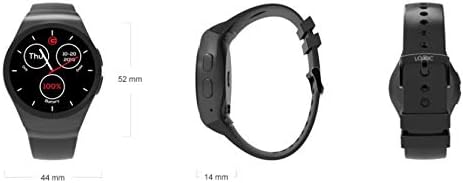
Imaginea 4.1: Față, laterală și spate views of the Logic Life30 Smartwatch with dimensions (44mm width, 52mm height, 14mm thickness).
4.1 Față View
- IPS LCD Touch Display: The main interface for interacting with the smartwatch.
4.2 Latura View
- Buton de alimentare: Folosit pentru a porni/opri dispozitivul și a activa/dezactiva ecranul.
- Microfon: Pentru comenzi vocale și apeluri.
4.3 Înapoi View

Imaginea 4.2: Spate view of the Logic Life30 Smartwatch, highlighting the optical heart rate sensor and magnetic charging contacts.
- Senzor de ritm cardiac: Monitorizează ritmul cardiac.
- Contacte de încărcare: For connecting the magnetic USB charging cable.
- Vorbitor: For audio output during calls or media playback.
5. Configurare
5.1 Încărcarea ceasului inteligent
- Connect the USB charging cable to a power adapter (not included) or a computer's USB port.
- Align the magnetic end of the charging cable with the charging contacts on the back of the smartwatch. It will snap into place.
- The watch display will show a charging indicator. Allow the device to fully charge before first use (approximately 2 hours).
5.2 Pornire/Oprire
- Pentru a porni: Press and hold the Power Button on the side of the watch until the Logic logo appears.
- Pentru a opri: Press and hold the Power Button, then select "Power Off" on the screen.
5.3 Pairing with Your Smartphone (Bluetooth)
To access all features, including calls, notifications, and data synchronization, pair your Life30 Smartwatch with your smartphone via Bluetooth.
- Ensure your smartwatch is powered on and Bluetooth is enabled on your smartphone.
- On your smartwatch, navigate to the Bluetooth settings.
- On your smartphone, open Bluetooth settings and search for available devices.
- Select "Logic Life30" (or similar name) from the list of found devices on your smartphone.
- Confirmați solicitarea de asociere atât pe smartphone, cât și pe ceasul inteligent.
5.4 Instalarea aplicației însoțitoare
For full functionality, including fitness data tracking and advanced settings, download the recommended companion app from your smartphone's app store. Refer to the smartwatch's display or packaging for the specific app name or QR code.
- Scan the QR code displayed on the smartwatch or in the quick start guide, or search for the app name in your phone's app store.
- Install the app and follow the on-screen instructions to create an account and connect your Life30 Smartwatch.
6. Instrucțiuni de utilizare
6.1 Navigarea prin interfață
- Glisați în sus/jos: Derulați prin meniuri sau notificări.
- Glisați la stânga/dreapta: Access different screens, widgets, or app lists.
- Robinet: Selectați un element sau deschideți o aplicație.
- Apăsați butonul de pornire: Return to the home screen or wake/sleep the display.
6.2 Caracteristici de comunicare
- Efectuarea/Primirea apelurilor: Once paired via Bluetooth, you can dial numbers directly from the watch or answer incoming calls.
- Mesaje: View incoming text messages and social media notifications directly on your watch.
- Contacte: Access your phone's contact list from the smartwatch.
6.3 Monitorizarea sănătății și a fitness-ului

Image 6.1: The Logic Life30 Smartwatch supports fitness tracking, monitoring activities like running.
- Monitor de ritm cardiac: Access the heart rate app to measure your current heart rate. The watch can also log your heart rate over time.
- Pedometru: Tracks your steps, distance, and estimated calories burned throughout the day.
- Monitorizare somn: Monitorizează tiparele de somn, inclusiv somnul profund, somnul ușor și orele de trezire.
- Memento sedentar: Notifies you when you have been inactive for too long, encouraging you to move.
6.4 Multimedia and Other Features
- Camera/Remote Camera: Use the built-in camera (if available) or control your smartphone's camera remotely from the smartwatch.
- MP3/MP4 Player: Play music or videos stored on the device or control media playback on your connected smartphone.
- Înregistrator de sunet: Record audio directly from the smartwatch.
- Calculator, Calendar, Alarm, Stopwatch: Standard utility applications.
- Antifurt: Helps locate your phone if it's out of range or alerts you if the connection is lost.
- Asistent vocal: Access your phone's voice assistant through the smartwatch.
6.5 Personalizare
- Vizionați fețele: Personalize your smartwatch by choosing from various pre-installed watch faces or downloading new ones via the companion app.
- Teme: Adjust the overall visual theme of the smartwatch interface.
7. Întreținere
7.1 Curățarea ceasului inteligent
- Ștergeți ecranul și carcasa ceasului cu o lavetă moale, fără scame.
- Pentru petele încăpățânate, ușor dampen the cloth with water. Avoid using harsh cleaning agents, solvents, or abrasive materials.
- Asigurați-vă că contactele de încărcare sunt curate și uscate înainte de încărcare pentru a preveni coroziunea.
7.2 Depozitare
- Când nu este utilizat pentru perioade lungi de timp, depozitați ceasul inteligent într-un loc răcoros și uscat.
- Charge the device periodically (e.g., every 3 months) to prevent deep discharge of the battery.
8. Depanare
| Problemă | Soluție posibilă |
|---|---|
| Ceasul inteligent nu se pornește. | Asigurați-vă că dispozitivul este complet încărcat. Conectați-l la încărcător timp de cel puțin 30 minute. |
| Nu se poate conecta la smartphone. |
|
| Notificările nu sunt primite. |
|
| Citirile ritmului cardiac sunt inexacte. | Asigurați-vă că ceasul este purtat strâns pe încheietura mâinii, nici prea strâns, nici prea lejer. Curățați senzorul de pe spatele ceasului. |
| Ecranul nu răspunde. | Restart the smartwatch by pressing and holding the power button. If the issue persists, ensure the screen is clean and dry. |
9. Specificații
| Caracteristică | Detaliu |
|---|---|
| Numele modelului | Viața30 |
| Marca | Logică |
| Afişa | 1.3 Inch IPS LCD Touch Screen |
| Conectivitate | Bluetooth |
| Comunicare fără fir | Bluetooth |
| Caracteristici speciale | Email, Sleep Monitor, Notifications, Heart Rate Monitor, Pedometer, Remote Camera, MP3/MP4 Player |
| Intrare interfață umană | Touch screen |
| Dimensiunile produsului | 3.81 x 1.3 x 4.5 cm (1.5 x 0.51 x 1.77 țoli) |
| Greutatea articolului | 426 g (0.94 livre) |
| Opțiuni de culoare | Silver/White (other colors may be available) |
| Formă | Rundă |
10. Garanție și asistență
10.1 Informații despre garanție
The Logic Life30 Smartwatch comes with a standard manufacturer's warranty. Please refer to the warranty card included in your package or visit the official Logic webpentru termeni și condiții detaliate privind acoperirea garanției, durata și procesul de reclamații.
10.2 Asistență pentru clienți
For technical assistance, troubleshooting, or any questions regarding your Logic Life30 Smartwatch, please contact Logic customer support. Contact information can typically be found on the official Logic website-ul sau pe ambalajul produsului.
- Suport online: Visit the official Logic website cu întrebări frecvente, articole de asistență și formulare de contact.
- Asistență prin e-mail: Consultați documentația produsului pentru adresa de e-mail a serviciului de asistență pentru clienți.
- Asistență telefonică: Refer to your product documentation for customer service phone numbers.