
1. Introducere
This manual provides detailed instructions for the setup, operation, and maintenance of your OWLENZ SD60 Wi-Fi Mini Projector. Please read this manual thoroughly before using the product to ensure proper functionality and safety. The SD60 features advanced LED light technology with 1500 lumens brightness, Wi-Fi screen sharing capabilities (Miracast/Airplay), and multiple media playback options for a versatile home theater experience. Its portable and compact design allows for easy installation and use.
2. Informații importante privind siguranța
- Nu priviți direct în lentila proiectorului atunci cândamp este pornit.
- Asigurați o ventilație adecvată în jurul proiectorului pentru a preveni supraîncălzirea.
- Nu lăsați proiectorul să intre în contact cu apă sau alte lichide.
- Folosiți doar adaptorul de alimentare furnizat împreună cu proiectorul.
- Evitați plasarea proiectorului pe suprafețe instabile.
- The LED light technology is designed to be gentle on the eyes and has no radiation.
3. Conținutul pachetului
Verificați dacă toate articolele enumerate mai jos sunt incluse în colet. Dacă lipsesc sau sunt deteriorate articole, vă rugăm să contactați serviciul de asistență pentru clienți.
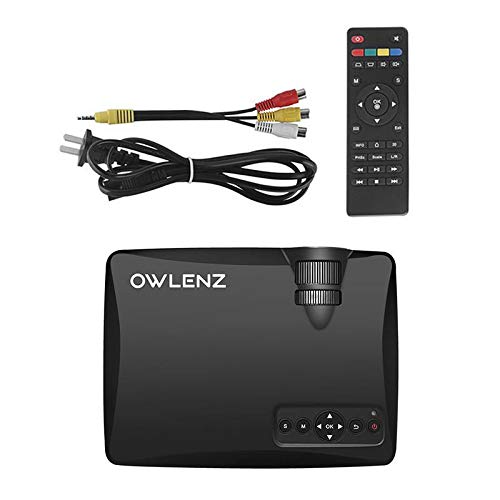
Image: OWLENZ SD60 Projector, remote control, power cable, and AV cables.
- OWLENZ SD60 Mini Projector
- Telecomanda
- Cablu de alimentare
- Cablu AV
- Manual de utilizare (acest document)
4. Produs terminatview
Familiarize yourself with the various parts and controls of your OWLENZ SD60 projector.
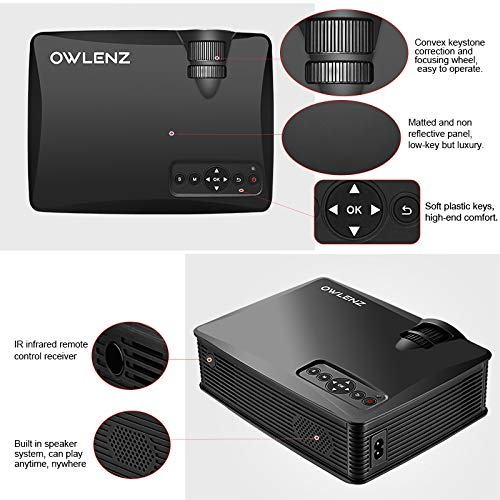
Image: Key features of the OWLENZ SD60 projector, including the focusing wheel, keystone correction, control panel, IR receiver, and built-in speaker.
- Convex Keystone Correction and Focusing Wheel: Located on the top, these allow for easy image adjustment.
- Matted and Non-Reflective Panel: Provides a sleek, low-key appearance.
- Soft Plastic Keys: For comfortable and responsive control.
- IR Infrared Remote Control Receiver: For remote operation.
- Built-in Speaker System: A 3W speaker for integrated audio playback.
- Porturi de intrare: HDMI, USB, AV, SD Card slot (located on the side/rear).
5. Configurare
5.1 Conexiune la alimentare
- Conectați cablul de alimentare la portul de intrare al proiectorului.
- Conectați celălalt capăt al cablului de alimentare la o priză electrică adecvată.
- Apăsați butonul de alimentare de pe proiector sau de pe telecomandă pentru a-l porni.
5.2 Conectarea surselor de intrare
The projector supports various input options:
- HDMI: Connect an HDMI cable from your device (laptop, gaming console, etc.) to the projector's HDMI port.
- USB: Introduceți o unitate USB în portul USB pentru redarea directă a fișierelor media.
- DE: Use the provided AV cable to connect to devices with AV output.
- Card SD: Insert an SD card into the SD card slot for media playback.
After connecting, select the appropriate input source from the projector's menu using the remote or control panel.
5.3 Wi-Fi Screen Sharing (Miracast / Airplay)
The SD60 supports wireless screen sharing from compatible smartphones and tablets.
- Asigurați-vă că dispozitivul mobil și proiectorul sunt conectate la aceeași rețea Wi-Fi.
- On the projector, navigate to the "Screen Share" or "Miracast/Airplay" option in the main menu.
- On your mobile device, activate the screen mirroring function (e.g., "Smart View" on Android, "Screen Mirroring" on iOS).
- Selectați numele proiectorului din lista de dispozitive disponibile pentru a stabili conexiunea.
5.4 Reglarea focalizării și a trapezului
- Focus: Rotate the focusing wheel near the lens until the projected image is clear and sharp.
- Corecție trapezoială: Use the keystone correction wheel to adjust the image shape if it appears trapezoidal (wider at the top or bottom).
6. Funcționare
6.1 Controale de bază
Use the control panel on the projector or the remote control to navigate menus and adjust settings.
- Buton de alimentare: Pornește/oprește proiectorul.
- Navigation Buttons (Arrows/OK): Pentru navigarea și selecția meniurilor.
- Buton sursă: Switches between input sources (HDMI, USB, AV, SD Card, Wi-Fi).
- Buton de meniu: Accesează meniul de setări al proiectorului.
6.2 Redare media
Once an input source is selected, the projector will display content. For USB/SD card playback, navigate through the file browser to select your desired media.
6.3 Ieșire audio
- Difuzor încorporat: The projector has a built-in 3W speaker suitable for small viewing zone.
- Difuzor extern: For a better listening experience, connect external speakers or headphones to the 3.5mm audio port.
6.4 Dimensiunea proiecției
The projector supports projection sizes ranging from 40 to 150 inches, offering a large screen experience.
7. Întreținere
7.1 Curățare
- Folosiți o lavetă moale și uscată pentru a curăța exteriorul proiectorului.
- For the lens, use a lens cleaning cloth and specialized lens cleaning solution. Do not use abrasive materials.
- Regularly clean the ventilation openings to ensure proper airflow and prevent dust buildup.
7.2 LED Bulb Lifespan
The OWLENZ SD60 features an LED bulb with a lifespan of up to 30,000+ hours, significantly longer than traditional projector lamps. No regular bulb replacement is typically required under normal usage conditions.
8. Cazuri de utilizare
The OWLENZ SD60 Mini Projector is versatile and suitable for various applications:
- Teatru acasă: Bucurați-vă de filme, emisiuni TV și sport pe un ecran mare.
- Jocuri: Connect gaming consoles for an immersive gaming experience.
- Scopuri educaționale: Project educational content, videos, and presentations.
- Children's Entertainment: Ideal for playing videos and cartoons for children.
- Mic Viewing Areas: Its compact design and built-in speaker make it perfect for use in smaller rooms or spaces.
9. Depanare
| Problemă | Cauza posibila | Soluţie |
|---|---|---|
| Nu este afișată nicio imagine | Incorrect input source selected; loose cable connection; source device not powered on. | Select the correct input source. Check all cable connections. Ensure the source device is powered on. |
| Imaginea este neclară | Focalizarea nu este reglată corect. | Ajustați rotița de focalizare până când imaginea este clară. |
| Imaginea este trapezoidală | Keystone not adjusted correctly. | Adjust the keystone correction wheel. |
| Nici un sunet | Volume too low; external speakers not connected properly; audio format not supported. | Increase volume. Check external speaker connection or use built-in speaker. Ensure audio format is compatible. |
| Wi-Fi screen sharing not working | Devices not on the same Wi-Fi network; screen mirroring function not activated on mobile device. | Ensure both devices are on the same Wi-Fi. Activate screen mirroring on your mobile device and select the projector. |
10. Specificații
| Caracteristică | Detaliu |
|---|---|
| Marca | OWLENZ |
| Model | SD60 |
| Dimensiunile produsului (Lxlxh) | 20.8 x 16.5 x 8 cm |
| Greutatea articolului | 949 g |
| Interfață hardware | HDMI, USB |
| Tehnologia de conectivitate | HDMI, USB, Wi-Fi |
| Dispozitive compatibile | Smartphone-uri, tablete, laptopuri |
| Caracteristici speciale | Difuzor încorporat, portabil |
| Tehnologia de afișare | LCD |
| Luminozitate | 1500 lumeni |
| Durata de viață a becului LED | Până la peste 30,000 ore |
| Dimensiunea proiecției | 40 până la 150 inci |
| Putere difuzor încorporată | 3W |
| Factor de formă | Portabil |
| Tip de montare | Suport de masă |
| Wattage | 24 wați |
| Bateriile necesare | Yes (for remote control, not included) |
11. Videoclipul produsului de mai susview
Urmăriți acest scurt videoclip pentru o scurtă trecere în revistăview of the OWLENZ SD60 Mini Projector's features and capabilities.
Video: O scurtă prezentareview highlighting the OWLENZ SD60 projector's display, sound, smart features, other features, portability, and use cases.
12. Garanție și asistență
The OWLENZ SD60 Mini Projector comes with a standard brand warranty. For detailed warranty information, technical support, or service inquiries, please refer to the product detail page on Amazon.in or contact OWLENZ customer service directly.
For further information, visit the product detail page: Pagina de produs Amazon