
Introducere
The VAIS Technology GSR-MZ01 adapter kit allows seamless integration of SiriusXM Satellite Radio into your compatible factory Mazda radio system. This adapter eliminates the need for additional mounts or FM modulation adapters, preserving your vehicle's original aesthetic and functionality. Enjoy a vast array of music, sports, news, and entertainment channels directly through your existing car stereo controls.
Ce este inclus
Verificați dacă toate componentele sunt prezente în pachet:
- Adaptor de interfață GSR
- Cablu USB GSR
- Harna de putere
- Antena vehiculului
- SiriusXM Tuner SXV300 (Note: Vehicle Antenna and SiriusXM Tuner SXV300 are included in GSR-TKIT only)
- conector OBD II

Produs terminatview: GSR Connectors and Ports
Familiarize yourself with the connectors and ports on the GSR Interface Adapter:

- Conector de interfață USB maro: Connects to the factory USB data port in your vehicle.
- Conector de interfață pentru tunerul SiriusXM SXV300: Connects to the SiriusXM tuner module.
- Stecher: Connects to the provided power harness.
- LED-uri: Indicatori pentru starea dispozitivului.
- Conector micro USB: Folosit pentru actualizări de firmware.
Compatibilitate
The VAIS Technology GSR-MZ01 is specifically designed for select Factory Mazda models. Please refer to the table below to ensure compatibility with your specific vehicle model and year:

Modele compatibile:
- Yaris / Yaris iA (2018-2019) - With factory USB
- iA (2017) - With factory USB
- Spider (2017-2019) - With Factory USB
- Mazda 3 (2015-2017) - With USB A
- Mazda 6 (2016-2017) - With USB A
- CX3 (2016-2017) - With USB A
- CX5 (2016-2017) - With USB A
- CX9/CX90 (2016-2017) - With USB A
- Miata/MX5 (2017) - With USB A
Instalare
Urmați acești pași pentru o instalare reușită:
- Conectați conectorul OBD II: Connect the provided OBD II connector to your vehicle's OBD II port for power.
- Conectați GSR-ul la portul USB din fabrică: Plug the VAIS adapter into the factory USB data port to send SiriusXM data to the radio. This port is typically found on the dashboard or in the center console.
- Instalați antena pe acoperiș: For optimal Satellite Radio reception, install the antenna on the highest point of the vehicle's roof. It must be mounted outside the vehicle with a clear view of the sky. Avoid placing it near other antennas or under roof racks.
- Montați totul în spatele panourilor: Secure the GSR and the SiriusXM tuner module behind the dash panels to keep them hidden and prevent clutter.

Antenna Installation Video Guide
Video 1: This video demonstrates the proper installation of a SiriusXM antenna, including recommended mounting locations and cable routing techniques.
Operațiunea
Once installed, activating and using your SiriusXM Satellite Radio is straightforward:
- Activează abonamentul: After connecting the adapter, activate your SiriusXM subscription.
- Selectați sursa SiriusXM: Turn on your vehicle and select SiriusXM from the source menu on your factory radio.
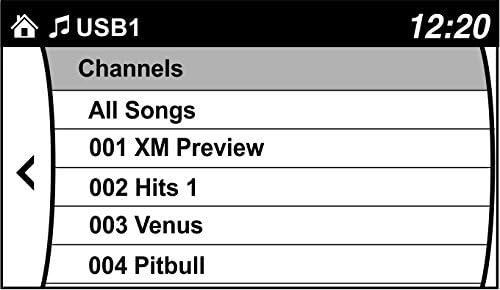
- Browse Channels: Use your factory radio controls and steering wheel controls to browse and enjoy SiriusXM channels. You can also save up to 36 presets.

Produs terminatview Videoclipuri
Video 2: This video highlights the benefits of adding SiriusXM to your factory original radio with the VAIS Technology adapter, showcasing seamless integration and control.
Video 3: This video demonstrates how to quickly add SiriusXM to your factory radio using a GSR adapter, emphasizing the ease of installation and use.
Depanare
Dacă întâmpinați probleme, luați în considerare următoarele:
- Nici un semnal: Ensure the antenna is correctly positioned on the vehicle's roof with an unobstructed view of the sky. Check all cable connections.
- Fără putere: Verify the OBD II connector is securely plugged into the vehicle's OBD II port.
- No Audio/Channels: Confirm the USB connection to the factory radio is secure. Ensure your SiriusXM subscription is active.
- Semnal intermitent: Re-evaluate antenna placement for optimal reception. Avoid areas with tall buildings or dense foliage.
Pentru asistență suplimentară, vă rugăm să contactați serviciul de asistență pentru clienți VAIS Technology.
Specificații
| Numărul de model | GSR-MZ01 Interface Tuner Kit |
| Marca | Tehnologia VAIS |
| Tehnologia de conectivitate | USB |
| Tehnologie Tuner | Satelit |
| Sursa de alimentare | Acționat de vehicul |
| Componente incluse | Antenna, OBD II connector, SXV300V1 SiriusXM tuner module |
| Greutatea articolului | 1 lire sterline (16 uncii) |
| Dimensiuni pachet | 9.4 x 5.9 x 2.3 inci |
Informații despre garanție
For detailed warranty information regarding your VAIS Technology GSR-MZ01 adapter kit, please refer to the warranty card included with your product or visit the official VAIS Technology webPăstrați dovada achiziției pentru reclamații în garanție.
Asistență pentru clienți
Should you require technical assistance, have questions about installation, or need to troubleshoot an issue, please contact VAIS Technology customer support. Contact information can typically be found on the product packaging or the official VAIS Technology website-ul.