
Introducere
The Teesa Hypercare T300 rotary shaver (model TSA0520) is designed for efficient and comfortable facial hair removal. Its three flexible blades adapt to facial contours, and the integrated pop-up trimmer allows for precise styling of sideburns and moustaches. This manual provides essential information for safe operation, maintenance, and optimal performance of your device.
Informații de siguranță
Please read these safety instructions carefully before using the appliance and keep them for future reference.
- Acest aparat este destinat numai pentru uz casnic.
- Do not immerse the shaver in water or other liquids. Keep it dry.
- Nu utilizați aparatul dacă cablul de alimentare sau ștecherul sunt deteriorate.
- Always disconnect the shaver from the power supply before cleaning.
- Nu lăsați aparatul la îndemâna copiilor.
- Use only the power cable supplied with the device.
- Do not use the shaver if the shaving heads are damaged, as this may cause injury.
Conținutul pachetului
Vă rugăm să verificați conținutul coletului. Dacă lipsesc sau sunt deteriorate articolele, contactați distribuitorul.
- Teesa Hypercare T300 Rotary Shaver
- Cablu de alimentare
- Capac de protectie
- Perie de curățare
- Ulei lubrifiant
- Manual de instructiuni
Produs terminatview
Familiarize yourself with the components of your Teesa Hypercare T300 Rotary Shaver.
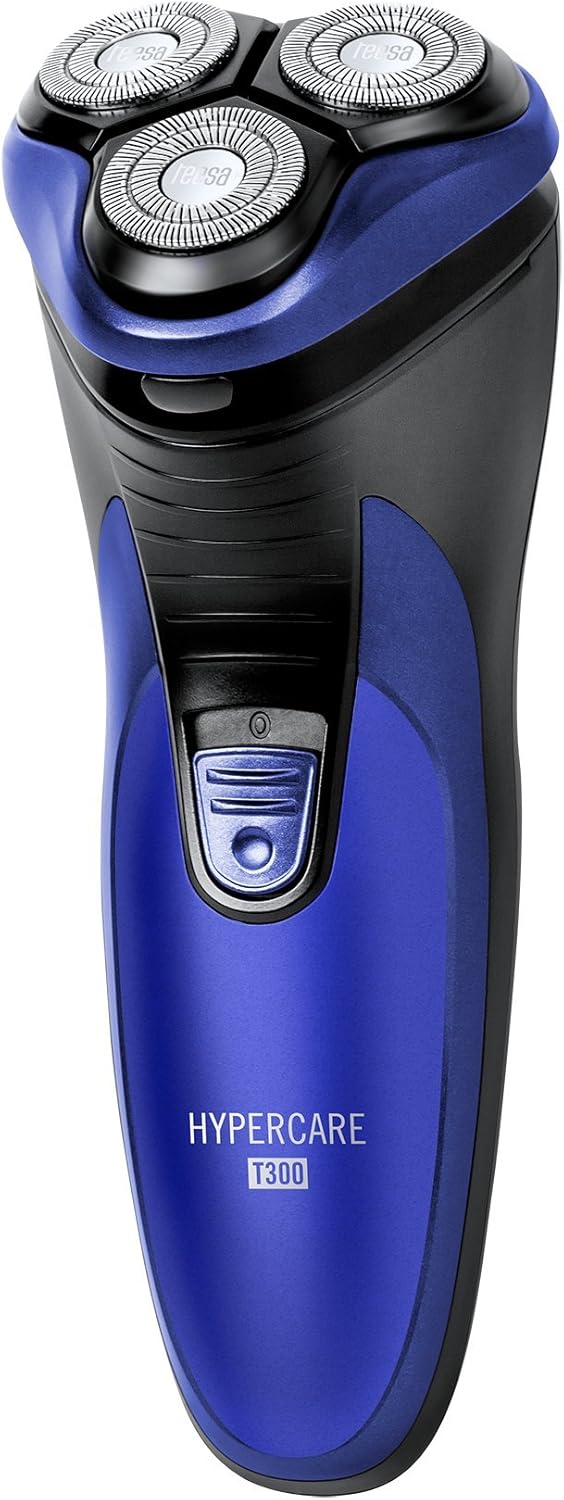


Înființat
Încărcarea aparatului de ras
- Asigurați-vă că aparatul de ras este oprit înainte de încărcare.
- Connect the power cable to the charging port on the shaver.
- Plug the other end of the power cable into a standard electrical outlet (220-240V; 50/60Hz).
- Indicatorul luminos de încărcare se va aprinde, indicând faptul că aparatul de ras se încarcă.

A full charge takes approximately 8 hours and provides up to 45 minutes of cordless operation. Do not leave the shaver connected to the charger for extended periods after it is fully charged.
Funcționează
Ras
- Asigurați-vă că aparatul de ras este încărcat complet.
- Apăsați butonul de pornire pentru a porni aparatul de ras.
- Țineți aparatul de ras într-un unghi drept față de piele.
- Move the shaver in small, circular motions over your face and neck. For optimal results, shave against the direction of hair growth.
- The flexible shaving heads will adapt to the contours of your face for a close shave.
- După bărbierit, apăsați butonul de pornire pentru a opri aparatul de ras.
Utilizarea trimmerului pop-up
- Porniți aparatul de ras.
- Locate the pop-up trimmer release button on the side of the shaver.
- Slide the release button upwards to extend the pop-up trimmer.

- Use the trimmer to precisely shape sideburns, moustaches, or beard lines.
- After use, push the trimmer back down until it clicks into its closed position.
Întreţinere
Curățarea aparatului de ras
Curățarea regulată asigură performanță și igienă optime.
- Opriți aparatul de ras și deconectați-l de la sursa de alimentare.
- Press the release button on the front of the shaver to open the shaving head unit.
- Use the provided cleaning brush to remove any accumulated hair clippings from the shaving heads and the hair chamber.
- For a more thorough cleaning, you may rinse the shaving heads under running water. Ensure the main body of the shaver does not get wet.
- Allow all parts to air dry completely before reassembling the shaving head unit.
- Periodically apply a small drop of the provided lubricating oil to the shaving foils and cutters to maintain smooth operation and prolong blade life.
- Always replace the protective cap over the shaving heads after each use to prevent damage.
Depanare
If you encounter any issues with your shaver, refer to the following common problems and solutions:
- Aparatul de bărbierit nu pornește:
- Asigurați-vă că aparatul de ras este încărcat complet.
- Apăsați ferm butonul de pornire.
- Performanță slabă de bărbierit:
- The blades may be clogged with hair. Clean the shaver thoroughly as described in the Maintenance section.
- Ensure the shaver is fully charged. Performance may decrease with low battery.
- Blades may be dull. Consider replacing the shaving heads after extended use (replacement parts sold separately).
- Aparatul de ras nu se încarcă:
- Check that the power cable is securely connected to both the shaver and the electrical outlet.
- Verificați dacă priza electrică funcționează corect.
- Ensure the charging indicator light illuminates when connected.
Dacă problema persistă după încercarea acestor soluții, vă rugăm să contactați serviciul de asistență pentru clienți.
Specificații
| Caracteristică | Caietul de sarcini |
|---|---|
| Numărul de model | TSA0520 |
| Putere | 3 W |
| Viteza de rotatie | 6000 RPM |
| Timp de rulare | Până la 45 de minute |
| Timp de încărcare | Până la 8 ore |
| Baterie | 2.4 V; 2/3 AA 600 mAh x2 (Rechargeable) |
| Alimentare electrică | 220 – 240 V; 50/60 Hz |
| Greutate | 165 g |
| Dimensiuni (L x l x H) | 58.2 x 46.8 x 150.9 mm |
| Materialul lamei | Oțel aliat |
| Numărul de lame | 3 (Rotary Type) |
| Caracteristica specială | Design ergonomic |
Garanție și suport
For warranty information, technical assistance, or to inquire about replacement parts, please refer to the documentation included with your purchase or visit the official Teesa webPăstrați dovada achiziției pentru reclamații în garanție.