
Introducere
Thank you for choosing the USX MOUNT UL Listed Tilting TV Wall Mount. This manual provides detailed instructions for safe and proper installation, operation, and maintenance of your TV mount. Please read all instructions carefully before beginning installation to ensure a secure and optimal viewexperiență.
Informații de siguranță
AVERTIZARE: Failure to read and follow all instructions may result in personal injury, property damage, or voiding of warranty. If you have any questions, please contact customer service.
- Ensure the mounting surface (wall) can safely support the combined weight of the mount and your television.
- Do not install this product into drywall alone. It must be mounted to wood studs, concrete, or brick walls.
- Use appropriate tools and follow all drilling and fastening instructions precisely.
- Two-person installation is highly recommended for safety, especially when lifting and positioning the television.
- Țineți copiii și animalele de companie departe în timpul instalării.
Conținutul pachetului
Please verify that all components are present and undamaged before installation. If any parts are missing or defective, contact USX MOUNT customer service.
- Ansamblu de montare pe perete pentru televizor
- Standard Mounting Hardware Kit (pre-labeled bags)
- Nivel cu bule
- Bride de cablu (3 bucăți)
- Manual de instructiuni
Specificații
| Caracteristică | Detaliu |
|---|---|
| Numărul de model | XTM009 |
| Tip de montare | Montare pe perete |
| Tipul de mișcare | Înclinare |
| Material | Metal |
| Culoare | Negru |
| Dimensiuni TV compatibile | 26-60 inci |
| Capacitate de greutate | Până la 99 lbs (45 kg) |
| Compatibilitate VESA | 75x75mm, 100x100mm, 200x100mm, 200x200mm, 300x200mm, 300x300mm, 400x300mm, 400x400mm |
| Unghi maxim de înclinare | 0° până la -8° |
| Profile de pe perete | 1.5 inchi (3.8 cm) |
| Greutatea articolului | 1.42 kg |
Verificare compatibilitate
Before installation, ensure your TV and wall are compatible with this mount:
- Dimensiunea televizorului: Suitable for most 26-60 inch flat screen, LED, LCD, and curved TVs.
- Greutatea televizorului: Televizorul dumneavoastră nu trebuie să cântărească mai mult de 45 kg.
- Model VESA: Check the four mounting holes on the back of your TV. The distance (width x height) must match one of the following VESA patterns: 75x75mm, 100x100mm, 200x100mm, 200x200mm, 300x200mm, 300x300mm, 400x300mm, 400x400mm.
- Tip de perete: This mount is designed for installation on wood studs (12 or 16 inch spacing), solid concrete, or brick walls. NU instalați numai pe gips-carton.
- Blocked Inputs: Ensure the mount will not block any necessary input ports on the back of your TV.

Ghid de instalare
Follow these steps for a secure and easy installation. A detailed installation video is also provided below.
Pasul 1: Atașați suporturile la spatele televizorului
- Așezați cu grijă televizorul cu fața în jos pe o suprafață moale și curată pentru a preveni zgârieturile.
- Identify the correct screws and spacers from the hardware kit that fit your TV's VESA mounting holes.
- Attach the two vertical TV brackets to the back of your TV using the selected screws and spacers. Ensure they are securely tightened.

Pasul 2: Instalați placa de perete
- Locate the desired mounting position on your wall. Use a stud finder to identify wood studs if applicable.
- Mark the drilling points for the wall plate. Use the included bubble level to ensure the marks are perfectly horizontal.
- Drill pilot holes at the marked locations. For wood studs, use a 4/32 inch (3mm) drill bit to a depth of 2.36 inches (60mm). For concrete/brick, use a 3/8 inch (10mm) drill bit and insert concrete anchors.
- Attach the wall plate to the wall using the lag bolts and washers. Tighten securely.
Step 3: Hang TV onto Wall Plate
- With assistance, carefully lift the TV with the attached brackets and hook them onto the top edge of the wall plate.
- Gently lower the TV until the brackets engage with the wall plate.
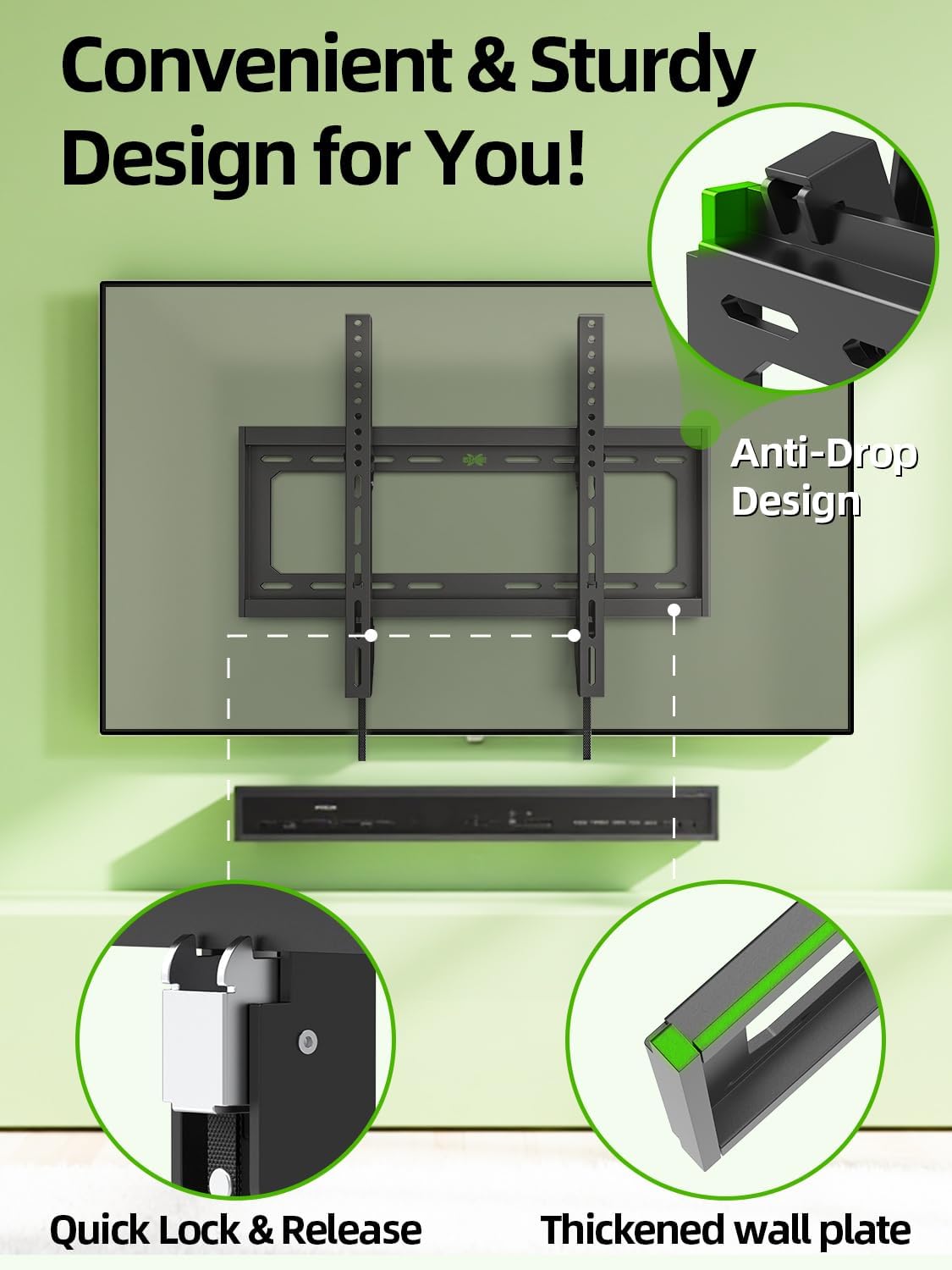
- Pull the quick-release straps downwards to ensure the TV is securely locked onto the wall plate.
Video de instalare
This video demonstrates the installation process for the USX MOUNT Tilting TV Wall Mount, showing steps from preparing the wall to mounting the TV.
Operațiunea
This tilting TV wall mount allows for easy adjustment to optimize your viewunghiul de iluminare și reduce strălucirea.
Reglarea unghiului de înclinare
- The mount offers a tilt adjustment range of 0° to -8°.
- To adjust the tilt, gently push or pull the bottom of your TV to achieve the desired angle. No tools are required for this adjustment.

Quick Lock and Release
- The mount features a quick lock and release mechanism for easy removal or re-attachment of the TV.
- To release the TV, pull down on the integrated straps located at the bottom of the TV brackets. This disengages the locking mechanism, allowing you to lift the TV off the wall plate.
- To lock, ensure the straps are released and the TV is fully seated on the wall plate. The anti-drop design helps secure the TV.
Scenario Video
This video illustrates various scenarios where the USX MOUNT Tilting TV Wall Mount can be applied, showcasing its functionality in different settings.
Întreţinere
Întreținerea regulată asigură longevitatea și funcționarea în siguranță a suportului TV.
- Verificați periodic toate șuruburile și bolțurile pentru a vă asigura că rămân strânse. Strângeți-le din nou dacă este necesar.
- Curățați suportul cu o cârpă moale și uscată. Evitați utilizarea de produse de curățare abrazive sau solvenți.
- Ensure no cables are pinched or stressed by the mount or TV.
Depanare
Dacă întâmpinați probleme, consultați următoarele probleme comune și soluții:
- Televizorul nu este orizontal: Ensure the wall plate was installed level. Small adjustments can sometimes be made by slightly loosening and re-tightening the TV brackets on the wall plate, or by using the leveling feature if available.
- Montura se simte slăbită: Immediately remove the TV. Re-check all wall fasteners and TV bracket screws for proper tightness. Ensure the wall type is appropriate for installation.
- Dificultate la înclinarea televizorului: Ensure no cables are obstructing the movement. Check that the tilt mechanism is not overtightened (though this model is tool-free tilt).
- TV cannot be locked onto wall plate: Ensure the TV brackets are correctly aligned with the wall plate and the quick-release straps are fully engaged.
Garanție și suport
USX MOUNT provides a 10-year warranty for this product. For technical assistance, missing parts, or any other inquiries, please contact our US-based friendly customer service. We are committed to providing quality products and excellent customer experience.
Informații de contact: Please refer to the product packaging or the official USX MOUNT website pentru cele mai recente date de contact ale serviciului clienți.