
1. Introducere
Mulțumesc pentru achizițieasing the Homtime D2qi Bluetooth Speaker with Wireless Charging and Alarm Clock. This device is designed to provide a versatile audio experience with convenient features for your daily life. Please read this manual carefully before use to ensure proper operation and to maximize the product's lifespan.
2. Informații de siguranță
- Nu expuneți dispozitivul la temperaturi extreme, umiditate sau lumina directă a soarelui.
- Țineți departe de apă și alte lichide.
- Nu dezasamblați și nu încercați să reparați singur dispozitivul. Apelați la personal calificat pentru toate lucrările de service.
- Use only the provided or recommended power adapter.
- Evitați scăderea sau supunerea dispozitivului la impacturi puternice.
3. Conținutul pachetului
Vă rugăm să verificați pachetul pentru următoarele articole:
- Homtime D2qi Bluetooth Speaker
- Adaptor de alimentare
- Manual de utilizare
4. Produs terminatview
The Homtime D2qi combines a high-quality Bluetooth speaker with a digital alarm clock and a convenient wireless charging pad. It features intuitive controls for easy operation.

Figura 4.1: Față view of the Homtime D2qi speaker with a smartphone placed on its top surface for wireless charging.

Figure 4.2: The Homtime D2qi speaker positioned on a book, showcasing its compact design and the digital clock display.

Figure 4.3: The Homtime D2qi speaker in a home setting, demonstrating wireless charging functionality.
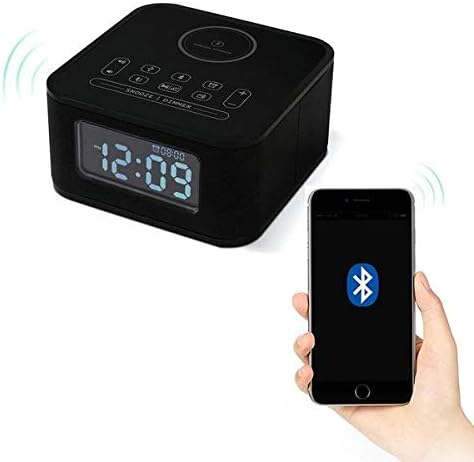
Figure 4.4: The Homtime D2qi speaker connected via Bluetooth to a smartphone.
5. Configurare
5.1 Conexiune la alimentare
- Connect the provided power adapter to the DC input port on the back of the Homtime D2qi.
- Conectați adaptorul de alimentare la o priză standard de perete.
- The display will light up, indicating the device is powered on.
5.2 Setarea inițială a orei
La prima pornire sau după o întrerupere a alimentăriitage, you may need to set the time. Refer to the 'Operating Instructions' section for detailed steps on setting the clock.
6. Instrucțiuni de utilizare
6.1 Conexiune Bluetooth
- Apăsați tasta butonul Bluetooth on the top panel to enter Bluetooth pairing mode. The Bluetooth indicator will flash.
- Pe smartphone sau dispozitivul audio, activați Bluetooth și căutați dispozitivele disponibile.
- Select "Homtime D2qi" from the list.
- Once connected, the Bluetooth indicator will stop flashing and remain solid. You can now play audio through the speaker.
6.2 Încărcare fără fir
- Place your Qi-compatible smartphone centrally on the wireless charging pad located on the top surface of the speaker.
- Ensure the phone is properly aligned with the charging coil.
- Indicatorul de încărcare de pe telefon va arăta că încărcarea a început.
6.3 Funcția ceas cu alarmă
- Apăsați tasta Buton de alarma pentru a intra în modul de setare a alarmei.
- Utilizați Butoanele +/- pentru a regla ora și minutul.
- Apăsați tasta Buton de alarma din nou pentru a confirma fiecare setare.
- Pentru a activa/dezactiva alarma, apăsați butonul Buton de alarma briefly when not in setting mode.
- Pentru a amâna, apăsați butonul Butonul de amânare/dimmer când sună alarma.
6.4 Funcția radio
- Apăsați tasta Butonul de mod pentru a comuta la modul radio FM.
- Țineți apăsat butonul Buton Redare/Pauză pentru a scana automat și a salva posturile disponibile.
- Utilizați Butoanele Anterior/Următorul to navigate through saved stations.
6.5 Răspuns la apel
Când este conectat prin Bluetooth, difuzorul poate fi utilizat pentru apeluri hands-free.
- Pentru a răspunde la un apel primit, apăsați tasta Buton Redare/Pauză.
- Pentru a termina un apel, apăsați tasta Buton Redare/Pauză din nou.
7. Întreținere
- Curățați dispozitivul cu o lavetă moale și uscată. Nu utilizați substanțe de curățare abrazive sau solvenți.
- Keep the charging pad free of dust and debris to ensure efficient wireless charging.
- Depozitați dispozitivul într-un loc răcoros și uscat atunci când nu îl utilizați pentru perioade lungi de timp.
8. Depanare
| Problemă | Cauza posibila | Soluţie |
|---|---|---|
| Fără putere | Adaptorul de alimentare nu este conectat sau priza este defectă. | Ensure power adapter is securely plugged into the device and a working wall outlet. |
| Niciun sunet de la difuzor | Bluetooth not connected; volume too low; incorrect mode. | Ensure Bluetooth is paired. Increase volume on both the speaker and your device. Check if the speaker is in the correct mode (Bluetooth/Radio). |
| Încărcarea fără fir nu funcționează | Phone not Qi-compatible; phone not aligned; phone case too thick. | Verify phone supports Qi wireless charging. Realign phone on the charging pad. Remove thick phone cases. |
| Buttons difficult to locate in the dark | Buttons are flush with the surface. | Familiarize yourself with button layout during daylight. Use the dimmer function to adjust display brightness. |
| Bluetooth disconnects automatically | Power saving feature; device out of range. | Reconnect Bluetooth manually. Keep devices within Bluetooth range (approx. 10 meters). |
9. Specificații
| Caracteristică | Detaliu |
|---|---|
| Marca | Hometime |
| Numărul de model | D2qi |
| Culoare | Negru |
| Tip difuzor | Difuzoare Bluetooth |
| Conectivitate | Fără fir |
| Dispozitive compatibile | Smartphone-uri |
| Putere de ieșire | 5 - 10 wați |
| Greutatea produsului | 0.5 kg |
| Dimensiuni pachet | 19.6 x 18.8 x 14.8 cm |
| Interfață hardware | Audio/Video Port |
10. Garanție și asistență
Homtime products are manufactured to the highest quality standards. For warranty information and customer support, please refer to the warranty card included in your package or visit the official Homtime webPăstrați bonul fiscal ca dovadă a achiziției.