
Akuvox Akuvox SP-R50
Manual de utilizare pentru telefonul IP pentru afaceri Akuvox SP-R50
Model: SP-R50
Introducere
The Akuvox SP-R50 is a business IP phone designed to provide high-quality, cost-effective communication solutions. It features HD Voice, a 2.3-inch 132x64 graphical LCD with backlight, and supports 3-way conferencing. This manual provides essential information for setting up, operating, maintaining, and troubleshooting your SP-R50 IP phone.
Conținutul pachetului
Înainte de a începe, verificați dacă toate articolele sunt prezente în colet:
- IP Phone (Akuvox SP-R50) x 1
- Stand x 1
- Handset with Cord x 1
- Cablu Ethernet x 1
- Adaptor de alimentare x 1
Înființat
Follow these steps to set up your Akuvox SP-R50 IP Phone:
- Atașați suportul: Securely attach the stand to the back of the IP phone.
- Conectați receptorul: Conectați un capăt al cablului spiralat al receptorului la receptor și celălalt capăt în portul pentru receptor de pe baza telefonului.
- Conectați-vă la rețea:
- If using Power over Ethernet (PoE), connect one end of the Ethernet cable to the LAN port on the phone and the other end to a PoE-enabled network switch or router.
- If not using PoE, connect one end of the Ethernet cable to the LAN port on the phone and the other end to your network switch or router. Then, connect the power adapter to the phone's power port and plug it into a power outlet.
- Pornire inițială: The phone will power on automatically. The LCD screen will display the boot-up sequence. Once complete, it will attempt to obtain an IP address and register with your SIP server.
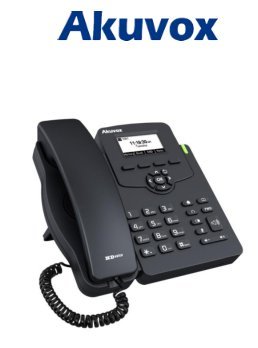
Image: Akuvox SP-R50 Business IP Phone, showing the main unit with the handset resting on its cradle and the stand attached, ready for setup.
Instrucțiuni de operare
This section covers the basic operation of your Akuvox SP-R50 IP Phone.
Efectuarea și primirea apelurilor
- Pentru a efectua un apel: Pick up the handset or press the Speaker button. Dial the desired number and press the Apelează or # cheie.
- Pentru a primi un apel: Ridicați receptorul sau apăsați tasta Difuzor buton când sună telefonul.
- Pentru a încheia un apel: Închideți receptorul sau apăsați tasta Difuzor buton.
Caracteristici de apel
- Apel în așteptare: Allows you to answer a second incoming call while on an active call.
- Call Forward: Redirects incoming calls to another number.
- Transfer de apel: Transfers an active call to another party.
- Call on Hold: Puts an active call on hold.
- Mut: Dezactivează microfonul în timpul unui apel.
- Răspuns automat: Configures the phone to automatically answer incoming calls.
- Reapelare: Formează ultimul număr apelat.
- Nu deranja (DND): Blocks all incoming calls.
- Local 3-Way Conference: Allows you to conduct a three-way conference call.
Phonebook and Settings
- Carte de telefoane: The phone supports a phonebook of up to 500 groups and 5 remote phone book URLs. Access and manage contacts through the menu.
- Reglarea volumului: Use the volume keys on the phone to adjust the handset, speaker, or ringer volume.
- Tonuri de apel: Select from various ring tones through the phone's settings menu.
Image: Akuvox SP-R50 Business IP Phone, showcasing its ergonomic design and key layout from a slightly elevated angle, highlighting the display and navigation buttons.
Întreţinere
Întreținerea corespunzătoare asigură longevitatea și performanța optimă a telefonului dumneavoastră IP.
- curatenie: Folosiți o cârpă moale și uscată pentru a curăța suprafața telefonului. Pentru petele persistente, ștergeți ușor.ampClătiți cârpa cu apă. Nu utilizați substanțe chimice dure, produse de curățare abrazive sau solvenți.
- Mediu: Keep the phone away from direct sunlight, excessive heat sources, and moisture. Ensure it is placed on a stable surface to prevent accidental falls.
- Cabluri: Periodically check all connected cables (handset, Ethernet, power) for any signs of wear or damage. Replace damaged cables immediately.
Depanare
If you encounter issues with your Akuvox SP-R50, refer to the following common problems and solutions:
| Problemă | Cauza posibila | Soluţie |
|---|---|---|
| Telefonul nu pornește. | Fără conexiune la alimentare sau adaptor de alimentare/PoE defect. | Check if the power adapter is securely plugged in or if the Ethernet cable is connected to a PoE-enabled port. Try a different power outlet or PoE port. |
| Fără ton de apel. | Network connection issue or SIP registration failure. | Verify the Ethernet cable is properly connected. Check the network status on the phone's display. Contact your network administrator or SIP service provider if the issue persists. |
| Nu pot efectua sau primi apeluri. | SIP registration failed, DND enabled, or network problem. | Ensure the phone is registered (check display). Disable DND if active. Confirm network connectivity. |
| Calitate slabă a apelului (ecou, zgomot static). | Aglomerație sau interferență în rețea. | Ensure your network has sufficient bandwidth. Avoid placing the phone near other electronic devices that may cause interference. |
Specificații
Key technical specifications for the Akuvox SP-R50 Business IP Phone:
| Caracteristică | Descriere |
|---|---|
| Marca | Akuvox |
| Model | Akuvox SP-R50 |
| Afişa | 2.3'' 132*64 Graphical LCD with Backlight |
| Conturi SIP | 1 Line (Support 1 SIP account) |
| Funcții vocale | HD Voice, 3-Way Conference |
| Capacitate agenda telefonică | 500 groups, 5 Remote Phone Book URL Sprijinit |
| Jurnalele de apeluri | 100 de intrări |
| Putere | PoE Support, Power Adapter (included) |
| Caracteristici speciale | Call Waiting, Call Forward, Call Transfer, Call on Hold, Mute, Auto-answer, Redial, DND, Speed Dial, Hotline, Direct IP call, Music on hold, Intercom, Call Pickup, Group Call Pickup, Anonymous Call, Anonymous Call Rejection |
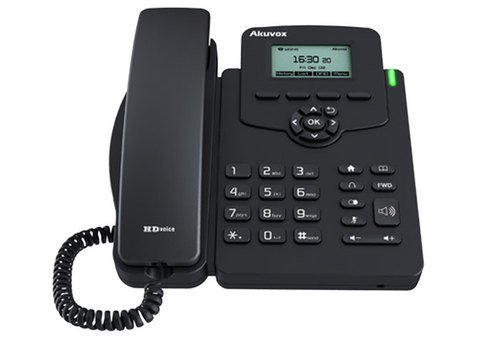
Imagine: față view of the Akuvox SP-R50 Business IP Phone, clearly showing the display, navigation keys, and numeric keypad.
Informații despre garanție
The Akuvox SP-R50 Business IP Phone comes with a 2 ani garanție from the date of purchase. This warranty covers manufacturing defects and malfunctions under normal use. Please retain your proof of purchase for warranty claims. For detailed terms and conditions, refer to the warranty card included with your product or contact Akuvox customer support.
Sprijin
If you require further assistance or have questions not covered in this manual, please contact your vendor or Akuvox customer support. You may also visit the official Akuvox website for additional resources and frequently asked questions.
Ask a question about this manual
Ask about setup, troubleshooting, compatibility, parts, safety, or missing instructions. Manuals+ will review the question and use this page’s manual context to help answer it.