
Introducere
This manual provides essential information for the installation, operation, and maintenance of your Amcrest UltraHD 4K (8MP) Outdoor Bullet Security IP PoE Camera. Please read these instructions carefully before using the product to ensure proper functionality and safety.
Ce este în cutie
- Amcrest UltraHD 4K (8MP) Outdoor Bullet Security IP PoE Camera
- Ghid de pornire rapidă
Note: PoE Injector or Switch required for Power Over Ethernet (not included, sold separately).
Caracteristici cheie
UltraHD 4K (8MP) Resolution
Experience stunning ultra-high quality 4K (8-Megapixel / 3840x2160) resolution video. This camera provides four times the resolution of Full HD cameras, capturing clear and detailed footage.
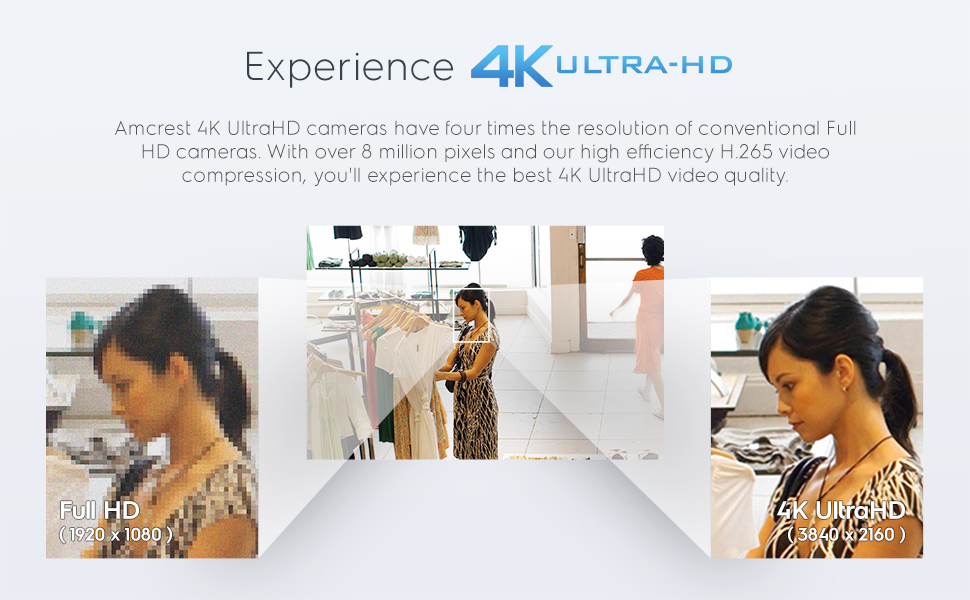
Image: Visual comparison demonstrating the superior clarity of 4K UltraHD resolution over Full HD.
Enhanced Night Vision & Low Light Capability
The camera features enhanced low light capability utilizing the latest CMOS image sensor and chipset. With a built-in IR LED and Starlight Technology, it achieves unsurpassed low-light performance and night-vision up to 98 feet (or 131 feet as per specifications).

Image: Amcrest 4K UltraHD PoE IP Camera highlighting its IP67 weatherproof housing, IR LED, and Starlight Technology for superior night vision.
Video: Official Amcrest video showcasing the key features of the 4K IP8M-2496E Bullet Camera, including its night vision capabilities.
Super-Wide 125° Viewunghiul ing
A super-wide 125° viewing angle allows you to cover more ground and keep more of what matters to you safe. This wide field of view minimizează punctele moarte.

Image: Graphic illustrating the camera's motion detection capabilities and its super-wide 125-degree diagonal viewunghiul de ing.
Alimentare prin Ethernet (PoE)
Power Over Ethernet (PoE) simplifies installation by allowing both power and data to be transmitted over a single Ethernet cable. A PoE injector or switch is required (not included).

Image: Close-up of the Amcrest camera's connection ports, highlighting the RJ45 Ethernet Port for PoE and the 12V DC Power input.
Smarter Security with IVS Features
Receive motion alert notifications and review footage via your smartphone with the Amcrest View app. IVS Features include Tripwire, which triggers an event anytime a human or vehicle crosses a set line, and Intrusion, which alerts you anytime a human or vehicle crosses a defined intrusion area.

Image: Diagram showing how perimeter protection features like Tripwire and Intrusion detection zones can be set up for enhanced security.
Opțiuni flexibile de stocare
Record and store events on a MicroSD card (up to 256GB), local PC, NAS, Amcrest NVRs, or via FTP. The optional Amcrest Cloud remote video storage subscription service allows you to automatically store your videos off-site, accessible through a web-based interface or the AmcrestCloud smartphone app.
Carcasa rezistenta la intemperii IP67
Built to withstand various weather conditions, this 4K PoE IP Bullet Camera features a heavy-duty weatherproof IP67 housing, ensuring reliable operation day or night, rain or shine.

Image: Amcrest camera mounted outdoors, demonstrating its IP67 weatherproof rating by showing it functioning in the rain.
Dual H.265/H.264 Compression
Dual H.265/H.264 compression allows for maximum encryption and efficient storage. H.265 (HEVC) technology reduces file size, resulting in more efficient storage and less bandwidth usage for your video stream, while maintaining backward compatibility with H.264 platforms.
Înființat
- Instalare fizică: Mount the camera in your desired outdoor location using appropriate hardware. Ensure the camera is securely fastened and positioned for optimal viewing.
- Conexiune retea: Connect an Ethernet cable from your PoE injector or PoE switch to the camera's RJ45 Ethernet port. This single cable provides both power and data connectivity.
- Configurație inițială: Accesați camera web interface via a computer connected to the same network. Use the Amcrest IP Config tool to find the camera's IP address. Follow the on-screen prompts to set up a secure password and configure basic network settings.
- Configurare aplicație mobilă: Descărcați Amcrest View app from the App Store or Google Play. Create an account or log in, then add your camera by scanning the QR code on the camera or manually entering its details.
Operarea camerei
Using the Amcrest View App
- Trăi View: Open the Amcrest View aplicație și selectați camera pentru view trăi footage de oriunde.
- Redare: Acces înregistrat footage stored on your MicroSD card, NVR, or Amcrest Cloud directly through the app.
- Alerte de mișcare: Enable motion detection and receive instant notifications on your smartphone when activity is detected. Customize detection zones and sensitivity settings.
- Zoom digital: Utilize the 16x digital zoom feature to get a closer look at specific areas within the camera's view.

Image: A smartphone screen showing the Amcrest View Pro app interface, displaying multiple live camera views and a list of motion alert notifications.
PC/Mac Access
View live feeds and playback recordings professionally on a PC or Mac using Amcrest Surveillance Pro or Blue Iris Professional software. The camera is also compatible with various web browsers (IE, Safari, Firefox 49.0, and Chrome with Amcrest Web View Extension).