
1. Introducere
Thank you for choosing the ASAKUKI Smart Wi-Fi Essential Oil Diffuser. This device combines aromatherapy with smart technology, allowing you to control it via a mobile application or voice commands. It is designed to humidify and purify the air, creating a relaxing atmosphere in your home or office.
This manual provides detailed instructions for the safe and efficient use of your diffuser. Please read it thoroughly before operation and retain it for future reference.

Image: The ASAKUKI Smart Wi-Fi Essential Oil Diffuser is versatile for various environments, including nurseries, family rooms, bedrooms, yoga studios, and workspaces.
2. Măsuri de siguranță
Pentru a asigura o funcționare sigură și a preveni deteriorarea, vă rugăm să respectați următoarele:
- Always place the diffuser on a flat, stable surface.
- Do not exceed the maximum water fill line (500ml).
- Use only clean tap water or distilled water. Avoid using hot water.
- Add essential oils carefully to avoid spilling on the exterior of the unit.
- Nu lăsați difuzorul la îndemâna copiilor și a animalelor de companie.
- Do not cover the mist outlet during operation.
- Deconectați dispozitivul de la priză înainte de curățare sau reumplere.
- Nu scufundați aparatul în apă sau alte lichide.
- If the unit is damaged, do not attempt to repair it yourself. Contact customer support.
- The diffuser features an automatic shut-off when water runs out, but it is recommended to monitor water levels.
3. Conținutul pachetului
Verificați dacă toate articolele sunt prezente în colet:
- ASAKUKI Smart Wi-Fi Essential Oil Diffuser (Model DF010)
- Adaptor de alimentare
- Manual de utilizare
- Measuring Cup (may be included)
4. Produs terminatview
Familiarize yourself with the main components of your diffuser:

Image: The ASAKUKI Smart Wi-Fi Essential Oil Diffuser, showing its sleek design and the accompanying mobile app for control.
- Capac: Top cover of the diffuser.
- Priza de ceață: Unde se eliberează ceața.
- Rezervor de apă: Capacitate de până la 500 ml de apă.
- Max Water Line: Indicates the maximum fill level.
- Ultrasonic Plate: Located at the bottom of the water tank, responsible for mist generation.
- Ieșire de aer: Located on the base.
- Drain Side: Indicated for proper water drainage.
- Buton luminos: Controls the LED light functions.
- Mist/Wi-Fi Button: Controls mist output and initiates Wi-Fi pairing.
- Mufă de alimentare: Pentru conectarea adaptorului de alimentare.
5. Instrucțiuni de configurare
Urmați acești pași pentru configurarea inițială:
- Plasați difuzorul: Position the diffuser on a flat, stable, and water-resistant surface.
- Scoateți capacul: Gently lift the top lid off the diffuser.
- Adaugă apă: Using a measuring cup, fill the water tank with clean tap water or distilled water up to the maximum water line (500ml). Do not overfill.
- Adăugați uleiuri esențiale: Adăugați 3-5 picături din uleiul esențial preferat direct în rezervorul de apă. Ajustați cantitatea în funcție de preferințele personale și de dimensiunea camerei.
- Înlocuiți capacul: Puneți capacul la loc în siguranță pe difuzor.
- Conectare alimentare: Plug the power adapter into the power jack at the base of the diffuser, then plug the adapter into a wall outlet.
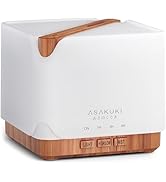
Image: Simple setup guide illustrating connecting power, app pairing, and wireless control.
6. Instrucțiuni de utilizare
6.1 Control manual
- Controlul ceții: Apăsați tasta Mist/Wi-Fi button once for continuous mist. Press again for intermittent mist (30 seconds on, 30 seconds off). Press a third time to turn off the mist.
- Controlul luminii: Apăsați tasta Aprinde button once to turn on the LED light with automatic color cycling. Press again to fix the light to a specific color. Continue pressing to cycle through colors. Press and hold the Light button to turn off the light.
6.2 Smart Wi-Fi and App Control
The diffuser can be controlled remotely using the TuyaSmart app.
- Descărcați aplicația: Caută "TuyaSmart" in your smartphone's app store (iOS or Android) and download it.
- Înregistrare/Autentificare: Deschide aplicația și înregistrează un cont nou sau autentifică-te dacă ai deja unul.
- Intrați în modul de asociere: With the diffuser plugged in, press and hold the Mist/Wi-Fi button for 5 seconds until the indicator light flashes rapidly. This indicates the diffuser is in pairing mode.
- Adăugați dispozitiv: In the TuyaSmart app, tap "Add Device" or the "+" icon. Select "Small Home Appliance" > "Diffuser" (Wi-Fi).
- Conectați-vă la Wi-Fi: Follow the in-app instructions to connect the diffuser to your 2.4GHz Wi-Fi network. Ensure your phone is also connected to the same 2.4GHz network during setup.
- Controla: Once successfully paired, you can control the mist, light, set timers, and create schedules directly from the TuyaSmart app.

Image: The mobile app allows for convenient control of the diffuser's functions.
6.3 Control vocal cu Alexa
The diffuser is compatible with Amazon Alexa for voice control.
- Activați abilitate: In the Alexa app, search for and enable the "TuyaSmart" skill.
- Conectare cont: Link your TuyaSmart account to your Alexa account.
- Descoperiți dispozitive: Ask Alexa to "Discover devices" or manually discover them in the Alexa app.
- Comenzi vocale: Odată descoperite, puteți utiliza comenzi precum:
- "Alexa, turn on the diffuser."
- "Alexa, turn off the diffuser."
- "Alexa, set the diffuser to red."
- "Alexa, set diffuser brightness to 50%."

Image: Voice control with Alexa allows hands-free operation of the diffuser.
7. Întreținere
Curățarea regulată ajută la menținerea performanței optime și prelungește durata de viață a difuzorului.
7.1 Curățare
Curățați difuzorul după fiecare 5-6 utilizări sau la fiecare 3-5 zile, în special când schimbați uleiurile esențiale.
- Deconectați: Disconnect the diffuser from the power outlet.
- Apa goala: Remove the lid and carefully pour out any remaining water from the drain side of the water tank.
- Curățați cu ștergerea: Use a soft cloth or cotton swab with a small amount of mild dish soap to gently wipe the inside of the water tank and the ultrasonic plate.
- Clătiți: Rinse the water tank with clean water, being careful not to get water into the air outlet.
- Uscat: Wipe all parts dry with a clean, soft cloth.
- Curățare profundă (opțional): For stubborn residue, add a small amount of white vinegar to the water tank and let it sit for 10-15 minutes before wiping and rinsing.
7.2 Depozitare
When not in use for an extended period, ensure the diffuser is clean and completely dry. Store it in a cool, dry place away from direct sunlight.
8. Depanare
Dacă întâmpinați probleme, consultați următoarele probleme și soluții comune:
| Problemă | Cauza posibila | Soluţie |
|---|---|---|
| Fără ceață sau debit redus de ceață |
|
|
| Diffuser does not power on |
|
|
| Nu mă pot conecta la Wi-Fi/aplicație |
|
|
| Scurgeri de apă |
|
|
9. Specificații
| Caracteristică | Detaliu |
|---|---|
| Marca | ASAKUKI |
| Numărul de model | DF010 |
| Capacitate | 500 de mililitri |
| Dimensiuni | 6 cm L x 6 cm l x 7 cm Î |
| Material | Acrilonitril butadien stiren (ABS), Polipropilenă (PP) |
| Sursa de alimentare | Electric cu fir |
| Wattage | 10 wați |
| Zona de acoperire | Până la 323 de metri pătrați |
| Caracteristici speciale | App Control, Automatic Shut-Off, Multiple Light Settings, Multiple Mist Settings, Voice Control (Alexa) |
| Nivel de zgomot | Lower than 35 dB |
| Runtime (Full Capacity) | Up to 16 hours (on weak mist setting) |
10. Garanție și asistență
The ASAKUKI Smart Wi-Fi Essential Oil Diffuser comes with a 1-year technical support warrantyAceastă garanție acoperă defectele de fabricație și problemele care apar în urma utilizării normale.
For technical assistance, troubleshooting, or warranty claims, please contact ASAKUKI customer support through the retailer where you purchased the product or visit the official ASAKUKI website pentru informații de contact.
Please have your model number (DF010) and proof of purchase ready when contacting support.