
1. Introducere
This manual provides detailed instructions for the operation and maintenance of your FEELWORLD T7PLUS 7-inch DSLR Camera Monitor. Please read this manual thoroughly before using the product to ensure proper function and to prevent damage. Keep this manual for future reference.
2. Produs terminatview
The FEELWORLD T7PLUS is a high-resolution 7-inch camera monitor designed for professional photography and video production. It features a 1920x1200 display, 4K HDMI input/output, and advanced monitoring tools.
2.1 Caracteristici cheie
- Afișaj de înaltă rezoluție: 7-inch screen with 1920 x 1200 resolution, 1200:1 contrast ratio, and Rec.709 color standard for vivid and accurate image reproduction.
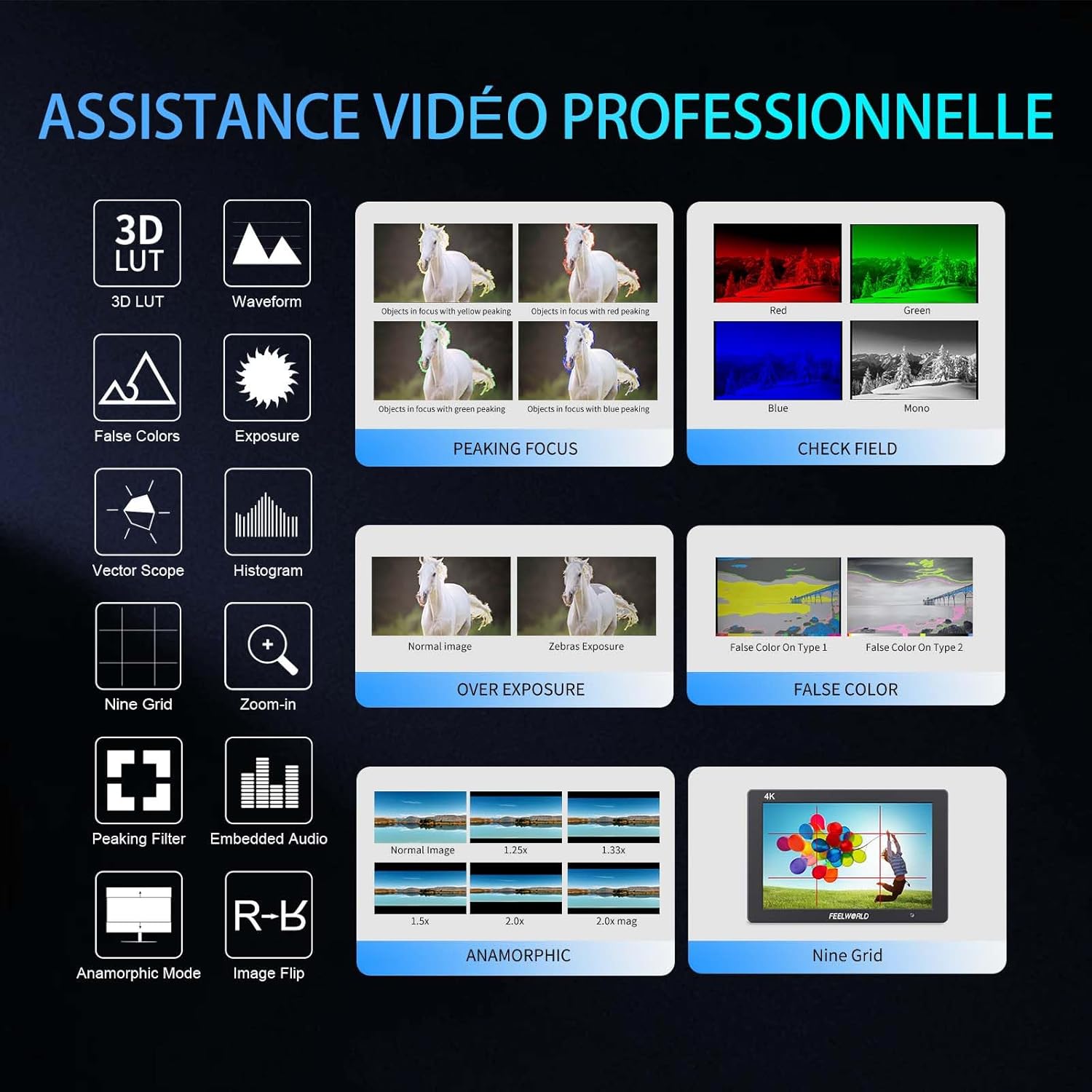
- Advanced Customization Functions: Supports 32 custom 3D LUTs and professional tools including waveform, vector scope, RGB histogram, peaking focus, false color, and more for precise control during shooting.
- Conectivitate versatilă: Equipped with 4K HDMI input and output, allowing simultaneous display and transmission of live signals to other monitors without compromising video quality.
- Design ușor și durabil: Slim 18mm aluminum casing, weighing only 320g.
- Opțiuni flexibile de alimentare: Compatible with F550/F970 series batteries and DC 12V power input.
2.2 Componente
Pachetul include următoarele articole:
- 1 x FEELWORLD T7PLUS Monitor
- 1 x Mini HDMI Cable
- 1 x Parasolar
- 1 x Warming Boot Holder
- 1 x F970 Battery Plate
- 1 x F550 Battery
- 1 x Manual de utilizare
- 1 x Cablu adaptor USB
- 1 x Geanta

Imagine: față view of the FEELWORLD T7PLUS monitor, showcasinecranul său de 7 inci.

Image: A visual representation of all items included in the FEELWORLD T7PLUS package, including the monitor, cables, battery, and accessories.
3. Configurare
3.1 Montarea monitorului
The T7PLUS monitor can be mounted using the included warming boot holder or other compatible mounting solutions. Ensure the monitor is securely attached to your camera rig or stand.

Image: The FEELWORLD T7PLUS monitor shown mounted on top of a DSLR camera, ready for use.
3.2 Conexiune la alimentare
The monitor supports two power input methods:
- Putere baterie: Attach a compatible F550 or F970 series battery to the F970 battery plate on the back of the monitor.
- Alimentare CC 12V: Connect a 12V/1.5A DC power adapter to the DC 12V input port on the side of the monitor.

Imagine: Prim-plan view of the rear of the FEELWORLD T7PLUS monitor, highlighting the battery plate and DC 12V power input port.
3.3 Conexiune HDMI
Connect your camera or video source to the HDMI-IN port using the provided Mini HDMI cable. If you need to output the signal to another monitor, use the HDMI-OUT port.
Imagine: Laterală view of the FEELWORLD T7PLUS monitor, showing the HDMI-IN and HDMI-OUT ports, along with the DC 12V input and headphone jack.
4. Instrucțiuni de utilizare
4.1 Controale de bază
Monitorul dispune de mai multe butoane pentru navigare și controlul funcțiilor:
- Buton de alimentare: Press and hold to turn the monitor on/off.
- Butonul MENU: Accesează meniul principal.
- Butoane săgeată (Sus/Jos/Stânga/Dreapta): Navigați prin opțiunile din meniu și ajustați setările.
- F1-F4 Function Buttons: Customizable shortcut buttons for quick access to frequently used features.

Image: Close-up of the control buttons on the top edge of the FEELWORLD T7PLUS monitor, including power, menu, navigation, and customizable function buttons (F1-F4).
4.2 Navigare prin meniu
Press the MENU button to open the main menu. Use the arrow buttons to navigate through categories and options. Press the MENU button again or the right arrow to confirm selections. To exit the menu, press the left arrow button repeatedly until the menu closes.
5. Caracteristici avansate
5.1 3D LUT (Look Up Table)
The T7PLUS supports loading up to 32 custom 3D LUTs via a USB drive. This allows you to preview foo-ul tăutage with specific color grades in real-time.
- Save your .cube LUT files to the root directory of a USB drive.
- Connect the USB drive to the monitor's USB port.
- Navigate to the "LUT" menu option.
- Select "Load LUT" and choose your desired LUT file.
- You can switch between loaded LUTs for quick comparison.

Image: The FEELWORLD T7PLUS monitor displaying the 3D LUT menu, showing options for loading and managing custom LUT files de pe o unitate USB.
5.2 Waveform, Vector Scope, and Histogram
These tools provide detailed analysis of your video signal, helping you achieve accurate exposure and color balance.
- Forma de undă: Afișează nivelurile de luminanță și crominanță ale semnalului video.
- Domeniul de aplicare al vectorului: Shows the color hue and saturation.
- Histograma RGB: Illustrates the distribution of red, green, and blue color channels.
These functions can be activated individually or simultaneously via the menu or assigned to a function button.
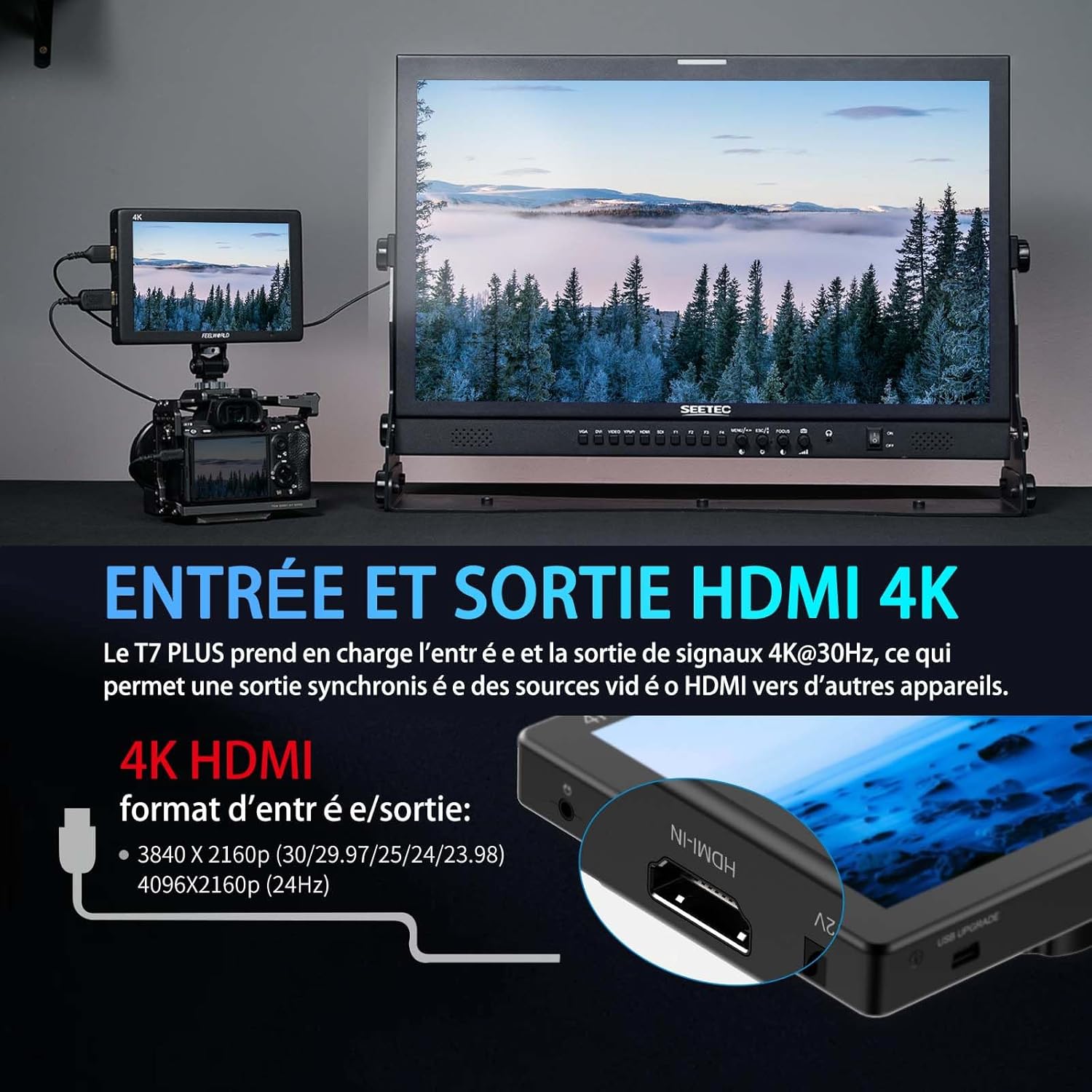
Image: The FEELWORLD T7PLUS monitor displaying a waveform monitor, showing the luminance and chrominance levels of the video input.
5.3 Other Monitoring Tools
- Asistență la focalizarea maximă: Evidențiază marginile ascuțite pentru a ajuta la obținerea unei focalizări precise.
- Culoare falsă: Displays exposure levels using a spectrum of colors.
- Expunere (Zebre): Indică zone supraexpuse cu modele zebrate.
- A mari: Magnifies a portion of the image for critical focus.
- Grilă nouă: Overlays a grid for composition assistance.
- Mod anamorfic: De-strânge foo anamorfictage.
- Flip de imagine: Răstoarnă imaginea pe orizontală sau pe verticală.
- Audio încorporat: Afișează nivelurile audio de la intrarea HDMI.
6. Specificații
| Caracteristică | Caietul de sarcini |
|---|---|
| Marca | FEELWORLD |
| Numărul de model | T7 PLUS |
| Dimensiunea ecranului | 7 inchi |
| Rezoluţie | 1920 x 1200 (UXGA Wide) |
| Raportul de aspect | 16:10 |
| Raport de contrast | 1200:1 |
| Luminozitate | 450 nits |
| Rata de reîmprospătare | 60 Hz |
| Viewunghiul ing | 178 de grade |
| Tehnologia de conectivitate | HDMI |
| Porturi HDMI | 1x HDMI-IN, 1x HDMI-OUT (Supports 4K@30Hz) |
| Caracteristica specială | Advanced Customization with 3D LUT |
| Dispozitive compatibile | DSLR Camera, Camcorder, Handheld Stabilizer |
| Greutate | 1 Kilogram (approx. 320g for monitor only) |
| Intrare de putere | DC 12V, NP-F Battery Plate |
7. Depanare
- Fără putere:
- Ensure the battery is fully charged and correctly inserted, or the DC adapter is securely connected to a power source.
- Verificați dacă butonul de alimentare este fixat corect.
- Nici un semnal:
- Verify that the HDMI cable is securely connected to both the camera/source and the monitor's HDMI-IN port.
- Confirm the camera's HDMI output settings are correct and active.
- Încearcă un alt cablu HDMI.
- Distorsiune a imaginii/Culori incorecte:
- Check the monitor's color settings and ensure no LUTs are incorrectly applied.
- Verify the camera's video output format is compatible with the monitor.
- Butoanele nu răspund:
- Restart the monitor by turning it off and on again.
- Asigurați-vă că butoanele nu sunt obstrucționate de resturi.
8. Întreținere
- curatenie: Use a soft, dry cloth to clean the monitor's body. For the screen, use a specialized screen cleaning solution and a microfiber cloth. Avoid harsh chemicals or abrasive materials.
- Depozitare: When not in use, store the monitor in a cool, dry place, away from direct sunlight and extreme temperatures. Use the provided bag for protection during transport.
- Îngrijirea bateriei: If using batteries, ensure they are charged periodically even when not in use to maintain battery health.
9. Garanție și asistență
The FEELWORLD T7PLUS monitor comes with a 1 an garanție from the FEELWORLD Official Store. For technical support, service, or warranty claims, please contact FEELWORLD customer service through their official channels or the retailer where the product was purchased.
Pentru mai multe informații, vizitați FEELWORLD Brand Store.
10. Videoclip de produs
Video: A short product showcase of the FEELWORLD T7PLUS monitor, demonstrating its physical design, various ports (HDMI-IN, HDMI-OUT, DC 12V), and control buttons. This video provides a visual overview of the monitor's external features and connectivity options.