
Introducere
Thank you for choosing the MeeTion K9310 Gaming Keyboard. This manual provides detailed instructions for setting up, operating, and maintaining your new keyboard. The K9310 is designed for an enhanced gaming experience with features such as multicolor backlighting, anti-ghosting, and dedicated shortcut keys.
Conținutul pachetului
- MeeTion K9310 Gaming Keyboard
- Manual de utilizare (acest document)
Înființat
Follow these steps to connect your MeeTion K9310 Gaming Keyboard to your computer:
- Despachetați tastatura din ambalaj.
- Găsiți un port USB disponibil pe computer.
- Conectați conectorul USB al tastaturii la portul USB.
- Your operating system (Windows XP/Vista/7/8/10) will automatically detect and install the necessary drivers. No additional software installation is typically required.
- The keyboard is ready for use once the drivers are installed.

Imagine: Sus view of the MeeTion K9310 Gaming Keyboard with its USB cable, ready for connection.
Instrucțiuni de operare
Caracteristici cheie
- Multicolor Key Backlit: The keyboard features vibrant multicolor backlighting for enhanced visibility and aesthetic appeal, especially in low-light conditions.
- Comfortable and Soft Keys: Designed with membrane keys offering tactile feedback, providing a comfortable typing and gaming experience.
- 19 taste anti-ghosting: This feature ensures that up to 19 keys can be pressed simultaneously without any input loss, crucial for complex gaming commands.
- Win Lock Function with LED Indication: Prevents accidental presses of the Windows key during gameplay, which can interrupt your game. An LED indicator shows when this function is active.
- 12 FN Shortcut Buttons: Access various multimedia and system functions quickly using the Function (FN) key in combination with the F1-F12 keys.
Controlul luminii de fundal
The K9310 keyboard features a multicolor backlight. Specific key combinations may be used to adjust brightness or switch lighting modes. Refer to the keyboard's markings for dedicated backlight control keys, often indicated by a sun or light bulb icon, or through FN key combinations.
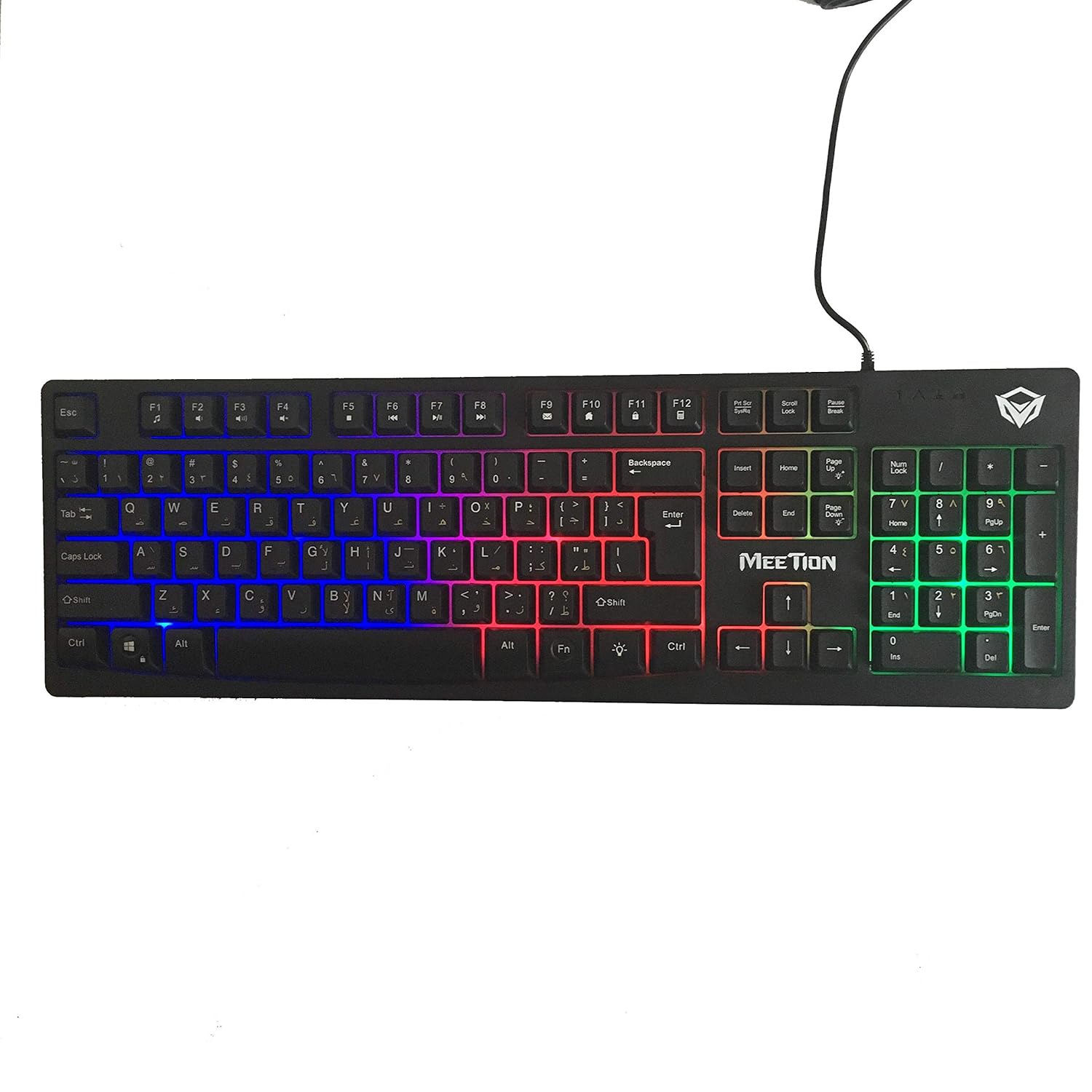
Imagine: Sus view of the MeeTion K9310 Gaming Keyboard with its multicolor backlighting illuminated.
FN Shortcut Functions
The keyboard includes 12 FN (Function) shortcut buttons. To activate these functions, press and hold the FN key, then press the desired F-key (F1-F12).
| Combinație de taste | Funcţie |
|---|---|
| FN + F1 | Media Player |
| FN + F2 | Reducerea volumului |
| FN + F3 | Creșterea volumului |
| FN + F4 | Mut |
| FN + F5 | Stop |
| FN + F6 | Piesa anterioară |
| FN + F7 | Redare/Pauză |
| FN + F8 | Următoarea piesă |
| FN + F9 | |
| FN + F10 | Web Browser |
| FN + F11 | Computerul meu |
| FN + F12 | Calculator |
Funcția de blocare a ușilor
To activate or deactivate the Windows key lock function, press FN + Tasta Win. When active, the Windows key will be disabled, preventing accidental presses during gaming. An LED indicator on the keyboard will typically illuminate to show the Win Lock status.
Întreţinere
Întreținerea corectă asigură longevitatea și performanța optimă a tastaturii dumneavoastră.
- curatenie: Folosiți o lavetă moale și uscată pentru a șterge suprafața tastaturii. Pentru o curățare mai profundă, ștergeți ușor suprafața tastaturii.amp Se poate folosi o lavetă cu săpun delicat, asigurându-vă că nu pătrunde lichid în comutatoarele cu cheie sau în componentele interne.
- Îndepărtarea prafului: Folosește aer comprimat pentru a îndepărta praful și resturile dintre taste.
- Evitați lichidele: Do not spill liquids on the keyboard. If a spill occurs, immediately disconnect the keyboard from the computer and allow it to dry completely before reconnecting.
- Depozitare: Depozitați tastatura într-un loc răcoros și uscat, ferit de lumina directă a soarelui și de temperaturi extreme, atunci când nu o utilizați pentru perioade lungi de timp.

Imagine: Jos view of the MeeTion K9310 Gaming Keyboard, showing the product label and rubber feet.
Depanare
If you encounter issues with your MeeTion K9310 Gaming Keyboard, refer to the following troubleshooting steps:
- Tastatura nu răspunde:
- Asigurați-vă că cablul USB este conectat corect la un port USB funcțional al computerului.
- Încearcă să conectezi tastatura la un alt port USB.
- Reporniți computerul.
- Testați tastatura pe un alt computer pentru a determina dacă problema este cu tastatura sau cu computerul.
- Keys Not Working (e.g., 'W' key):
- Check for any debris or foreign objects lodged under the affected key. Use compressed air to clear it.
- If only specific keys are not responding, and the keyboard is otherwise functional, it might indicate a hardware issue.
- Lumina de fundal nu funcționează sau pâlpâie:
- Asigurați-vă că tastatura este conectată corect.
- Check if the backlight brightness is set to minimum or turned off via FN key combinations.
- If the issue persists, it may indicate a hardware malfunction.
- Win Lock Function Not Working:
- Ensure you are using the correct key combination (FN + Win Key) to toggle the function.
- Check the LED indicator for Win Lock status.
Specificații
| Caracteristică | Detaliu |
|---|---|
| Marca | ÎNTÂLNIREA |
| Model | K9310 |
| Tip tastatură | Tastatură pentru jocuri |
| Contact cheie | Membrane with tactile feedback |
| Aspect | Cyrillic alphabet layout (Windows Keys) |
| Anti-Ghosting | 19 chei |
| Iluminare de fundal | Tasta multicolor iluminata din spate |
| Funcția de blocare a ușilor | Da, cu indicație LED |
| FN Shortcut Buttons | 12 |
| Error-Free Running Time | More than 10 million strokes |
| Compatibilitate cu sistemul de operare | Windows XP/Vista/7/8/10 |
| Dimensiuni | 17.5 × 5.5 x 1.5 inches (approximate) |
| Greutate | 1.2 lire sterline (aproximativ) |
| Dispozitive compatibile | Laptopuri (și PC-uri desktop) |
Garanție și suport
For warranty information or technical support, please refer to the documentation provided at the time of purchase or visit the official MEETION webPăstrați dovada achiziției pentru orice reclamații în garanție.