
1. Introducere
Thank you for choosing the Hanwha Techwin Wisenet QND-6020R 2 Megapixel Network Camera. This manual provides essential information for the safe and efficient installation, operation, and maintenance of your new surveillance camera. Please read this manual thoroughly before using the product and retain it for future reference.
2. Informații de siguranță
Respectați următoarele măsuri de siguranță pentru a preveni vătămările corporale sau deteriorarea produsului:
- Sursa de alimentare: Use only the specified power adapter (AC/DC) for this device. Incorrect voltage poate provoca incendiu sau electrocutare.
- Instalare: Ensure the camera is securely mounted to prevent it from falling. Wall mounting is recommended.
- Apă și umiditate: This camera has an IP65 waterproof rating, meaning it is protected against dust and low-pressure water jets. However, avoid submerging the camera in water or exposing it to high-pressure water.
- curatenie: Deconectați alimentarea înainte de curățare. Folosiți o cârpă moale și uscată. Nu utilizați agenți de curățare lichizi sau cu aerosoli.
- Temperatura de functionare: Do not operate the camera outside its specified temperature range.
- Service: Nu încercați să reparați singur acest produs. Consultați toate lucrările de service către personalul calificat de service.
3. Conținutul pachetului
Verificați dacă toate articolele sunt prezente în colet:
- Hanwha Techwin Wisenet QND-6020R Network Camera
- Șuruburi și ancore de montare
- Ghid de instalare
- Adaptor de alimentare (AC/DC)
4. Produs terminatview
The Hanwha Techwin Wisenet QND-6020R is a 2-megapixel network dome camera designed for reliable surveillance. It features advanced video compression (H.264, H.265, Motion JPEG), 1080p video capture, and a 3.60 mm lens. Key features include night vision up to 65.62 ft and motion detection capabilities.
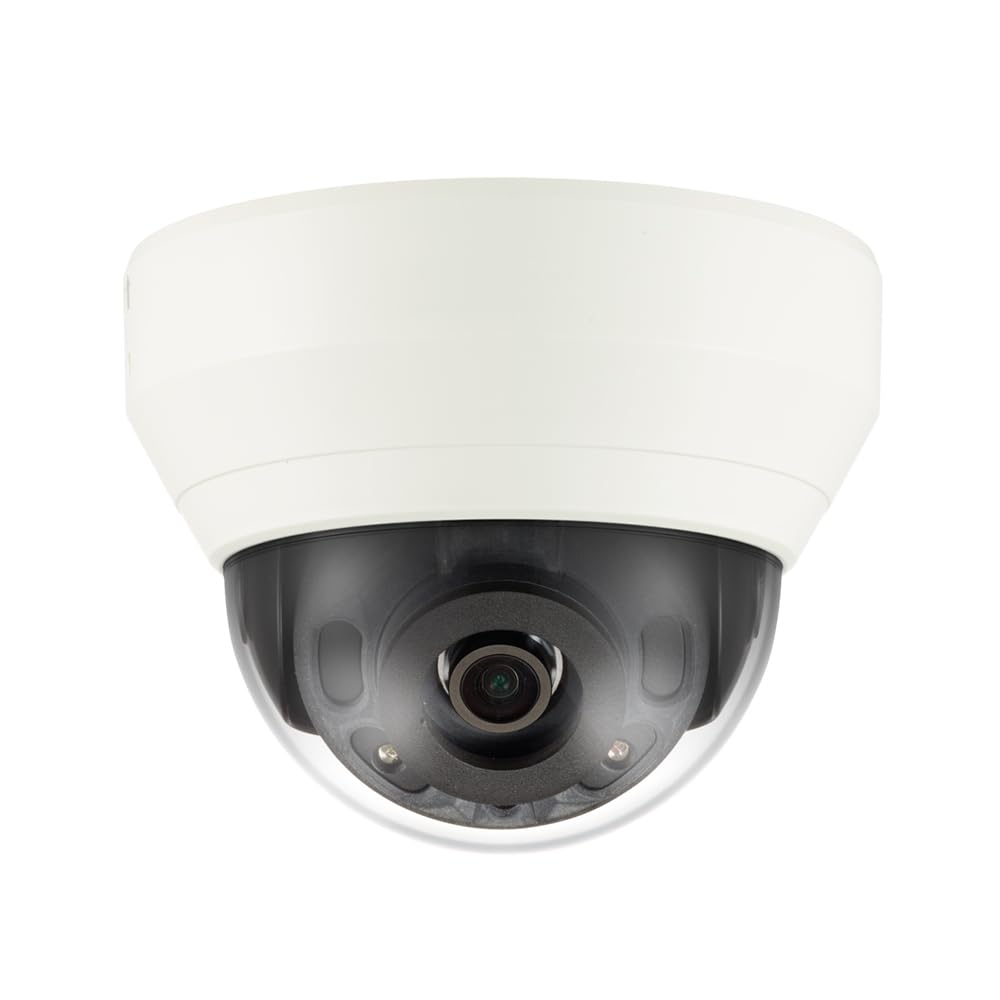
Figura 4.1: Faţă view of the Hanwha Techwin Wisenet QND-6020R 2 Megapixel Network Dome Camera. This image shows the compact dome design, suitable for discreet surveillance installations. The camera features a dark housing and a clear dome covering the lens, indicating its robust construction for various environments.
5. Configurare
5.1 Montarea camerei
- Selectați o locație: Choose a suitable wall location for optimal surveillance coverage. Ensure the surface is strong enough to support the camera.
- Găuri: Use the provided mounting template (if applicable) to mark and drill pilot holes for the mounting screws.
- Fixați suportul: Attach the camera's mounting base to the wall using the screws and anchors.
- Reglarea unghiului: Odată montată, reglați camera viewunghiul de reglare după cum este necesar.
5.2 Conectarea la rețea și la alimentare
- Conexiune de alimentare: Connect the supplied AC/DC power adapter to the camera's power input port and then to a power outlet.
- Conexiune la rețea (prin cablu): For a wired connection, connect an Ethernet cable from the camera's network port to your network router or switch.
- Conexiune la rețea (Wi-Fi): For Wi-Fi connectivity, refer to the camera's initial setup wizard or the dedicated network configuration section in the full digital manual for pairing instructions. The camera supports Wi-Fi connectivity.
5.3 Configurare inițială
After connecting power and network, the camera will boot up. Access the camera's web interface via a browser using its IP address (refer to your network's DHCP client list or use the manufacturer's discovery tool). Follow the on-screen prompts to set up administrator credentials, network settings, and initial video configurations.
6. Instrucțiuni de utilizare
6.1 În direct View și Înregistrare
Accesați imaginile live ale camerei view prin intermediul său web interface or a compatible network video recorder (NVR) / surveillance software. Configure recording schedules, motion-triggered recording, and continuous recording settings as desired. Video is captured at 1080p resolution in MP4 format.
6.2 Detectarea mișcării
The camera features a motion sensor. Configure motion detection zones and sensitivity settings within the camera's web interface. You can set up alerts (e.g., email notifications) to be triggered upon motion detection.
6.3 Vedere nocturnă
The QND-6020R is equipped with night vision capabilities, providing clear images in low-light conditions up to 65.62 ft. The camera automatically switches between day and night modes based on ambient light levels. Night vision is in color.
7. Întreținere
7.1 Curățare
Regularly clean the camera's lens and housing with a soft, dry cloth to ensure optimal image quality. Avoid using harsh chemicals or abrasive materials.
7.2 de actualizări de firmware
Periodically check the Hanwha Techwin website for firmware updates. Keeping your camera's firmware up-to-date ensures optimal performance, security, and access to new features.
8. Depanare
- Fără putere: Asigurați-vă că adaptorul de alimentare este conectat corect atât la cameră, cât și la o priză funcțională. Verificați dacă priza are curent.
- Fără videoclip/Offline: Check network cable connections (if wired) or Wi-Fi signal strength (if wireless). Verify the camera's IP address and network settings. Restart the camera and your network router.
- Calitate slabă a imaginii: Curățați obiectivul camerei. Asigurați-vă că nu există obstrucții în câmpul de acțiune al camerei. view. Check lighting conditions.
- Detectarea mișcării nu funcționează: Review motion detection zone settings and sensitivity in the camera's web interface. Ensure the feature is enabled.
- Nu se poate accesa Web Interfata: Verify the camera's IP address. Ensure your computer is on the same network segment as the camera. Try a different web browser.
9. Specificații
| Caracteristică | Descriere |
|---|---|
| Numărul de model | QND-6020R |
| Marca | HANWHA |
| Utilizări recomandate | Supraveghere |
| Caracteristici speciale | Senzor de mișcare, Viziune nocturnă |
| Sursa de alimentare | AC/DC |
| Protocol de conectivitate | Wifi |
| Tip controler | H.264 |
| Tip de montare | Montare pe perete |
| Tip de alertă | Doar mișcare |
| Evaluare rezistentă la apă | IP65 |
| Tehnologia fără fir | Wifi |
| Tehnologia senzorului foto | CMOS |
| Rezoluție captură video | 1080p |
| Format de captură video | MP4 |
| Vedere de noapte | Culoarea Nopții |
| Producător | Hanwha Group |
10. Garanție și asistență
This Hanwha Techwin product is covered by a manufacturer's warranty provided by Hanwha Group. For detailed warranty terms and conditions, please refer to the warranty card included with your product or visit the official Hanwha Techwin website. For technical support, troubleshooting assistance, or service inquiries, please contact Hanwha Techwin customer support through their official channels.