
1. Introducere
Thank you for choosing the Eaton 187083 USB 3.0 Flush-Mount Receptacle. This product is designed to provide a convenient and integrated USB 3.0 port for various applications, featuring a flat front and a 30 cm cable for front mounting. This manual provides essential information for the safe and effective installation, operation, and maintenance of your device.
2. Informații de siguranță
Vă rugăm să citiți cu atenție toate instrucțiunile de siguranță înainte de a instala sau utiliza dispozitivul. Nerespectarea acestor instrucțiuni poate duce la vătămări corporale sau la deteriorarea produsului.
- Ensure power is disconnected before installation to prevent electrical shock.
- Instalarea trebuie efectuată de către personal calificat dacă nu aveți nicio certitudine în privința cablajului electric.
- Nu expuneți dispozitivul la umezeală sau la temperaturi extreme.
- Use only with compatible USB 3.0 devices and cables.
3. Conținutul pachetului
Verificați dacă toate articolele sunt prezente la despachetare:
- 1 x Eaton 187083 USB 3.0 Flush-Mount Receptacle with 30 cm cable
4. Installation (Front Mounting)
The Eaton 187083 is designed for front mounting, providing a clean, integrated look. Follow these steps for proper installation:
- Pregătiți suprafața de montare: Identify a suitable location for the receptacle. Ensure there is enough space behind the mounting surface for the 30 cm cable and its connection.
- Creați deschiderea: Cut an appropriate-sized opening in the mounting panel. Refer to the product dimensions for precise measurements (e.g., 70 x 46 mm for the front face, though the cutout size will be slightly smaller).
- Insert the Receptacle: Carefully insert the front of the USB receptacle into the prepared opening from the front of the panel. The flat front design should sit flush with the surface.
- Secure the Receptacle: Use appropriate fasteners (not included, typically screws or clips depending on the panel design) to secure the receptacle firmly in place from the front or rear, ensuring it does not move.
- Conectați cablul: Route the integrated 30 cm USB 3.0 cable to your host device (e.g., computer, hub, or other USB 3.0 compatible equipment). Ensure the connection is secure.
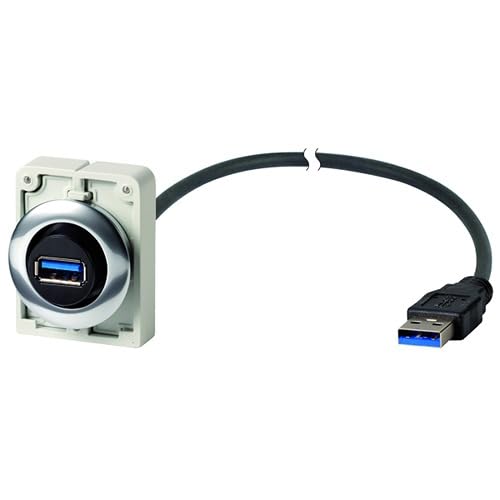
Figure 1: Eaton 187083 USB 3.0 flush-mount receptacle. This image shows the flat front design and the integrated 30 cm cable for connection.
5. Funcționare
Operating the Eaton 187083 USB 3.0 Flush-Mount Receptacle is straightforward:
- Ensure the receptacle is correctly installed and its 30 cm cable is connected to a powered USB 3.0 host port.
- Plug your USB 3.0 compatible device (e.g., flash drive, external hard drive, camera) into the front-facing USB port of the Eaton 187083 receptacle.
- The connected device should be recognized by your host system. Data transfer will occur at USB 3.0 speeds, provided both the host and the connected device support USB 3.0.
6. Întreținere
The Eaton 187083 requires minimal maintenance:
- curatenie: Use a soft, dry cloth to wipe the surface of the receptacle. Do not use abrasive cleaners or solvents.
- Inspecţie: Periodically check the connections and the receptacle for any signs of damage or wear.
- Conditii de mediu: Ensure the operating environment remains within specified temperature and humidity ranges to prolong the life of the device.
7. Depanare
If you encounter issues with your Eaton 187083, refer to the following common solutions:
- Dispozitiv nerecunoscut:
- Ensure the 30 cm cable is securely connected to a functional USB 3.0 port on your host device.
- Try connecting the USB device directly to the host port to rule out issues with the device itself.
- Reporniți sistemul gazdă.
- Transfer lent de date:
- Verify that both your host port and the connected device are USB 3.0 compatible. If either is USB 2.0, speeds will be limited to USB 2.0.
- Ensure the cable connection is secure.
8. Specificații
| Producător | Eaton |
| Numărul de model | 187083 |
| Dimensiuni produs (L x l x H) | 70 x 46 x 160 cm (overall); 80 grams |
| Lungimea cablului | 30 cm |
| USB standard | USB 3.0 |
| Tip de montare | Front Mount, Flush Front |
| Numărul de articole din pachet | 1 |
| ASIN | B0797PYMNT |
| Data primului disponibil | 10 aprilie 2018 |
9. Garanție și asistență
Worldwide Eaton Warranty: This product is covered by a worldwide Eaton warranty. For specific terms and conditions, please refer to the official Eaton warranty documentation or contact Eaton customer service.
Asistență clienți: For technical assistance, troubleshooting beyond this manual, or warranty claims, please visit the official Eaton website or contact their customer support department. You can find contact information on the Eaton website: www.eaton.com


