
1.view
The Digilent Zybo Z7-10 is a feature-rich, ready-to-use embedded software and digital circuit development board. It provides a comprehensive set of multimedia and connectivity peripherals, making it a versatile single-board computer solution.
Built around the Xilinx Zynq-7000 AP SoC, the board integrates a 650MHz dual-core Cortex-A9 processor with a DDR3 memory controller and 8 DMA channels. This combination of processing system and programmable logic offers a powerful platform for various applications.

Figure 1: Digilent Zybo Z7-10 Development Board and its packaging.
2. Configurare și configurare inițială
To begin using your Zybo Z7-10 development board, follow these steps for proper setup:
- Conexiune de alimentare: Connect the board to a power source using either the USB port or a 5V barrel jack connector. Ensure the power supply meets the board's requirements.
- Conexiune USB: For communication with a host computer, connect the board via a USB cable to an available USB port. This connection is typically used for programming and debugging.
- Ieșire video (opțională): If your application requires video output, connect an HDMI display to the board's HDMI TX port.
- Conexiuni audio (opționale): For audio input or output, connect appropriate audio devices to the MIC IN, LINE IN, or HPH OUT (headphone out) jacks.
- Pmod Connectors (Optional): Utilize the six Pmod connector ports for expanding functionality with various peripheral modules.
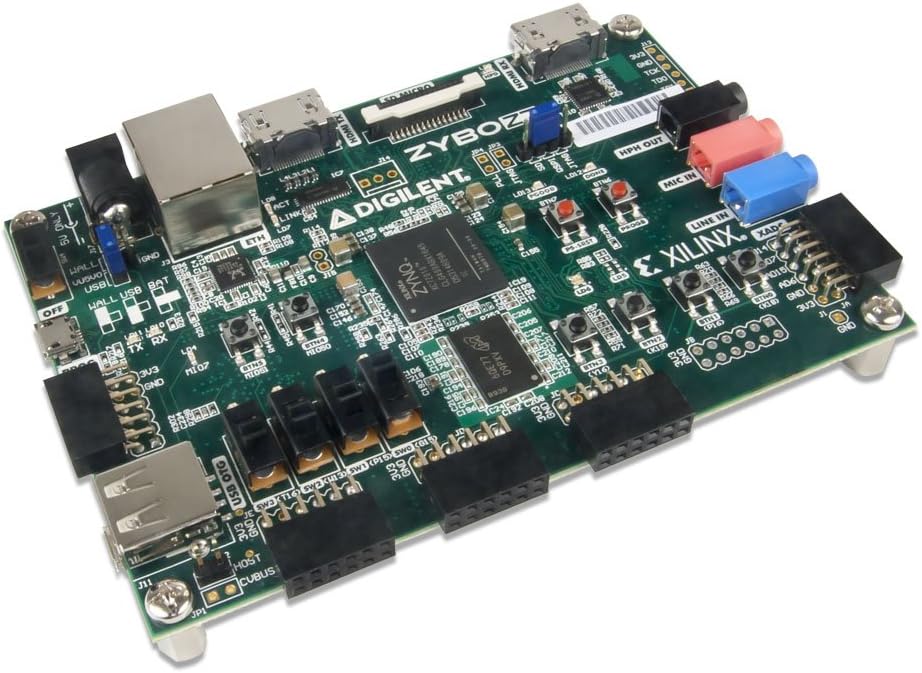
Figura 2: lateral view of the Zybo Z7-10 board highlighting connectivity options.

Figura 3: De sus în jos view of the Zybo Z7-10 board, detailing component layout.
3. Operating the Board
The Zybo Z7-10 offers various on-board user interfaces and extensive I/O for development:
- Interfețe cu utilizatorul: The board includes 6 push buttons, 4 slide switches, 5 LEDs, and 2 RGB LEDs for direct user interaction and status indication.
- FPGA I/O: Over 30 FPGA I/O pins are available for custom connections and interfacing with external circuits.
- Conversie analog-digitală: Four analog-capable 0-1.0V differential pairs connect to the XADC, enabling analog signal processing.
3.1. FPGA Programming
The Zynq-7000 AP SoC on the Zybo Z7-10 can be programmed via JTAG for volatile configuration or through the on-board QSPI flash memory for non-volatile storage of your designs. Development typically involves Xilinx Vivado Design Suite.
For detailed programming instructions and examples, refer to the official Digilent documentation and tutorials available on their website-ul.
4. Specificatii tehnice
| Caracteristică | Detaliu |
|---|---|
| Procesor | Xilinx Zynq-7000 AP SoC (XC7Z010-1CLG400C) with 650MHz dual-core ARM Cortex-A9 |
| RAM | DDR3L, 1 GB installed size |
| Sistem de operare | Linux (supported) |
| Tip fără fir | 802.11b |
| Greutatea articolului | 4 uncii |
| Dimensiunile produsului | 6 x 8 x 3 inci |
| Sursa de alimentare | See product details (USB or barrel connector) |
| On-board User Interfaces | 6 push buttons, 4 slide switches, 5 LEDs, 2 RGB LEDs |
| Expansiune | 6 Pmod connector ports, >30 FPGA I/O, 4 Analog capable 0-1.0V differential pairs to XADC |
5. Întreținere și îngrijire
To ensure the longevity and proper functioning of your Zybo Z7-10 board, observe the following maintenance guidelines:
- Manipulare: Always handle the board by its edges to avoid touching components, especially the FPGA chip, which can be sensitive to electrostatic discharge (ESD).
- Depozitare: Store the board in an anti-static bag when not in use, and keep it in a dry, dust-free environment.
- curatenie: If necessary, gently clean the board with a soft, dry brush or compressed air to remove dust. Avoid using liquids or abrasive cleaners.
- Oprire: Always disconnect power before making or changing any connections to the board.

Figura 4: De jos view of the Zybo Z7-10 board, showing mounting points.
6. Depanare
If you encounter issues with your Zybo Z7-10 board, consider the following common troubleshooting steps:
- No Power Indication:
- Verify that the power supply is correctly connected and providing the specified 5V.
- Verificați cablul de alimentare pentru orice deteriorare.
- Probleme de conectare USB:
- Ensure the USB cable is securely connected to both the board and the host computer.
- Încercați un alt port USB sau cablu.
- Install or update the necessary USB drivers for the Zynq device.
- FPGA Not Programming:
- Confirm that the JTAG chain is correctly connected and recognized by your development software (e.g., Xilinx Vivado).
- Ensure the correct bitstream or programming file este selectat.
- Check for any error messages in the development software console.
- Probleme software/firmware:
- Refer to Digilent's official support resources for specific software setup and known issues.
- Ensure your development environment (e.g., Vivado) is up to date.
7. Garanție și asistență
For warranty information, technical support, and additional resources, please visit the official Digilent website. Digilent provides extensive documentation, tutorials, and community forums to assist users with their development boards.
Producător: Digilent
Resurse online: www.digilentinc.com