
1. Introducere
Mulțumesc pentru achizițieasing the CONTEC SolarView Compact SV-CPT-MC310. This device is designed for efficient monitoring and data logging of solar power generation. It integrates essential functions such as power measurement, data display, and storage into a compact form factor. This manual provides detailed instructions for the proper setup, operation, and maintenance of your device.
Vă rugăm să citiți cu atenție acest manual înainte de a utiliza produsul pentru a asigura o performanță sigură și optimă. Păstrați acest manual pentru referințe ulterioare.
2. Produs terminatview
The CONTEC SolarView Compact SV-CPT-MC310 is a versatile device for solar power monitoring. Its slim design houses comprehensive features including a screen display, network connectivity, RS-485 communication, and an SD card slot for data storage.
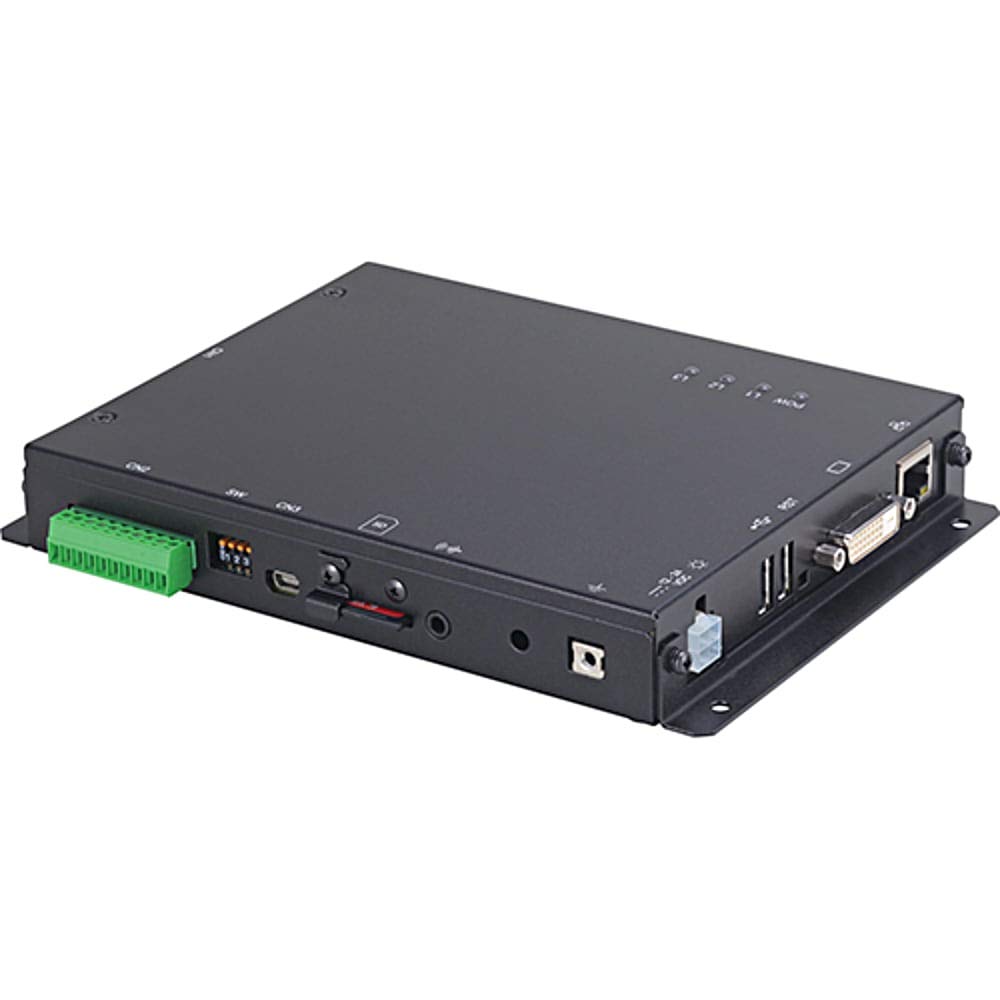
Figura 1: Faţă view of the CONTEC SolarView Compact SV-CPT-MC310. This image illustrates the compact size and the integrated display panel of the device, highlighting its user-friendly interface for monitoring solar power data.
3. Informații de siguranță
Respectați întotdeauna următoarele măsuri de siguranță pentru a preveni vătămările corporale și deteriorarea dispozitivului:
- Ensure the device is installed by qualified personnel.
- Nu expuneți dispozitivul la temperaturi extreme, umiditate sau lumina directă a soarelui.
- Deconectați alimentarea înainte de a efectua orice procedură de întreținere sau instalare.
- Use only specified power adapters and cables.
- Do not attempt to open or repair the device yourself. Refer to authorized service personnel.
4. Configurare
4.1 Despachetarea și inspecția
Carefully remove the device from its packaging. Inspect for any signs of damage during transit. If any damage is found, contact your supplier immediately.
4.2 Montarea dispozitivului
SolarulView Compact SV-CPT-MC310 is designed for indoor installation. Choose a location that is dry, well-ventilated, and free from direct sunlight or excessive heat sources. Ensure adequate space around the device for ventilation and cable connections.
- Identificați o suprafață de montare adecvată.
- Secure the device using appropriate screws or mounting brackets (not included).
4.3 Conexiuni electrice
Connect the power supply and communication cables as follows:
- Putere de intrare: Connect the DC power adapter to the device's power input port. Ensure the power source matches the device's voltage cerințe.
- Comunicare RS-485: Connect the RS-485 cable to the designated port for communication with other devices or systems.
- Rețea (Ethernet): For network connectivity, plug an Ethernet cable into the RJ45 port.
- Card SD: Insert a compatible SD card into the SD card slot for data logging. Ensure the card is correctly oriented.
Warning: Ensure all connections are secure before applying power.
5. Instrucțiuni de utilizare
5.1 Pornirea și pornirea inițială
Once all connections are made, apply power to the device. The device will perform a self-test and the display will show the boot-up sequence. After successful boot, the main monitoring screen will appear.
5.2 Navigarea în interfața utilizator
The device features an integrated display and control buttons. Use the navigation buttons to scroll through menus and select options.
- Butoane Sus / Jos: Navigate through menu items or adjust values.
- Buton Enter: Confirmați selecția sau intrați într-un submeniu.
- Back/Exit Button: Reveniți la ecranul anterior sau părăsiți un meniu.
5.3 Monitoring Solar Power Data
The main screen typically displays real-time data such as:
- Current Power Generation (W)
- Daily Energy Yield (Wh)
- Total Energy Yield (kWh)
- Stare sistem
Refer to the on-screen menu for detailed historical data and system settings.
5.4 Înregistrarea și exportul datelor
The device automatically logs data to the inserted SD card. To access or export data:
- Navigate to the "Data Management" or "Log" menu.
- Select the desired time range or data type.
- Choose the "Export" option (if available) to transfer data via network or remove the SD card and access data on a computer.
6. Întreținere
6.1 Curățare
Keep the device clean and free from dust. Use a soft, dry cloth to wipe the exterior. Do not use liquid cleaners or abrasive materials.
6.2 de actualizări de firmware
Periodically check the CONTEC website for firmware updates. Follow the provided instructions carefully for any update procedures to ensure optimal performance and access to new features.
6.3 Managementul cardului SD
Regularly back up data from the SD card. Consider replacing the SD card periodically, especially if it shows signs of wear or data corruption, to ensure reliable data logging.
7. Depanare
| Problemă | Cauza posibila | Soluţie |
|---|---|---|
| Dispozitivul nu pornește. | Fără alimentare; adaptor de alimentare defect; conexiune slăbită. | Check power cable connection. Ensure power adapter is functional. Verify power outlet. |
| No data displayed. | Sensor not connected; communication error; incorrect settings. | Verify sensor connections. Check RS-485 or network settings. Restart the device. |
| Eroare card SD. | SD card not inserted correctly; incompatible card; corrupted card. | Reinsert SD card. Try a different compatible SD card. Format the SD card (data will be lost). |
| Eroare de conexiune la rețea. | Ethernet cable disconnected; incorrect network settings; router issue. | Check Ethernet cable. Verify network settings on the device. Restart router/modem. |
If the problem persists after attempting these solutions, please contact CONTEC technical support.
8. Specificații
| Caracteristică | Detaliu |
|---|---|
| Numărul de model | SV-CPT-MC310 |
| Dimensiuni (L x l x H) | 14 x 17 x 3 cm |
| Greutate | 650 g |
| Interfețe de comunicare | Network (Ethernet), RS-485 |
| Stocarea datelor | Card SD |
| Producător | CONTEC |
9. Garanție și asistență
9.1 Informații despre garanție
CONTEC warrants this product against defects in materials and workmanship for a period specified at the time of purchase. Please retain your proof of purchase. The warranty does not cover damage caused by improper installation, misuse, unauthorized repairs, or natural disasters.
For detailed warranty terms and conditions, please refer to the warranty card included with your product or visit the official CONTEC website-ul.
9.2 Suport tehnic
If you require technical assistance or have questions regarding the operation of your SolarView Compact SV-CPT-MC310, please contact CONTEC technical support through their official website-ul sau informațiile de contact furnizate în documentația produsului.
When contacting support, please have your model number (SV-CPT-MC310) and a detailed description of the issue ready.