
Macara EE-5622
Crane EE-5622 Digital LED Display Tower Fan User Manual
Model: EE-5622
Introducere
This manual provides detailed instructions for the safe and efficient use of your Crane EE-5622 Digital LED Display Tower Fan. Please read all instructions carefully before operation and retain this manual for future reference.

Image: Crane EE-5622 Tower Fan with its packaging, highlighting key features like digital LED display, 12-hour timer, 70-degree oscillation, and 3 adjustable speed settings.
Instrucțiuni importante de siguranță
- Always place the fan on a firm, level surface.
- Nu acționați ventilatorul cu un cablu sau un ștecher deteriorat.
- Țineți ventilatorul departe de apă sau alte lichide.
- Ensure the fan is unplugged before cleaning or maintenance.
- Nu introduceți degetele sau obiecte străine în nicio deschidere.
- Acest ventilator este destinat exclusiv utilizării în interior.
- Supravegheați copiii atunci când ventilatorul este în funcțiune.
Conținutul pachetului
Verificați dacă toate articolele sunt prezente în colet:
- 1 x Crane EE-5622 Tower Fan
- 1 x Wireless Remote Control (batteries included)
- 1 x Manual de utilizare (acest document)
Înființat
- Despachetarea: Scoateți cu grijă ventilatorul și toate accesoriile din ambalaj.
- Plasare: Place the fan on a stable, flat surface, ensuring there is adequate space around it for air circulation. Avoid placing it near curtains or objects that could obstruct airflow.
- Conexiune de alimentare: Conectați cablul de alimentare la o priză electrică standard.

Imagine: Completă view of the Crane EE-5622 Tower Fan, showing its base and power cord connection point.
Instrucțiuni de operare
The Crane EE-5622 Tower Fan can be operated using the control panel on top of the unit or the wireless remote control.
Panoul de control
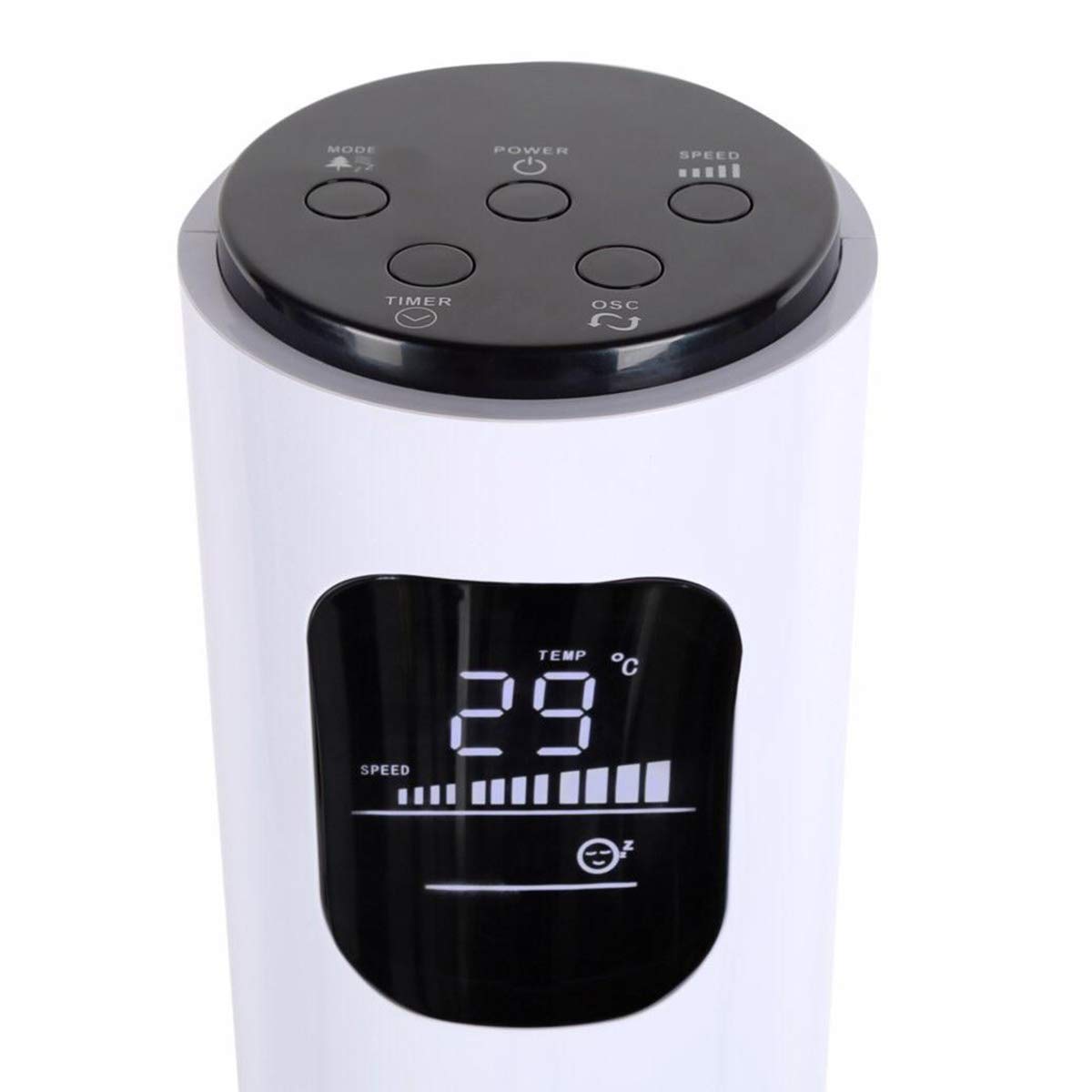
Image: Close-up of the fan's top control panel and digital LED display, showing buttons for Power, Speed, Oscillation, Timer, and Mode.
- Butonul de pornire (⏻): Apăsați pentru a porni sau opri ventilatorul.
- Buton de viteză (█████): Press to cycle through 3 speed settings (Low, Medium, High). The current speed is indicated on the LED display.
- Buton de oscilație (↻): Press to activate or deactivate the 70° oscillation function.
- Butonul temporizatorului (⏱): Press to set the auto-off timer from 1 to 12 hours. Each press increases the timer by one hour.
- Buton Mod (☼): Press to cycle through different operating modes:
- Modul normal: Flux de aer constant la viteza selectată.
- Modul briză naturală: Simulează vântul natural prin variația vitezei ventilatorului.
- Modul de somn: Reduce treptat viteza ventilatorului în timp pentru o funcționare silențioasă în timpul repausului.
Telecomanda fara fir
The remote control provides convenient operation from a distance. Ensure the remote is pointed towards the fan's receiver.
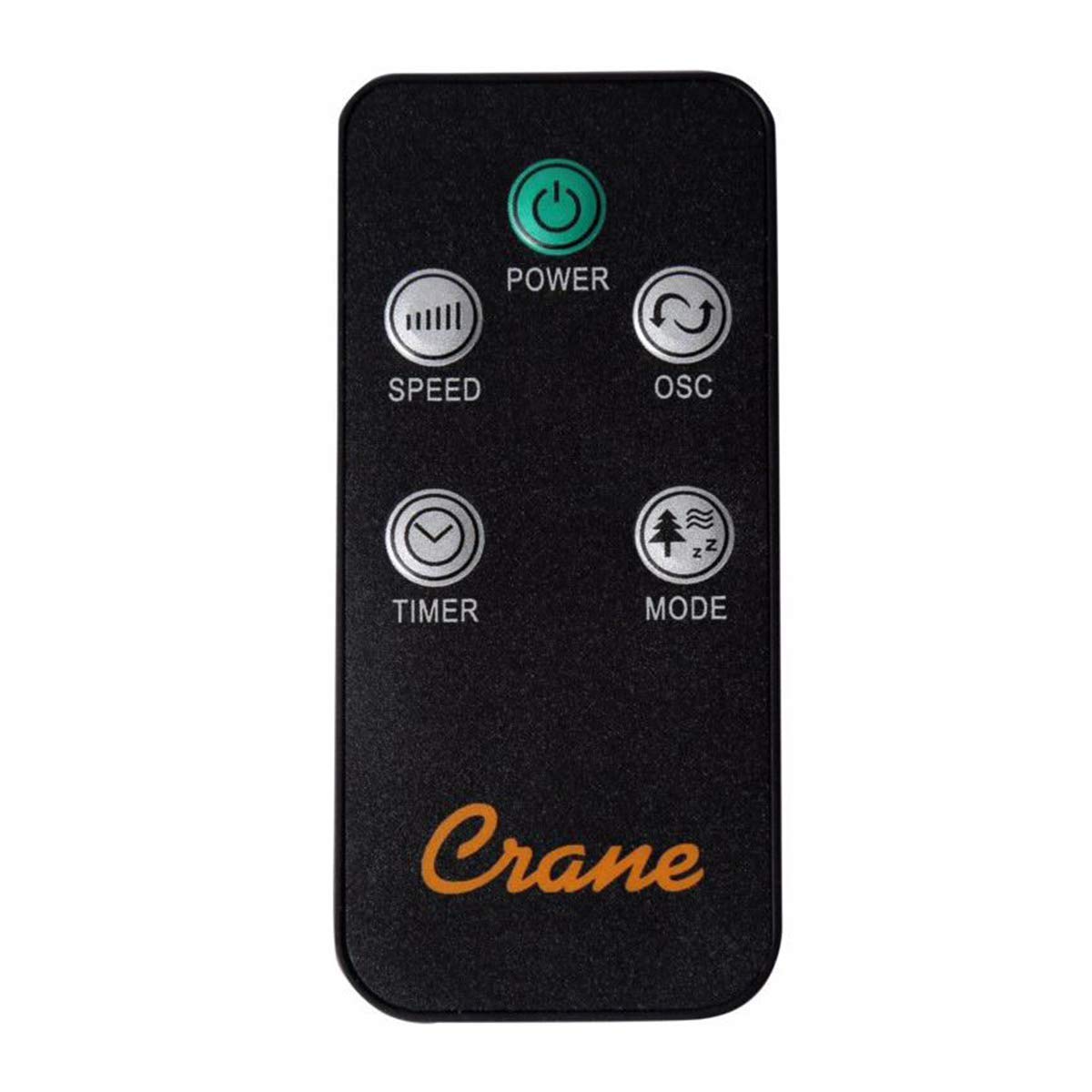
Image: The wireless remote control for the Crane EE-5622 Tower Fan, showing buttons for Power, Speed, Oscillation, Timer, and Mode.
The remote control features the same buttons as the control panel for Power, Speed, Oscillation, Timer, and Mode. It requires batteries (included).

Imagine: Sus view of the Crane EE-5622 Tower Fan, illustrating the integrated slot for storing the remote control.
Întreţinere
Întreținerea regulată asigură performanța optimă și durata de viață a ventilatorului dumneavoastră.
- curatenie: Deconectați întotdeauna ventilatorul de la priză înainte de curățare. Folosiți o lavetă moale,amp cloth to wipe the exterior surfaces. Do not use abrasive cleaners or allow water to drip into the fan's interior.
- Îndepărtarea prafului: Use a vacuum cleaner with a brush attachment or compressed air to remove dust from the air intake and exhaust grilles.
- Depozitare: If storing the fan for an extended period, clean it thoroughly, place it back in its original packaging, and store it in a cool, dry place.
Depanare
| Problemă | Cauza posibila | Soluţie |
|---|---|---|
| Ventilatorul nu pornește. | Fără alimentare; Cablul de alimentare nu este conectat; Butonul de alimentare nu este apăsat. | Verificați priza; Asigurați-vă că cablul de alimentare este conectat corect; Apăsați butonul de alimentare. |
| Flux de aer slab. | Fan speed set too low; Air intake/exhaust blocked; Dust accumulation. | Increase fan speed; Clear any obstructions; Clean the fan grilles. |
| Ventilatorul este zgomotos. | Fan not on a level surface; Foreign object inside; Dust accumulation. | Place fan on a flat, stable surface; Unplug and check for obstructions; Clean the fan. |
| Telecomanda nu funcționează. | Batteries depleted; Obstruction between remote and fan; Remote not pointed correctly. | Replace remote control batteries; Remove obstructions; Point remote directly at the fan's receiver. |
Specificații
| Marca | Macara |
| Numărul de model | EE-5622 |
| Sursa de alimentare | AC Powered (Remote Control: Battery Powered) |
| Wattage | 45 wați |
| Numărul de viteze | 3 |
| Unghiul de oscilație | 70° |
| Cronometru | 1 până la 12 ore |
| Înălţime | Aproximativ 115 cm (44 inchi) |
| Greutatea articolului | 5.1 lire sterline |
| Metoda de control | Telecomandă, butoane integrate |
| Caracteristici speciale | Digital LED Display, Room Temperature Display, Natural Breeze Mode, Sleep Mode, Auto Shut-off |
| Material | Acrylonitrile Butadiene Styrene (ABS), Plastic Blades |
| Utilizare în interior/exterior | Numai pentru utilizare în interior |
Garanție și suport
For warranty information or technical support, please refer to the warranty card included with your product or contact Crane customer service directly. Contact details are typically available on the manufacturer's official webamplasamentul sau ambalajul produsului.
Notă: Referințe clientviews indicate potential challenges with service support. It is recommended to retain your purchase receipt for warranty claims.
Ask a question about this manual
Ask about setup, troubleshooting, compatibility, parts, safety, or missing instructions. Manuals+ will review the question and use this page’s manual context to help answer it.