
Introducere
This manual provides essential instructions for the safe and effective use of the MSA Altair 4X Multigas Detector and its accompanying calibration kit. Please read this manual thoroughly before operating the device to ensure proper function and safety.
Produs terminatview
The MSA Altair 4X Multigas Detector is a portable device designed to simultaneously measure up to four gases: combustible gases (LEL), oxygen (O2), carbon monoxide (CO), and hydrogen sulfide (H2S). It features XCell sensor technology and Bluetooth connectivity, allowing information to be viewed on an Android device.
Caracteristicile cheie includ:
- Large buttons and a bright display for clear operation, even with gloves.
- MotionAlert sensor: Activates an alarm if the user becomes immobile for 30 seconds.
- InstantAlert feature: Allows users to manually trigger an alarm in dangerous situations.
- Compatibility with Galaxy Test System and Altair 4 QuickCheck Station.
- MSA Link software readiness for data management.

Figura 1: MSA Altair 4X Multigas Detector. This image shows the front view of the black, rugged gas detector with its digital display showing gas readings and control buttons.
Înființat
Despachetarea și inspecția
- Carefully unpack all components from the calibration kit case.
- Inspect the detector, calibration gas cylinder, and flow control regulator for any visible damage. Do not use if damaged.
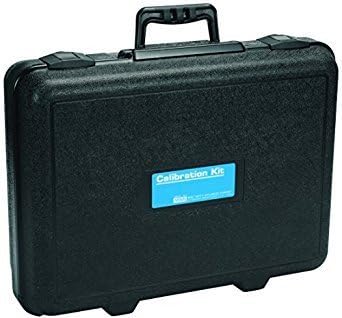
Figura 2: Black calibration kit case. This image displays a black, rectangular carrying case with a handle and latches, designed to protect the detector and calibration components.
Instalarea bateriei
The device is battery-powered. Ensure batteries are correctly installed according to the markings inside the battery compartment. (Note: Batteries are not included with the product.)
Calibration Kit Assembly
- Attach the flow control regulator to the calibration gas cylinder. Ensure a secure, leak-free connection.
- Connect the tubing from the regulator to the detector's calibration port.

Figura 3: Calibration gas cylinder. This image shows a silver gas cylinder with a blue and white label, containing calibration check gas.
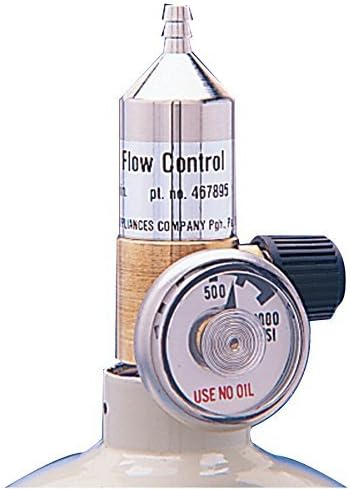
Figura 4: Flow control regulator. This image displays a metallic flow control regulator with a pressure gauge, used to regulate gas flow from the cylinder.
Instrucțiuni de operare
Pornire/Oprire
- Pentru a porni, apăsați și mențineți apăsat butonul de pornire până când afișajul se aprinde.
- To power off, press and hold the power button until the shutdown sequence completes.
Verificări înainte de utilizare
- Verify battery level is sufficient for the intended use period.
- Perform a bump test daily or before each use to confirm sensor response.
- Ensure all sensor readings are stable and within acceptable limits in fresh air.
Monitoring Gases
The detector continuously displays real-time gas concentrations for LEL, O2, CO, and H2S. Alarms will activate if gas levels exceed preset thresholds.
MotionAlert and InstantAlert
- MotionAlert: If the detector remains motionless for 30 seconds, a pre-alarm will sound, followed by a full alarm if no movement is detected.
- InstantAlert: Press the designated button to manually activate an audible and visual alarm to alert others of a hazardous situation.
Întreţinere
Calibrare
Regular calibration is crucial for accurate readings. Refer to the detector's on-screen prompts and the calibration kit instructions for detailed steps. Calibration frequency should adhere to local regulations and company policies, typically every 3-6 months.
Viața senzorului
The XCell sensors have an approximate four-year lifespan. Replace sensors as indicated by the device or during routine maintenance if performance degrades.
Curățare și depozitare
- Clean the exterior of the detector with a damp pânză. Nu utilizați substanțe chimice dure sau materiale abrazive.
- Store the detector and calibration kit in a cool, dry place away from direct sunlight and extreme temperatures.
Depanare
Probleme comune și soluții
| Emisiune | Cauza posibila | Soluţie |
|---|---|---|
| Detector not powering on | Baterii descărcate sau descărcate; instalare incorectă a bateriilor. | Înlocuiți bateriile; asigurați-vă că polaritatea este corectă. |
| Inaccurate gas readings | Detector requires calibration; sensor failure; blocked sensor inlet. | Perform calibration; replace faulty sensor; clear any obstructions. |
| Eșec de calibrare | Incorrect gas flow; expired calibration gas; faulty regulator. | Check regulator connection and flow; use fresh calibration gas; inspect regulator. |
| MotionAlert false alarms | Detector left stationary for too long. | Ensure detector is moved periodically or placed in a stable, non-hazardous location when not in active use. |
If issues persist after attempting these solutions, contact MSA customer support for further assistance.
Specificații
- Marca: MSA
- Număr de model: 10110488
- Sursa de alimentare: Alimentat cu baterii (bateriile nu sunt incluse)
- Gaze detectate: Combustible (LEL), Oxygen (O2), Carbon Monoxide (CO), Hydrogen Sulfide (H2S)
- Tip senzor: Gas (XCell sensors)
- Tip alarma: Audible, Visual (InstantAlert, MotionAlert)
- Culoare: Black, Blue, Gold
- Greutatea articolului: Approximately 11 Pounds (for the kit)
- Cantitate pachet: 1 (includes detector and calibration kit components)
- Numar de piese: 3 (detector, gas cylinder, regulator)
- Prima dată disponibilă: 6 noiembrie 2017
Garanție și suport
Specific warranty details are not provided within this document. For warranty information, technical support, or service inquiries, please refer to the official MSA website or contact MSA customer service directly. Keep your purchase receipt for warranty claims.
MSA Official Website: www.msasafety.com