
1. Introducere
The Poly Plantronics Blackwire 3210 is a wired, monaural (single-ear) headset designed for unified communications (UC) environments. It features a boom microphone and connects via USB-A, making it compatible with PCs and Macs. This headset is part of the Blackwire 3200 series, known for its durability, comfort, and ease of deployment.
Caracteristicile cheie includ:
- Lightweight metal headband for durability and a comfortable fit.
- Intuitive inline controls for call answer/end, mute, and volume adjustment.
- PC wideband audio with noise-canceling microphone for high-quality PC telephony.
- Monaural design allows users to remain aware of their surroundings.
2. Ce se află în cutie
Your Poly Plantronics Blackwire 3210 package includes:
- Blackwire 3210 Monaural Headset with USB-A cable and inline controls.
- Headband (integrated).

Image: The Poly Plantronics Blackwire 3210 Monaural Headset, showing the single earpiece, boom microphone, inline controls, and USB-A connector.
3. Configurare
3.1 Conectarea căștilor
- Locate an available USB-A port on your PC or Mac.
- Plug the USB-A connector of your Blackwire 3210 headset into the USB-A port.
- Calculatorul dumneavoastră ar trebui să detecteze și să instaleze automat driverele necesare.

Image: The Plantronics Blackwire 3210 headset with its USB-A connector, ready to be plugged into a computer.
3.2 Purtarea căștilor
- Place the earpiece over one ear. The monaural design allows you to keep one ear free to hear your surroundings.
- Reglați bentita pentru o potrivire confortabilă și sigură.
- Position the flexible boom microphone approximately two finger-widths from the corner of your mouth.

Image: A person wearing the Plantronics Blackwire 3210 headset, demonstrating its comfortable and lightweight design for all-day use.
3.3 Instalare software (opțional)
For advanced settings and firmware updates, download the Plantronics Hub app from the official Poly website-ul.
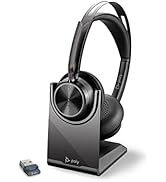
Image: The icon for the Plantronics Hub app, used for managing headset settings and updates.
3.4 Product Summary Video
Video: A brief product summary of the Plantronics Blackwire 3210 headset, highlighting its main features and design.
4. Instrucțiuni de utilizare
4.1 Controale în linie
The headset features intuitive inline controls for managing your calls and audio:
- Call Answer/End Button: Apăsați pentru a răspunde sau a termina un apel.
- Butoane de creștere / reducere volum: Apăsați „+” pentru a crește volumul, „-” pentru a-l reduce.
- Buton mut: Press to mute or unmute the microphone. A red indicator light on the control unit typically shows when muted.

Image: Close-up of the inline control unit on the Plantronics Blackwire 3210 headset cable, showing buttons for call control, volume, and mute.
4.2 Utilizarea microfonului
The noise-canceling microphone ensures clear communication by reducing background noise.
- Adjust the boom arm so the microphone is positioned close to your mouth, about two finger-widths away.
- The flexible boom allows for precise positioning.

Imagine: O imagine detaliată view of the noise-canceling boom microphone on the Plantronics Blackwire 3210 headset.
5. Întreținere
To ensure the longevity and optimal performance of your Blackwire 3210 headset, follow these maintenance guidelines:
- curatenie: Gently wipe the earpiece and headband with a soft, damp pânză. Evitați utilizarea substanțelor chimice dure sau a materialelor abrazive.
- Depozitare: Store the headset in a clean, dry place when not in use. Avoid extreme temperatures and direct sunlight.
- Îngrijirea cablului: Nu trageți de cablu pentru a deconecta setul cu cască. Prindeți întotdeauna conectorul USB. Evitați îndoiturile sau îndoiturile bruște ale cablului.
6. Depanare
If you encounter issues with your Blackwire 3210 headset, try the following steps:
- Fără sunet/Microfonul nu funcționează:
- Ensure the USB-A connector is securely plugged into your computer.
- Check your computer's audio settings to ensure the headset is selected as the default input and output device.
- Verificați dacă microfonul nu este dezactivat folosind controlul în linie.
- Try plugging the headset into a different USB port or another computer to rule out port or computer issues.
- Calitate slabă audio:
- Adjust the volume using the inline controls or your computer's settings.
- Asigurați-vă că brațul microfonului este poziționat corect lângă gură.
- Check for any software updates for your operating system or the Plantronics Hub app.
- Headset Not Recognized:
- Reporniți computerul.
- Ensure the Plantronics Hub app is installed and updated.
7. Specificații
| Caracteristică | Detaliu |
|---|---|
| Marca | Poli |
| Numele modelului | Căști Plantronics Blackwire C3210 |
| Tehnologia de conectivitate | USB |
| Mufă pentru căști | USB |
| Stil de purtare | Supraauriculare (Monaurale) |
| Microfon | Boom, Noise-Canceling |
| Tip control | Inline Call Control (Answer/End, Mute, Volume +/-) |
| Dispozitive compatibile | PCs, Macs |
| Greutatea articolului | 3.5 uncii (99.2 grame) |
| Dimensiunile produsului | 4.33 x 4.33 x 1.97 inci |
| Material | Metal |
| Culoare | Negru |
| Numărul de model | 129958 |
8. Garanție și asistență
The Poly Plantronics Blackwire 3210 headset comes with a Garanție globală de 2 an. For warranty claims, technical support, or additional product information, please visit the official Poly website-ul sau contactați departamentul de servicii pentru clienți.
Producator: Poly