
1. Introducere și Pesteview
The Goal Zero Lighthouse Micro Charge Flashlight is a compact, versatile lighting solution designed for various applications, including emergency preparedness, outdoor activities, and everyday use. This device functions as both a flashlight and a power bank for small USB-compatible devices. It features adjustable light settings and can be recharged via USB or a compatible solar panel.
The package includes one Lighthouse Micro Charge Lantern.
Caracteristicile cheie includ:
- Integrated USB charging port for device charging.
- Multiple light modes and adjustable brightness.
- IPX6 weatherproof rating.
- Design compact și portabil.
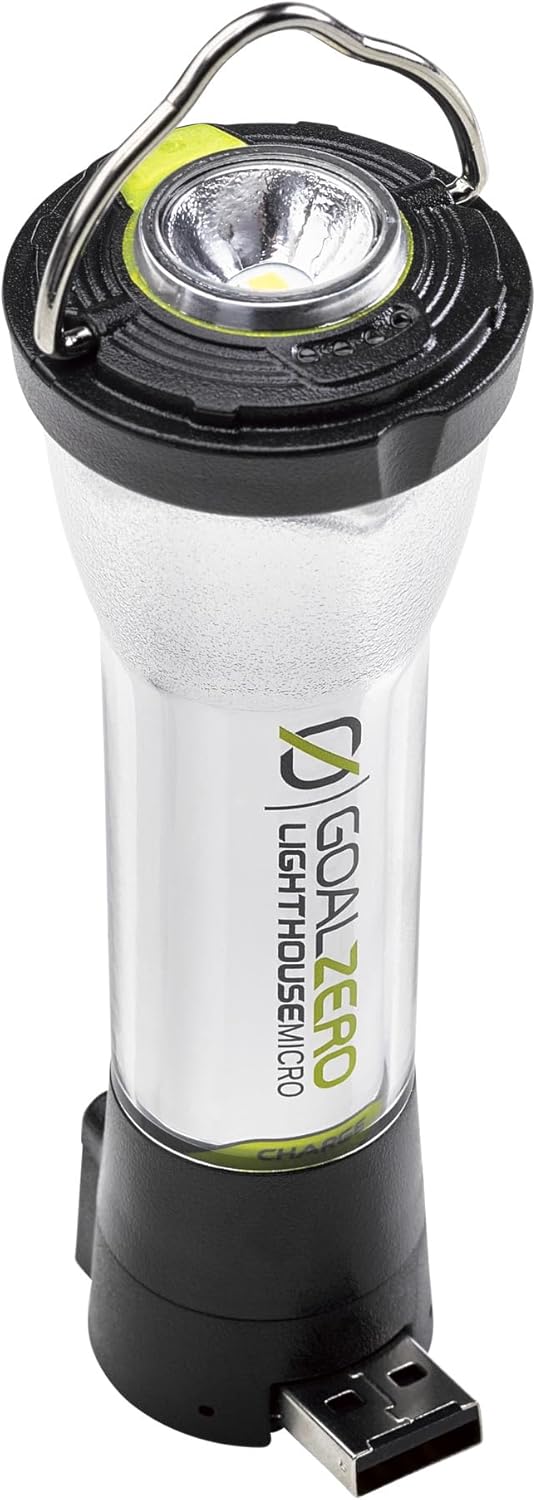
Image: The Goal Zero Lighthouse Micro Charge Flashlight, showing its compact design and integrated USB port.
2. Configurare
2.1 Taxa inițială
Before first use, fully charge your Lighthouse Micro Charge Flashlight. This ensures optimal battery performance and longevity.
- Locate the integrated USB charging port at the base of the flashlight.
- Connect the flashlight to any standard USB power source (e.g., wall adapter, computer USB port, or compatible solar panel) using a USB-A cable.
- The LED indicator lights will show charging progress. The flashlight is fully charged when all indicator lights are solid.
Charging time is approximately 3.5 hours when connected to a USB source or compatible solar panel.

Image: The Lighthouse Micro Charge with its integrated USB charging connector extended, ready for charging.
3. Instrucțiuni de utilizare
3.1 Powering On/Off and Light Modes
The Lighthouse Micro Charge features a single button for controlling power and cycling through light modes.
- Apăsați butonul de pornire o dată pentru a porni lanterna.
- Subsequent presses will cycle through the available light modes:
- Flashlight mode (top LED).
- One-sided lantern mode (half of the side LEDs).
- Both-sided lantern mode (all side LEDs).
- To turn off the device, press the power button until the light turns off, or hold the button down for a few seconds in any mode.
3.2 Reglarea luminozității
To adjust the brightness in any active light mode:
- Once a light mode is active, press and hold the power button. The brightness will gradually increase or decrease.
- Eliberați butonul când este atins nivelul de luminozitate dorit.

Image: The Lighthouse Micro Charge illuminating an area, demonstrating its lantern functionality.
3.3 Funcționalitatea bateriei externe
The Lighthouse Micro Charge can provide emergency power to small USB devices.
- Ensure the Lighthouse Micro Charge has sufficient battery life.
- Extend the integrated USB-A port from the base of the flashlight.
- Connect your small USB device (e.g., smartphone, GPS) to the USB-A port using its charging cable.
- The Lighthouse Micro Charge will begin charging your device.
Note: Using the power bank feature will deplete the flashlight's battery, reducing its light runtime.
4. Charging the Lighthouse Micro Charge
The Lighthouse Micro Charge offers flexible charging options:
- Sursa USB: Connect the integrated USB-A plug directly into any powered USB port (e.g., computer, wall adapter, car charger). Full charge in approximately 3.5 hours.
- Panou solar: Connect to a compatible Goal Zero solar panel (sold separately). Charging time varies depending on solar intensity. Full charge in approximately 3.5 hours under optimal sunlight.
The battery indicator LEDs will illuminate during charging, showing the current charge level. All LEDs will be solid when fully charged.

Image: A Lighthouse Micro Charge flashlight being charged by a Goal Zero solar panel, set up next to a camper in a natural outdoor setting.
5. Specificații
| Caracteristică | Detaliu |
|---|---|
| Numărul de model | 32008 |
| Dimensiuni | 4.4"L x 1.5"W (112 x 37.75 mm) |
| Greutate | 3.07 oz (87 g) |
| Luminozitate | Până la 135 lumeni |
| Tip baterie | 18650 Li-ion (included) |
| Battery Life (Lantern - Both Sides) | 7 ore (mare), 80 ore (scăzut) |
| Battery Life (Lantern - One Side) | 15 ore (mare), 170 ore (scăzut) |
| Battery Life (Flashlight) | 8.5 ore (mare), 100 ore (scăzut) |
| Charging Time (USB/Solar) | Aproximativ 3.5 ore |
| Rezistenta la apa | IPX6 Weatherproof |
| Port de ieșire | USB-A (5V, 1A, 5W max) |
6. Întreținere
To ensure the longevity and optimal performance of your Lighthouse Micro Charge Flashlight, follow these maintenance guidelines:
- curatenie: Ștergeți exteriorul cu un material moale, damp cloth. Avoid using harsh chemicals or abrasive cleaners. Ensure the USB port is free of dust and debris.
- Depozitare: Store the flashlight in a cool, dry place away from direct sunlight and extreme temperatures. For long-term storage, ensure the battery is charged to approximately 50-70% to preserve battery health. Recharge every 3-6 months if not in use.
- Îngrijirea bateriei: The integrated battery is not user-replaceable. Do not attempt to open the device.
- Expunerea la apă: While IPX6 weatherproof, avoid submerging the device in water. Dry thoroughly if it gets wet.
7. Depanare
If you encounter issues with your Lighthouse Micro Charge Flashlight, refer to the following common solutions:
| Problemă | Cauza posibila | Soluţie |
|---|---|---|
| Lumina nu se aprinde. | Bateria este epuizată. | Charge the flashlight using a USB source or solar panel. |
| Lumina este slabă sau pâlpâie. | Încărcare redusă a bateriei. | Reîncărcați lanterna. |
| Device not charging from flashlight. | Flashlight battery is low or cable is faulty. | Ensure flashlight is charged. Try a different USB cable. Ensure the device being charged is compatible with 5V, 1A output. |
| Lanterna nu se încarcă. | Faulty USB source or cable. | Try a different USB port or power adapter. Ensure the USB cable is fully inserted. If using solar, ensure direct sunlight. |
If the problem persists after trying these solutions, please contact Goal Zero customer support.
8. Garanție și asistență
Goal Zero products are designed for durability and performance. The Lighthouse Micro Charge Flashlight comes with a 2 an garanție.
For warranty claims, technical assistance, or further inquiries, please contact Goal Zero customer support. You may need your proof of purchase and the product model number (32008).
Additional resources and support information can often be found on the official Goal Zero website-ul.

Image: An infographic highlighting Goal Zero's commitment to quality and customer satisfaction, including a 2-year warranty and customer support.