
Introducere
This manual provides comprehensive instructions for the setup, operation, and maintenance of your NETUM NT-R3 Mini 1D CCD Bluetooth Barcode Scanner. Please read this guide thoroughly to ensure proper use and to maximize the performance of your device.
Conținutul pachetului
La despachetare, vă rugăm să verificați dacă toate articolele enumerate mai jos sunt prezente și în stare bună:
- 1 x NETUM Mini Bluetooth Barcode Scanner (NT-R3)
- 1 x cablu de încărcare USB
- 1 x Ghid de pornire rapidă
- 1 x 2.4 GHz Adapter
Produs terminatview
The NETUM NT-R3 is a compact and versatile 1D CCD barcode scanner designed for portability and ease of use. Its ring-style design allows for comfortable wear, enhancing productivity in various environments.

Image: The NETUM NT-R3 Mini Barcode Scanner, a small black electronic device with a screen and button, designed to be worn on a finger with an adjustable ring structure.
Caracteristici cheie:
- Ring Design: Magnesium alloy casing and trigger for durability and ease of use.
- Rotație 180°: Unique rotatable design for scanning from various angles.
- CCD Scanning: Reads 1D barcodes directly from LCD screens of computers or mobile devices, including poorly printed or damaged barcodes.
- Conectivitate wireless: Supports Bluetooth (SPP, HID) and 2.4 GHz wireless connections.
- Compatibilitate largă: Compatible with Windows XP/7/8/8.1/10, Google Android, iOS, and Mac OS X.
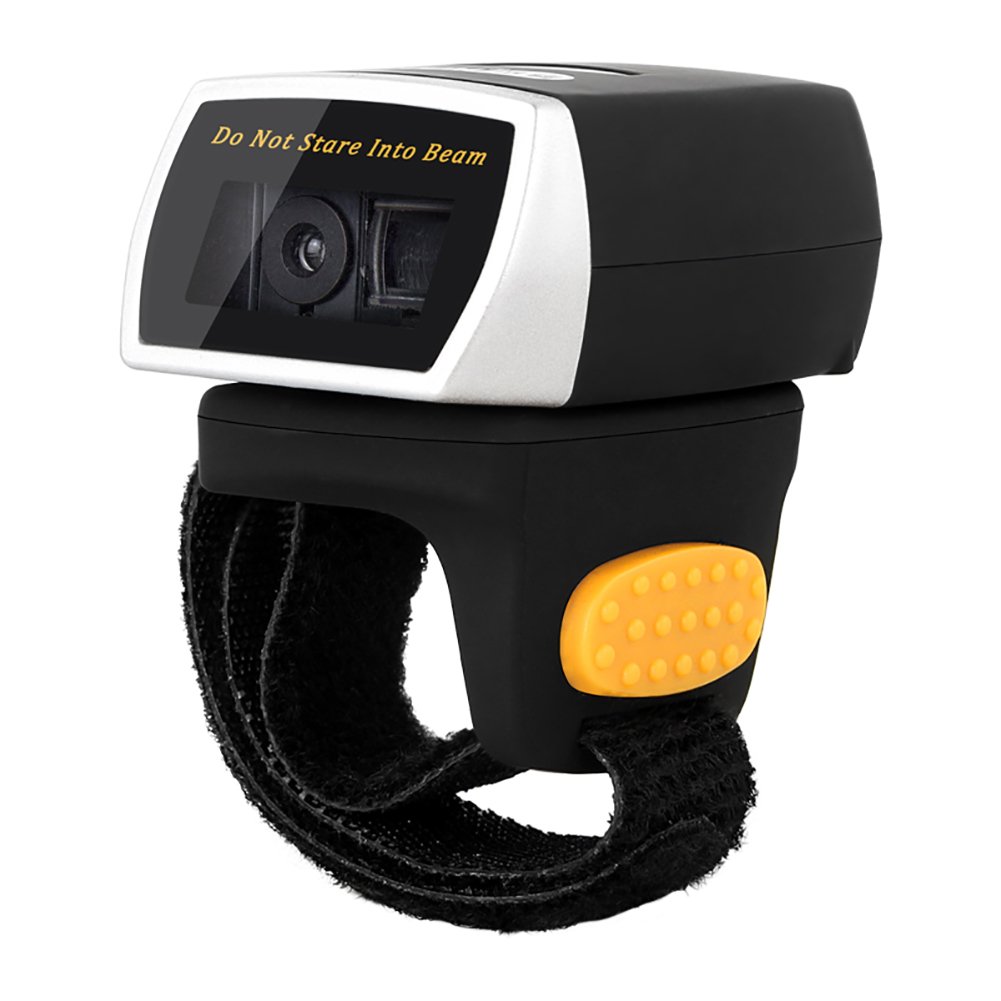
Image: The NETUM NT-R3 Mini Barcode Scanner demonstrating its 180-degree rotation design, allowing for flexible scanning angles.

Image: The NETUM NT-R3 Mini Barcode Scanner held in a hand, illustrating its compact dimensions (50mm x 44mm x 38mm) and light weight (50g), emphasizing its strong compatibility with various devices.
Configurare și conectivitate
1. Încărcarea scanerului
Before initial use, fully charge the scanner using the provided USB charging cable. Connect the small end of the USB cable to the scanner's charging port and the other end to a USB power source (e.g., computer, USB wall adapter). The charging indicator light will show the charging status.
2. Pornire/Oprire
To power on the scanner, press and hold the trigger button for a few seconds until you hear a beep and see the indicator light. To power off, press and hold the trigger button again until the indicator light turns off.
3. Opțiuni de conectivitate
The NT-R3 scanner offers two primary connectivity methods:
Bluetooth Connection (HID Mode - Keyboard Emulation)
- Asigurați-vă că scanerul este pornit.
- Scan the "Bluetooth HID Mode" barcode (refer to the Quick Start Guide for specific barcodes).
- Pe dispozitivul gazdă (smartphone, tabletă, computer), activați Bluetooth și căutați dispozitivele disponibile.
- Select "NETUM Barcode Scanner" or a similar name from the list of devices.
- The scanner will beep to confirm successful pairing.
In HID mode, scanned barcodes are input directly as keyboard entries into any active text field.
Bluetooth Connection (SPP Mode - Serial Port Profile)
SPP mode is typically used for applications that require direct data communication with the scanner. This mode requires specific software on the host device to interpret the data. Refer to your application's documentation for SPP setup.
- Asigurați-vă că scanerul este pornit.
- Scan the "Bluetooth SPP Mode" barcode (refer to the Quick Start Guide).
- Follow the instructions provided by your specific application for connecting to an SPP device.
Conexiune wireless de 2.4 GHz
- Plug the provided 2.4 GHz adapter into a USB port on your computer.
- Asigurați-vă că scanerul este pornit.
- Scan the "2.4G Wireless Mode" barcode (refer to the Quick Start Guide).
- The scanner will automatically connect to the adapter. A successful connection is indicated by a specific beep or light pattern (refer to the Quick Start Guide for details).
The 2.4 GHz connection offers a wireless range of up to 10 meters (30 feet).
Moduri de operare
The NETUM NT-R3 scanner supports two data upload modes:
1. Mod de încărcare instantanee
In this mode, scanned barcodes are immediately transmitted to your connected device. This is suitable for real-time data entry.
2. Mod de stocare
The scanner can store up to 2000 barcodes in its built-in flash memory. This mode is useful when working out of range of your host device. Barcodes can be uploaded later when a connection is established.
Image: A visual representation of the two upload modes. Instant Upload Mode shows barcodes being sent directly to a device. Storage Mode shows barcodes being stored internally and then uploaded later.
To switch between modes, scan the corresponding configuration barcodes found in the Quick Start Guide.
Scanarea codurilor de bare
Pentru a scana un cod de bare:
- Țineți scanerul cu fereastra de scanare orientată spre codul de bare.
- Press the trigger button. A red scanning line will appear.
- Align the red scanning line across the entire barcode.
- Once successfully scanned, the scanner will emit a beep, and the indicator light will flash.
The NT-R3 is capable of reading 1D barcodes from various surfaces, including:
- Etichete imprimate
- LCD screens (computers, smartphones, tablets)
- Poorly printed or damaged barcodes
Întreţinere
Îngrijirea bateriei
- Pentru a prelungi durata de viață a bateriei, evitați descărcarea completă frecventă a acesteia.
- Încărcați scanerul în mod regulat, chiar dacă nu îl utilizați constant.
- Depozitați scanerul într-un loc răcoros și uscat atunci când nu îl utilizați pentru perioade lungi de timp.
Curatenie
- Folosiți o lavetă moale, uscată și fără scame pentru a curăța exteriorul scanerului.
- Pentru fereastra de scanare, folosiți o lavetă de curățare a lentilelor sau o lavetă moale, ușor tamponată.ampcurățate cu apă sau cu un produs de curățare blând, neabraziv.
- Nu utilizați substanțe chimice dure, solvenți sau materiale abrazive, deoarece acestea pot deteriora dispozitivul.
Depanare
| Problemă | Cauza posibila | Soluţie |
|---|---|---|
| Scanerul nu pornește. | Baterie descărcată. | Încărcați scanerul timp de cel puțin 2 ore. |
| Scanerul nu se conectează prin Bluetooth. | Incorrect mode selected; device not discoverable; out of range. | Ensure "Bluetooth HID Mode" or "SPP Mode" is scanned. Make sure Bluetooth is enabled on the host device and the scanner is within 10 meters. Try re-pairing. |
| Scanner does not connect via 2.4 GHz adapter. | Adapter not properly inserted; incorrect mode selected. | Ensure the 2.4 GHz adapter is securely plugged in. Scan the "2.4G Wireless Mode" barcode. |
| Scanerul nu citește coduri de bare. | Barcode is unreadable; scanner not aligned; scanner in storage mode. | Ensure the barcode is clear and well-lit. Align the red line across the entire barcode. If in storage mode, switch to instant upload mode or upload stored data. |
| Datele scanate apar incorect. | Keyboard layout mismatch (for HID mode). | Scan the appropriate keyboard layout barcode (e.g., US, UK, French) from the Quick Start Guide. |
Specificatii tehnice
| Caracteristică | Detaliu |
|---|---|
| Numărul de model | NT-R3 |
| Tehnologie de scanare | CCD 1D |
| Conectivitate | Bluetooth (SPP, HID), 2.4 GHz Wireless, USB |
| Sisteme de operare compatibile | Windows XP/7/8/8.1/10, Google Android, iOS, Mac OS X |
| Rata de scanare | 260 samplei pe secundă |
| Capacitate de stocare | Până la 2000 de coduri de bare (în modul de stocare) |
| Tip baterie | 1 Lithium metal battery (included) |
| Sursa de alimentare | Alimentat cu baterie |
| Vol. De operaretage | 5 volți |
| Temperatura maximă de depozitare | 45 de grade Celsius |
| Certificari | CE, ISO, RoHS |
| Producător | Guangzhou Netum Electronic Technology Co.,Ltd. |
| Țara de origine | China |
Garanție și suport
POLITICA DE RETURNARE
Acest produs este eligibil pentru rambursare sau înlocuire în termen de 30 de zile de la cumpărare, în conformitate cu politica de returnare a vânzătorului.
Informații despre producător
Manufacturer: Guangzhou Netum Electronic Technology Co.,Ltd.
For further assistance or technical support, please refer to the contact information provided in your Quick Start Guide or visit the official NETUM website-ul.
Notă: Informațiile privind disponibilitatea pieselor de schimb și actualizările de software garantate nu sunt disponibile în acest moment.