
1. Introducere
This manual provides detailed instructions for the installation, operation, programming, and maintenance of your SASWELL SAS6000UTK-7 Thermostat. This thermostat is designed for use with various heating and cooling systems, including single-stage, multi-stage, and heat pump systems (up to 3-stagcăldură, 2-stage cool, with auxiliary or emergency heat). Please read this manual thoroughly before installation and use to ensure proper function and safety.
2. Informații de siguranță
- Opriți întotdeauna alimentarea sistemului de încălzire/răcire de la întrerupătorul principal sau de la cutia de siguranțe înainte de a instala sau a efectua service la termostat.
- Instalarea trebuie efectuată de către un tehnician calificat dacă nu sunteți familiarizat cu cablajul electric.
- Asigurați-vă că toate conexiunile cablurilor sunt sigure și respectă codurile electrice locale.
- Do not short-circuit the thermostat terminals.
- This thermostat is not compatible with millivolt systems.
3. Produs terminatview
The SASWELL SAS6000UTK-7 is a programmable thermostat featuring a large LCD digital display with backlight for easy readability. It offers flexible 7-day/4-period programming to optimize energy usage. The thermostat can be powered by two AA batteries or directly by the system via a C-wire (recommended for consistent backlight and operation).
Caracteristici cheie:
- Compatibility with single-stage, multi-stage, and heat pump systems (up to 3-stagcăldură, 2-stage cool, with auxiliary or emergency heat).
- Optional 7-day programming with 4 periods per day (Wake, Leave, Return, Sleep).
- Large LCD digital display with adjustable backlight.
- Dual power options: 2 AA batteries or 24V AC C-wire connection.
- Vacation set-point override for energy savings.
- Accurate temperature control of +/-1°F (0.5°C).
- 12 or 24-hour clock display.
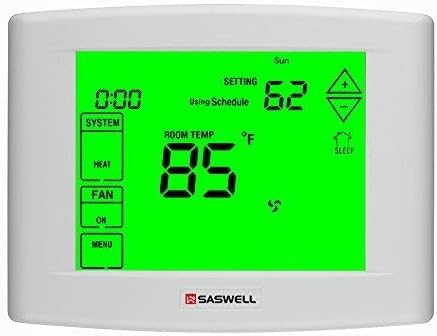
Figura 1: Faţă view of the SASWELL SAS6000UTK-7 Thermostat, showing the large green backlit LCD display with current temperature, setting, system mode, and fan status.
4. Instalare
4.1 Instrumente necesare:
- Șurubelniță (Phillips și cu cap plat)
- Găuriți (dacă sunt necesare găuri noi de montare)
- Wire strippers (if wires are not pre-stripped)
- Level (optional, for aesthetic mounting)
4.2 Pașii de instalare:
- Opriți alimentarea: Locate the circuit breaker or fuse box that controls your heating and cooling system and turn off the power. Verify the power is off by attempting to operate your old thermostat.
- Scoateți termostatul vechi: Carefully remove the cover of your old thermostat. Take a picture of the wiring connections before disconnecting any wires. Label each wire with the corresponding terminal letter (e.g., R, C, Y, G, W, O/B).
- Montarea bazei termostatului: Detach the front cover of the new SASWELL thermostat from its base. Position the new base on the wall, using existing holes if possible, or mark new holes. Drill pilot holes if necessary and secure the base to the wall using the provided screws.
- Conectează firele: Connect the labeled wires to the corresponding terminals on the new thermostat base. Refer to the wiring diagrams in Section 5 for specific configurations. Ensure the C-wire (common wire) is connected for optimal performance and backlight functionality.
- Instalați bateriile: Insert two fresh AA alkaline batteries into the battery compartment, observing polarity.
- Atașați termostatul la bază: Carefully align the thermostat body with the mounted base and snap it into place.
- Restabiliți puterea: Reconectați alimentarea la întrerupătorul de circuit sau la cutia de siguranțe.
5. Diagrame de cablare
The SASWELL SAS6000UTK-7 thermostat is compatible with various HVAC systems. Below are common wiring configurations. Always refer to your HVAC system's manual for specific wiring details. If you are unsure, consult a qualified HVAC technician.
Important Note for Heat Pump Systems: Some heat pump systems may require the O/B terminal to be wired differently than standard. If your air conditioning activates when heat is selected, or vice-versa, you may need to reverse the wiring on the O and B terminals. Consult your heat pump's manual or an HVAC professional for clarification.
Denumiri comune ale terminalelor:
- R (Rh/Rc): 24V AC Power (Heating/Cooling)
- C: 24V AC Common (Required for continuous power and backlight)
- Y/Y1: Compresor Stage 1 (răcire)
- Y2: Compresor Stage 2 (Cooling, for multi-stagsisteme e)
- G: Releu ventilator
- W/W1: Incalzestetage 1 (încălzire)
- W2: Incalzestetage 2 (Heating, for multi-stagsisteme e)
- O / B: Reversing Valve (Heat Pumps - O for Cool, B for Heat)
- Aux/E: Auxiliary/Emergency Heat (for heat pump systems)
Example Wiring (Heat Pump with Auxiliary Heat):
| Terminal pentru termostat | Funcția firului |
|---|---|
| R | Alimentare 24V AC |
| C | 24V AC Common |
| Y1 | Compresor (Răcire) |
| G | Ventilator |
| O/B | Reversing Valve (typically O for cooling, B for heating) |
| Aux / E | Încălzire auxiliară/de urgență |
Note: This table provides a general guide. Always match the wire labels from your old thermostat or your HVAC system's documentation to the new thermostat terminals.
6. Configurare și configurare inițială
After installation and restoring power, the thermostat will require initial configuration to match your specific HVAC system. Access the installer settings menu (refer to the on-screen prompts or a specific button combination, often holding a button for several seconds).
Common Settings to Adjust:
- Tip sistem: Select between Conventional (Furnace/AC) or Heat Pump.
- Tip ventilator: Electric or Gas.
- O/B Valve: Set for cooling (O) or heating (B) activation in heat pump mode.
- Scala de temperatură: Fahrenheit (°F) sau Celsius (°C).
- Cycle Rate (Differential): Adjust the temperature swing before the system activates. The default "Fast Start" (0.5°C) may cause frequent cycling. Consider "Slow Start" (1.5°C) for less frequent operation and potentially longer equipment life. This can be set separately for heating and cooling.
- Setări de iluminare de fundal: Choose between No Backlight, Touch Backlight (activates on touch), or Always On Backlight.
- Ora și data: Set the current time (12-hour or 24-hour format) and day of the week.
7. Instrucțiuni de utilizare
7.1 System Mode Selection:
Press the "SYSTEM" button to cycle through available modes:
- CĂLDURĂ: The system will heat to your set temperature.
- MISTO: The system will cool to your set temperature.
- OPRIT: The heating and cooling system is turned off. The fan can still be operated manually.
- MAȘINĂ: Termostatul comută automat între încălzire și răcire pentru a menține intervalul de temperatură setat.
- EMERGENCY HEAT (Heat Pump Systems): Activates auxiliary heat directly, bypassing the heat pump compressor. Use only when the heat pump is not functioning or during extreme cold.
7.2 Fan Mode Selection:
Press the "FAN" button to cycle through fan modes:
- MAȘINĂ: Ventilatorul funcționează numai atunci când sistemul de încălzire sau răcire este în funcțiune.
- PE: Ventilatorul funcționează continuu, indiferent de solicitările de încălzire sau răcire.
7.3 Adjusting Temperature:
Utilizați Up (▲) și Jos (▼) arrow buttons on the display to adjust the desired set temperature. The display will show the current room temperature and the set temperature.
7.4 Vacation Override:
This feature allows you to set a temporary energy-saving temperature while you are away. Consult the on-screen menu for specific steps to activate and deactivate vacation mode.
8. Programming (7-Day, 4-Period Schedule)
The SASWELL SAS6000UTK-7 allows for flexible 7-day programming with four distinct periods per day: Wake, Leave, Return, and Sleep. This enables you to customize temperature settings for different times of the day and days of the week to maximize comfort and energy efficiency.
Nota: Some users have reported that the unit needs to be in the "OFF" system mode to access and program the schedule. If you encounter difficulties, try switching the system mode to OFF before entering the programming menu.
Programming Steps (General):
- Intrați în modul program: Press the "MENU" button, then navigate to the "PROGRAM" or "SCHEDULE" option.
- Selectați ziua: Choose the day of the week you wish to program (e.g., Monday, All Weekdays, Weekend).
- Perioade stabilite: For each period (Wake, Leave, Return, Sleep), set the desired start time and temperature for both heating and cooling.
- Repeta: Repeat for all desired days and periods.
- Salvează și ieși: Follow the on-screen prompts to save your settings and exit the programming mode.
Detailed instructions for navigating the programming menu are available on the thermostat's display. Familiarize yourself with the menu structure for optimal use.
9. Întreținere
9.1 Înlocuirea bateriei:
When the low battery indicator appears on the display, replace the two AA alkaline batteries promptly. Even with a C-wire connection, batteries serve as a backup to retain settings during power outages. To replace:
- Turn off power to the HVAC system at the breaker.
- Scoateți termostatul de pe placa sa de perete.
- Remove the old batteries and insert new AA alkaline batteries, ensuring correct polarity.
- Reattach the thermostat to the wall plate and restore power.
9.2 Curățare:
Curățați exteriorul termostatului cu o lavetă moale șiamp Nu utilizați substanțe de curățare abrazive sau solvenți. Evitați pulverizarea lichidelor direct pe termostat.
10. Depanare
| Problemă | Cauza posibila | Soluţie |
|---|---|---|
| Termostatul nu are alimentare/afișaj gol. | Dead batteries, no C-wire power, tripped circuit breaker. | Replace batteries. Ensure C-wire is connected and receiving 24V AC. Check circuit breaker for HVAC system. |
| Sistemul de încălzire/răcire nu răspunde. | Incorrect wiring, system mode set to OFF, power off at breaker, system lockout. | Verify wiring connections (refer to Section 5). Ensure system mode is set to HEAT or COOL. Check circuit breaker. Wait 5 minutes for system lockout to reset. |
| Air conditioning runs when heat is selected (or vice-versa) on a heat pump. | O/B wire reversed or incorrect O/B setting in installer menu. | Consult your heat pump's manual to confirm if the reversing valve (O/B wire) should be energized for heating or cooling. Adjust wiring or the O/B setting in the thermostat's installer menu accordingly. |
| Thermostat cycles too frequently. | Cycle rate (differential) set too low. | Access installer settings (Section 6) and increase the cycle rate (e.g., change from "Fast Start" to "Slow Start"). |
| Difficulty programming schedule. | Thermostat not in correct mode for programming. | Try setting the system mode to "OFF" before entering the programming menu. |
| Citirea temperaturii pare inexactă. | Amplasarea termostatului, curenți de aer sau lumina directă a soarelui. | Ensure the thermostat is not exposed to direct sunlight, drafts, or heat sources. Recalibration may be available in advanced settings (consult manufacturer if needed). |
11. Specificații
| Caracteristică | Caietul de sarcini |
|---|---|
| Marca | SASWELL |
| Numele modelului | SAS6000UTK-7 |
| Tip controler | Touch screen |
| Caracteristici speciale | Low Battery Indicator, Programmable, Temperature Control |
| Culoare | Alb |
| Utilizări specifice | Sisteme cu pompe de caldura |
| Tip de control al temperaturii | Both Cooling and Heating |
| Componente incluse | C-wire (for power) |
| Sursa de alimentare | Battery Powered (2 AA batteries) or System Power (24V AC C-wire) |
| Voltage | 24 volți |
| Formă | Pătrat |
| Tip de afișare | Digital |
| Tip control | Atingere |
| Metoda de control | Atingere |
| Iluminare de fundal | Da |
| Dimensiunile produsului | 5.9 x 4.5 x 1.2 inci |
| Greutatea articolului | 12.6 uncii |
12. Garanție și asistență
Specific warranty information for the SASWELL SAS6000UTK-7 Thermostat is typically provided with the product packaging or can be obtained by contacting SASWELL customer support directly. For technical assistance, troubleshooting, or warranty claims, please refer to the contact information provided by SASWELL or visit their official website-ul.
Producător: Saswell
Pentru asistență suplimentară, vă rugăm să vizitați SASWELL Store on Amazon sau oficialul lor website-ul.