
Alarm.com ADC-V723x
Alarm.com ADC-V723 Outdoor Wi-Fi Camera User Manual
Model: ADC-V723x
1. Produs terminatview
The Alarm.com ADC-V723 is a high-definition 1080p outdoor Wi-Fi camera designed to provide reliable surveillance for your property. Featuring High Dynamic Range (HDR) and powerful Video Analytics, it can detect and alert you to people, vehicles, and animals. Its robust design ensures performance in various lighting conditions and environments. This manual provides comprehensive instructions for installation, operation, and maintenance.
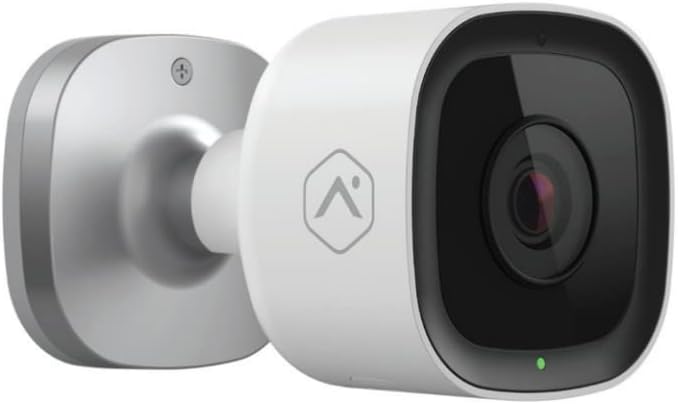
Imagine: față view of the Alarm.com ADC-V723 Outdoor Wi-Fi Camera, showing its compact, bullet-style design and lens.
2. Informații de siguranță
- Ensure the camera is installed in a location that complies with local building codes and regulations.
- Folosiți doar adaptorul de alimentare furnizat împreună cu camera.
- Nu expuneți camera la temperaturi extreme în afara intervalului său de funcționare.
- Avoid placing the camera near sources of strong electromagnetic interference.
- Deconectați alimentarea cu energie electrică înainte de curățare sau efectuarea oricărei operațiuni de întreținere.
3. Conținutul pachetului
Verificați dacă toate articolele sunt prezente în colet:
- Alarm.com ADC-V723 Outdoor Wi-Fi Camera
- Placa de montare
- Șuruburi de montare și ancore de perete
- Adaptor de alimentare
- Ghid de instalare (acest document)
4. Configurare și instalare
4.1 Alegerea unei locații
Selectați o locație în aer liber care oferă calitatea dorită viewing angle and is within range of your Wi-Fi network. The camera is designed for outdoor use and is IP67 rated for weather resistance. Consider areas with good lighting or where the camera's night vision capabilities can be maximized.
4.2 Montarea camerei
- Secure the mounting plate to the desired surface using the provided screws and wall anchors. Ensure the plate is level.
- Attach the camera to the mounting plate by aligning the camera with the plate and twisting until it locks securely.
- Adjust the camera's angle to achieve the optimal field of view.
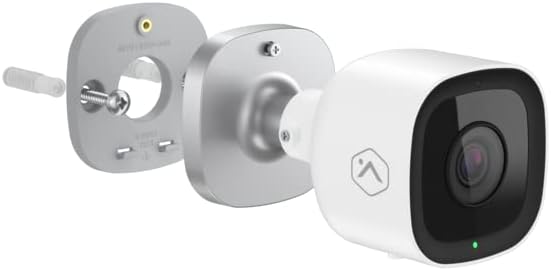
Imagine: Explodată view showing the Alarm.com ADC-V723 camera, its mounting plate, and a screw with wall anchor, illustrating the assembly process.
4.3 Powering On and Connecting to Wi-Fi
- Connect the power adapter to the camera and plug it into a suitable outdoor power outlet.
- Wait for the camera's LED indicator to show a specific status (refer to the LED status guide in Section 5.2).
- Download the Alarm.com mobile application from your device's app store.
- Follow the in-app instructions to add the ADC-V723 camera to your Alarm.com system and connect it to your Wi-Fi network. This typically involves scanning a QR code on the camera or entering its MAC address.
5. Operarea camerei
5.1 În direct View și Înregistrare
Access live video feeds and recorded clips through the Alarm.com mobile app or web portal. You can view foo în timp realtage, initiate manual recordings, and review event-triggered clips.
5.2 indicatoare LED de stare
The camera features an LED indicator that communicates its current status:
- Verde continuu: Connected to Wi-Fi and operating normally.
- Verde intermitent: Attempting to connect to Wi-Fi.
- Roșu continuu: Not connected to Wi-Fi or an error has occurred.
- Roșu intermitent: Firmware update in progress or factory reset.
5.3 Video Analytics and Alerts
The ADC-V723 supports advanced Video Analytics. Configure detection zones and rules within the Alarm.com app to receive specific alerts for people, vehicles, or animals entering designated areas. Alerts can be customized to send notifications to your mobile device.
5.4 Night Vision and HDR
The camera is equipped with infrared night vision, allowing clear video capture up to 40 feet in low-light conditions. High Dynamic Range (HDR) technology enhances video quality by balancing bright and dark areas, providing clearer images in challenging lighting environments.
6. Întreținere
- Curățați regulat obiectivul camerei cu o lavetă moale,amp o lavetă pentru a asigura o calitate clară a imaginii. Nu utilizați substanțe chimice dure.
- Periodically check the mounting hardware to ensure the camera remains securely fastened.
- Ensure the power cable is free from damage and properly secured.
- Keep the camera's firmware updated through the Alarm.com app to ensure optimal performance and access to new features.
7. Depanare
| Problemă | Cauza posibila | Soluţie |
|---|---|---|
| Camera nu pornește | Fără curent, adaptor defect, conexiune slăbită. | Check power outlet, ensure connections are secure, try a different outlet. |
| Nu se poate conecta la Wi-Fi | Incorrect Wi-Fi password, camera too far from router, network interference. | Verify Wi-Fi password, move camera closer to router, reduce interference, restart router. |
| Calitate video slabă | Obiectiv murdar, lățime de bandă redusă, iluminare slabă. | Clean lens, check internet speed, ensure adequate lighting or rely on night vision. |
| Fără alerte de mișcare | Incorrect Video Analytics settings, notifications disabled. | Review and adjust Video Analytics rules in the app, enable notifications for the camera. |
8. Specificații
| Caracteristică | Detaliu |
|---|---|
| Numărul de model | ADC-V723x |
| Rezoluție captură video | 1080p (1920x1080) |
| Conectivitate | Wifi |
| Sursa de alimentare | Electric cu fir |
| Utilizare în interior/exterior | În aer liber |
| Viewunghiul ing | 167 de grade |
| Gama de vedere nocturnă | 40 picioare |
| Material | Metal |
| Dimensiuni (L x l x H) | 2.5 x 2.5 x 4.5 inci |
| Greutatea articolului | 1.32 lire sterline |
| Evaluarea internațională de protecție | IP67 |
| Caracteristica specială | Motion Sensor, HDR |
9. Garanție și asistență
For warranty information and technical support, please contact your Alarm.com service provider or visit the official Alarm.com website. Nu încercați să reparați singur dispozitivul, deoarece acest lucru poate anula garanția.
For additional resources and FAQs, please refer to the Alarm.com support portal.
Ask a question about this manual
Ask about setup, troubleshooting, compatibility, parts, safety, or missing instructions. Manuals+ will review the question and use this page’s manual context to help answer it.