
Comix CS-3302
Comix CS-3302 12-Digit Desktop Calculator User Manual
Model: CS-3302 (P/N: 11821063)
Brand: Comix
1. Introducere
This user manual provides comprehensive instructions for the Comix CS-3302 12-Digit Desktop Calculator. Please read this manual thoroughly before using the calculator to ensure proper operation and to maximize its lifespan. This calculator is designed for general office and school use, featuring a large LCD display, dual power source, and various calculation functions.
2. Informații de siguranță
- Do not expose the calculator to extreme temperatures, direct sunlight, or high humidity.
- Evitați să scăpați calculatorul sau să îl supuneți la impacturi puternice.
- Do not attempt to disassemble or modify the calculator. This will void the warranty.
- Use a soft, dry cloth for cleaning. Do not use liquid cleaners or abrasive materials.
- A nu se lăsa la îndemâna copiilor mici.
3. Produs terminatview

Figura 3.1: Faţă view of the Comix CS-3302 Desktop Calculator, showing the large LCD display and full keypad.
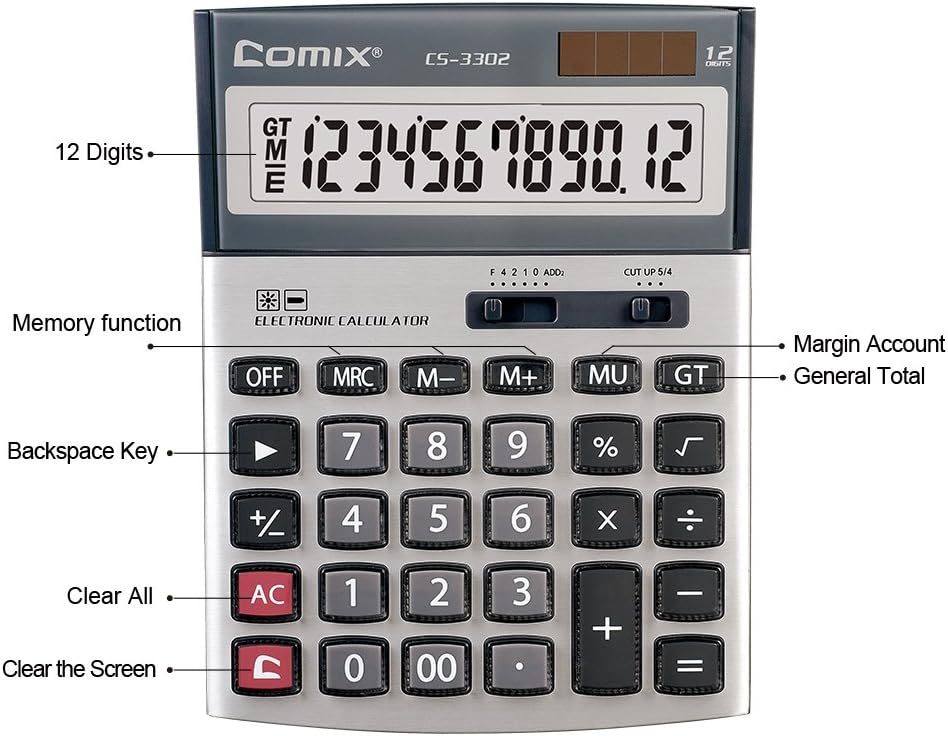
Figura 3.2: Key functions and display features of the Comix CS-3302 Calculator, including 12 digits display, memory functions, and clear keys.

Figura 3.3: Dimensions of the Comix CS-3302 Calculator, showing its compact and ergonomic design.

Figura 3.4: Înclinat view of the Comix CS-3302 Calculator, highlighting its sleek profile și dispunerea tastelor.

Figura 3.5: Side profile of the Comix CS-3302 Calculator, showing its slim design.

Figura 3.6: Retail packaging of the Comix CS-3302 Calculator, highlighting key features like 12 digits, dual power, and acrylic keys.
4. Configurare
Sursa de alimentare 4.1
The Comix CS-3302 calculator operates on a dual power system: solar and battery. The solar panel provides power in well-lit environments, while a single AA battery (not included) serves as an auxiliary power source for low-light conditions or when solar power is insufficient.
- Instalare baterie: Locate the battery compartment on the back of the calculator. Open the cover and insert one AA battery, ensuring correct polarity (+/-). Close the battery compartment cover securely.
- Pornire inițială: The calculator should power on automatically when sufficient light is available or with the battery installed. If not, press the ON/AC buton.
5. Instrucțiuni de utilizare
5.1 Operații de bază
- Adăugare (+): Introduceți primul număr, apăsați +, introduceți al doilea număr, apoi apăsați =.
- Scădere (-): Introduceți primul număr, apăsați -, introduceți al doilea număr, apoi apăsați =.
- Înmulțire (×): Introduceți primul număr, apăsați ×, introduceți al doilea număr, apoi apăsați =.
- Împărțire (÷): Introduceți primul număr, apăsați ÷, introduceți al doilea număr, apoi apăsați =.
- Procenttage (%): Introduceți numărul, apăsați × (sau ÷), enter the percentage value, then press %. De exampadică, pentru a calcula 10% din 200, introduceți 200 × 10 %.
- Rădăcină pătrată (√): Introduceți numărul, apoi apăsați √.
5.2 Funcții speciale
- OPRIT: Powers off the calculator.
- AC (toate clare): Clears all entries and memory, resetting the calculator to its initial state.
- C (Ștergere intrare): Clears the last entered number or the current display value without affecting previous calculations or memory.
- Backspace (►): Șterge ultima cifră introdusă.
- M+ (Memorie Plus): Adaugă valoarea afișată în memorie.
- M- (Minusul memoriei): Scade valoarea afișată din memorie.
- MRC (Rechemare/Ștergere memorie): Apăsați o dată pentru a reapela valoarea din memorie. Apăsați de două ori pentru a șterge memoria.
- MU (Mark Up / Margin Account): Used for profit margin calculations. Enter cost, press MU, enter selling price, then press = to get the profit margin.
- GT (total mare): Accumulates the results of all calculations. Pressing GT displays the grand total.
- +/- (schimbarea semnului): Changes the sign of the displayed number (positive to negative, or negative to positive).
5.3 Decimal and Rounding Settings
The calculator features two slide switches at the top for controlling decimal places and rounding:
- Decimal Selector (F 4 2 1 0 ADD2):
- F (Floating Decimal): Afișează toate zecimalele disponibile.
- 4, 2, 1, 0: Sets the number of decimal places to 4, 2, 1, or 0 respectively.
- ADD2 (Mod Adăugare): Automatically adds two decimal places to all results, useful for currency calculations.
- Rounding Selector (CUT UP 5/4):
- CUT (Cut Off): Truncates the number, discarding all digits beyond the set decimal places.
- UP (Round Up): Rounds up the last digit if there are any non-zero digits beyond the set decimal places.
- 5/4 (Round Half Up): Rounds up if the first discarded digit is 5 or greater, otherwise rounds down.
6. Întreținere
- curatenie: Wipe the calculator surface with a soft, dry cloth. For stubborn dirt, slightly dampen the cloth with water, but ensure no liquid enters the calculator. Do not use chemical cleaners.
- Depozitare: Când nu îl utilizați pentru perioade lungi de timp, depozitați calculatorul într-un loc răcoros și uscat, ferit de lumina directă a soarelui și de temperaturi extreme.
- Înlocuire baterie: If the display becomes dim or unresponsive in low light, replace the AA battery. Ensure the calculator is off before replacing the battery.
7. Depanare
| Problemă | Cauza posibila | Soluţie |
|---|---|---|
| Afișajul este gol sau întunecat. | Lumină insuficientă pentru energia solară sau baterie descărcată. | Move to a brighter area or replace the AA battery. |
| Rezultate incorecte ale calculelor. | Incorrect input, incorrect decimal/rounding settings, or memory interference. | Presa AC to clear all and restart. Check decimal and rounding switch positions. Ensure correct key presses. |
| Tastele nu răspund. | Calculator frozen or physical damage. | Încercați să apăsați OFF apoi ON/AC. If problem persists, remove and reinsert battery. If still unresponsive, contact support. |
8. Specificații
| Marca | Comix |
| Numărul de model | CS-3302 (P/N: 11821063) |
| Afişa | LCD cu 12 cifre |
| Sursa de alimentare | Dual Power (Solar & 1x AA Battery - not included) |
| Material | Acrylic, Metal |
| Dimensiuni (L x l x H) | Aproximativ 23.6 x 15.7 x 4.3 cm (9.3 x 6.2 x 1.7 inchi) |
| Greutate | Aproximativ 322 g (0.71 lbs) |
| Temperatura de operare | -25 ℃ până la +60 ℃ (-13 ℉ până la +140 ℉) |
| UPC | 842064102524 |
9. Garanție și asistență
Comix products are designed for quality and durability. This product comes with a 3 an garanție de la data achiziției, acoperind defectele de materiale și de fabricație în condiții normale de utilizare.
For warranty claims, technical support, or any inquiries regarding your Comix CS-3302 calculator, please contact Comix customer service through their official website or the retailer where the product was purchased. Please have your proof of purchase and the product model number ready when contacting support.
For more information, visit the official Comix website: www.comix.com
Ask a question about this manual
Ask about setup, troubleshooting, compatibility, parts, safety, or missing instructions. Manuals+ will review the question and use this page’s manual context to help answer it.