
ALIGATOR A321
Aligator A321 Mobile Phone for Seniors User Manual
Model: A321 | Brand: ALIGATOR
1. Introducere
This manual provides comprehensive instructions for the safe and efficient use of your Aligator A321 mobile phone. Designed with seniors in mind, the A321 features large buttons, a clear display, and an essential SOS function for emergencies. Please read this manual thoroughly before operating your device.
2. Conținutul pachetului
Vă rugăm să bifați căsuța pentru următoarele elemente:
- Aligator A321 Mobile Phone
- Baterie
- Adaptor de încărcare
- Cablu de încărcare USB
- Manual de utilizare (acest document)
Dacă lipsesc sau sunt deteriorate articolele, vă rugăm să contactați distribuitorul.
3. Sunați la telefonview
Familiarize yourself with the key components of your Aligator A321 phone.

Image 1: Aligator A321 Front View. This image displays the front of the Aligator A321 mobile phone, showing the screen, large numeric keypad, call and end call buttons, and navigation keys. The brand "ALIGATOR" is visible below the screen.
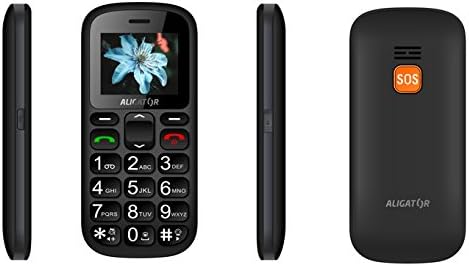
Image 2: Aligator A321 Side and Back View. This image shows multiple views of the Aligator A321. From left to right: left side profile, față view, right side profile, and the back of the phone. The back view prominently features the orange SOS button and the "ALIGATOR" logo.
Componente cheie:
- Ecran de afișare: Ecran color de 1.8 inci pentru viewing menus, contacts, and messages.
- Tastatură numerică: Large, easy-to-press buttons for dialing numbers and typing messages.
- Call/End Call Buttons: Green button to initiate calls, red button to end calls or return to the home screen.
- Taste de navigare: Butonul Sus, Jos, Stânga, Dreapta și OK/Confirmare pentru navigarea în meniu.
- Butonul SOS: Located on the back of the phone, used for emergency calls and SMS (see Section 5.4).
- Lanternă: Lumină integrată pentru confort.
- Port de încărcare: Located at the bottom for connecting the charging cable.
4. Configurare
4.1. Introducerea cartelei (cartelelor) SIM și a bateriei
- Scoateți cu grijă capacul din spate al telefonului.
- If the battery is already inserted, remove it by gently lifting it from the notch.
- Locate the SIM card slot(s). The Aligator A321 supports Dual SIM. Insert your SIM card(s) into the designated slot(s) with the gold contacts facing down, ensuring it clicks into place.
- Introduceți bateria, aliniind contactele aurii de pe baterie cu cele din telefon.
- Replace the back cover, pressing firmly until it snaps securely.
4.2. Introducerea unui card MicroSD (opțional)
The phone supports MicroSD cards for additional storage (e.g., for photos or music).
- Remove the back cover and battery as described above.
- Localizați slotul pentru cardul MicroSD.
- Insert the MicroSD card with the gold contacts facing down until it is securely in place.
- Înlocuiți bateria și capacul din spate.
4.3. Încărcarea bateriei
Înainte de prima utilizare, încărcați complet bateria telefonului.
- Connect the USB charging cable to the charging adapter.
- Conectați adaptorul de încărcare la o priză standard de perete.
- Connect the other end of the USB cable to the charging port at the bottom of your phone.
- Indicatorul bateriei de pe ecran va afișa starea de încărcare. Deconectați încărcătorul odată ce bateria este încărcată.
4.4. Pornire/Oprire
- Pentru a porni: Țineți apăsat butonul butonul de apelare (green button) until the screen lights up.
- Pentru a opri: Țineți apăsat butonul Butonul Terminare apel (red button) until the power-off options appear, then confirm.
5. Instrucțiuni de utilizare
5.1. Efectuarea și primirea apelurilor
- Pentru a efectua un apel: Enter the phone number using the numeric keypad and press the butonul de apelare.
- Pentru a răspunde la un apel: Când sună telefonul, apăsați butonul butonul de apelare.
- Pentru a încheia un apel: Apăsați tasta Butonul Terminare apel.
5.2. Trimiterea și primirea de mesaje SMS
- Pentru a trimite un SMS: Navigate to the "Messages" menu, select "New Message," enter the recipient's number and your message, then send.
- Pentru a citi un SMS: New messages will typically display a notification. Navigate to the "Messages" menu to view căsuța dvs. de e-mail.
5.3. Managing Contacts (Phonebook)
Agenda telefonică poate stoca până la 500 de intrări.
- Pentru a adăuga un contact: Go to "Contacts" or "Phonebook," select "Add New," enter the name and phone number, then save.
- Pentru a apela un contact: Go to "Contacts," select the desired contact, and press the butonul de apelare.
5.4. Funcția de urgență SOS
The SOS button is a critical safety feature. It allows you to quickly contact pre-set emergency numbers and send an SOS message with your location.
- Configurarea numerelor SOS: Access the "SOS Settings" menu. You can typically add up to 5 emergency contact numbers. These numbers will be called sequentially until one answers.
- Activarea SOS: În caz de urgență, apăsați și mențineți apăsat butonul Butonul SOS pe spatele telefonului timp de câteva secunde.
- SOS Action: The phone will automatically:
- Send an emergency SMS message to all pre-set SOS numbers.
- Initiate calls to the pre-set SOS numbers in a loop until one is answered.
- Activate the SOS Locator function (see Section 5.5).
5.5. SOS Locator
The SOS Locator feature sends your phone's approximate location via SMS to your emergency contacts when the SOS button is activated. This allows the recipient to view your location on a map (if their device supports it).
- This function is automatically triggered when the SOS button is pressed.
- Ensure your phone has network coverage for the SMS to be sent successfully.
5.6. Alte caracteristici
- Lanternă: Often activated by a dedicated side button or through the menu.
- Radio FM: Requires headphones (not included) to be plugged in as an antenna. Access via the "Multimedia" or "Tools" menu.
- Ceas cu alarmă: Set multiple alarms through the "Tools" or "Settings" menu.
- Calculator: Basic arithmetic functions available in the "Tools" menu.
6. Întreținere și îngrijire
- curatenie: Folosește o lavetă moale și uscată pentru a curăța suprafața telefonului. Evită detergenții lichizi.
- Îngrijirea bateriei:
- Nu expuneți bateria la temperaturi extreme.
- Evitați descărcarea completă frecventă a bateriei.
- If the phone will not be used for an extended period, charge it partially before storing.
- Rezistenta la apa: This phone is not waterproof. Keep it away from water and moisture.
- Impact: Evitați să scăpați telefonul sau să îl supuneți la impacturi puternice.
7. Depanare
| Problemă | Cauza posibila | Soluţie |
|---|---|---|
| Telefonul nu pornește. | Bateria este descărcată sau nu este introdusă corect. | Încărcați bateria. Asigurați-vă că bateria este introdusă corect. |
| Nu pot efectua sau primi apeluri. | Fără semnal de rețea, cartela SIM nu este introdusă sau problemă cu cartela SIM. | Verificați puterea semnalului rețelei. Reintroduceți cartela SIM. Contactați furnizorul de servicii. |
| Funcția SOS nu funcționează. | SOS numbers not set, no network, or button not pressed long enough. | Ensure SOS numbers are configured. Check network coverage. Press and hold the SOS button for several seconds. |
| Bateria se descarcă rapid. | Heavy usage, old battery, or background processes. | Reduce usage. Consider replacing the battery if it's old. Close unused applications. |
8. Specificații
| Caracteristică | Detaliu |
|---|---|
| Marca | ALIGATOR |
| Numele modelului | A321 |
| Culoare | Negru |
| Tip de produs | Mobile Phone (Feature Phone) |
| Sistem de operare | KaiOS |
| Dimensiunea ecranului | 1.8 inchi |
| Tehnologia celulară | 2G (GSM) |
| Tehnologia de conectivitate | 2G (GSM) |
| Number of SIM Slots | SIM dual |
| Capacitate agenda telefonică | 500 de intrări |
| Timp de vorbire | Până la 4 ore |
| Timp de așteptare | Până la 240 ore |
| Caracteristici speciale | SOS Button, SOS Locator, Large Keys, Flashlight, FM Radio, Alarm Clock, Calculator, Micro SD Card Support |
| Dispozitive compatibile | A321 |
9. Garanție și asistență
Your Aligator A321 mobile phone comes with a standard manufacturer's warranty. Please refer to the warranty card included in your package for specific terms and conditions, including the warranty period and coverage details.
Asistență clienți:
For technical assistance, troubleshooting beyond this manual, or warranty claims, please contact your retailer or the official ALIGATOR customer support. Contact information can usually be found on the manufacturer's website-ul sau pe ambalaj.
When contacting support, please have your product model (A321) and purchase details ready.
Ask a question about this manual
Ask about setup, troubleshooting, compatibility, parts, safety, or missing instructions. Manuals+ will review the question and use this page’s manual context to help answer it.