
BLACK+DECKER WD7201G
BLACK+DECKER 7.2V Cordless Li-Ion Wet & Dry Cyclonic Dustbuster Hand Vacuum WD7201G Instruction Manual
Model: WD7201G
Introducere
This manual provides essential information for the safe and efficient operation, maintenance, and care of your BLACK+DECKER 7.2V Cordless Li-Ion Wet & Dry Cyclonic Dustbuster Hand Vacuum, model WD7201G. Please read these instructions thoroughly before using the appliance and retain them for future reference.
Informații de siguranță
Always observe basic safety precautions when using electrical appliances to reduce the risk of fire, electric shock, and personal injury. This appliance is intended for household use only. Do not use it for industrial or commercial purposes. Keep the appliance out of reach of children.
- Asigurați-vă că adaptorul de încărcare este compatibil cu sursa locală de alimentare.
- Nu scufundați aparatul în apă sau alte lichide.
- Nu preluați lichide inflamabile sau combustibile, cum ar fi benzina, și nu utilizați în zone în care acestea pot fi prezente.
- Nu ridicați nimic care arde sau care fumează, cum ar fi țigări, chibrituri sau cenușă fierbinte.
- Nu utilizați fără filtrul la loc.
- Dacă cablul de alimentare este deteriorat, acesta trebuie înlocuit de producător, de agentul său de service sau de persoane calificate similar pentru a evita un pericol.
Conținutul pachetului
Verificați dacă toate componentele sunt prezente și în stare bună:
- BLACK+DECKER 7.2V Cordless Li-Ion Wet & Dry Cyclonic Dustbuster Hand Vacuum
- Charging wall/stand mount
- Filtru lavabil
- Accessory Kit (specific accessories may vary)
- Manual de instructiuni
Înființat
Încărcarea aparatului
Before first use, fully charge the vacuum for approximately 10-16 hours. Subsequent charges will typically take less time. The appliance is powered by a Lithium-ion battery.
- Connect the charging adapter to the charging wall/stand mount.
- Conectați adaptorul la o priză electrică standard.
- Place the hand vacuum onto the charging mount. Ensure the charging indicator light illuminates, confirming proper connection.
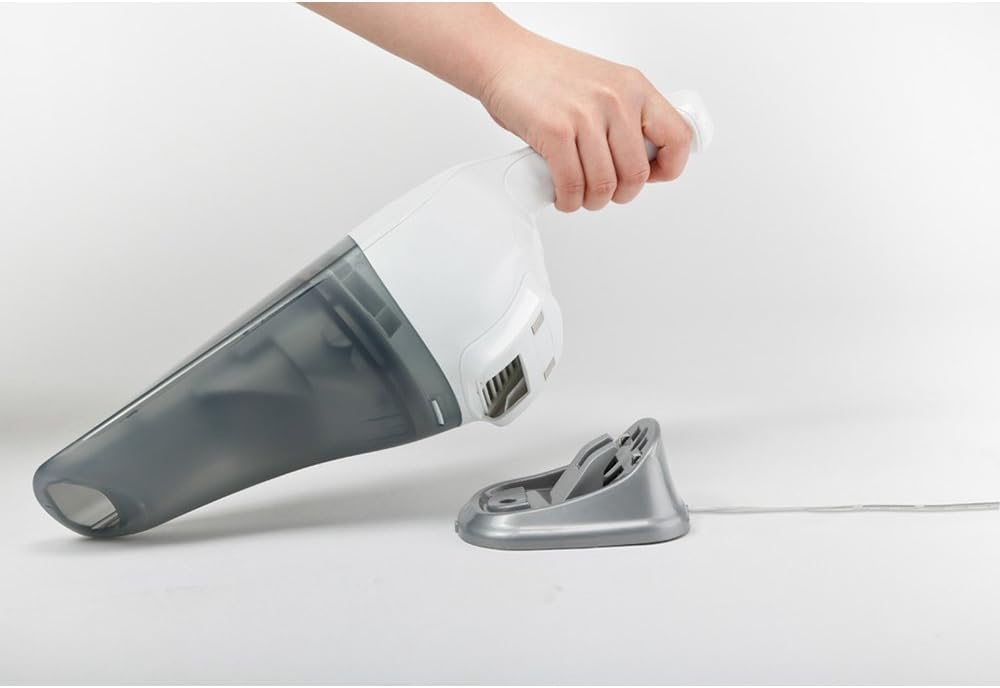
Figura 1: The hand vacuum placed on its charging stand, connected to power. The charging stand allows for convenient storage and ensures the vacuum is always ready for use.
Instrucțiuni de operare
Utilizare generală
To turn the vacuum on, slide the power switch to the 'ON' position. To turn it off, slide the switch to the 'OFF' position. The vacuum is designed for both wet and dry cleaning tasks.
Curățătorie chimică
For dry debris such as crumbs, dust, or pet hair, ensure the wet pick-up nozzle is removed (if attached) and the filter is clean and dry. Position the nozzle over the debris and activate the vacuum. Move the vacuum slowly over the area to ensure thorough cleaning.

Figura 2: The hand vacuum effectively picking up dry crumbs from a kitchen counter. Its compact design allows for easy maneuverability for quick clean-ups.
Curățare umedă
For liquid spills, attach the wet pick-up nozzle (if included in your accessory kit). Ensure the dust container is empty before picking up liquids. Do not exceed the maximum liquid fill line indicated on the dust container. After picking up liquids, always empty and clean the dust container and filter immediately to prevent odors and maintain performance.

Figura 3: The hand vacuum demonstrating its wet cleaning capability by suctioning a liquid spill from a table surface. This feature makes it versatile for various household accidents.
Întreţinere
Golirea recipientului de praf
For optimal suction performance, empty the dust container after each use or when the debris reaches the 'MAX' fill line. To empty:
- Asigurați-vă că aspiratorul este oprit.
- Apăsați butonul de eliberare pentru a detașa recipientul de praf de corpul principal.
- Carefully remove the filter assembly.
- Goliți conținutul recipientului de praf într-un coș de gunoi.
- Reassemble the filter and dust container, ensuring they click securely into place.
Curățarea filtrului
The washable filter should be cleaned regularly to maintain suction power. For best results, clean the filter after every 5-10 uses, or more frequently if vacuuming fine dust.
- Remove the dust container and filter as described above.
- Tap the filter gently over a waste bin to dislodge loose dirt.
- Rinse the filter under running water until the water runs clear. Do not use hot water or detergents.
- Allow the filter to air dry completely for at least 24 hours before reinserting it into the vacuum. Using a wet filter can damage the motor.
Depanare
| Problemă | Cauza posibila | Soluţie |
|---|---|---|
| Aspiratorul nu pornește. | Bateria este descărcată. | Charge the battery for the recommended time. |
| Putere de aspirare redusă. | Recipientul de praf este plin. Filtrul este înfundat. Duza este blocată. | Empty the dust container. Clean or replace the filter. Clear any blockages from the nozzle. |
| Water leaks from the vacuum during wet pick-up. | Dust container is overfilled. Wet pick-up nozzle not properly attached. | Do not exceed the maximum liquid fill line. Ensure the wet pick-up nozzle is securely attached. |
Specificații
| Caracteristică | Detaliu |
|---|---|
| Marca | BLACK+DECKER |
| Numele modelului | WD7201G-B1 |
| Voltage | 7.2 volți |
| Sursa de alimentare | Alimentat cu baterie |
| Caracteristici speciale | Curățare umedă și uscată |
| Tip filtru | Cartuş |
| Recomandare de suprafață | Upholstery, Car Interiors |
| Greutatea articolului | 0.72 kilograme |
| Wattage | 100 wați |
| Componente incluse | Set de accesorii |
| Factor de formă | De mână |
| Utilizare în interior/exterior | De interior |
Garanție și suport
This BLACK+DECKER appliance comes with a Garanție de 1 an pentru producătorul local (Singapore). For warranty claims, technical support, or service inquiries, please contact your local BLACK+DECKER service center or the retailer from whom the product was purchased. Keep your proof of purchase for warranty validation.
Ask a question about this manual
Ask about setup, troubleshooting, compatibility, parts, safety, or missing instructions. Manuals+ will review the question and use this page’s manual context to help answer it.