
1. Introducere
The Duronic DMUSB5X1 is a desk-mounted monitor arm designed to optimize your workspace. It features a gas spring mechanism for smooth, effortless adjustments, allowing you to position your monitor for optimal viewing comfort. This model also integrates a USB hub and audio ports for convenient connectivity directly at your desk.
This manual provides detailed instructions for the safe and efficient installation, operation, and maintenance of your Duronic DMUSB5X1 monitor arm.
2. Instrucțiuni de siguranță
- Citiți cu atenție toate instrucțiunile înainte de asamblare și utilizare.
- Ensure your desk surface is strong enough to support the monitor arm and attached monitor(s).
- Do not exceed the maximum weight capacity of 8 kg (17.6 lbs) per arm.
- Ensure all screws and connections are securely tightened before use. Periodically check for tightness.
- Țineți copiii și animalele de companie departe de zona de asamblare.
- Use only the provided hardware. If any parts are missing or damaged, contact Duronic customer support.
- Adjust the gas spring tension carefully to match your monitor's weight. Improper tension can cause the monitor to drop or spring up unexpectedly.
3. Conținutul pachetului
Vă rugăm să verificați dacă toate componentele sunt prezente înainte de a începe asamblarea:
- Monitor Arm Assembly (Gas Spring Arm, Pole)
- Birou Clamp Baza
- Placă de montare VESA
- USB and Audio Extension Cables
- Elemente de montare (diverse șuruburi, șaibe, distanțiere)
- Allen Keys for assembly and adjustment
4. Configurare și instalare
Follow these steps to install your Duronic DMUSB5X1 monitor arm:
- Atașați suportul de birouamp: Poziționați biroul clamp base on your desk edge. Ensure the desk clamp is securely fastened to a stable surface. The clamp can accommodate desk thicknesses up to 68mm. Tighten the clamp înșurubați ferm.

Figura 4.1: Clangă de birouamp instalare.
- Assemble Arm to Pole: Insert the monitor arm onto the pole of the desk clamp. Secure it with the provided screws and Allen key.
- Atașați placa VESA la monitor: Carefully place your monitor face down on a soft, clean surface. Attach the VESA mounting plate to the back of your monitor using the appropriate screws and spacers (if needed). The arm supports VESA 75x75mm and 100x100mm patterns.
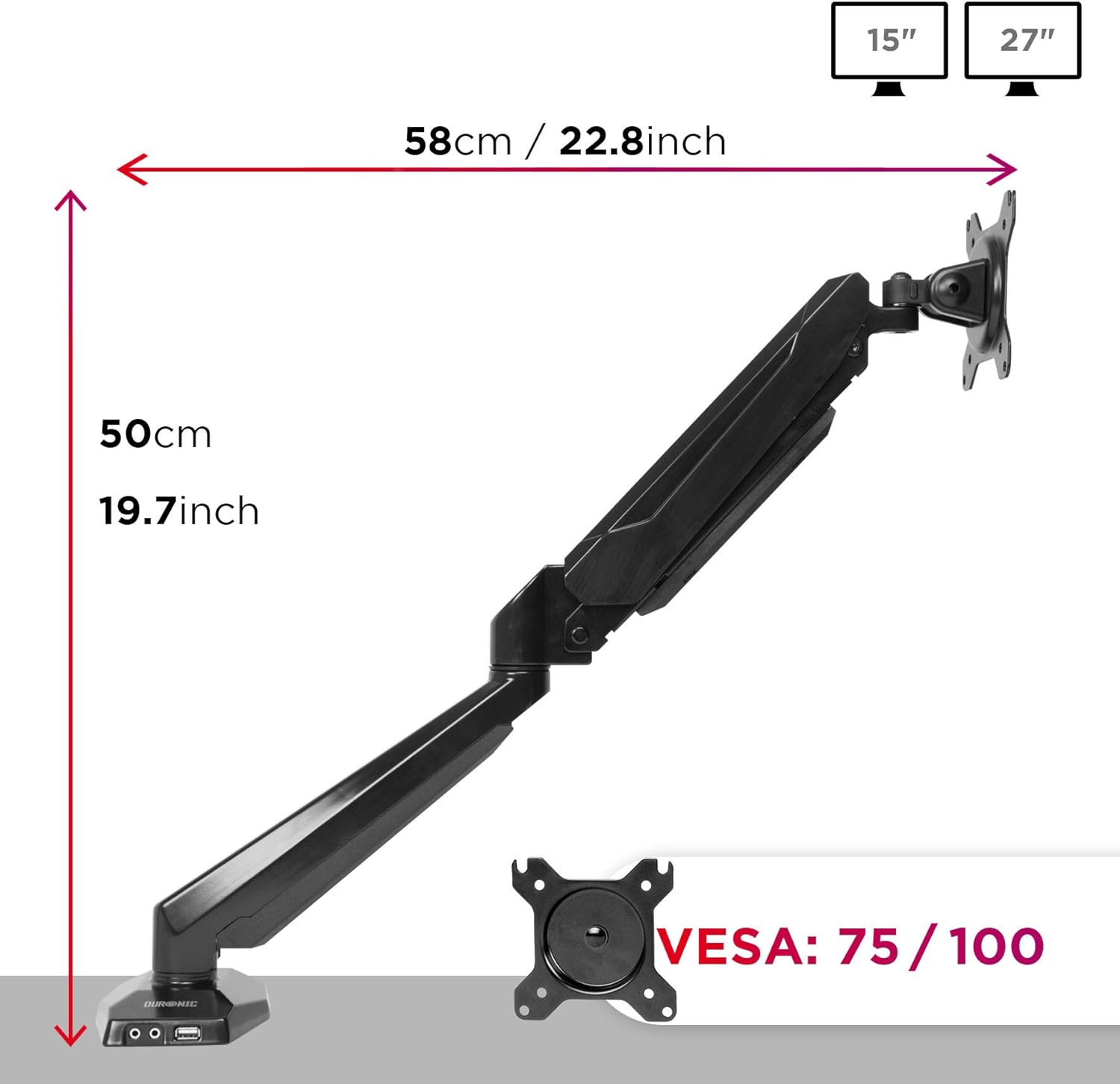
Figure 4.2: VESA plate and arm dimensions.
- Montarea monitorului pe braț: Slide the monitor (with VESA plate attached) onto the arm's VESA head. Secure it with the locking mechanism or screws as per the specific design.
- Connect USB and Audio Cables: Connect the integrated USB and audio extension cables from the monitor arm base to the corresponding ports on your computer. This enables the convenient USB and audio ports on the arm's base.

Figure 4.3: Integrated USB and audio ports.
- Reglarea tensiunii arcului cu gaz: The gas spring comes pre-tensioned. You may need to adjust it to match your monitor's weight. Use the provided Allen key to turn the adjustment screw on the arm. Turn clockwise to increase tension for heavier monitors, and counter-clockwise to decrease tension for lighter monitors. Adjust until the monitor stays in position when moved.
5. Operare și reglaje
The Duronic DMUSB5X1 offers a wide range of adjustments for optimal viewing:
- Reglarea înălțimii: The gas spring arm allows for smooth vertical movement. Gently push or pull the monitor to the desired height.
- Înclinare: The VESA head allows tilting the monitor -90° (downwards) to +85° (upwards) to reduce glare and improve viewunghiuri de ing.
- pivotare: The arm can swivel 180° left or right at the pole and at the arm joints, allowing you to share your screen or adjust its position.
- Rotaţie: The VESA plate allows for 360° rotation, enabling you to switch between landscape and portrait orientations.
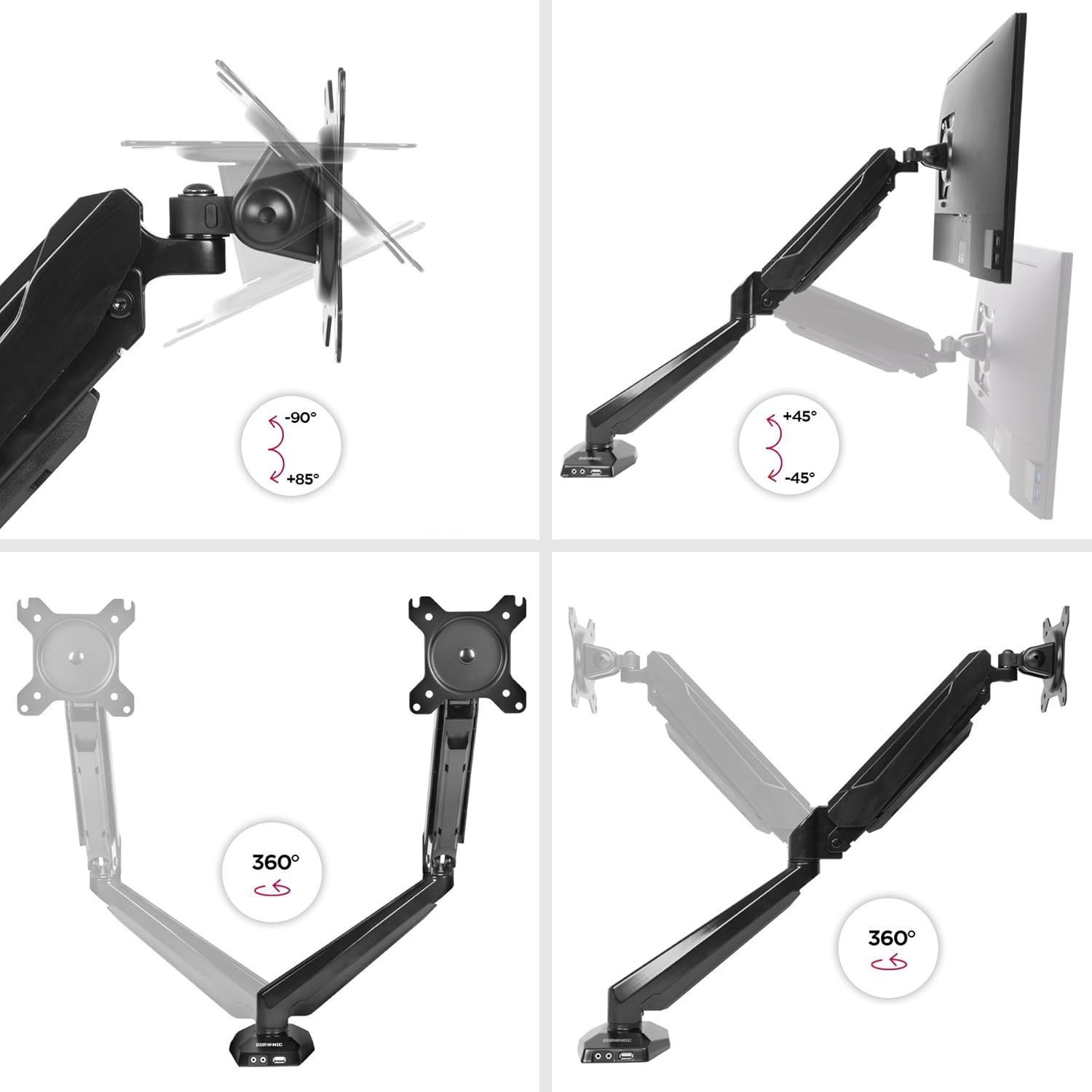
Figure 5.1: Monitor arm adjustment ranges.
- Integrated USB and Audio Ports: Use the two USB 2.0 ports for connecting peripherals like keyboards, mice, or USB drives. The headphone and microphone jacks provide convenient access for audio devices.
6. Întreținere
- curatenie: Ștergeți brațul monitorului cu o lavetă moale șiamp Evitați produsele de curățare abrazive sau solvenții care ar putea deteriora finisajul.
- Verificări periodice: Regularly check all screws and connections to ensure they remain tight and secure. Re-tighten if necessary.
- Reglarea arcului cu gaz: If your monitor's weight changes, or if the arm no longer holds its position correctly, re-adjust the gas spring tension as described in the setup section.
7. Depanare
| Problemă | Cauza posibila | Soluţie |
|---|---|---|
| Monitor does not stay in desired position (sags or springs up). | Incorrect gas spring tension. | Adjust the gas spring tension using the provided Allen key. Turn clockwise for heavier monitors, counter-clockwise for lighter monitors. |
| Monitor cannot be attached to the VESA plate. | Monitor VESA pattern is not compatible (not 75x75mm or 100x100mm). | Verify your monitor's VESA compatibility. An adapter may be required for non-standard patterns. |
| USB or audio ports on the arm base are not working. | Extension cables are not properly connected to the computer. | Ensure the USB and audio extension cables from the monitor arm base are securely plugged into the corresponding ports on your computer. |
| Arm feels loose or unstable. | Birou clamp is not tightened sufficiently or desk surface is unstable. | Strângeți din nou clemele birouluiamp. Ensure the desk surface is stable and within the recommended thickness. |
8. Specificații
- Model: DMUSB5X1
- Marca: Duronic
- Material: Aluminiu
- Monitor Size Compatibility: 15-27 inchi (38-68 cm)
- Capacitate de greutate: Up to 8 kg (17.6 lbs) per arm
- Compatibilitate VESA: 75x75mm, 100x100mm
- Ajustari:
- Înclinare: -90 ° până la + 85 °
- Rotire: 180°
- Rotație: 360°
- Birou Clamp Grosime: Până la 68 mm
- Integrated Ports: 2 x USB 2.0, 1 x Headphone Jack, 1 x Microphone Jack
9. Garanție și asistență
Informații despre garanție: For detailed warranty terms and conditions, please refer to the manufacturer's official website-ul web sau cardul de garanție inclus în ambalajul produsului.
Asistență clienți: If you encounter any issues or have questions regarding your Duronic DMUSB5X1 monitor arm, please visit the official Duronic website for support resources, FAQs, and contact information for their customer service team.