
Emerald SM-720-8712
Emerald Full Motion TV Wall Mount Bracket User Manual
Model: SM-720-8712
1. Introducere
This manual provides detailed instructions for the safe and proper installation, operation, and maintenance of your Emerald Full Motion TV Wall Mount Bracket, Model SM-720-8712. This mount is designed to securely hold flat and curved televisions ranging from 32 to 85 inches.
Caracteristicile cheie includ:
- Wide Range of Motion: Allows for full articulation, including swiveling, tilting, and extending, providing flexibility in viewing angles from any part of the room.
- Compatibilitate și versatilitate: Designed to accommodate TVs ranging from 32 inches up to 85 inches in size, ensuring compatibility with a wide range of television models.
- Construcție robustă: Built with robust materials such as high-grade steel, ensuring stability and support for larger TVs while maintaining safety and durability.
- Instalare ușoară: Includes a straightforward installation process with clear instructions and all necessary hardware.
- Organizare de cabluri: Often includes integrated cable management systems to keep wires organized and hidden, contributing to a cleaner and more organized living space.
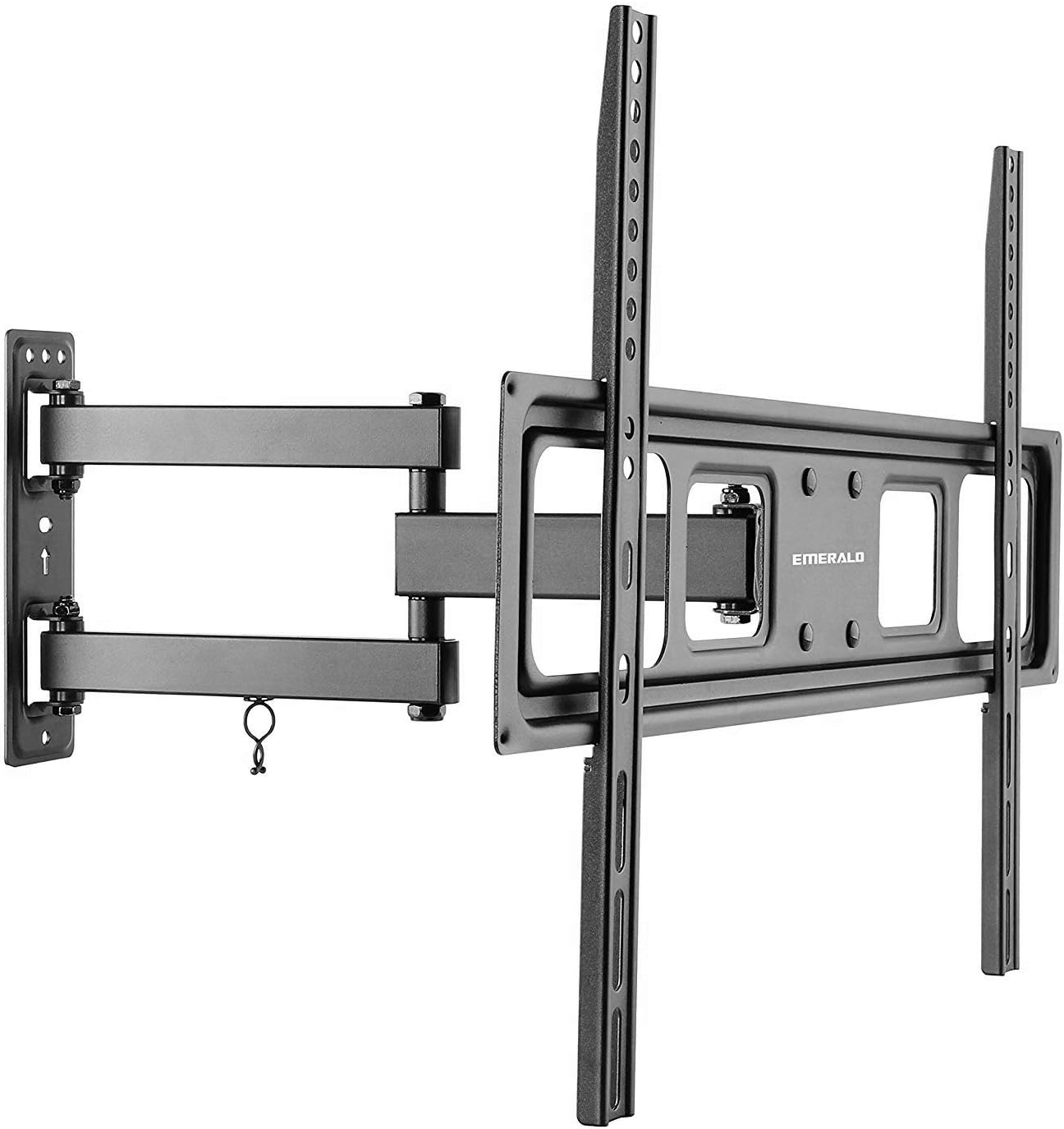
Image 1.1: The Emerald Full Motion TV Wall Mount Bracket, showing its articulated arm and TV mounting plate.
2. Informații de siguranță
WARNING: Failure to read and follow these instructions may result in serious personal injury, property damage, or voiding of your warranty. If you do not understand these instructions or have doubts about the safety of the installation, please contact customer support or a qualified installer.
- Do not install this product on walls that are not structurally sound. Ensure the mounting surface can support the combined weight of the mount and your television.
- Always use the provided hardware. If any parts are missing or defective, contact customer support for replacement.
- Do not exceed the maximum weight capacity of 200 lbs (90.7 kg) or the specified TV size range (32-85 inches).
- Acest produs este destinat numai utilizării în interior.
- Țineți copiii și animalele de companie departe în timpul instalării.
- Verificați periodic dacă suportul este fixat și dacă toate elementele de fixare sunt strânse.
3. Conținutul pachetului
Please verify that all components are present and undamaged before beginning installation. If any parts are missing or damaged, do not attempt to install and contact customer support.
- Ansamblu placă de perete
- Brațe suport TV (2)
- Kit de montare (diverse șuruburi, șaibe, distanțiere, ancore)
- Manual de instructiuni
4. Configurare și instalare
4.1 Unelte necesare (nu sunt incluse)
- Detector de grinzi (pentru instalarea grinzilor din lemn)
- Găuriți cu burghie adecvate
- Nivel
- Șurubelniță cu cap Phillips
- Cheie tubulară
- Creion
- Bandă de măsurare
4.2 Considerații privind tipul de perete
This mount is designed for installation on wood studs or solid concrete/brick walls. Do not install on drywall alone.
- Wood Stud Walls: Locate the center of the wood studs using a stud finder. Ensure the studs are at least 2x4 inches (51x102mm) and can support the weight.
- Solid Concrete/Brick Walls: Use a masonry drill bit and the appropriate concrete anchors (if provided, otherwise purchase separately).
4.3 Atașarea suporturilor TV la televizor
- Așezați cu grijă televizorul cu fața în jos pe o suprafață moale și curată pentru a preveni deteriorarea ecranului.
- Identificați găurile de montare VESA de pe spatele televizorului.
- Select the correct diameter and length of screws (M4, M6, or M8) that fit your TV's mounting holes. Use washers and spacers as needed to ensure the screws do not bottom out or protrude too far into the TV.
- Attach the two TV bracket arms to the back of your TV using the selected screws, washers, and spacers. Ensure the arms are centered and securely tightened. The hooks on the arms should face upwards.
4.4 Mounting the Wall Plate Assembly
- Determine the desired height for your TV. Mark the location for the top mounting holes of the wall plate.
- Hold the wall plate against the wall at the marked height and use a level to ensure it is perfectly horizontal. Mark all drilling locations.
- Faceți găuri pilot în locurile marcate.
- For wood studs: Drill 7/32 inch (5.5mm) pilot holes.
- For concrete/brick: Drill 3/8 inch (10mm) pilot holes and insert concrete anchors flush with the wall surface.
- Attach the wall plate assembly to the wall using the lag bolts and washers. Tighten securely, but do not overtighten.

Imaginea 4.1: Example of a TV mounted on the Emerald Full Motion TV Wall Mount in a living room setting.
5. Instrucțiuni de utilizare
Once your TV is securely mounted, you can adjust its position for optimal viewing.
5.1 Reglarea pivotării
The mount allows for 180-degree swivel in either direction (depending on TV size and wall clearance). Gently push or pull the TV to the desired angle.
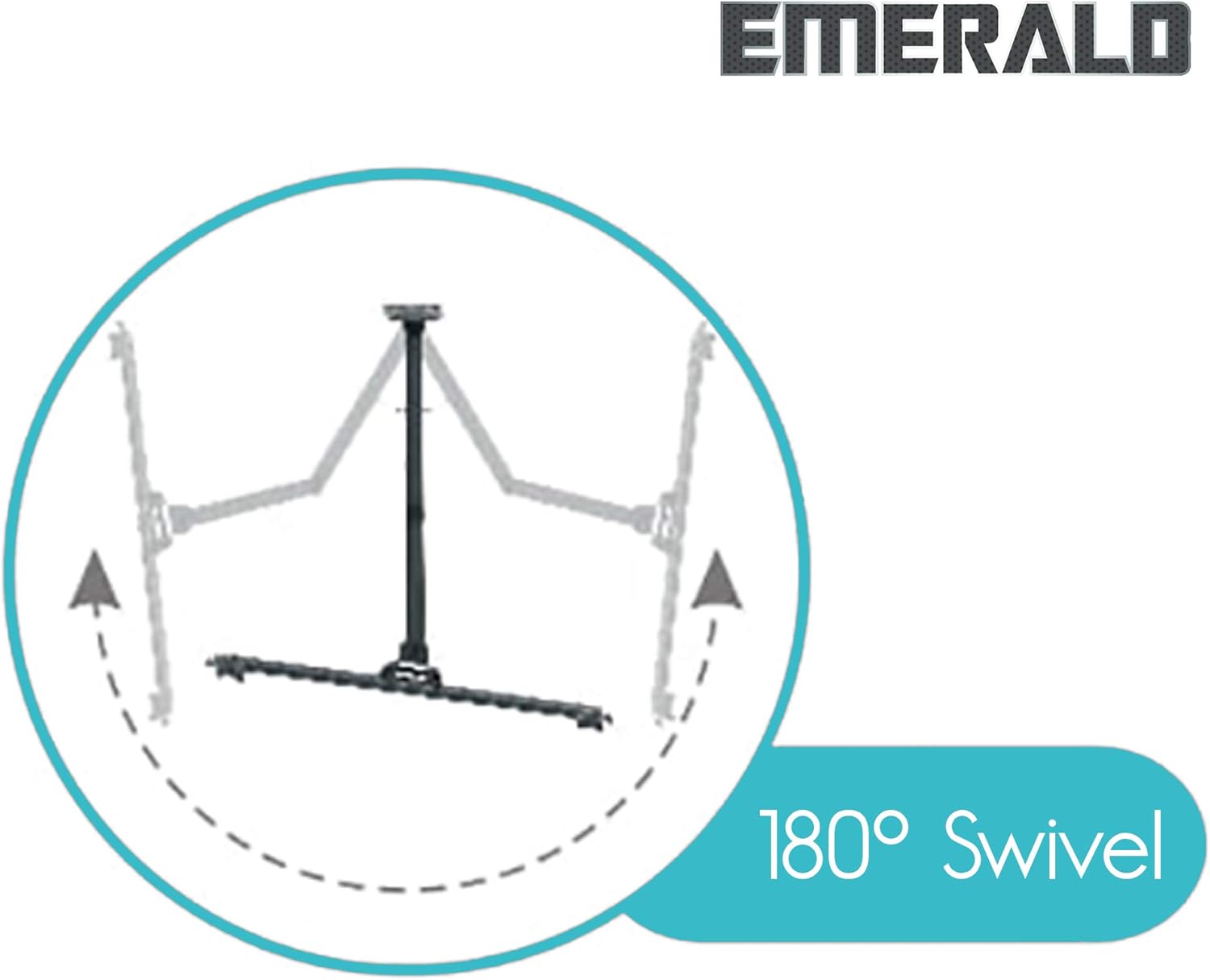
Image 5.1: Diagram illustrating the 180-degree swivel capability of the TV mount.
5.2 Reglarea înclinării
The mount offers a tilt range of +10 degrees upward and -15 degrees downward. Loosen the tilt adjustment knobs on the TV bracket arms, adjust the TV to the desired tilt angle, and then securely tighten the knobs.

Image 5.2: Diagram illustrating the tilt adjustment range of +10 degrees upward and -15 degrees downward.
5.3 Extensie și retracție
The articulated arm allows the TV to extend up to 16.81 inches (427mm) from the wall and retract to a minimum of 2.48 inches (63mm). Gently pull or push the TV to extend or retract it.

Image 5.3: Diagram comparing the mount in its compressed state (2.48 inches from wall) and fully extended state (16.81 inches from wall).
5.4 Ajustarea nivelului post-instalare
After installation, you can make minor horizontal level adjustments of +/- 3 degrees. Loosen the leveling screws on the TV bracket arms, adjust the TV to be perfectly level, and then re-tighten the screws.

Image 5.4: Diagram illustrating the post-installation level adjustment feature, allowing for +/- 3 degrees of rotation.
6. Întreținere
- Periodically inspect the mount and all fasteners to ensure they are secure. Re-tighten if necessary.
- Curățați suportul cu o cârpă moale și uscată. Evitați utilizarea de produse de curățare abrazive sau solvenți.
- Do not apply lubricants to the moving parts unless specifically instructed by the manufacturer.
7. Depanare
- Televizorul nu este la nivel după instalare: Use the post-installation level adjustment feature as described in Section 5.4. Loosen the leveling screws, adjust, and re-tighten.
- Difficulty moving the TV (swivel/tilt/extension): Check if any adjustment knobs or screws are overtightened. Loosen slightly to allow movement, then re-tighten to secure the position. Ensure no cables are snagged.
- Montura pare instabilă: Immediately remove the TV from the mount. Re-check all wall mounting fasteners and TV bracket screws for proper tightness and secure installation into wall studs or concrete. Ensure the TV weight and size are within the mount's specifications.
- Părți lipsă: Do not proceed with installation. Contact Emerald customer support for replacement parts.
8. Specificații
| Numărul de model | SM-720-8712 |
| Dimensiuni TV compatibile | 32 - 85 inci |
| Capacitate maximă de greutate | 200 lbs (90.7 kg) |
| Tip de montare | Montare pe perete |
| Tipul de mișcare | Swivel, Tilt, Extension |
| Gama rotativă | 180 degrees (left/right) |
| Interval de înclinare | +10 grade (sus) / -15 grade (jos) |
| Reglarea nivelului | +/- 3 degrees (post-installation) |
| Extensie de la perete | 2.48 inches (63mm) to 16.81 inches (427mm) |
| Material | Metal |
| Culoare | Negru |
| Dimensiunile produsului | 26 x 11 x 3 inci |
| Greutatea articolului | 6.59 lire sterline |
| UPC | 854443007337 |
9. Videoclip oficial al produsului
Watch the official product video for a visual guide on the features and benefits of the Emerald Full Motion TV Wall Mount.
Video 9.1: Official product video demonstrating the features and functionality of the Emerald Full Motion TV Wall Mount Bracket. This video highlights the mount's articulation, swivel, and tilt capabilities.
10. Garanție și asistență
Emerald products are manufactured with quality and durability in mind. For warranty information, technical support, or to report missing/damaged parts, please contact Emerald customer service. Keep your purchase receipt as proof of purchase.
For further assistance, please visit the official Emerald store or contact their customer support channels.
Ask a question about this manual
Ask about setup, troubleshooting, compatibility, parts, safety, or missing instructions. Manuals+ will review the question and use this page’s manual context to help answer it.