
1. Produs terminatview
The LaiPuDuo 11-Key RF Mini Wireless Remote LED Controller is designed for controlling single-color LED strip lights operating on DC5-24V. This compact and lightweight controller utilizes 433MHz radio frequency (RF) signals, allowing for control without direct line-of-sight. It features 8 dynamic modes, 10-level speed adjustment, and 10-level static brightness adjustment, making it a versatile solution for various lighting applications.
Ce este inclus
- LED controler
- Telecomanda
2. Caracteristici
- Curent de ieșire: <6A (each circuit), DC5-24V.
- Control fără fir: 11-button RF wireless remote control operating at 433MHz.
- Funcția de memorie: Features automatic shutdown memory, retaining the last setting.
- Aplicație versatilă: Compatible with various LED lights including LED source, LED strips (3528, 5050, COB), wall washer lights, and glass curtain wall lights.
- Moduri dinamice: Includes 8 kinds of monochrome dynamic models (e.g., flash blasting, breathing, strobe, flicker).
- Reglarea vitezei: 10 levels of dynamic speed adjustment.
- Reglarea luminozității: Single-channel static 10-level brightness adjustment.
- Ușurință de utilizare: Compact, lightweight, intuitive button design, easy to wire and operate.
- Distanță: Offers control from a long distance, with signal penetration through walls and doors.
3. Specificații
| Caietul de sarcini | Valoare |
|---|---|
| Dimensiunile produsului | 4.96 x 3.31 x 0.39 inci |
| Greutatea articolului | 1.23 uncii |
| Numărul de model al articolului | 11key RF Mini |
| Marca | LaiPuDuo |
| Caracteristica specială | Telecomanda |
| Culoare | Alb/Negru |
| Numărul maxim de dispozitive acceptate | 1 |
| Dispozitive compatibile | LED lamps, LED strips (3528, 5050, COB) |
| Producător | Shenzhen LPD Co.,Ltd |
4. Instrucțiuni de configurare
4.1 Conectarea controlerului
Follow these steps to connect your LED controller system. Ensure all components are compatible with DC5-24V power. The LED strip and power supply are not included with this controller.
- Connect your DC5-24V power supply to the input side of the LED controller receiver.
- Connect your single-color LED strip light to the output side of the LED controller receiver.
- Asigurați-vă că toate conexiunile sunt sigure înainte de a aplica alimentarea.
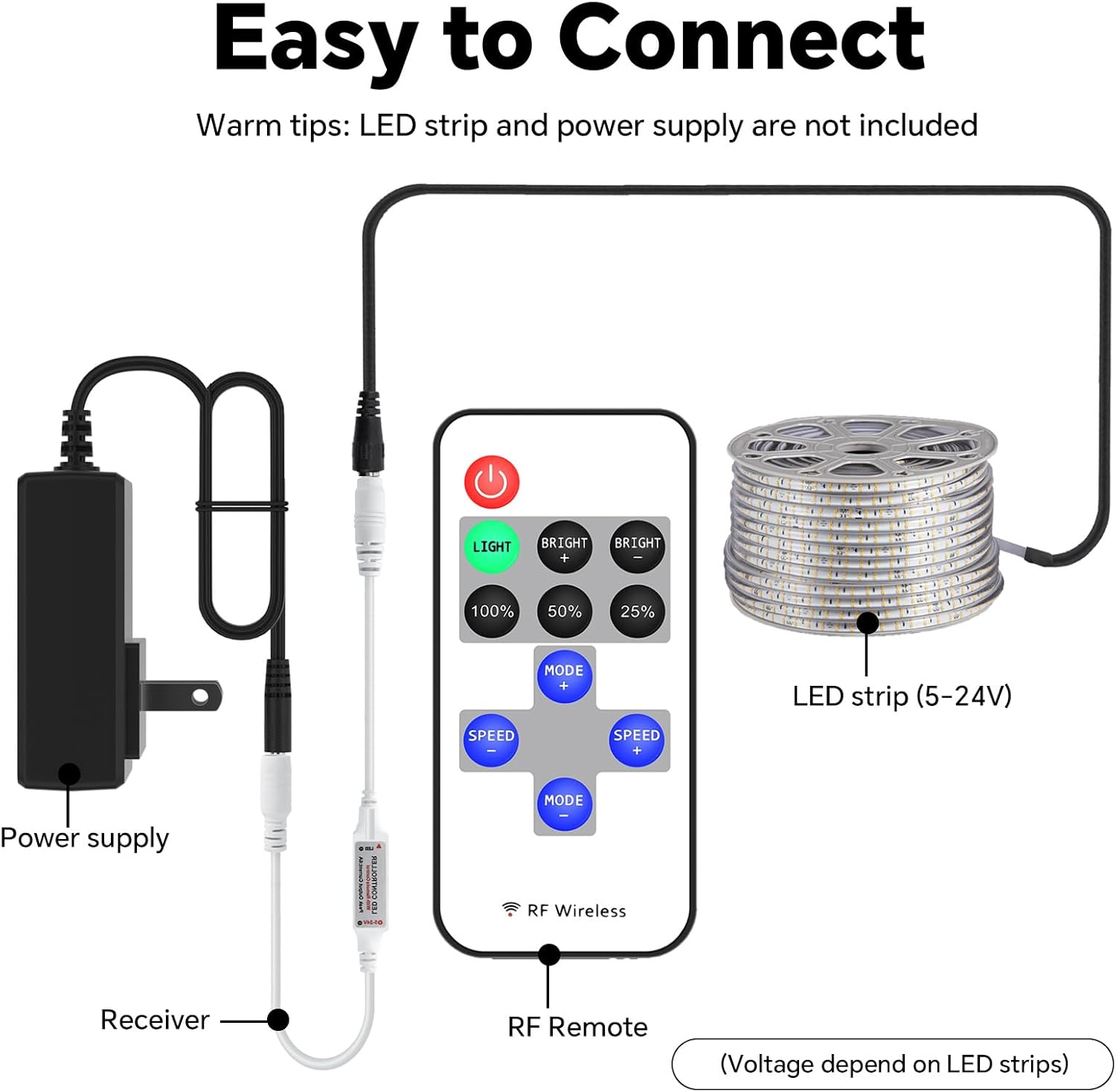
4.2 Asocierea telecomenzii
The remote control is typically pre-paired with the receiver. If re-pairing is necessary or if the remote is unresponsive, follow the instructions in the video below.
5. Instrucțiuni de utilizare
5.1 Funcții de control de la distanță
The 11-key RF Mini Remote provides intuitive control over your LED strip lights. Refer to the diagram below for button identification and their respective functions.

- Buton de pornire (roșu): Turns the LED lights On or Off.
- LIGHT Button (Green): Activates the static lighting function.
- BRIGHT + / BRIGHT - Buttons: Adjusts the brightness level of the static light.
- 100% / 50% / 25% Buttons: Sets the static brightness to predefined levels.
- MODE + / MODE - Buttons: Cycles through the 8 dynamic lighting modes.
- SPEED + / SPEED - Buttons: Adjusts the speed of the active dynamic lighting mode (10 levels).
5.2 Reglarea luminozității
You can precisely control the brightness of your LED lights using the dedicated brightness buttons or the '+' and '-' controls. The remote offers 10 levels of brightness adjustment for static light.

5.3 Dynamic Modes and Speed
The controller features 8 distinct dynamic modes, such as flashing, breathing, and strobing effects. Use the 'MODE +' and 'MODE -' buttons to switch between these modes. The 'SPEED +' and 'SPEED -' buttons allow you to adjust the speed of the selected dynamic mode across 10 different levels.

6. Întreținere
6.1 Înlocuirea bateriei
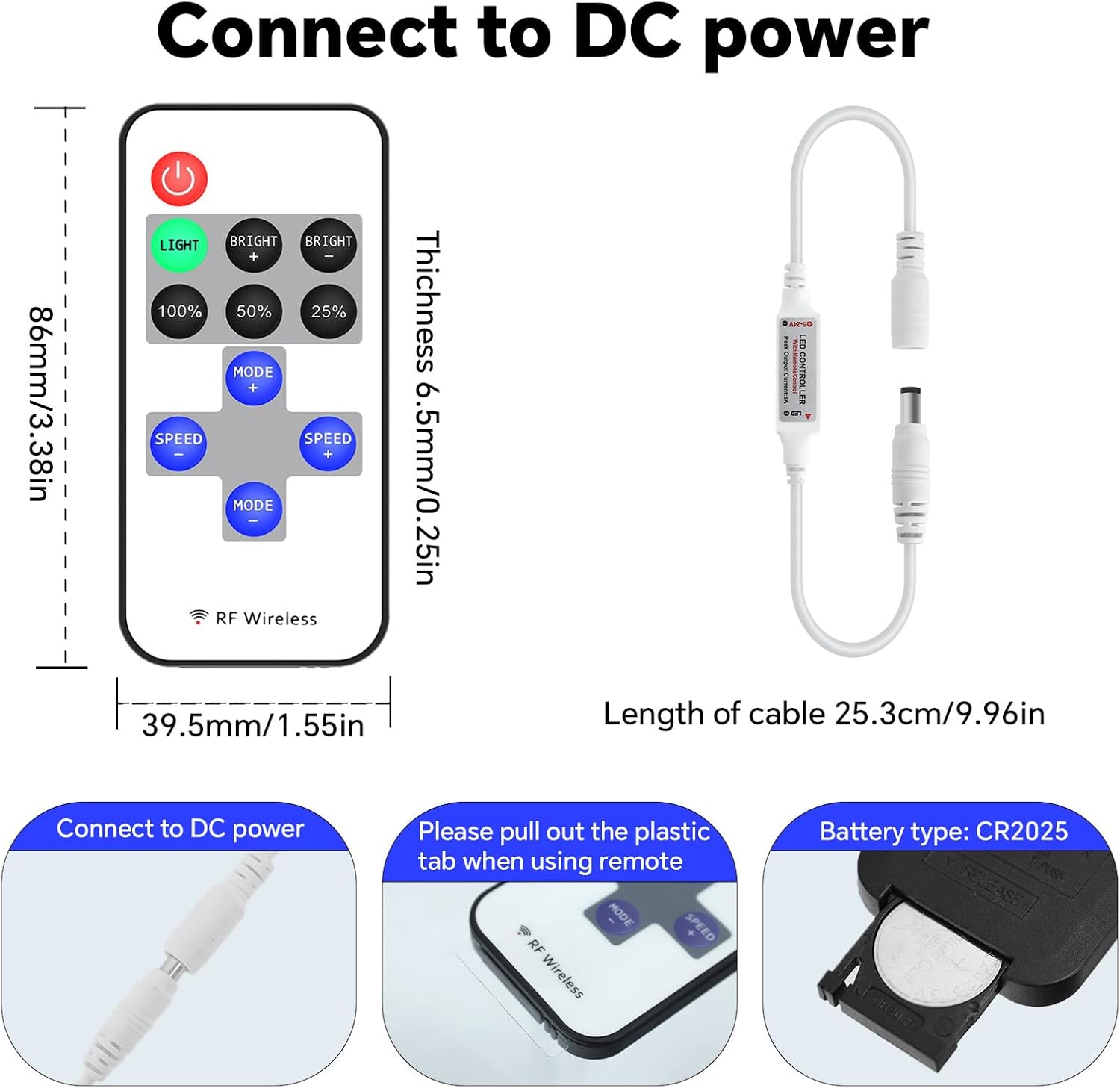
The remote control is powered by a CR2025 coin cell battery. If the remote's range decreases or it becomes unresponsive, the battery may need replacement.
- Localizați compartimentul bateriei de pe spatele telecomenzii.
- Slide open the battery tray or use a small tool to gently pry it open.
- Scoateți vechea baterie CR2025.
- Introduceți o nouă baterie CR2025 cu partea pozitivă (+) în sus.
- Închideți bine compartimentul bateriei.
7. Depanare
- Luminile nu răspund: Check if the remote control battery needs replacement. Ensure the plastic tab has been removed from the battery compartment. Verify all power and LED strip connections are secure.
- Control intermitent: Ensure the remote is within effective range. While RF technology allows for signal penetration, extreme distances or dense obstacles may affect performance.
- Luminile nu se aprind: Confirm the power supply is functioning correctly and providing the appropriate voltage (DC5-24V). Check the LED strip for any damage.
- Comportament incorect al luminii: If the lights are not behaving as expected, try re-pairing the remote control as shown in the setup video.
8. Informații importante
8.1 Liniile directoare de siguranță
- Do not expose the controller or remote to moisture or extreme temperatures.
- Asigurați-vă că sursa de alimentare voltage corespunde cerințelor controlerului (DC5-24V).
- Avoid short-circuiting the connections.
- A nu se lăsa la îndemâna copiilor.
- Aruncați bateriile în mod responsabil, conform reglementărilor locale.
8.2 Garanție și asistență
For warranty information, technical support, or further assistance, please refer to the product packaging or contact the manufacturer directly through their official website-ul sau canalele de servicii pentru clienți.