
Introducere
This manual provides comprehensive instructions for the safe and effective use of your Winplus AC55925-80 3-in-1 Emergency Socket Power Bank. This device combines a compact power bank, a USB car charger, and an emergency glass-breaking tool. Please read this manual thoroughly before operation and retain it for future reference.
Produs terminatview
The Winplus 3-in-1 Emergency Socket Power Bank is designed for convenience and safety, offering multiple functionalities in a compact form factor.

Figure 1: Winplus 3-in-1 Emergency Socket Power Bank with key features highlighted.
Componente:
- Compact Power Bank: Provides portable power for charging devices.
- Încărcător auto USB: Plugs into a 12V car socket to charge devices and the power bank.
- Emergency Glass-Breaking Tool: Integrated for emergency situations.
- Port de ieșire USB: For connecting charging cables to devices.
- Port de intrare Micro USB: For charging the internal power bank.
- Indicator LED: Afișează starea de încărcare.

Figura 2: Detaliat view of the device's ports.
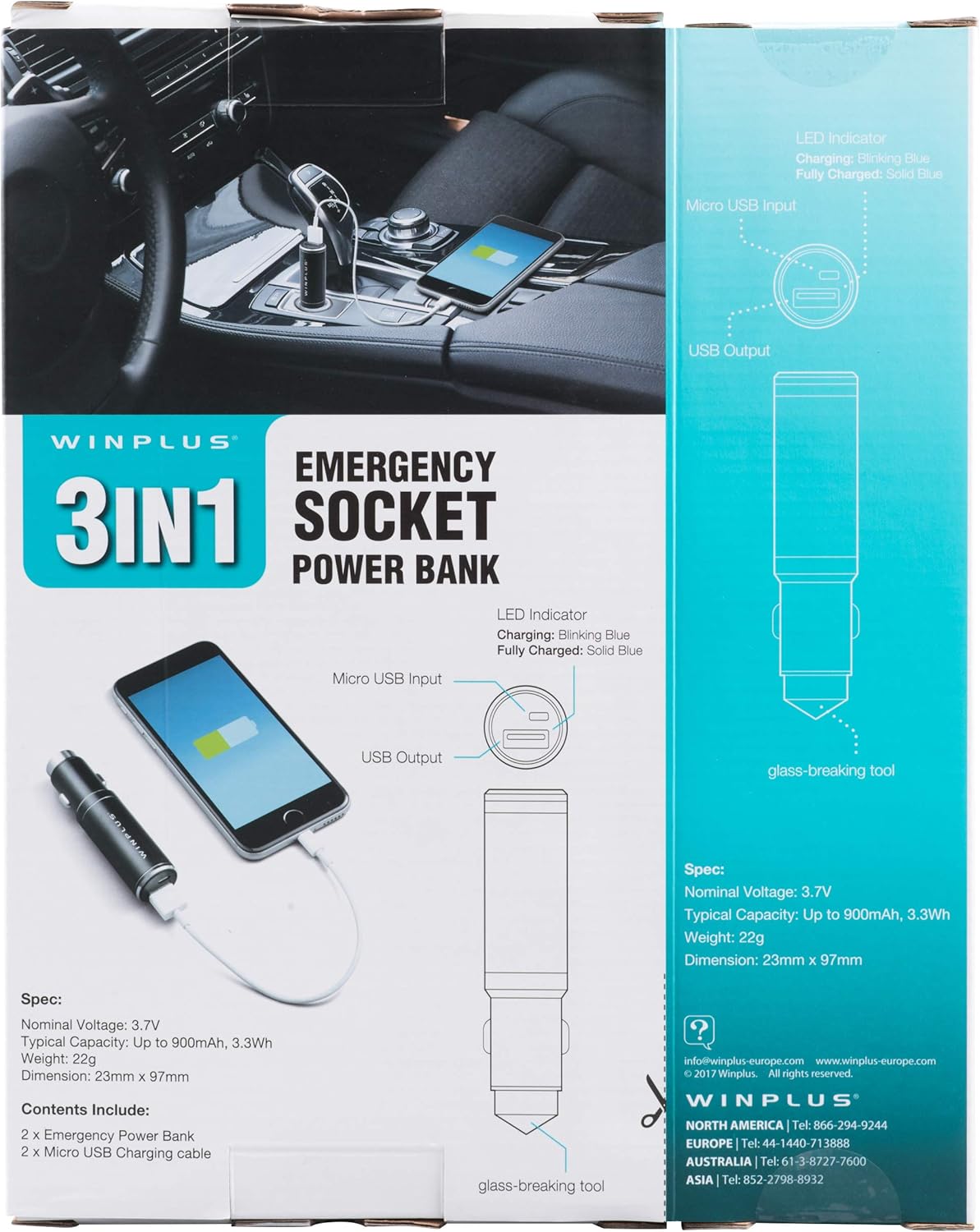
Figure 3: LED indicator status and glass-breaking tool location.
Înființat
Încărcarea inițială a bateriei externe:
- Locate the Micro USB Input port on the device.
- Connect the provided Micro USB charging cable to the Micro USB Input port.
- Connect the other end of the USB cable to a standard USB power source (e.g., a computer USB port, a wall adapter, or the car's 12V socket when used as a car charger).
- The LED indicator will blink blue during charging.
- Once fully charged, the LED indicator will turn solid blue.
Note: It is recommended to fully charge the power bank before its first use.
Instrucțiuni de operare
Utilizarea ca Power Bank portabil:
- Ensure the power bank is charged (solid blue LED indicator).
- Connect your device's charging cable to the USB Output port on the power bank.
- Connect the other end of the cable to your mobile device (smartphone, tablet, etc.).
- Acumulatorul extern va începe automat încărcarea dispozitivului.
Using as a USB Car Charger:
- Insert the Winplus 3-in-1 device into your vehicle's 12V accessory socket (cigarette lighter socket).
- Connect your device's charging cable to the USB Output port on the Winplus device.
- Conectați celălalt capăt al cablului la dispozitivul dvs. mobil.
- Your device will begin charging. The internal power bank will also charge simultaneously if it is not full.
Using the Emergency Glass-Breaking Tool:
The emergency glass-breaking tool is located at the tip of the device, opposite the USB ports. This tool is intended for emergency use only to break vehicle side windows in situations where occupants are trapped.
- In an emergency, firmly press the tip of the tool against a corner of a side window.
- Apply steady pressure until the spring-loaded mechanism activates and shatters the glass.
- Once the glass is broken, carefully clear any remaining shards before exiting the vehicle.
AVERTIZARE: Use this tool only in genuine emergencies. Misuse can cause serious injury. Keep out of reach of children.
Întreţinere
- Păstrați dispozitivul uscat. Umiditatea poate deteriora circuitele interne.
- Nu expuneți la temperaturi extreme (cald sau rece).
- Curățați dispozitivul cu o lavetă moale și uscată. Nu utilizați substanțe chimice dure sau produse de curățare abrazive.
- A se păstra într-un loc răcoros și uscat atunci când nu este utilizat.
- Evitați scăderea sau supunerea dispozitivului la impacturi puternice.
Depanare
| Problemă | Cauza posibila | Soluţie |
|---|---|---|
| Dispozitivul nu se încarcă. | Acumulatorul extern este descărcat. Cablul este defect. USB port is dirty or damaged. | Reîncărcați banca de energie. Încearcă un alt cablu de încărcare. Clean the USB ports carefully or try another port. |
| Indicatorul LED nu se aprinde. | Device is not connected to a power source. Device is fully charged (if solid blue). Dispozitivul este defect. | Ensure proper connection to a power source. Check if it's already solid blue. Contactați asistența pentru clienți dacă problemele persistă. |
| Încărcare lentă. | Cable is not suitable. Power source is low current. Device being charged has high power requirements. | Use a high-quality charging cable. Connect to a higher current USB adapter. This device provides 2.1A output, which is standard for fast charging most phones. |
Specificații
- Model: AC55925-80
- Vol. Nominaltage: 3.6V
- Capacitate tipică: Up to 2500 mAh, 9 Wh
- Compoziția celulei bateriei: Polimer de litiu
- Ieșire USB: 5V / 2.1A
- Intrare Micro USB: 5V / 0.5A
- Dimensiuni: 23mm x 127mm (approximate)
- Greutatea articolului: 510 g (for the 2-pack)
- Tip conector: Micro USB (Input), USB Type-A (Output)
Informații de siguranță
- Nu dezasamblați, nu deschideți și nu sfărâmați bateria.
- Nu expuneți acumulatorul la căldură sau foc. Evitați depozitarea în lumina directă a soarelui.
- Nu scurtcircuitați un pachet de baterii. Nu depozitați pachetele de baterii la întâmplare într-o cutie sau sertar unde se pot scurtcircuita reciproc sau pot fi scurtcircuitate de alte obiecte metalice.
- Nu supuneți acumulatorii la șocuri mecanice.
- În cazul în care există scurgeri din baterie, evitați contactul lichidului cu pielea sau ochii. În caz de contact, spălați zona afectată cu multă apă și solicitați sfatul medicului.
- Nu utilizați alt încărcător decât cel prevăzut special pentru utilizarea cu echipamentul.
- Nu lăsați acumulatorii la îndemâna copiilor.
- Solicitați imediat sfatul medicului dacă un acumulator a fost înghițit.
- Achiziționați întotdeauna acumulatorul corect pentru echipament.
- Păstrați bateriile curate și uscate.
- Nu lăsați o baterie la încărcare prelungită când nu este utilizată.
- Eliminați bateriile în mod corespunzător, conform reglementărilor locale.
Garanție și suport
For warranty information or technical support, please contact Winplus North America Inc. directly.
- Producător: Winplus North America Inc
- Informații de contact: Refer to product packaging or the official Winplus website-ul pentru cele mai recente detalii de asistență.
You can also visit the Winplus website pentru întrebări frecvente și informații suplimentare despre produs: www.winplus-europe.com