
Introducere
Mulțumesc pentru achizițieasing the Ezonetronics 1DIN Car Stereo, Model RM-CW9601. This unit features a 7-inch retractable touchscreen, Bluetooth connectivity, FM radio, and multimedia playback capabilities. This manual provides essential information for installation, operation, and maintenance to ensure optimal performance and user satisfaction. Please read this manual thoroughly before using the product.
Informații de siguranță
- Nu utilizați unitatea într-un mod care vă distrage atenția de la condus. Acordați întotdeauna prioritate siguranței rutiere.
- Asigurați-vă că instalarea este efectuată corect de către un profesionist calificat pentru a preveni deteriorarea unității sau a vehiculului.
- Evitați expunerea unității la temperaturi extreme, la lumina directă a soarelui pentru perioade lungi de timp sau la umiditate.
- Nu încercați să dezasamblați sau să modificați unitatea. Acest lucru poate anula garanția și poate prezenta riscuri de siguranță.
- Mențineți volumul la un nivel care vă permite să auziți sunetele traficului exterior.
Conținutul pachetului
Verificați dacă toate articolele sunt prezente în colet:
- Ezonetronics 1DIN Car Stereo Unit (RM-CW9601)
- Alimentarea și cablajul difuzoarelor
- Telecomanda
- Manual de utilizare (acest document)
- Mounting Accessories (brackets, screws)
- Optional: Rearview Camera (if included in your specific package)
Produs terminatview
The Ezonetronics RM-CW9601 features a single DIN chassis with a motorized retractable 7-inch touchscreen display. The front panel includes essential controls and ports for easy access.

Figura 1: Faţă view of the Ezonetronics RM-CW9601 car stereo, illustrating the 7-inch screen in both retracted and extended positions, along with front panel controls and ports.
Comenzi și porturi pe panoul frontal:
- Buton de alimentare / mod: Press to turn on/off, short press to change mode.
- Buton de volum: Rotiți pentru a regla volumul. Apăsați pentru a dezactiva/activa sunetul.
- Port USB: Pentru redarea media de pe unități USB.
- Slot pentru card SD: For media playback from SD cards.
- Intrare AUX: Mufă de 3.5 mm pentru dispozitive audio externe.
- Buton de resetare: Small button to reset the unit (requires a pointed object).
- Screen Retract/Extend Button: Controls the motorized screen movement.
Înființat
1. Instalare
The RM-CW9601 is designed for a standard 1DIN car stereo opening. Professional installation is highly recommended. Ensure the vehicle's battery is disconnected before starting installation.
- Scoateți sistemul stereo auto existent de pe bord.
- Connect the wiring harness to the vehicle's wiring.
- Secure the unit into the dashboard using the provided mounting brackets and screws.
- Reconectați bateria vehiculului și testați unitatea.
2. Schemă de cablare (generală)
Refer to the detailed wiring diagram included with your product packaging for specific connections. Below are common connections:
- Sârmă galbenă: 12V constant (baterie)
- Fir roșu: Comutator 12V (accesoriu/aprindere)
- Sârmă neagră: Sol
- Sârmă portocalie: Illumination (Optional)
- Sârmă albastră: Antena de alimentare / AmpPornire de la distanță a lifier-ului
- Cabluri difuzoare: Connect to vehicle speakers (e.g., White/White-Black for Front Left, Grey/Grey-Black for Front Right, Green/Green-Black for Rear Left, Purple/Purple-Black for Rear Right).
- Intrare cameră inversă: Conectați-vă la spateview camera video output and reverse trigger wire.
- Intrare control volan: Connect to vehicle's steering wheel control wires (if applicable).

Figura 2: Illustration of USB connection points, relevant for media input and smartphone integration.
Instrucțiuni de operare
1. Operare de bază
- Pornire/Oprire: Apăsați butonul de alimentare de pe panoul frontal sau de pe telecomandă.
- Reglarea volumului: Rotate the volume knob or use the remote control.
- Selectarea modului: Short press the power/mode button to cycle through available modes (Radio, USB, SD, Bluetooth, AUX, CarPlay/Android Auto).
- Control ecran: Use the dedicated button to retract or extend the 7-inch display.
2. Funcția Bluetooth
The unit supports Bluetooth for hands-free calling and wireless audio streaming.
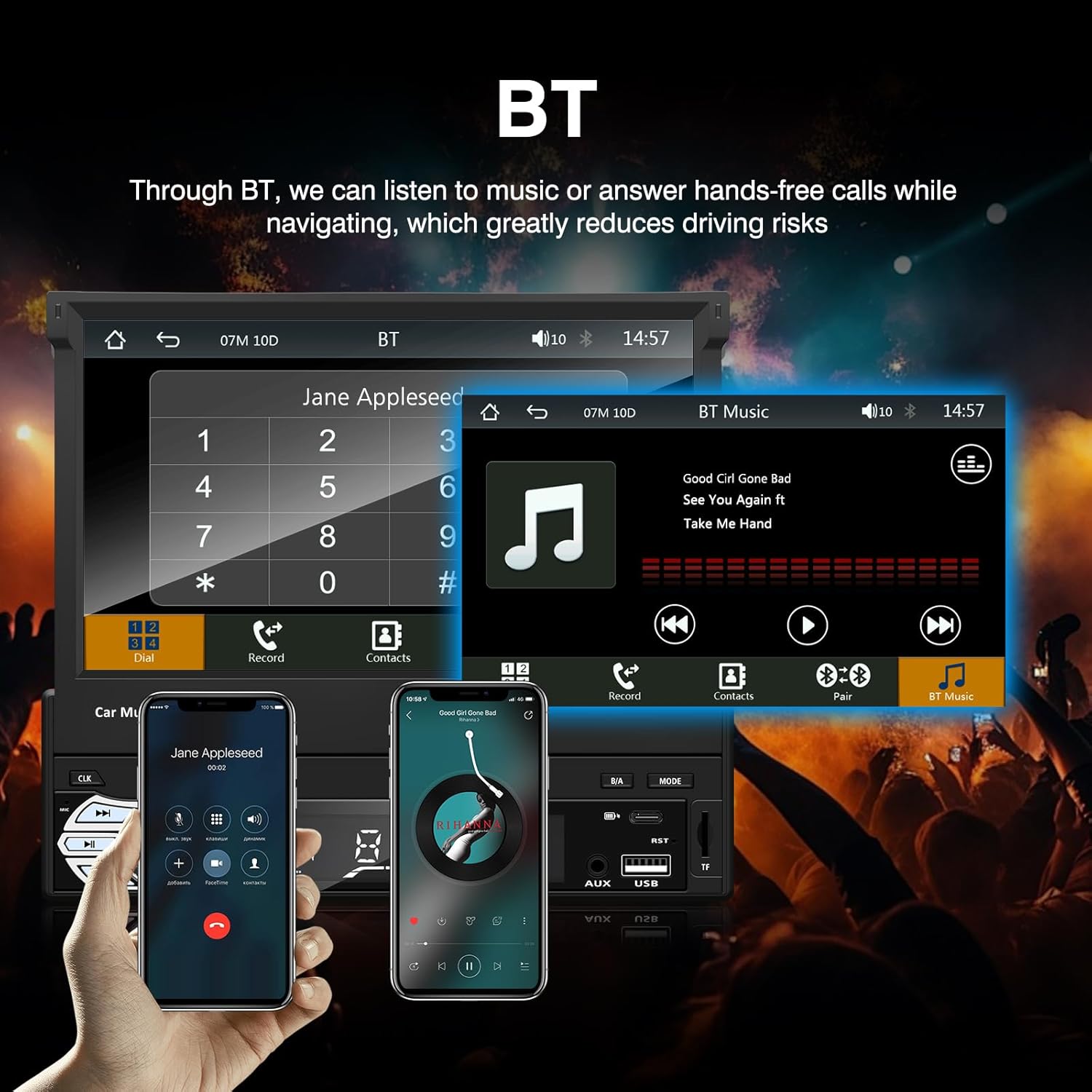
Figura 3: Bluetooth interface for hands-free calls and music streaming, showing a dial pad and music controls.
- Asociere: Activați Bluetooth pe dispozitivul dvs. mobil. Caută available devices and select "Ezonetronics" or similar. Enter PIN "0000" if prompted.
- Apeluri fără mâini: Once paired, you can make and receive calls directly through the car stereo. Use the touchscreen or remote to dial, answer, or end calls.
- Transmisie audio (A2DP): Play music from your paired device wirelessly. Control playback (play/pause, skip) from the car stereo or your device.
3. USB/SD Media Playback
Insert a USB drive or SD card into the respective slot. The unit will automatically switch to USB/SD mode and begin playing compatible media files.

Figura 4: Icons indicating support for Bluetooth, Auxiliary input, TF (SD) Card, and USB connections for media playback.
- Supported formats include RM, RMVB, ASF, MKV, DIVX, MPEG4, AVI, VOB for video, and MP3/MP4 for audio.
- Navigați prin foldere și fileutilizează interfața cu ecran tactil.
4. Radio FM
Access the FM radio mode to listen to local broadcasts.

Figura 5: FM Radio interface with frequency display and equalizer settings for audio customization.
- Auto scanare: Automatically search and save strong stations.
- Reglare manuală: Fine-tune frequencies using the touchscreen.
- presetări: Save your favorite stations for quick access (up to 18 preset stations).
5. Apple CarPlay / Android Auto
Connect your compatible smartphone via USB to access Apple CarPlay or Android Auto features directly on the stereo's display.

Figura 6: Wired Apple CarPlay interface, displaying phone applications like navigation, music, and messages on the car stereo screen.

Figura 7: Wired Android Auto interface, displaying Android applications like Google Maps, Spotify, and phone calls on the car stereo screen.
- Ensure your phone has CarPlay or Android Auto enabled.
- Use a high-quality USB cable for a stable connection.
- Access navigation, music, messages, and other compatible apps safely while driving.
6. Legătură în oglindă
Mirror Link allows you to display your smartphone's screen content directly onto the car stereo's display via a USB data cable.

Figura 8: Mirror Link function demonstrating a smartphone screen being projected onto the car stereo display.
- Connect your smartphone to the USB port using a data cable.
- Urmați instrucțiunile de pe ecran atât de pe sistemul stereo, cât și de pe telefon pentru a stabili conexiunea.
- Note: Functionality may vary depending on your smartphone model and operating system.
7. Spateview Intrarea camerei
Când o parte din spateview camera is connected and the vehicle is shifted into reverse, the stereo automatically displays the camera feed.

Figura 9: Reversing display showing the view from a rearview camera with parking assistance lines, providing an intuitive aid for parking.
- Asigurați spateleview camera is properly installed and connected to the dedicated input.
- Afișajul va comuta automat la cameră view când este cuplată treapta de marșarier.
8. Comandă pe volan
The unit supports connection to your vehicle's existing steering wheel controls for convenient operation. Refer to your vehicle's manual and the stereo's wiring diagram for proper connection and configuration.
Întreţinere
- Curățarea ecranului: Folosiți o lavetă moale, fără scame, pentru a șterge ușor ecranul tactil. Nu utilizați substanțe de curățare abrazive sau solvenți.
- Curatenie generala: Ștergeți exteriorul unității cu o cârpă uscată și moale.
- Evitați lichidele: Nu pulverizați lichide direct pe unitate.
- Temperatură: Avoid prolonged exposure to extreme heat or cold, which can affect the unit's lifespan.
Depanare
| Problemă | Cauza posibila | Soluţie |
|---|---|---|
| Unitatea nu pornește. | Cablare incorectă; Siguranță arsă; Problemă cu bateria vehiculului. | Check power connections (Yellow, Red, Black wires). Inspect vehicle fuses. Ensure battery is charged. |
| Nici un sunet. | Volume too low; Mute activated; Incorrect speaker wiring. | Măriți volumul. Verificați dacă sunetul este activat. Verificați conexiunile difuzoarelor. |
| Bluetooth nu se conectează. | Bluetooth not enabled on phone; Incorrect pairing process. | Ensure phone's Bluetooth is on and discoverable. Re-attempt pairing. |
| USB/SD media not playing. | Neacceptat file format; Corrupted media; Drive/card not inserted correctly. | Verifica file formats. Try a different USB drive/SD card. Ensure proper insertion. |
| Spateview camera nu afișează. | Camera not connected; Reverse trigger wire not connected. | Verify camera video input and reverse trigger wire connection. |
If problems persist, consult a qualified technician or contact customer support.
Specificații
- Marca: EZoneTronics
- Număr de model: RM-CW9601
- Culoare: Negru
- Ecran: 7-inch Capacitive Touchscreen, Retractable
- Tehnologie de conectivitate: Bluetooth, USB, SD, AUX, RCA
- Bluetooth: Integrated Bluetooth 2.0 with A2DP/Hands-free
- Dispozitive compatibile: Smartphone
- Mod de ieșire audio: Stereo
- Suport pentru codare video: RM, RMVB, ASF, MKV, DIVX, MPEG4, AVI, VOB
- Suport USB/SD: Up to 32GB max.
- Caracteristici speciale: Touchscreen, Steering Wheel Control Support, Rear Camera Input, Apple CarPlay, Android Auto, Mirror Link
- Producător: Rhythm Electronics Limited
Garanție și suport
This product comes with a limited manufacturer's warranty.
- Garanția unității principale: 12 months for defective items (excluding damaged or misused items after receipt).
- Garanție accesorii: 3 months for accessories.
Pentru reclamații în garanție sau asistență tehnică, vă rugăm să contactați distribuitorul sau direct producătorul. Păstrați bonul fiscal ca dovadă a achiziției.