
Introducere
This manual provides detailed instructions for the setup, operation, and maintenance of your Hyperkin Knight Premium Controller. Designed for use with PlayStation 3 (PS3), PC, and Mac systems, this controller offers a versatile gaming experience with its ergonomic design and responsive controls. Please read this manual thoroughly before using the product to ensure optimal performance and longevity.
Caracteristicile produsului
- Dual Analog Joysticks: Two wide-spectrum analog joysticks for precise control.
- Pressure-Sensitive D-Pad: An eight-way directional pad with pressure sensitivity.
- Pressure-Sensitive Buttons: Four shoulder buttons and four face buttons with pressure sensitivity for nuanced input.
- Feedback forțat: Integrated force feedback for immersive gaming experiences.
- Buton Acasă: Dedicated button for system menu access.
- Cablu lung: A 6-foot (1.8 meter) cable for flexible positioning.
- Compatibilitate cu mai multe platforme: Compatible with all PS3 models, as well as PC and Mac via USB.
Conținutul pachetului
- Hyperkin Knight Premium Controller (White)
- Integrated USB Cable (6 ft.)
Instrucțiuni de configurare
Conectarea la PlayStation 3 (PS3)
- Ensure your PS3 console is powered off or in standby mode.
- Locate an available USB port on your PS3 console.
- Plug the USB connector of the Hyperkin Knight Controller into the USB port on your PS3.
- Power on your PS3 console. The controller should be automatically recognized and assigned a player number.
- If the controller does not respond, try a different USB port or restart the console.
Conectarea la PC/Mac
- Locate an available USB port on your PC or Mac computer.
- Plug the USB connector of the Hyperkin Knight Controller into the USB port.
- Your operating system (Windows, macOS) should automatically detect and install the necessary drivers. This process may take a few moments.
- Once installed, the controller will be ready for use with compatible games and applications. You may need to configure controller settings within individual games or system preferences.
- Nota: Functionality may vary depending on the operating system and specific game titles.
Instrucțiuni de operare
The Hyperkin Knight Premium Controller features a standard layout for intuitive gameplay.
Aspect controler

Imagine: Sus view of the Hyperkin Knight Premium Controller, showing the D-pad, analog sticks, face buttons, and central buttons.
- D-Pad (D-Pad direcțional): Situat în stânga, utilizat pentru introducerea de date direcționale.
- Stick analogic stâng: Below the D-Pad, for precise movement and camera control.
- Stick analogic drept: On the right side, typically for camera control or aiming.
- Face Buttons (Triangle, Circle, Cross, Square): On the right, used for actions within games.
- Butoane de umăr (L1, L2, R1, R2): Located on the top edge of the controller, used for various in-game functions.
- Buton SELECT: Typically used for menu access or specific game functions.
- Butonul de start: Typically used for pausing games or confirming selections.
- Butonul HOME: Central button to access the PS3 XMB (CrossMediaBar) or system menus on PC/Mac.
Feedback de forță
The controller features force feedback (rumble) functionality, which provides tactile sensations during gameplay, enhancing immersion. This feature is automatically enabled when supported by the game and system. If you wish to disable it, check your game's or system's controller settings.
Întreţinere
- curatenie: Folosiți o lavetă moale și uscată pentru a șterge controlerul. Pentru murdăria persistentă, ștergeți ușor.ampClătiți cârpa cu apă. Evitați utilizarea substanțelor chimice dure sau a produselor de curățare abrazive.
- Depozitare: Store the controller in a cool, dry place away from direct sunlight and extreme temperatures. Avoid wrapping the cable too tightly to prevent damage.
- Îngrijirea cablului: Do not pull the controller by its cable. Always grasp the USB connector when plugging or unplugging.
Depanare
Controllerul nu răspunde
- Verificați conexiunea: Ensure the USB cable is securely plugged into both the controller and the console/computer.
- Încercați un alt port USB: Connect the controller to another USB port on your system.
- Reporniți sistemul: Power cycle your PS3, PC, or Mac.
- Driver Check (PC/Mac): On PC, check Device Manager to see if the controller is recognized and if there are any driver issues. On Mac, check System Information > USB.
Incorrect Button Mapping or Limited Functionality
- Setări joc: Many games allow for custom controller mapping. Check the in-game settings for controller configuration.
- System Settings (PC/Mac): For PC, some games or emulators may require specific controller configurations or third-party software. For Mac, check System Preferences > Game Controllers (if available) or specific application settings.
- Compatibilitate PS3: While compatible with all PS3 models, some older games or specific PS3 system software versions might have unique controller handling. Ensure your PS3 system software is up to date.
Force Feedback Not Working
- Suport pentru jocuri: Verify that the game you are playing supports force feedback.
- Setări în joc: Check the game's options menu to ensure force feedback (rumble) is enabled.
- Setări de sistem: On PC, ensure rumble is enabled in your controller settings.
Specificații
| Numărul de model | M07213-WH |
| Compatibilitate | PlayStation 3, PC, Mac (via USB) |
| Lungimea cablului | 6 picioare (aproximativ 1.8 metri) |
| Tip de intrare | Pressure-sensitive buttons and D-pad, dual analog joysticks |
| Feedback | Force Feedback (Rumble) |
| Dimensiuni | 2.99 x 7.99 x 7.01 inci (aprox. 7.6 x 20.3 x 17.8 cm) |
| Greutate | 12.5 uncii (aproximativ 354 grame) |
| Producător | Hyperkin Inc |
Garanție și suport
Pentru informații despre garanție și asistență tehnică, vă rugăm să consultați pagina oficială Hyperkin. website-ul lor web sau contactați direct serviciul lor de asistență pentru clienți. Păstrați bonul fiscal ca dovadă a achiziției pentru orice reclamații în garanție.
Producător: Hyperkin Inc
Website: www.hyperkin.com (Vă rugăm să vizitați site-ul oficial website pentru cele mai recente informații de asistență.)
Produs terminatview Imagini
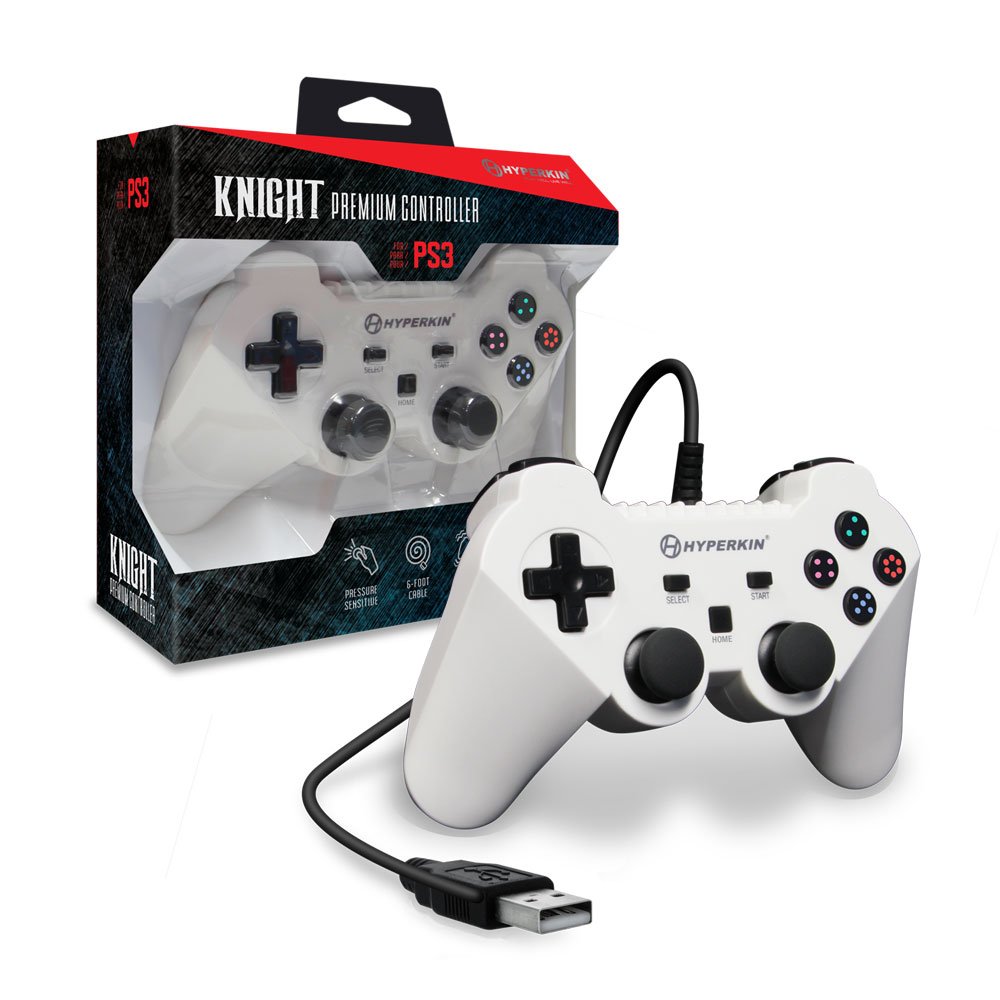
Image: The Hyperkin Knight Premium Controller displayed alongside its retail packaging, highlighting the product's design and branding.

Imagine: Un prim-plan view of the Hyperkin Knight Premium Controller's retail box, showcasincaracteristici cheie și elemente de design.

Imagine: Un unghi view of the Hyperkin Knight Premium Controller, emphasizing its ergonomic shape and button placement.