
Introducere
Thank you for choosing the ALLOYSEED Bluetooth FM Transmitter Car Charger. This device allows you to stream audio from your Bluetooth-enabled smartphone or tablet to your car's FM radio, make hands-free calls, and charge your mobile devices via its integrated USB port. Please read this manual carefully to ensure proper use and optimal performance.
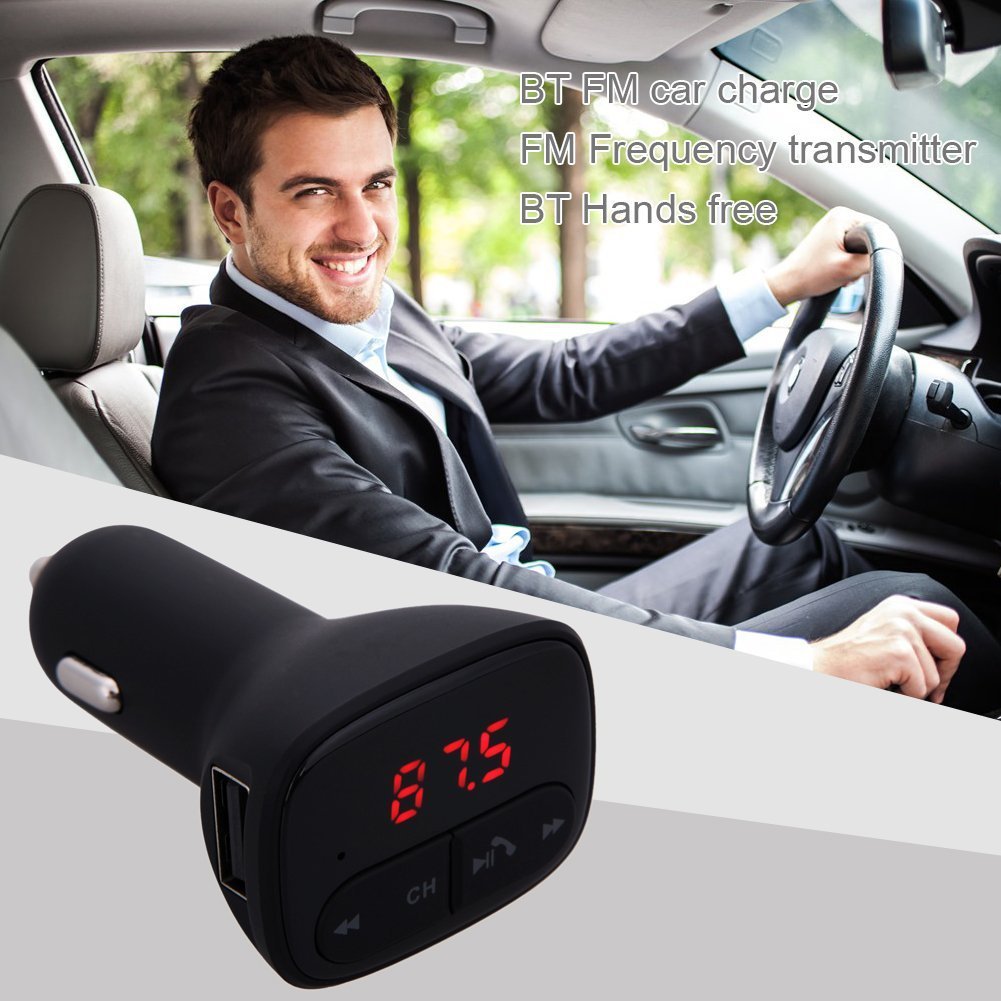
Image: The ALLOYSEED Bluetooth FM Transmitter Car Charger plugged into a car's cigarette lighter socket, with a driver in the background.
Informații de siguranță
- Nu dezasamblați sau modificați dispozitivul.
- Țineți dispozitivul departe de apă, umiditate și temperaturi extreme.
- Evitați expunerea dispozitivului la lumina directă a soarelui pentru perioade lungi de timp.
- Ensure the car's cigarette lighter socket provides the specified DC 12V~24V input voltage.
- Do not operate the device while driving if it distracts you from the road. Prioritize road safety.
Produs terminatview
Familiarize yourself with the components of your ALLOYSEED Bluetooth FM Transmitter Car Charger:
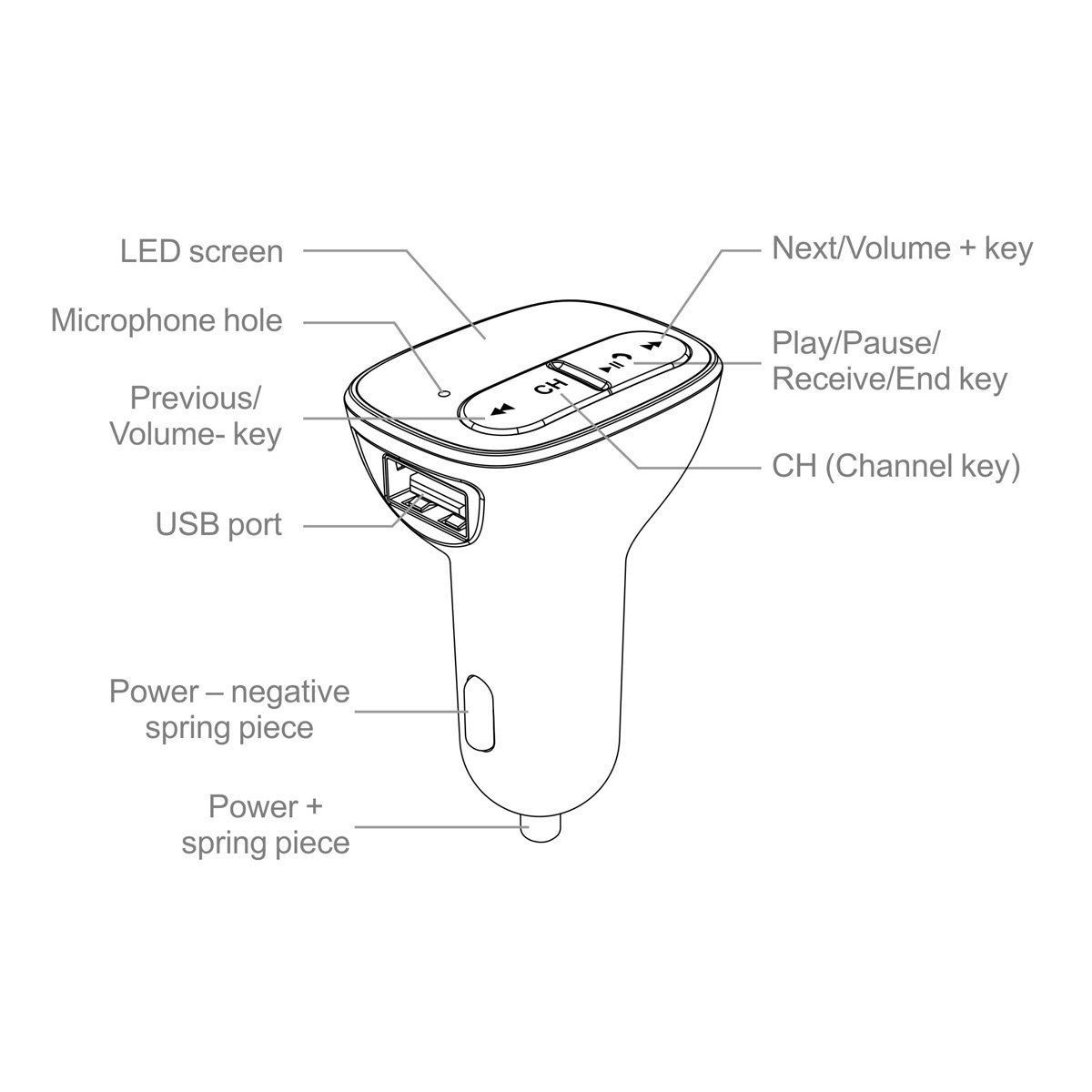
Image: A detailed diagram of the ALLOYSEED Bluetooth FM Transmitter Car Charger, highlighting its various components and controls.
- Ecran LED: Displays FM frequency.
- Microphone Hole: Pentru apeluri hands-free.
- Anterior/Volum- Key: Apăsare scurtă pentru piesa anterioară, apăsare lungă pentru a reduce volumul.
- Next/Volume+ Key: Apăsare scurtă pentru următoarea piesă, apăsare lungă pentru a crește volumul.
- Play/Pause/Receive/End Key: Short press to play/pause music, answer/end calls. Long press to reject calls.
- CH (Channel Key): Short press to enter FM frequency adjustment mode.
- Port USB: 2.1A output for charging mobile devices.
- Power - Negative Spring Piece: Connects to the negative terminal of the car's power socket.
- Power + Spring Piece: Connects to the positive terminal of the car's power socket.
Specificații
| Vol. De intraretage | DC 12V~24V |
| Curent de lucru | <100mA (when not charging) |
| Gama de frecvențe FM | 87.5 - 108.0MHz (0.1MHz increments) |
| Distanța de transmisie FM | <3 milion |
| Versiune Bluetooth | V2.1+EDR |
| Bluetooth Protocols Supported | A2DP / AVRCP / HSP / HFP |
| A2DP Transmission Distance | >5 M |
| Curentul de ieșire USB | 2.1A |
| Vol. ieșire USBtage | 5.2V |
| Greutatea articolului | 80 g |
Înființat
- Introduceți în priza mașinii: Plug the ALLOYSEED Bluetooth FM Transmitter into your car's 12V-24V cigarette lighter socket. The device will power on automatically, and the LED screen will display the current FM frequency.
- Pornire: The device powers on automatically when connected to the car's power.
Instrucțiuni de operare
1. Setting the FM Frequency
- Apăsați tasta CH (Channel) key. The frequency display on the LED screen will start flashing.
- Utilizați Previous/Volume- key or Next/Volume+ key to adjust the FM frequency. Select a frequency that is clear and not occupied by a local radio station.
- Once the desired frequency is set, wait a few seconds. The display will stop flashing, and the frequency will be saved.
- Tune your car's FM radio to the aceeasi frecventa as displayed on the transmitter.
2. Asociere Bluetooth
- After powering on, the device will automatically enter Bluetooth pairing mode. The LED screen may show a Bluetooth icon or similar indicator.
- Pe smartphone sau tabletă, activați Bluetooth și căutați dispozitivele disponibile.
- Select the device named "SEMINTE DE ALIE" (or similar) from the list to pair.
- Once paired, a confirmation sound or indicator may be heard/seen. You are now ready to stream audio.
3. Redarea muzicii
- After successful Bluetooth pairing, open your music player on your smartphone/tablet and start playing music.
- The audio will be transmitted to your car's FM radio.
- Utilizați Tasta Redare / Pauză on the transmitter to play or pause music.
- Utilizați Previous/Volume- key şi Next/Volume+ key for track navigation (short press) and volume adjustment (long press).
- The device has an automatic memory function, resuming the last played song when restarted.
4. Apeluri hands-free
- When a call comes in, the music will automatically pause.
- Apăsați tasta Play/Pause/Receive/End key once to answer the call.
- Pentru a termina un apel, apăsați tasta Play/Pause/Receive/End key încă o dată.
- Pentru a respinge un apel primit, apăsați lung tasta Play/Pause/Receive/End key.
- Microfonul încorporat permite o comunicare clară.
5. Dispozitive de încărcare
- Connect your mobile device (smartphone, tablet, etc.) to the Port USB on the transmitter using a compatible USB charging cable.
- The USB port provides a 2.1A output for efficient charging.
Întreţinere
- Curățați dispozitivul cu o lavetă moale și uscată. Nu utilizați agenți de curățare lichizi sau aerosoli.
- Ensure the USB port and cigarette lighter connector are free from dust and debris.
- Depozitați dispozitivul într-un loc răcoros și uscat atunci când nu îl utilizați pentru perioade lungi de timp.
Depanare
- Fără putere: Ensure the device is securely plugged into the car's cigarette lighter socket and that the car's ignition is on. Check the car's fuse for the cigarette lighter.
- Calitate slabă a sunetului/Static:
- Adjust the FM frequency on the transmitter and your car radio to find a clear, unoccupied channel.
- Ensure the volume on your phone and car radio is set appropriately.
- Move away from areas with strong radio interference.
- Bluetooth nu se asociază:
- Asigurați-vă că Bluetooth este activat pe dispozitivul dvs. mobil.
- Restart the transmitter by unplugging and re-plugging it.
- Ștergeți dispozitivul din setările Bluetooth ale telefonului și încercați din nou asocierea.
- Ensure the transmitter is within range of your phone.
- Încărcarea prin USB nu funcționează:
- Check if the charging cable is properly connected to both the device and the USB port.
- Încercați un alt cablu USB.
- Ensure the car charger is receiving power.
Garanție și suport
This product is covered by a warranty policy. For details regarding warranty coverage, terms, and conditions, please refer to the information provided at the point of purchase or contact ALLOYSEED customer support. Keep your purchase receipt as proof of purchase.
For technical assistance or further inquiries, please contact ALLOYSEED customer support through the official channels provided by the seller or manufacturer.


