
1. Introducere
Thank you for choosing the Stryker SR-94HPC 10 Meter Radio. This compact and powerful radio is designed for reliable communication, featuring AM/FM modulation, a full-color TFT display, and robust construction. This manual provides essential information for the proper setup, operation, and maintenance of your SR-94HPC radio to ensure optimal performance and longevity.
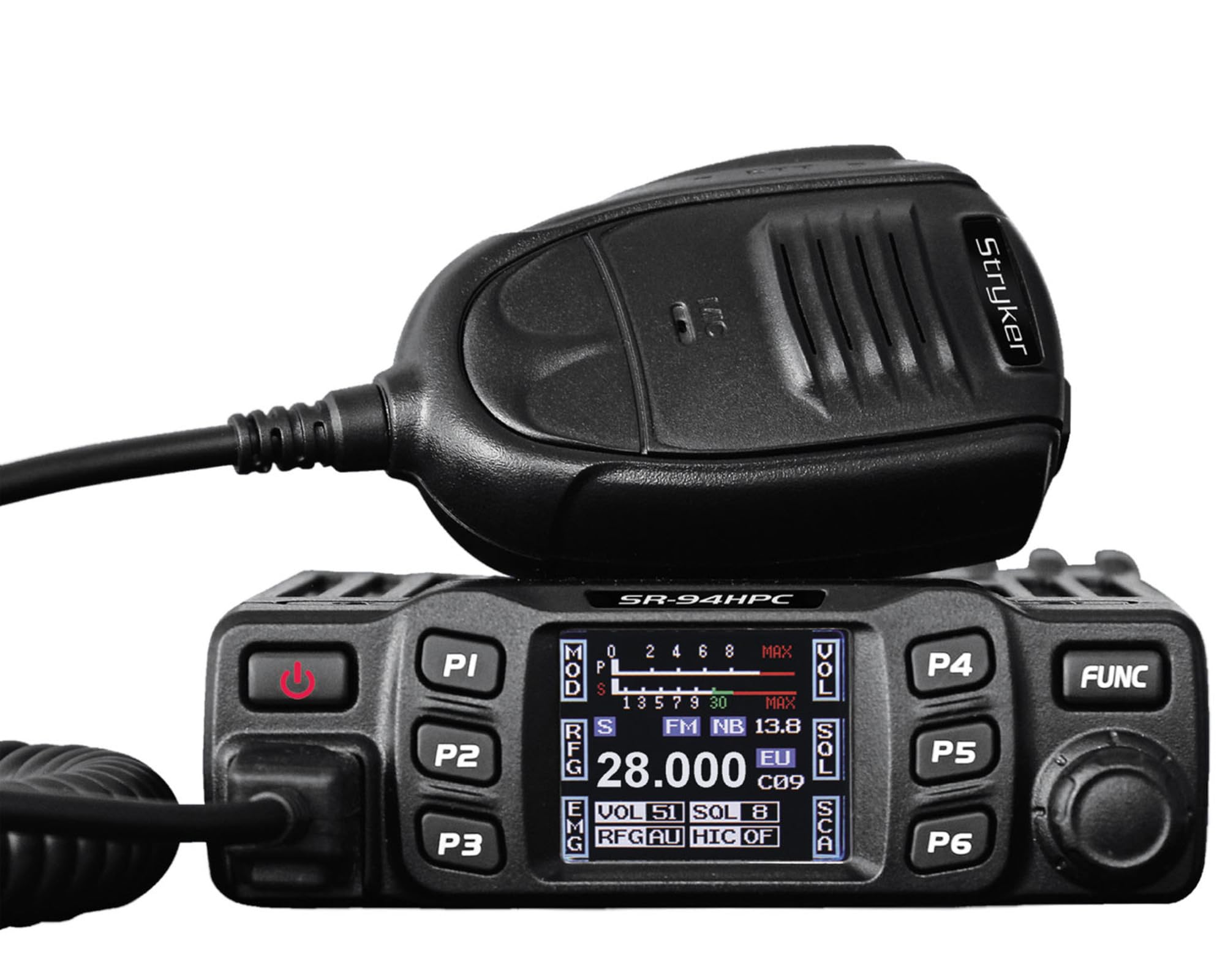
Figure 1: Stryker SR-94HPC 10 Meter Radio. This image shows the compact design of the radio, featuring its front panel with controls and the full-color TFT display.
2. Informații importante privind siguranța
Please read and understand all safety instructions before operating the radio. Failure to do so may result in injury, damage to the radio, or voiding the warranty.
- Sursa de alimentare: Connect the radio only to a 12V or 24V DC power source as specified. Incorrect voltagPoate deteriora unitatea.
- Antenă: Always connect a properly tuned antenna before transmitting. Transmitting without an antenna or with a poorly tuned antenna can cause damage to the radio's final transistors.
- Disiparea căldurii: Ensure adequate ventilation around the radio, especially the heat sink, to prevent overheating during prolonged transmission.
- Expunerea la apă: While the radio has some water resistance, avoid direct exposure to water or extreme moisture.
- Siguranța la conducere: Do not operate the radio in a manner that distracts you from driving. Prioritize road safety.
- Propunerea 65 Avertisment: Acest produs vă poate expune la substanțe chimice cunoscute de Statul California ca fiind cancerigene și cauzând malformații congenitale sau alte probleme reproductive. Pentru mai multe informații, accesați www.P65Warnings.ca.gov.
3. Conținutul pachetului
Verificați dacă toate articolele sunt prezente în colet:
- Stryker SR-94HPC 10 Meter Radio Unit
- Microfon
- Cablu de alimentare
- Suport de montare și hardware
- Manual de utilizare (acest document)
4. Comenzi și funcții
The SR-94HPC features a user-friendly interface with a full-color TFT display and intuitive controls. Familiarize yourself with the following:
- Full-Color TFT Display: Shows frequency, voltage, S units, functions, and other operational data. The display is designed for clarity and ease of reading while driving.
- Channel Selector/Encoder: Used to change channels and navigate menu options.
- Controlul volumului: Reglează nivelul de ieșire audio.
- Control squelch: Eliminates background noise when no signal is present.
- Butonul de mod: Switches between AM and FM modulation modes.
- Butoane funcționale: Access various radio features and settings. Refer to the on-screen menu for specific functions.
- Conector microfon: Front-panel connection for the supplied microphone.
- Buton PTT (Apăsare și Vorbire): Situat pe microfon, folosit pentru transmitere.
5. Configurare
Follow these steps for initial setup of your SR-94HPC radio:
- Montare: Securely mount the radio using the provided bracket and hardware in a location that allows for good ventilation and easy access to controls. Ensure the wrap-around cast aluminum heat sink has clear airflow.
- Conexiune antenă: Connect a 10-meter antenna with a UHF, SO-239 connector to the antenna port on the rear of the radio. Ensure the antenna is properly tuned for the 28.000 ~ 29.700MHz frequency range to prevent damage to the radio.
- Conexiune de alimentare: Connect the supplied power cable to the radio's power input. Connect the other end to a stable 12V or 24V DC power source in your vehicle or base station. Observe correct polarity (red to positive, black to negative).
- Conexiune microfon: Plug the microphone into the dedicated microphone jack on the front panel of the radio.
- Pornire inițială: Once all connections are secure, turn on the radio. The TFT display should illuminate, showing the current operating status.
6. Instrucțiuni de utilizare
This section details the basic operation of your Stryker SR-94HPC radio.
6.1 Pornire/Oprire
Press and hold the power button (usually integrated with the volume knob or a dedicated button) to turn the radio on or off. A quick tap of the power button may mute the audio.
6.2 Selectarea canalului
Rotate the Channel Selector knob to change the operating frequency or channel. The selected channel will be displayed on the TFT screen.
6.3 Modulation Mode
Press the Mode button to toggle between AM (Amplitude Modulation) and FM (Frequency Modulation) modes. The active mode will be indicated on the display.
6.4 Reglarea volumului și a squelch-ului
- Volum: Adjust the Volume knob to your desired listening level.
- Squelch: Rotate the Squelch knob clockwise until background noise disappears. Rotate counter-clockwise to hear weaker signals. The SR-94HPC may also feature an automatic squelch control (ASC) setting, which can be adjusted via the menu.
6.5 Transmisie
To transmit, press and hold the PTT button on the microphone. Speak clearly into the microphone. Release the PTT button to receive. Ensure the antenna is properly connected and tuned before transmitting to avoid damage.
6.6 Afișează informații
The full-color TFT display provides real-time information, including:
- Frecvență/Canal: Current operating frequency or channel number.
- Voltage: Vol. De intraretage to the radio.
- S Units: Signal strength indicator for received signals.
- Putere de ieșire: Indication of transmitted power.
- SWR: Standing Wave Ratio, indicating antenna tuning efficiency.
7. Întreținere
Proper maintenance ensures the longevity and reliable operation of your SR-94HPC radio.
- curatenie: Use a soft, dry cloth to clean the radio's exterior and display. Avoid abrasive cleaners or solvents.
- Sistem de antenă: Regularly check your antenna and coaxial cable for damage. Periodically verify your antenna's SWR (Standing Wave Ratio) to ensure efficient power transfer and prevent damage to the radio. An SWR meter can be used for this purpose.
- Radiator: Ensure the wrap-around cast aluminum heat sink on the rear of the radio remains free of obstructions to allow for proper heat dissipation, especially during high-power transmissions.
- Conexiuni: Verificați periodic toate conexiunile cablurilor (alimentare, antenă, microfon) pentru a vă asigura că sunt fixate și fără coroziune.
8. Depanare
If you encounter issues with your SR-94HPC, refer to the following common problems and solutions:
| Problemă | Cauza posibila | Soluţie |
|---|---|---|
| Radioul nu pornește. | No power connection; incorrect voltage; siguranță arsă. | Check power cable connections; verify 12V/24V DC source; inspect and replace fuse if necessary. |
| Fără sunet de la difuzor. | Volume too low; squelch set too high; speaker disconnected. | Increase volume; decrease squelch; check speaker connection. |
| "Error" message on display during transmission. | High SWR (Standing Wave Ratio); antenna not connected or poorly tuned. | Check antenna connection; tune antenna using an SWR meter. Do not transmit until SWR is acceptable. |
| Poor transmission or reception range. | Antenna issues; environmental interference; low power setting. | Verify antenna tuning and condition; check for local interference; ensure power output is set correctly. |
If the problem persists after attempting these solutions, please contact Stryker customer support for assistance.
9. Specificații
Detailed technical specifications for the Stryker SR-94HPC 10 Meter Radio:
| Caracteristică | Caietul de sarcini |
|---|---|
| Modul de modulare | AM/FM |
| Gama de frecvente | 28.000 ~ 29.700MHz (FM), 28.000 ~ 29.700MHz (AM) |
| Toleranță la frecvență | ±5.0 ppm |
| Vol. De intraretage | 12V / 24V DC |
| Controlul frecvenței | Sintetizator PLL |
| Interval de temperatură de funcționare | -4°F până la +131°F (-20°C până la +55°C) |
| Conector antenă | UHF, SO-239 |
| Putere de ieșire | 4 Watts FM/AM / 10 Watts AM/FM (PEP up to 45+ watts) |
| Transmission Interference | Inferior to 4nW (-54dBm) |
| Raspuns in frecventa | 300-3000Hz |
| Modulated Signal Distortion | Inferior to 5% |
| Impedanta de iesire | 50 ohmi |
| Respingerea imaginii | 70 dB |
| Respingerea canalului adiacent | 60 dB |
| Frecvențele IF | 1st: 10.695MHz, 2nd: 455KHz |
| Dimensiuni (lxlxh) | 4.88” x 6.42” x 1.54” (12.4 cm x 16.3 cm x 3.9 cm) |
| Greutate | Aproximativ. 1.48 lbs (0.67 kg) |
| Caracteristici speciale | Backlit Keys, Full-color TFT Display |
10. Garanție și asistență
Stryker Radios are manufactured to high-quality standards. For warranty information, please refer to the warranty card included with your product or visit the official Stryker Radios webPăstrați bonul fiscal ca dovadă a achiziției.
For technical support, troubleshooting assistance beyond this manual, or service inquiries, please contact Stryker customer support through their official channels. Contact information can typically be found on the manufacturer's website-ul.