
1. Introducere
Thank you for choosing the Comelit Classic Monitor, Model 6101N. This manual provides essential information for the correct installation, operation, and maintenance of your video intercom monitor. Please read these instructions carefully before using the device to ensure safe and efficient operation.
The Comelit Classic Monitor is designed to provide reliable video and audio communication for door entry systems, enhancing security and convenience for your home or office.
2. Informații de siguranță
- Siguranta electrica: Installation and maintenance should only be performed by qualified personnel. Disconnect power before performing any wiring or service.
- Mediu: Do not expose the monitor to extreme temperatures, humidity, direct sunlight, or corrosive substances.
- curatenie: Utilizați o cârpă moale și uscată pentru curățare. Nu utilizați agenți de curățare abrazivi sau solvenți.
- Modificari: Do not attempt to modify or repair the device yourself. Unauthorized modifications may void the warranty and pose safety risks.
3. Conținutul pachetului
Vă rugăm să verificați dacă toate componentele sunt prezente în pachet:
- Comelit Classic Monitor (Model 6101N)
- Suport de montare
- Șuruburi de montare și dibluri de perete
- Manual de instrucțiuni (acest document)
4. Produs terminatview
The Comelit Classic Monitor features a sleek design and intuitive controls for managing your door entry system. Below is an image of the monitor, highlighting its key features.
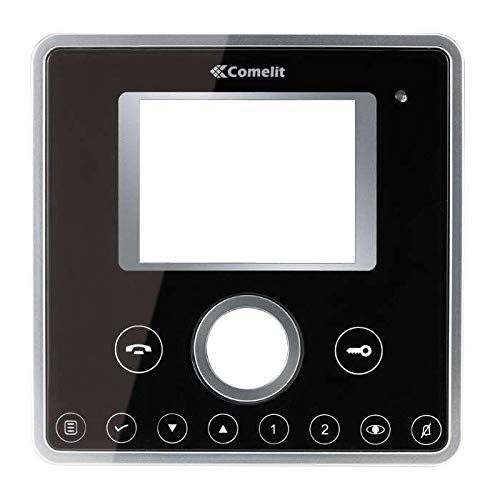
Figura 1: Față view of the Comelit Classic Monitor (Model 6101N). This image shows the monitor's display screen, handset, and control buttons. The monitor is black with a minimalist design.
Componentele cheie includ de obicei:
- Ecran de afișare: Shows video feed from the outdoor unit.
- Receptor: Pentru comunicare audio.
- Buton de eliberare a ușii: Activates the electric lock to open the door.
- Auxiliary Button: May control additional functions (e.g., secondary door, stair light).
- Controlul volumului: Adjusts ringtone and communication volume.
5. Configurare și instalare
Installation of the Comelit Classic Monitor requires electrical wiring and should ideally be performed by a qualified technician. Incorrect installation can lead to device malfunction or safety hazards.
5.1 Montarea monitorului
- Alegeți o locație potrivită pe un perete interior, departe de surse directe de căldură sau umiditate.
- Secure the mounting bracket to the wall using the provided screws and wall plugs. Ensure the bracket is level.
- Refer to the system wiring diagram (provided with your outdoor unit or system documentation) for correct cable connections.
- Connect the system cables to the monitor's terminals as indicated in the wiring diagram. Ensure all connections are secure.
- Carefully attach the monitor to the mounting bracket, ensuring it clicks securely into place.
5.2 Pornirea inițială
Once installed, restore power to the system. The monitor should power on and display a standby screen or indicator light. Perform a test call from the outdoor unit to verify proper operation.
6. Instrucțiuni de utilizare
6.1 Răspunsul la un apel
- When someone calls from the outdoor unit, the monitor will ring and display the video feed.
- Lift the handset to answer the call and begin two-way audio communication.
- Pentru a încheia apelul, puneți receptorul la loc.
6.2 Deschiderea ușii
During a call, or when the monitor is active, press the Buton de eliberare a ușii (often marked with a key symbol) to activate the electric lock and open the door.
6.3 Ajustarea setărilor
- Volum: Use the volume control (usually a rotary dial or buttons on the side/bottom) to adjust the ringtone and communication volume.
- Luminozitate/Contrast: Some models may have controls for adjusting screen brightness or contrast. Refer to specific model features if available.
7. Întreținere
- curatenie: Regularly wipe the monitor's surface and screen with a soft, dry, anti-static cloth. Do not use liquid cleaners directly on the screen or device.
- Inspecţie: Verificați periodic dacă există conexiuni slăbite sau deteriorări vizibile. Dacă găsiți probleme, contactați un tehnician calificat.
- Actualizări de software: If your system supports firmware updates, follow the manufacturer's instructions for applying them to ensure optimal performance and security.
8. Depanare
| Problemă | Cauza posibila | Soluţie |
|---|---|---|
| Nu se aude semnal video/audio de la unitatea exterioară. | Loose wiring, power issue, outdoor unit malfunction. | Check all connections. Ensure system has power. Contact technician if problem persists. |
| Monitorul nu pornește. | No power supply, faulty wiring, monitor malfunction. | Verify power supply to the system. Check wiring. Contact technician. |
| Deblocarea ușii nu funcționează. | Wiring issue to electric lock, faulty lock, monitor button malfunction. | Check wiring to the lock. Test the lock independently if possible. Contact technician. |
| Calitate video slabă. | Dirty camera lens (outdoor unit), poor wiring, interference. | Clean outdoor camera lens. Check wiring for damage or interference. |
9. Specificații
Below are the technical specifications for the Comelit Classic Monitor, Model 6101N:
- Număr de model: 6101N
- Producător: Comelit
- Tip produs: Monitor video interfon
- ASIN: B01MSE76EO
- Număr de produse: 1
- Prima dată disponibilă: 2 februarie 2017
- Note: Specific electrical and display specifications may vary by system configuration. Refer to your system's main documentation for full details.
10. Garanție și asistență
Comelit products are covered by a manufacturer's warranty. For specific warranty terms and conditions, please refer to the warranty card included with your product or visit the official Comelit webPăstrați dovada achiziției pentru reclamații în garanție.
For technical support, service, or further assistance, please contact your authorized Comelit dealer or visit the official Comelit support page:
Official Comelit Website: www.comelitgroup.com
Please have your model number (6101N) and purchase details ready when contacting support.