
1. Introducere
This manual provides essential instructions for the safe and efficient operation of your beFree Sound BFS-6445 Projection Party Light Dome Subwoofer Bluetooth Portable Speaker. Please read this manual thoroughly before using the product and retain it for future reference.
The beFree Sound BFS-6445 is a versatile portable speaker system featuring a 10-inch subwoofer, Bluetooth connectivity, USB/SD input, FM radio, and a unique projection light dome. It includes a wireless microphone and a remote control for enhanced functionality.
2. Produs terminatview
2.1 Caracteristici cheie
- Putere maximă de ieșire de 800 wați
- 10-inch Subwoofer for deep bass
- 7" x 4.5" LED Light Projection Dome
- Conectivitate fără fir Bluetooth
- USB and SD Card Input for media playback
- Tuner radio FM
- Microphone and Guitar Inputs with priority switch
- Bass, Treble, Echo, Mic Volume, and Guitar Volume Controls
- Built-in Side Handles, Rolling Handle, and Wheels for portability
- Includes Wireless Microphone and Remote Control
2.2 Componentele și comenzile difuzoarelor
Refer to the image below for a visual guide to the speaker's main components and control panel.

Figura 1: Faţă view of the beFree Sound BFS-6445 speaker, showing the projection light dome, control panel, 10-inch subwoofer grille, and included wireless microphone and remote control. The inset images highlight the light dome's color variations (green, blue, red), USB/SD card slots, Bluetooth logo, and FM radio icon.
The control panel, located on the top front of the speaker, provides access to various functions including volume, input selection, equalization, and light dome control.
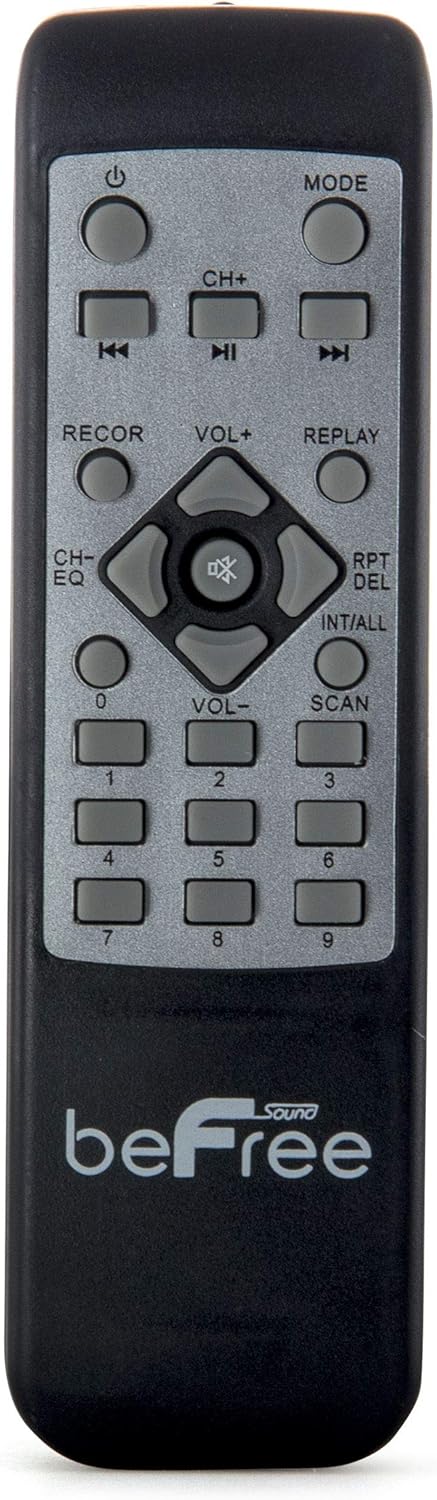
Figura 2: A închide view of the beFree Sound BFS-6445 remote control. It features buttons for power, mode selection, track navigation, volume adjustment, EQ, record, replay, scan, and numerical input.
The remote control allows for convenient operation of the speaker from a distance.
3. Configurare
3.1 Despachetarea și plasarea
- Scoateți cu grijă difuzorul și toate accesoriile din ambalaj.
- Așezați difuzorul pe o suprafață stabilă și plană. Asigurați o ventilație adecvată în jurul unității.
- The speaker is equipped with rolling wheels and an extendable handle for easy transport.
3.2 Conexiune la alimentare
- Connect the provided AC power cord to the speaker's AC input port (AC 100-240V, 50/60Hz).
- Conectați celălalt capăt al cablului de alimentare la o priză de perete adecvată.
- The speaker can operate on AC power.
3.3 Battery Installation (Remote Control & Wireless Microphone)
- Telecomanda: Open the battery compartment on the back of the remote control. Insert 2 x AAA batteries, ensuring correct polarity (+/-). Close the compartment.
- Microfon wireless: Open the battery compartment on the microphone. Insert 2 x AA batteries, ensuring correct polarity (+/-). Close the compartment.
4. Instrucțiuni de utilizare
4.1 Pornire/Oprire
Apăsați tasta PUTERE button on the control panel or remote control to turn the speaker on or off.
4.2 Selecție mod de intrare
Apăsați tasta MOD button on the control panel or remote control to cycle through available input modes: Bluetooth, USB, SD, FM Radio, and AUX (if an external device is connected via audio input).
4.3 Asociere Bluetooth
- Turn on the speaker and select Bluetooth mode using the MODE button. The display will indicate Bluetooth mode, and a pairing tone may sound.
- Activați Bluetooth pe dispozitivul mobil (smartphone, tabletă etc.).
- Caută available Bluetooth devices. The speaker will appear as "beFree Sound BFS-6445" or similar.
- Select the speaker from the list to pair. Once paired, a confirmation tone will sound.
- Acum poți reda sunet de pe dispozitiv prin difuzor.
4.4 Redare de pe USB/card SD
- Insert a USB flash drive or SD card into the respective slot on the control panel.
- Difuzorul va comuta automat în modul USB sau SD și va începe să redea sunet compatibil files. Dacă nu, apăsați butonul MOD pentru a selecta intrarea corectă.
- Utilizați REDARE/PAUZĂ, ANTERIOR, și URMĂTORUL buttons on the control panel or remote to control playback.
4.5 Funcționarea radioului FM
- Selecta Radio FM modul utilizând butonul MODE.
- Țineți apăsat butonul SCANĂ button (often the PLAY/PAUSE button) to automatically scan and save available FM stations.
- Utilizați ANTERIOR şi URMĂTORUL butoane pentru a naviga prin posturile salvate.
4.6 Intrări pentru microfon și chitară
- Conectați un microfon cu fir la INTRARE MIC jack.
- Conectați o chitară la INTRAREA CHITARII jack.
- Reglați VOLUM MIC şi VOLUMUL CHITARII knobs on the control panel to set desired levels.
- Utilizați COMUTATOR PRIORITATE MICROFOAN to enable or disable microphone priority. When enabled, the music volume will automatically lower when the microphone is in use.
- Reglați ECOU knob for microphone echo effects.
4.7 Light Projection Dome
The speaker features an integrated LED light projection dome. Use the LIGHT POWER SWITCH on the control panel to turn the light dome on or off. The dome projects various colored patterns to enhance the ambiance.
4.8 Reglarea sunetului
Utilizați BASS şi TRIPLA knobs on the control panel to adjust the low and high frequencies of the audio output.
Principalul VOLUM knob controls the overall output level of the speaker.
4.9 Using as Main or Passive Speaker
This speaker supports dual audio input/output, allowing it to be used in conjunction with another unit. Connect the audio output of one speaker to the audio input of another using an AV cable to amplify sound or create a stereo setup.
5. Întreținere
5.1 Curățare
- Deconectați întotdeauna difuzorul de la priză înainte de curățare.
- Folosiți o lavetă moale și uscată pentru a șterge suprafețele exterioare ale difuzorului.
- Nu utilizați agenți de curățare abrazivi, ceară sau solvenți, deoarece aceștia pot deteriora finisajul.
- Keep the speaker grilles free of dust and debris.
5.2 Depozitare
Când nu este utilizat pentru perioade lungi de timp, depozitați difuzorul într-un loc răcoros și uscat, ferit de lumina directă a soarelui și de temperaturi extreme. Dacă este posibil, folosiți ambalajul original pentru protecție.
6. Depanare
| Problemă | Cauza posibila | Soluţie |
|---|---|---|
| Fără putere | Cablul de alimentare nu este conectat; priza nu este activă; întrerupătorul este oprit. | Ensure power cord is securely connected. Check wall outlet with another device. Turn the speaker's power switch on. |
| Nici un sunet | Volume too low; incorrect input mode; device not paired (Bluetooth); media error (USB/SD). | Increase master volume. Select the correct input mode. Re-pair Bluetooth device. Check USB/SD card for compatible files and proper insertion. |
| Bluetooth nu se conectează | Speaker not in Bluetooth mode; device too far; interference; speaker already paired to another device. | Ensure speaker is in Bluetooth mode. Move device closer to speaker. Turn off other Bluetooth devices. Disconnect from previous device. |
| Microfonul nu funcționează | Microphone not powered; volume too low; incorrect input. | Check microphone batteries (if wireless) or connection (if wired). Increase MIC VOLUME. Ensure MIC PRIORITY switch is set correctly. |
| Light dome not working | Light power switch off. | Ensure the LIGHT POWER SWITCH is in the ON position. |
7. Specificații
- Tip difuzor: Subwoofer
- Dimensiune difuzor: 10 inchi
- Putere maximă de ieșire difuzor: 800 wați
- Tehnologie de conectivitate: Bluetooth, USB
- Caracteristici speciale: Portable, Projection Light Dome, FM Radio, USB/SD Input, Microphone/Guitar Input
- Metoda de control: Telecomandă, comenzi integrate în unitate
- Sursa de alimentare: AC 100-240V, 50/60Hz
- Dimensiunile produsului (A x L x Î): 13.5 cm x 12.5 cm x 29.75 cm
- Greutatea articolului: 30.3 lire sterline
- Baterii pentru telecomandă: 2 x AAA (incluse)
- Wireless Microphone Batteries: 2 x AA (inclus)
- Număr de model: BFS-6445
- UPC: 602573151884
8. Garanție și asistență
beFree Sound products are designed for reliability and performance. For warranty information, technical support, or service inquiries, please refer to the warranty card included with your purchase or contact beFree Sound customer service directly.
Vă rugăm să păstrați dovada achiziției pentru cererile de garanție.