
1. Produs terminatview
The Tenergy 11W Dimmable LED Desk Lamp (Model FY-0001) is designed to provide versatile lighting for various tasks, featuring adjustable brightness, multiple color temperatures, and a convenient USB charging port. Its sleek design and flexible arm make it suitable for home and office environments.

Image: The Tenergy 11W LED Desk Lamp, spectacolasing its modern design and adjustable features.
2. Ce se află în cutie
- Tenergy 11W Dimmable LED Desk Lamp
- Cablu de încărcare USB
- Adaptor de alimentare
- Manual de utilizare (acest document)

Image: The Tenergy 11W LED Desk Lamp and its included accessories laid out on a surface.
3. Configurare
- Scoateți cu grijă toate componentele din ambalaj.
- Așezați lamp baza pe o suprafață plană și stabilă.
- Conectați adaptorul de alimentare la lamp's power input port, typically located at the rear of the base.
- Plug the power adapter into a standard electrical outlet. The lamp's indicator light should illuminate, indicating it is ready for use.
4. Instrucțiuni de utilizare
4.1 Pornire/Oprire
Pentru a întoarce lamp on or off, gently touch the Pornit/Oprit button located on the touch control panel on the lampbaza lui.
4.2 Reglarea luminozității
Lamp offers 5 levels of brightness. Use the + şi - buttons on the touch control panel to increase or decrease the light intensity.
4.3 Changing Light Modes (Color Temperature)
Lamp features 4 distinct light modes, each with a different color temperature, optimized for various activities:
- Modul de citire: Provides a bright, neutral white light ideal for reading.
- Study Mode: Offers a cooler, more focused light to enhance concentration.
- Modul de relaxare: Emits a warm, soft light for a comfortable and calming atmosphere.
- Modul de somn: Delivers a very warm, dim light suitable for winding down before sleep.
To switch between these modes, repeatedly touch the corresponding icon on the control panel.

Image: Visual representation of the four adjustable light color temperatures available on the lamp.
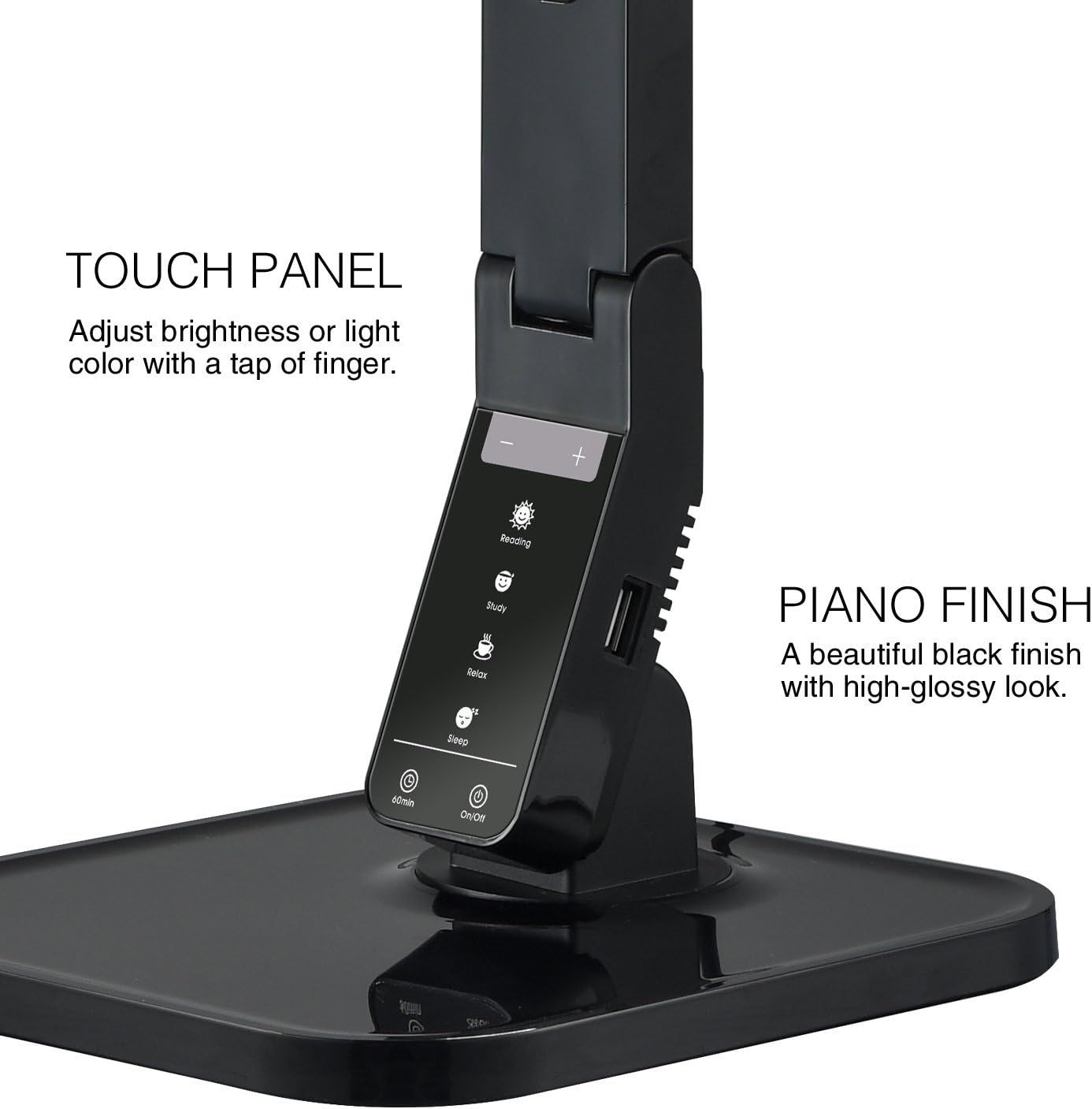
Image: The touch control panel with various light mode and brightness adjustment icons.
4.4 Utilizarea portului de încărcare USB
A USB charging port is integrated into the lamp's base, allowing you to charge compatible devices such as smartphones or tablets. Simply connect your device's USB charging cable to the port.

Image: A smartphone being charged via the integrated USB port on the lampbaza lui.
4.5 Reglarea Lamp Braţ
Lamp features an adjustable arm that allows you to direct the light precisely where needed. The arm can be folded, extended, and swiveled to achieve optimal positioning.

Image: Illustrations demonstrating the flexibility and adjustability of the lamp's arm.
4.6 Funcția de cronometru
Lamp includes a 60-minute timer function. To activate, press the 60 min button on the control panel. The lamp se va opri automat după 60 minute.
4.7 Videoclip oficial al produsului
Video: An official product video from Tenergy Corporation demonstrating the features and benefits of the 11W LED Desk Lamp, including its adjustable lighting, USB charging, and sleek design.
5. Întreținere
- curatenie: Pentru a curăța lamp, especially its glossy finish, use a soft, dry microfiber cloth. Avoid abrasive cleaners or harsh chemicals that may damage the surface.
- Depozitare: Când nu este utilizat pentru perioade lungi de timp, depozitați l-ulamp într-un loc răcoros și uscat.
6. Depanare
- Lamp nu se aprinde: Asigurați-vă că adaptorul de alimentare este conectat bine la ambele lamp and a working electrical outlet. Check if the outlet is receiving power.
- USB port not charging: Verificați lamp is powered on and the USB cable is properly connected to both the lamp and your device. Ensure your device is compatible with USB charging.
- Pâlpâire de lumină: If the light flickers, try unplugging the lamp for a few minutes and then plugging it back in. If the issue persists, contact customer support.
7. Specificații
| Numărul de model | FY-0001 |
| Marca | Tenergy |
| Wattage | 11 wați |
| Tip sursă de lumină | LED |
| Niveluri de luminozitate | 5 |
| Light Colors / Modes | 4 (Reading, Study, Relax, Sleep) |
| Metoda de control | Atingere |
| Tehnologia de conectivitate | USB |
| Sursa de alimentare | Electric cu fir |
| Dimensiunile produsului | 7" D x 6.75" L x 16.7" H |
| Tip material | Plastic |
| Tip de finisare | Lucios |
8. Garanție și asistență
For warranty information or technical support, please visit the official Tenergy website-ul lor web sau contactați departamentul de asistență pentru clienți. Păstrați bonul fiscal pentru orice reclamații în garanție.
Tenergy Store: https://www.amazon.com/stores/Tenergy/page/5AE2FFA8-E197-4708-9169-C4D8CB488E9E


