
1. Introducere
The Avantree Roxa Plus is an aptX Low Latency Bluetooth audio receiver designed to enable wireless audio streaming to your home stereo system, speakers, or other audio devices. It connects to an AC outlet for power and features a USB charging port for convenience.
2. Conținutul pachetului
- Avantree Roxa Plus Bluetooth Receiver
- Cablu audio de 3.5 mm
- RCA Audio Cable (3.5mm female to split RCA plugs)
- Ghid de pornire rapidă
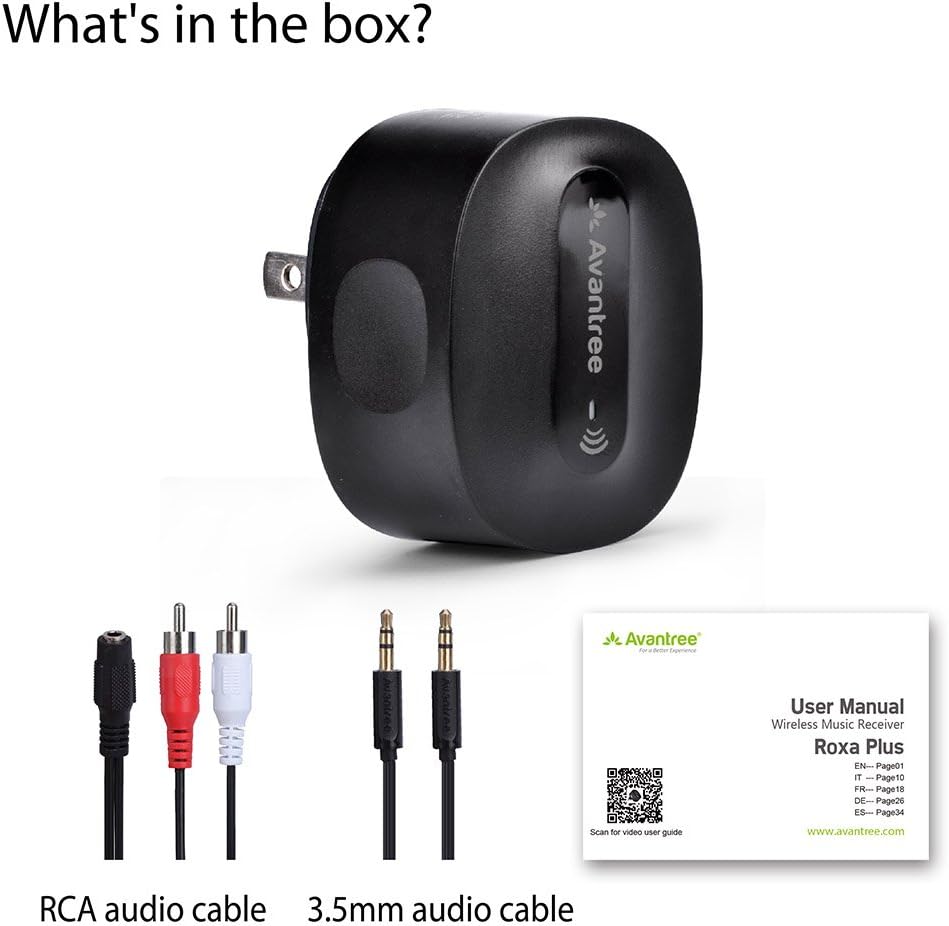
The package includes the Avantree Roxa Plus Bluetooth receiver, an RCA audio cable, a 3.5mm audio cable, and a quick start guide to assist with setup.
3. Produs terminatview
Caracteristici cheie:
- Bluetooth-Enable Your Audio System: Stream audio wirelessly from any Bluetooth-enabled device to your home stereo or speakers.
- Plug & Play: Simple setup with automatic connection after initial pairing.
- Alimentare AC: No internal battery, ensuring continuous operation without the need for charging.
- Latență redusă aptX: Reduces Bluetooth audio delay for synchronized sound, ideal for watching TV and movies.
- Port de încărcare USB: Charge your mobile devices simultaneously while using the receiver.
4. Configurare
4.1 Conectarea la sistemul audio
- Plug the Avantree Roxa Plus directly into a standard AC wall outlet. The device will power on automatically.
- Connect the Roxa Plus to your home stereo system or speakers using one of the provided audio cables:
- For a 3.5mm AUX input on your audio system, use the 3.5mm to 3.5mm audio cable.
- For RCA (red/white) inputs on your audio system, use the 3.5mm female to split RCA cable.

The Avantree Roxa Plus allows you to stream audio wirelessly from your Bluetooth-enabled device to your home stereo or speaker system.
4.2 Împerecherea cu un dispozitiv Bluetooth
- Once powered on, the Roxa Plus will automatically enter pairing mode. The LED indicator will flash to show it is ready to connect.
- On your Bluetooth-enabled device (e.g., smartphone, tablet, PC), go to the Bluetooth settings and search for new devices.
- Select "RoxaPlus" from the list of available devices to connect.
- Once connected, the LED indicator on the Roxa Plus will turn solid, and you can begin streaming audio.

Setting up the Roxa Plus is straightforward. Plug it into an AC outlet, connect it to your audio system using the provided AUX or RCA cable, and then pair it with your smartphone via Bluetooth.
5. Instrucțiuni de utilizare
5.1 Operare de bază
- After initial pairing, the Roxa Plus will automatically reconnect to the last paired device when both are powered on and within range.
- Control audio playback (play/pause, skip tracks) and volume directly from your connected Bluetooth device.
5.2 Utilizarea portului de încărcare USB
The Roxa Plus features a USB charging port (5V/1A output) on its side. You can use this port to charge your smartphone, tablet, or other USB-powered devices while the Roxa Plus is plugged into an AC outlet and functioning as an audio receiver.

The Roxa Plus includes a convenient USB charging port, allowing you to charge your smartphone, tablet, or other USB-powered devices while the receiver is in use.
5.3 aptX Low Latency Audio
The Roxa Plus supports aptX Low Latency, which significantly reduces audio delay when paired with an aptX Low Latency enabled Bluetooth transmitter (e.g., Avantree Oasis). This ensures that audio and video are synchronized, providing a better experience for watching movies or playing games.

Featuring aptX Low Latency technology, the Roxa Plus minimizes audio delay, ensuring synchronized sound for an optimal viewing or listening experience, especially when paired with an aptX Low Latency transmitter.
6. Întreținere
- Keep the device dry. Moisture can damage the internal circuits.
- Nu expuneți dispozitivul la temperaturi extreme.
- Curățați dispozitivul cu o lavetă moale și uscată. Nu utilizați substanțe chimice dure sau detergenți.
- Păstrați dispozitivul într-un loc răcoros și uscat atunci când nu este utilizat.
7. Depanare
7.1 Nu se poate conecta la un dispozitiv Bluetooth
- Ensure the Roxa Plus is powered on and in pairing mode (LED flashing).
- Make sure your Bluetooth device is within range (up to 33 feet) and its Bluetooth function is enabled.
- Turn off Bluetooth on any other nearby devices that might be trying to connect to the Roxa Plus.
- Try restarting both the Roxa Plus (unplug and replug) and your Bluetooth device.
7.2 Fără sunet
- Verify that the Roxa Plus is successfully paired with your Bluetooth device.
- Check that the audio cable is securely connected between the Roxa Plus and your audio system.
- Ensure your audio system is set to the correct input source (e.g., AUX, RCA).
- Adjust the volume on both your Bluetooth device and your audio system.
7.3 Întârziere audio
- For minimal audio delay, ensure your transmitting Bluetooth device also supports aptX Low Latency.
- Environmental factors or interference can sometimes cause minor delays. Try moving devices closer or away from other wireless electronics.
8. Specificații
| Model | BTRC-300L-BGY-US |
| Dimensiunile produsului | 2.13 x 1.77 x 1.02 inci |
| Greutatea articolului | 1.9 uncii |
| Tehnologia de conectivitate | Bluetooth |
| Sursa de alimentare | Corded Electric (AC Plug) |
| Producător | Avantree |
9. Informații de siguranță
- Manevrați dispozitivul cu grijă. Evitați să îl scăpați sau să îl supuneți la impacturi puternice.
- Nu încercați să dezasamblați sau să modificați dispozitivul. Acest lucru poate anula garanția și poate provoca daune.
- Keep the device away from water, fire, and high voltage echipamente.
- Dispose of the device responsibly according to local regulations. Do not dispose of with household waste.
- This device may cause interference with other wireless devices. Maintain a reasonable distance from other electronics to prevent disruption.
10. Garanție și asistență
Produsele Avantree beneficiază de garanția producătorului. Pentru informații detaliate despre garanție, asistență tehnică sau pentru a vă înregistra produsul, vă rugăm să vizitați site-ul oficial Avantree. website-ul lor sau contactați direct serviciul lor de asistență pentru clienți.
Official Avantree Support: www.avantree.com/support
