
1. Introducere
The BSIDE ELM02 is an auto-ranging digital lux/FC meter designed for measuring light illuminance. It provides accurate and easy-to-read measurements across a wide range, suitable for various applications requiring light level assessment. This manual provides detailed instructions for the proper use, setup, operation, and maintenance of your ELM02 meter.
2. Informații de siguranță
- Citiți cu atenție toate instrucțiunile înainte de a utiliza dispozitivul.
- Do not expose the meter to extreme temperatures, humidity, or direct sunlight.
- Avoid dropping or subjecting the meter to strong impacts.
- Do not attempt to open or modify the meter; this will void the warranty and may cause damage.
- Remove the battery if the meter is not used for an extended period to prevent leakage.
- Keep the sensor clean and free from obstructions for accurate readings.
3. Produs terminatview
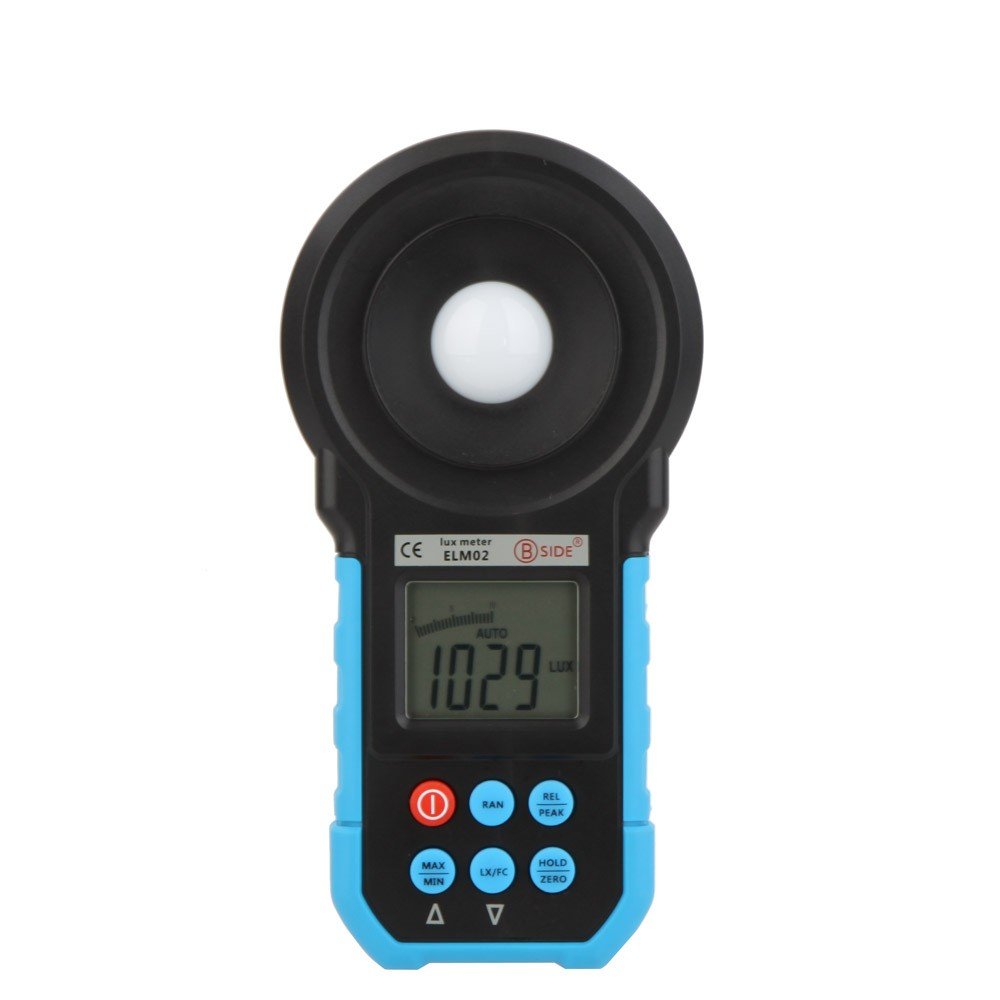
Figura 3.1: Față view of the BSIDE ELM02 Digital Lux/FC Meter, showing the light sensor, LCD display, and control buttons.
3.1 Componente
- Senzor de lumină: Detects ambient light levels.
- Display LCD: Afișează valorile măsurate, unitățile de măsură și diverși indicatori.
- Butoane de control: For operating different functions of the meter.
- Compartiment baterie: Located at the rear for 9V battery installation.
3.2 Butoane de control

Figura 3.2: Prim-plan view of the BSIDE ELM02 control buttons, including Power, RAN, REL/PEAK, MAX/MIN, LX/FC, and HOLD/ZERO.
- Buton de alimentare (1.): Turns the meter ON or OFF.
- Buton RAN (Rază): Toggles between auto-ranging and manual ranging modes. The ELM02 primarily operates in auto-range.
- REL/PEAK Button: Short press for Relative mode, long press for Peak value display.
- Butonul MAX/MIN: Displays the maximum or minimum measured value.
- LX/FC Button: Switches the measurement unit between Lux and Foot-Candles (FC).
- HOLD/ZERO Button: Short press to hold the current reading, long press for Zero Calibration.
4. Configurare
4.1 Instalarea bateriei
- Localizați capacul compartimentului bateriilor pe spatele contorului.
- Glisați sau deșurubați capacul pentru a-l deschide.
- Insert one 9V (6F22) battery, observing the correct polarity (+/-).
- Puneți bine capacul compartimentului bateriei.
The meter will display a low battery indicator on the LCD when the battery needs replacement.
5. Instrucțiuni de utilizare
5.1 Pornire/Oprire
- To turn ON the meter, press the 1. butonul (pornire).
- To turn OFF the meter, press and hold the 1. (Power) button until the display turns off.
5.2 Preluarea măsurătorilor
- Porniți contorul.
- Ensure the light sensor is clean and pointed towards the light source you wish to measure.
- The meter will automatically select the appropriate range for measurement (Auto Range function).
- Valoarea curentă a iluminanței va fi afișată pe ecranul LCD.
5.3 Unit Selection (Lux/FC)
Apăsați tasta LX/FC button to toggle between Lux and Foot-Candle (FC) measurement units. The selected unit will be indicated on the LCD.
5.4 Funcția de păstrare a datelor
Apăsați tasta HOLD/ZERO button briefly to freeze the current reading on the display. Press it again to release the hold function and resume live measurements.
5.5 Peak Value Display
Țineți apăsat butonul REL/VÂRF button to enter Peak mode. The meter will display the maximum light intensity detected during the measurement period. Press and hold again to exit Peak mode.
5.6 Relative Mode Measurement
Apăsați tasta REL/VÂRF button briefly to enter Relative mode. The current reading becomes the reference value, and subsequent measurements are displayed as the difference from this reference. Press again to exit Relative mode.
5.7 Funcția MAX/MIN
Apăsați tasta MAX/MIN button to cycle through the maximum, minimum, and current readings recorded since the function was activated. Press and hold to clear the recorded MAX/MIN values.
5.8 Calibrare la zero
Într-un mediu întunecat (de exemplu, cu capacul senzorului pus), apăsați și mențineți apăsat butonul HOLD/ZERO button to perform zero calibration. This ensures accuracy by setting the baseline reading to zero in the absence of light.
5.9 Oprire automată
The meter features an auto power-off function to conserve battery life. If no button is pressed for approximately 15 minutes, the meter will automatically shut down. To disable this feature temporarily, refer to the full user manual if available (not detailed in provided data).
6. Specificații
| Domeniul de măsurare | 20~200000 Lux; 20/200/2000/20000 FC |
| SampLing Time | 2 ori / secundă |
| Tip senzor | Diodă fotoelectrică din siliciu |
| Gama spectrală | 320~730 nm |
| Alimentare electrică | 1 x 9V battery (6F22) |
| Afişa | LCD with analogue bar graph |
| Caracteristici | Auto Range, Data Hold, Peak Value, Relative Mode, Lux/FC Switch, Low Battery Indicator, Zero Calibration, Auto Power Off |
| Numărul de model | BSIDE ELM02 Auto Range Digital LCD |
| ASIN | B01K1GG268 |
| Data primului disponibil | 22 iulie 2015 |
7. Întreținere
7.1 Curățare
- Wipe the meter's exterior with a soft, dry cloth.
- Nu utilizați agenți de curățare abrazivi sau solvenți.
- Keep the light sensor clean and free of dust or smudges for accurate readings. Use a soft brush or lens cloth if necessary.
7.2 Depozitare
- Depozitați glucometrul într-un loc răcoros și uscat, ferit de lumina directă a soarelui și de temperaturi extreme.
- Dacă depozitați dispozitivul pentru o perioadă lungă de timp, scoateți bateria pentru a preveni scurgerile și eventualele deteriorări ale acestuia.
- Utilize the provided carrying bag for protection during storage and transport.

Figure 7.1: The BSIDE ELM02 meter, carrying bag, and user manual.
8. Depanare
| Problemă | Cauză/Soluție posibilă |
|---|---|
| Contorul nu pornește | Check battery installation and polarity. Replace with a fresh 9V battery if necessary. |
| Citiri inexacte | Ensure the light sensor is clean and unobstructed. Perform Zero Calibration in a dark environment. Check for stable light conditions. |
| Display shows 'OL' or '---' | The measurement is out of the meter's range. Move to an area with lower or higher light intensity as appropriate. |
9. Conținutul pachetului
- 1 x BSIDE ELM02 Digital Lux/FC Meter
- 1 x manual în limba engleză
- 1 x Geantă de transport
10. Garanție și asistență
Pentru informații despre garanție sau asistență tehnică, vă rugăm să consultați documentația furnizată odată cu achiziția sau să contactați direct producătorul. Păstrați bonul fiscal ca dovadă a achiziției.