
LyxPro SPA-5.5
Manual de instrucțiuni pentru monitorul difuzorului PA LyxPro SPA-5.5 mic
Model: SPA-5.5
1. Introducere
This manual provides detailed instructions for the proper setup, operation, and maintenance of your LyxPro SPA-5.5 Small PA Speaker Monitor. Please read this manual thoroughly before using the device to ensure optimal performance and safety.
The LyxPro SPA-5.5 is a compact and powerful active speaker system featuring a Class-D amplifier, a 3-channel mixer, and a 3-band equalizer. It is designed for various applications including vocal and instrument monitoring, public address, and as a guitar amplifier or karaoke system.
2. Instrucțiuni de siguranță
- Sursa de alimentare: Connect the unit only to the specified power supply (100V – 240V AC). Ensure the power cord is not damaged or pinched.
- Ventilare: Nu blocați orificiile de ventilație. Asigurați o circulație adecvată a aerului în jurul unității pentru a preveni supraîncălzirea.
- Apă și umiditate: Nu expuneți unitatea la ploaie, umezeală sau alte lichide. Nu așezați obiecte umplute cu lichide pe unitate.
- Surse de caldura: Țineți unitatea departe de surse de căldură, cum ar fi calorifere, registre de căldură, sobe sau alte aparate producătoare de căldură.
- curatenie: Curățați doar cu o cârpă uscată. Deconectați de la priză înainte de curățare.
- Service: Nu încercați să reparați singur acest produs. Consultați toate lucrările de service către personalul calificat de service.
- Plasare: Place the unit on a stable surface. If mounting on a microphone stand, ensure the stand is stable and capable of supporting the unit's weight.
3. Conținutul pachetului
Verificați dacă toate articolele sunt prezente în colet:
- LyxPro SPA-5.5 Speaker Monitor
- Cablu de alimentare
- Microphone Stand Mounting Hardware
- Manual de utilizare (acest document)
4. Caracteristicile produsului
- 125W RMS / 150W Peak Class-D Ampmai în viață
- Integrated 3-Channel Mixer
- 3-Band Equalizer (Bass, Mid, Treble)
- +48V Phantom Power Supply for Condenser Microphones
- Multiple Inputs: XLR, 1/4" (6.35mm), RCA, and 3.5mm (1/8") Aux
- Instrument Switch for Direct Instrument Connection
- XLR Thru Connection for Daisy-Chaining
- Controlul ecoului
- Conectivitate Bluetooth încorporată
- Compatibilitate card SD
- Mounts on Standard Microphone Stands
- Durable and Compact Design
5. Controale și conexiuni
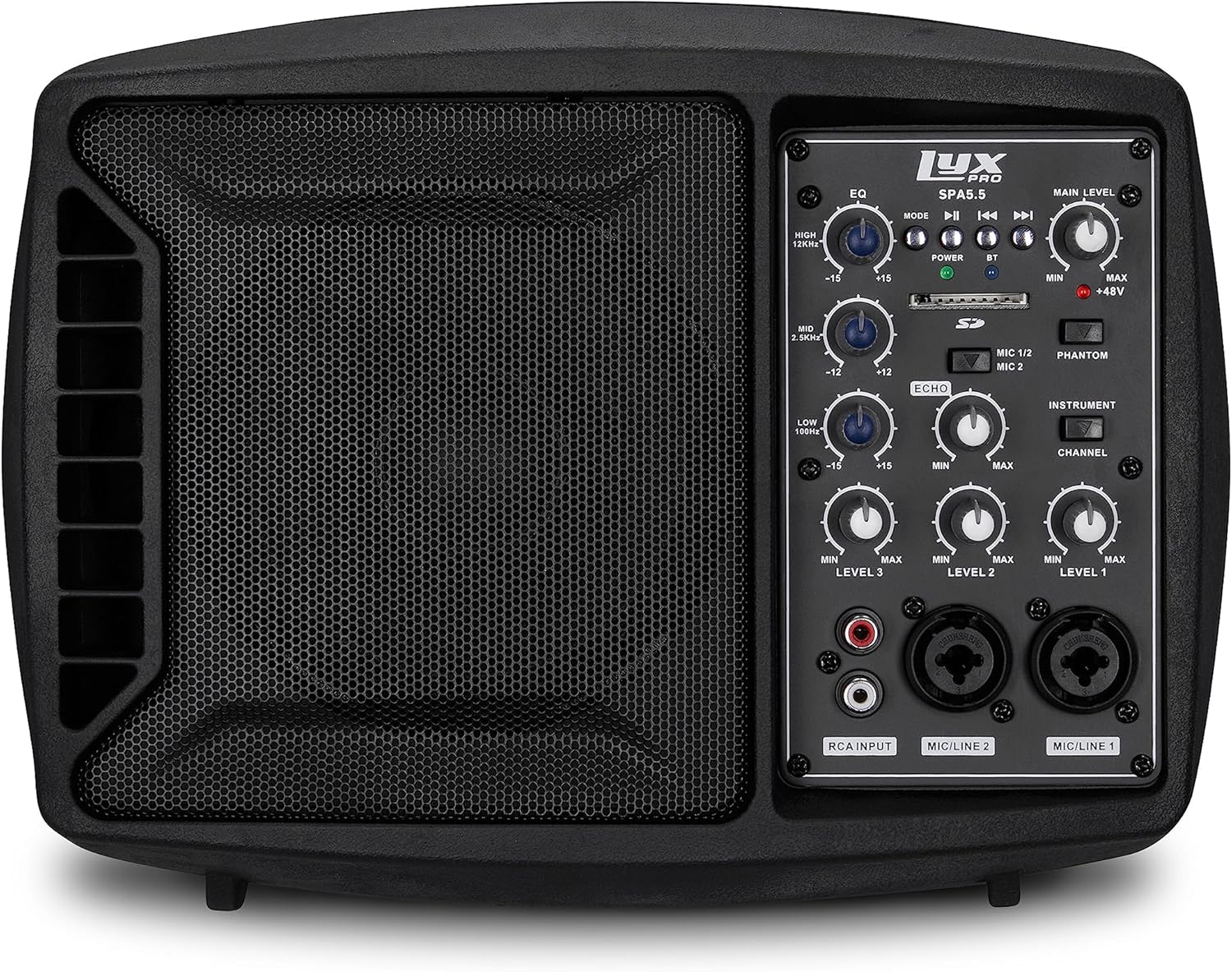
Figura 5.1: Față view of the LyxPro SPA-5.5 speaker monitor, showing the speaker grille and control panel.
5.1 Controale panoului frontal

Figure 5.2: Detailed diagram of the LyxPro SPA-5.5 front control panel with labeled components.
- Egalizator (EQ):
- ÎNALT (12kHz): Adjusts high frequencies. Range: ±15dB.
- MID (2.5 kHz): Adjusts mid frequencies. Range: ±15dB.
- LOW (80Hz): Adjusts low frequencies. Range: ±15dB.
- Nivelul principal: Controlează volumul general de ieșire al difuzorului.
- Lumina de putere: Indică atunci când unitatea este pornită.
- BT (Bluetooth) Light: Indică starea conexiunii Bluetooth.
- Slot pentru card SD: Pentru redarea audio files de pe un card SD.
- Comutator de alimentare Phantom (+48V): Activates +48V phantom power for condenser microphones connected to MIC 1 or MIC 2.
- MIC 1/2 Switch: Selects between MIC 1 and MIC 2 inputs for Channel 1.
- Comutator instrument: Optimizes input impedance for direct connection of instruments (e.g., guitar) to Channel 1.
- Controlul ecoului: Adjusts the level of echo effect applied to microphone inputs.
- Channel Level Controls (LEVEL 1, LEVEL 2, LEVEL 3): Adjusts the individual volume for each input channel.
- RCA Input (LINE 3): Stereo RCA inputs for connecting devices like CD players, MP3 players, or keyboards.
- MIC/LINE 2 Input: Combo XLR/1/4" (6.35mm) input for microphones or line-level devices.
- MIC/LINE 1 Input: Combo XLR/1/4" (6.35mm) input for microphones or line-level devices.
5.2 Conexiuni la panoul din spate

Figure 5.3: Detailed diagram of the LyxPro SPA-5.5 rear panel with labeled connections.
- MAIN IN (XLR): Main input for connecting external audio sources.
- MIC/LINE Level Switch: Selects between microphone or line level for the MAIN IN.
- THRU (XLR): XLR output for daisy-chaining to other speakers or sending the mixed signal to another device.
- Întrerupător: Pornește sau oprește unitatea.
- INTRARE CA: Power connector for the included AC power cable (100V – 240V AC).
6. Configurare
6.1 Pornirea inițială
- Ensure all level controls (Main Level, Channel Levels) are set to minimum.
- Connect the provided AC power cable to the AC INPUT on the rear panel and then to a suitable power outlet.
- Flip the Power Switch on the rear panel to the "ON" position. The Power Light on the front panel will illuminate.
6.2 Opțiuni de montare
The SPA-5.5 can be used in various configurations:
- Monitor de podea: Place the unit on the floor in front of the performer, angled upwards.
- Masa: Poziționați pe o suprafață plană, stabilă.
- Microphone Stand Mounting: The unit includes hardware to mount it directly onto a standard microphone stand.

Figure 6.1: The LyxPro SPA-5.5 speaker monitor positioned on a microphone stand, demonstrating its use as a personal monitor for a musician.

Figure 6.2: A band performing outdoors, utilizing the compact LyxPro SPA-5.5 speaker for sound reinforcement.
7. Instrucțiuni de utilizare
7.1 Conectarea microfoanelor și instrumentelor
- Microfoane: Connect dynamic or condenser microphones to the MIC/LINE 1 or MIC/LINE 2 inputs using XLR cables. If using a condenser microphone, activate the +48V Phantom Power Switch. Adjust the corresponding Channel Level control.
- Instrumente: Connect instruments (e.g., guitar, bass) directly to MIC/LINE 1 or MIC/LINE 2 using a 1/4" (6.35mm) cable. Engage the Instrument Switch for optimal impedance matching. Adjust the corresponding Channel Level control.
- Dispozitive la nivel de linie: Connect devices like keyboards or audio interfaces to MIC/LINE 1 or MIC/LINE 2 using 1/4" (6.35mm) cables. Ensure the Instrument Switch is disengaged. Adjust the corresponding Channel Level control.
- Stereo Audio Sources: Connect CD players, MP3 players, or other stereo sources to the RCA Input (LINE 3). Adjust LEVEL 3.
7.2 Reglarea sunetului
- Channel Levels: Use the LEVEL 1, LEVEL 2, and LEVEL 3 controls to balance the volume of individual inputs.
- Nivelul principal: Adjust the Main Level knob to control the overall output volume of the speaker.
- Egalizator (EQ): Use the HIGH, MID, and LOW knobs to shape the tone of your sound.
- Increase HIGH for brighter sound.
- Adjust MID for vocal clarity or instrument presence.
- Increase LOW for more bass.
- Controlul ecoului: Turn the Echo knob to add a reverberation effect to the microphone inputs.
7.3 Media Playback (SD Card & Bluetooth)

Figure 7.1: Icons indicating SD card compatibility and built-in Bluetooth functionality on the LyxPro SPA-5.5.
- Card SD: Introduceți un card SD care conține fișiere audio files into the SD Card Slot. The unit will automatically detect and begin playback. Use the built-in controls (Mode, Play/Pause, Skip) to manage playback.
- Bluetooth:
- Asigurați-vă că unitatea este pornită.
- Activați Bluetooth pe dispozitivul dvs. mobil.
- Caută "LyxPro SPA-5.5" in your device's Bluetooth settings and pair. The BT light on the unit will indicate a successful connection.
- Play audio from your device. Adjust volume using both your device and the SPA-5.5's Main Level control.

Figure 7.2: A musician utilizing the LyxPro SPA-5.5 as a personal monitor in a studio environment.
8. Întreținere
- curatenie: Folosiți o lavetă moale și uscată pentru a curăța exteriorul unității. Nu utilizați agenți de curățare lichizi sau aerosoli.
- Depozitare: Când nu este utilizată pentru perioade lungi de timp, depozitați unitatea într-un loc răcoros și uscat, ferit de lumina directă a soarelui și de temperaturi extreme.
- Înlocuirea siguranței: If the unit does not power on, check the fuse located near the AC input. Replace with a fuse of the same type and rating (T 3.15 A H 250V). Refer to qualified personnel if unsure.
9. Depanare
| Problemă | Cauza posibila | Soluţie |
|---|---|---|
| Fără putere | Power cable disconnected; Power switch off; Blown fuse | Check power cable connection; Turn power switch on; Replace fuse (refer to Maintenance section) |
| Fără ieșire de sunet | Main Level or Channel Levels too low; Input device not connected or muted; Incorrect input selected | Increase Main Level and Channel Levels; Check input device connection and volume; Verify correct input is used |
| Sunet distorsionat | Input signal too high; Main Level too high; EQ settings incorrect | Reduce input device volume; Lower Main Level; Adjust EQ settings |
| Microfonul nu funcționează (microfon cu condensator) | Phantom power not enabled | Activate the +48V Phantom Power Switch |
| Bluetooth nu se conectează | Unit not in pairing mode; Device too far; Incorrect device selected | Ensure Bluetooth is active on SPA-5.5 and device; Move device closer; Select "LyxPro SPA-5.5" from device list |
10. Specificații

Figure 10.1: Diagram illustrating the compact dimensions of the LyxPro SPA-5.5 speaker monitor.
| Caracteristică | Detaliu |
|---|---|
| Putere de ieșire | 125 W RMS / 150 W Peak |
| Dimensiunea difuzorului | 5 inci |
| Amptip mai în viață | Clasa-D |
| Răspuns în frecvență (-10dB) | 80 Hz – 14 kHz |
| Răspuns în frecvență (-3dB) | 100 Hz – 10 kHz |
| SPL maxim | 114dB SPL @ 1M |
| Puterea fantomă | +48V |
| Impedanta de intrare | 20K Ω |
| EQ High (12kHz) | ±15 dB |
| EQ Mid (2.5kHz) | ±15 dB |
| EQ Low (80Hz) | ±15 dB |
| Vol. De intraretage | 100V – 240V AC |
| Consumul de energie | 180 W max. |
| Dimensiuni (L x l x H) | 13.5" x 9" x 11.8" (34.3 cm x 22.9 cm x 30 cm) |
| Greutate | 6.1 lbs (2.77 kg) |
11. Garanție și asistență
For warranty information and technical support, please refer to the warranty card included with your product or visit the official LyxPro webPăstrați bonul fiscal ca dovadă a achiziției.
For further assistance, contact LyxPro customer support.
Ask a question about this manual
Ask about setup, troubleshooting, compatibility, parts, safety, or missing instructions. Manuals+ will review the question and use this page’s manual context to help answer it.