
1. Introducere
This manual provides essential information for the safe and efficient operation of your Cotek SP-3000-112 High Frequency Pure Sine Wave Inverter. This device converts 12V DC power from batteries into 120V AC power, suitable for a wide range of electronic appliances. Please read this manual thoroughly before installation and use, and retain it for future reference.
2. Informații de siguranță
Failure to follow these safety instructions may result in electric shock, fire, serious injury, or death. Always exercise caution when working with electrical equipment.
- Citiți toate instrucțiunile: Before operating the inverter, read all instructions and cautionary markings on the inverter, the batteries, and all appropriate sections of this manual.
- Personal calificat: Installation and servicing should be performed by qualified personnel familiar with batteries and inverters.
- Ventilare: Ensure adequate ventilation around the inverter. Do not install in a zero-clearance compartment.
- Evitați apa: Do not expose the inverter to rain, snow, spray, or bilge water.
- Împământare adecvată: Invertorul trebuie să fie împământat corespunzător.
- Siguranța bateriei: Work near lead-acid batteries is dangerous. Batteries generate explosive gases during normal operation. Ensure proper ventilation and wear appropriate personal protective equipment.
- Deconectați alimentarea: Always disconnect the battery supply before performing any maintenance or troubleshooting.
- Corect Voltage: Asigurați-vă că volumul de intrare DCtage matches the inverter's specifications (12VDC for this model).


3. Produs terminatview
3.1 Caracteristici cheie
- Ieșire sinusoidală pură pentru electronice sensibile.
- Power ON / OFF remote control capability (Green Terminal).
- Input & output fully isolated for enhanced safety.
- Temperature & load controlled cooling fan for optimal performance.
- User-friendly interface with 3-color LED status indicators.
- Multiple protection features: Reverse Polarity (Fuse), Under Voltage / Over Voltage, Output Protection (Short Circuit / Overload / Over Temperature).
- E-13 / UL / CE / FCC approved.
3.2 Componentele invertorului

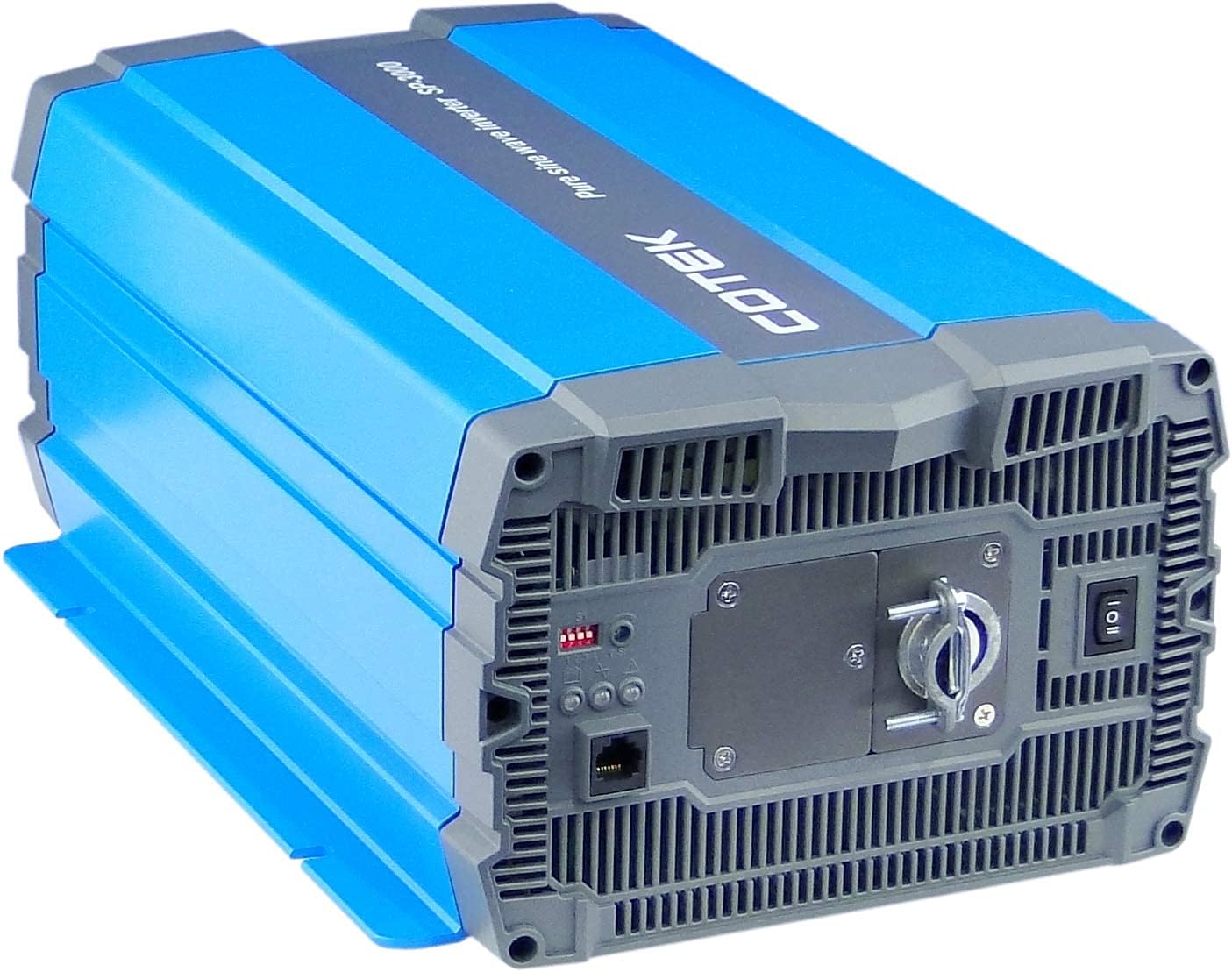
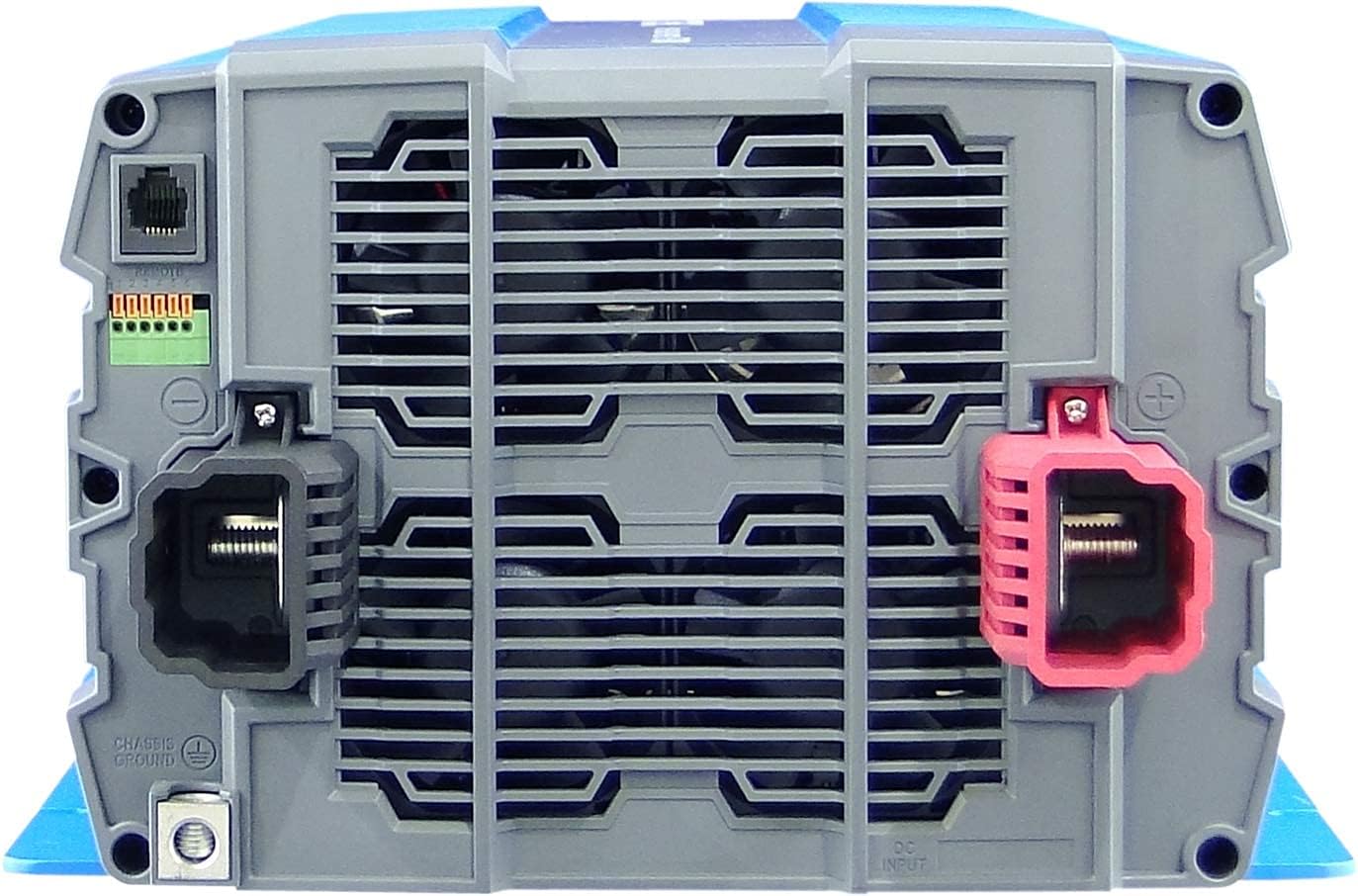
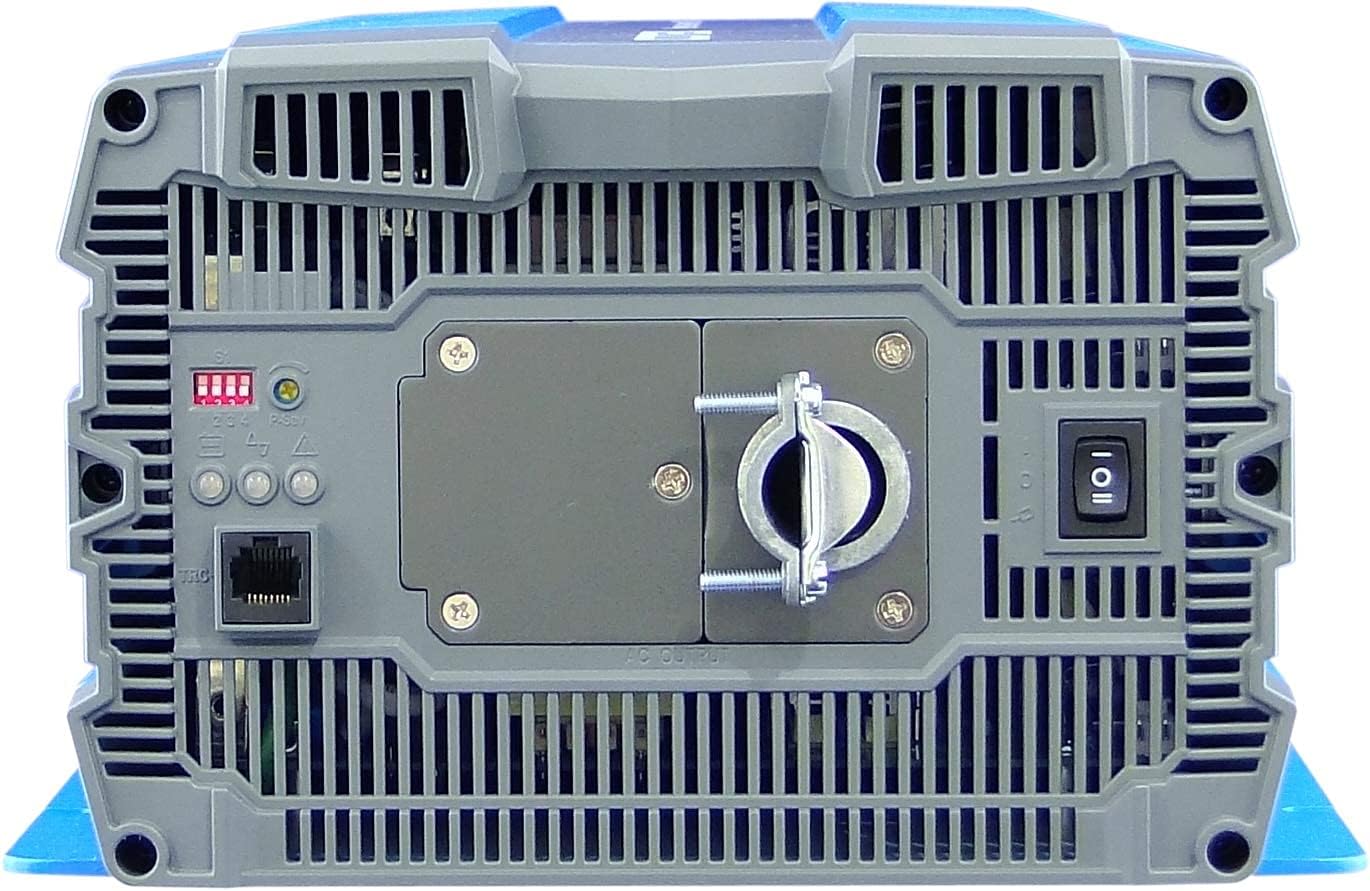
4. Configurare și instalare
Proper installation is crucial for the safe and efficient operation of your inverter. Refer to local electrical codes and standards.
4.1 Plasarea
- Install the inverter in a dry, well-ventilated area, away from direct sunlight, heat sources, and flammable materials.
- Ensure sufficient clearance around the inverter for proper airflow, especially around the cooling fan vents.
- Mount the inverter securely on a stable, non-combustible surface.
- Avoid areas where dust, moisture, or corrosive fumes are present.
4.2 Cablare
All wiring must comply with applicable electrical codes and be performed by a qualified electrician.
- Împământare: Connect the inverter's chassis ground terminal to a reliable earth ground using appropriate gauge wire.
- Conexiune de intrare DC:
- Asigurați-vă că volumul bancului de bateriitage este 12VDC.
- Use appropriately sized cables for the DC input to minimize voltage drop and ensure safety. Refer to cable sizing charts based on current and distance.
- Connect the positive (+) terminal of the battery bank to the red (+) terminal on the inverter.
- Connect the negative (-) terminal of the battery bank to the black (-) terminal on the inverter.
- Install a DC-rated fuse or circuit breaker between the battery bank and the inverter's positive terminal, as close to the battery as possible.
- Conexiune de ieșire CA:
- Connect your AC loads to the hardwire AC output terminal block.
- Ensure the total load does not exceed the inverter's continuous power rating (3000W).
- Telecomanda (Opțional): Connect the remote control unit to the RJ45 port or use the green terminal for external ON/OFF control if desired.
5. Instrucțiuni de utilizare
5.1 Pornire/Oprire
- Pentru a porni: Ensure all DC and AC connections are secure. Flip the main power switch on the inverter's rear panel to the 'ON' position. The Power LED indicator should illuminate.
- Pentru a opri: Disconnect all AC loads from the inverter. Flip the main power switch to the 'OFF' position.
5.2 Indicatori LED
The inverter features 3-color LED status indicators on the control panel (refer to Figure 4) to provide operational feedback:
- LED verde: Indicates normal operation and power output.
- LED galben: Indicates a warning condition, such as low battery voltage or high temperature. The inverter may continue to operate but requires attention.
- LED roșu: Indicates a fault condition, such as overload, short circuit, or severe over/under voltage. The inverter will shut down to protect itself and connected devices.
5.3 Setări DIP Switch
The DIP switches on the control panel allow for customization of certain inverter parameters, such as output voltage, frequency, and power saving mode. Refer to the detailed specifications table (Figure 5) or the product datasheet for specific configurations. Always adjust DIP switches when the inverter is powered off.
6. Întreținere
Întreținerea regulată asigură longevitatea și funcționarea fiabilă a invertorului dumneavoastră.
- curatenie: Curățați periodic exteriorul invertorului cu o cârpă uscată. Asigurați-vă că orificiile de ventilație sunt lipsite de praf și resturi. Nu utilizați agenți de curățare lichizi.
- Conexiuni: Regularly check all electrical connections (DC input, AC output, ground) for tightness and corrosion. Loose connections can cause overheating and poor performance.
- Verificarea bateriei: Inspect batteries for signs of damage, corrosion, or electrolyte leakage. Ensure battery terminals are clean and tight.
- Mediu: Verificați dacă mediul de operare se încadrează în intervalele de temperatură și umiditate specificate.
7. Depanare
Această secțiune oferă soluții pentru problemele frecvente pe care le puteți întâmpina. Dacă problema persistă, contactați serviciul de asistență pentru clienți.
| Problemă | Cauza posibila | Soluţie |
|---|---|---|
| Invertorul nu pornește. | No DC input power; Loose battery connections; Blown DC fuse/breaker; Inverter switch OFF. | Verificați volumul baterieitage; Tighten connections; Replace fuse/reset breaker; Turn inverter switch ON. |
| Fără ieșire AC. | Overload; Short circuit; Over-temperature shutdown; Low/High DC input voltage. | Reduce AC load; Check for short circuits in wiring/appliances; Allow inverter to cool; Check battery voltage. |
| Yellow LED illuminated. | Volumul bateriei scăzuttage warning; High temperature warning. | Recharge batteries; Ensure adequate ventilation, reduce load. |
| Red LED illuminated / Inverter shut down. | Overload; Short circuit; Over-temperature; Under/Over voltage. | Identify and correct the fault (e.g., reduce load, fix short, allow cooling, check battery voltage), then restart the inverter. |
| Cooling fan runs constantly or loudly. | Temperatură internă ridicată din cauza încărcăturii mari sau a ventilației deficitare. | Reduce load; Improve ventilation around the inverter. |
8. Specificații
The following table outlines the technical specifications for the Cotek SP-3000 Series Pure Sine Wave Inverter, specifically for the SP-3000-112 model.

| Categorie | Parametru | SP-3000-112 |
|---|---|---|
| Ieșire | AC Voltage | 100 / 110 / 115 / 120VAC ±5% |
| Putere nominală | 3000W | |
| Surge Power (1 Sec.) | 6000W | |
| Putere maximă de ieșire (1 min.) | 3450W | |
| Forma de undă de ieșire | Pure Sine Wave (THD<3%) | |
| Frecvenţă | 50 / 60 Hz ±0.5% | |
| Intrare | DC Voltage | 12VDC |
| Voltage Gama | 10.5 ~ 16.5VDC | |
| Curent fără sarcină | <3.0A@12VDC | |
| Modul de economisire a energiei | <0.4A@12VDC | |
| Eficiență (max.) | 90% | |
| Protecţie | Input Under - Voltage Protecție | 10.5 ±0.3VDC |
| Input Under - Voltage Alarma | 11.0 ±0.3VDC | |
| Input Under - Voltage Recuperare | 12.0 ±0.3VDC | |
| Input Over - Voltage Protecție | 16.5 ±0.3VDC | |
| Input Over - Voltage Recuperare | 14.5 ±0.3VDC | |
| Supraîncărcare de ieșire | Ieșire de oprire voltage, reporniți pentru a vă recupera | |
| Ieșire scurtă | Ieșire de oprire voltage, reporniți pentru a vă recupera | |
| Mediu | Temp. de operare | -20°C ~ +40°C |
| Temp. stocare & Umiditate | -30°C ~ +70°C, 10 ~ 95% RH | |
| General | Dimensiuni (L x A x A) | 442 x 214 x 102 mm (17.4 x 8.4 x 4.0 inchi) |
| Greutate | 8.2 kg (18.1 lbs) | |
| Răcire | Ventilator de răcire controlat cu sarcină și temperatură |

9. Garanție și asistență
9.1 Informații despre garanție
The Cotek SP-3000-112 Pure Sine Wave Inverter comes with a 2 an garanție de producătorAceastă garanție acoperă defectele de materiale și de fabricație în condiții normale de utilizare. Vă rugăm să păstrați dovada achiziției pentru reclamațiile în garanție.
9.2 Asistență pentru clienți
For technical assistance, troubleshooting beyond this manual, or warranty inquiries, please contact Cotek customer support through their official website or your point of purchase. Provide your model number (SP-3000-112) and a detailed description of the issue to expedite service.

