
Thrustmaster T16000M FCS Hotas
Thrustmaster T16000M FCS HOTAS PC Flight Control System User Manual
Model: T16000M FCS HOTAS (2960778)
Introducere
This manual provides detailed instructions for the setup, operation, and maintenance of your Thrustmaster T16000M FCS HOTAS (Hands On Throttle And Stick) flight control system. The system includes the T.16000M FCS flight stick, featuring H.e.A.R.T magnetic precision technology, and the TWCS (Thrustmaster Weapon Control System) throttle, featuring S.M.A.R.T technology. This system is designed for use with PC platforms running Windows 10, 8, 7, and Vista (32-bit and 64-bit).
Produs terminatview
The Thrustmaster T16000M FCS HOTAS system is comprised of two main components: the T.16000M FCS Joystick and the TWCS Throttle. Each component offers a range of controls for precise flight simulation.
T.16000M FCS Joystick
The joystick features advanced precision with 3D (Hall Effect) magnetic sensors, ensuring accurate control. It includes a total of 16 action buttons and 4 independent axes.
- Precizie: H.e.A.R.T (Hall Effect Accurate Technology) magnetic sensors for enhanced accuracy.
- Axe: 4 independent axes, including a twist rudder controlled by rotating the stick.
- Butoane: 16 action buttons with braille-style physical identification.
- POV Hat: One 8-way Point of View (POV) hat switch.

Figura 1: Față view of the Thrustmaster T16000M FCS HOTAS system, showing both the joystick and the throttle unit.
TWCS Throttle
The TWCS throttle unit provides comprehensive control over engine power and other aircraft functions, utilizing S.M.A.R.T (Sliding Motion Advanced Rail Tracks) technology for smooth and precise movement.
- Tehnologie: S.M.A.R.T technology for smooth sliding motion.
- Butoane: 14 action buttons, including two 4-way switches, 3 standard buttons, one 2-position slider, and one push mini-stick.
- POV Hat: One 8-way Point of View (POV) hat switch.
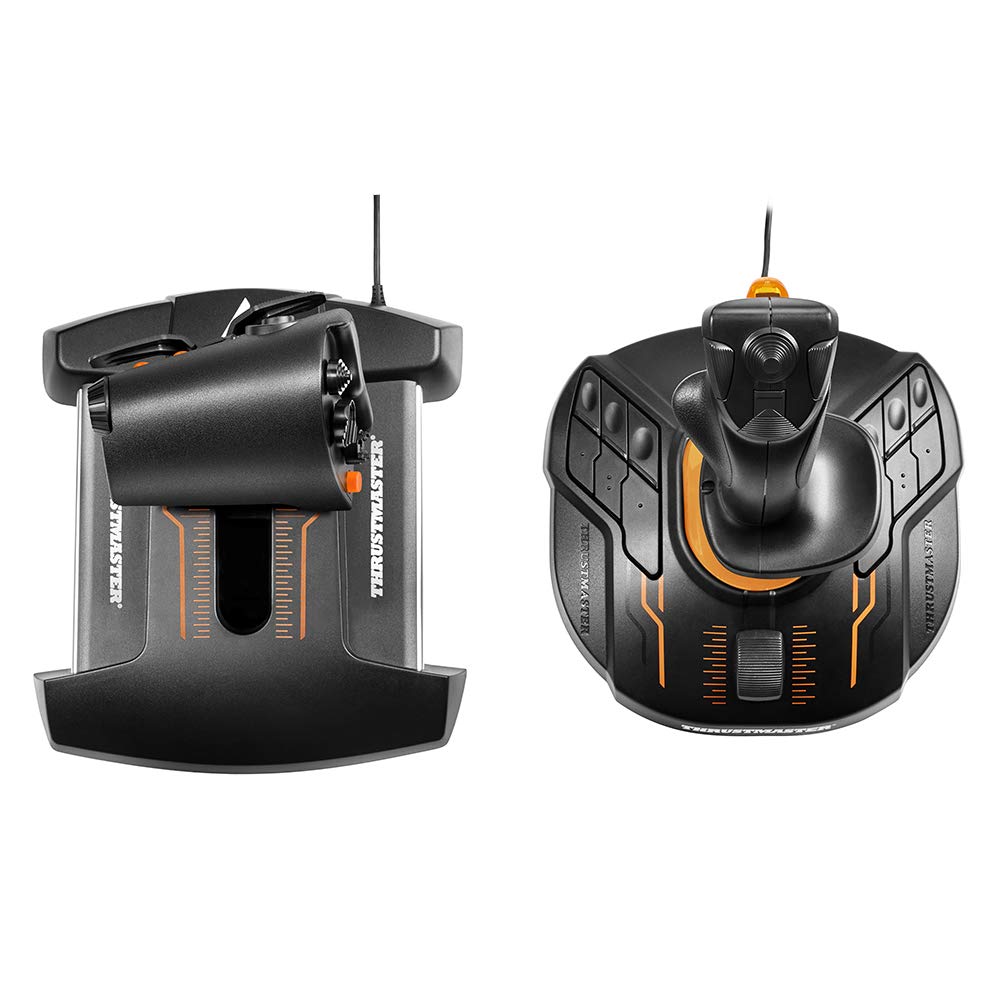
Figura 2: De sus în jos view of the Thrustmaster T16000M FCS HOTAS, illustrating the layout of controls on both the joystick and throttle.
Înființat
Follow these steps to set up your Thrustmaster T16000M FCS HOTAS system.
- Cerințe de sistem: Ensure your PC runs Windows 10, 8, 7, or Vista (32-bit or 64-bit).
- Instalare driver: Before connecting the devices, download and install the latest drivers and software from the official Thrustmaster support website. This ensures optimal performance and access to all features.
- Conectarea joystick-ului: Plug the USB cable from the T.16000M FCS Joystick into an available USB port on your PC.
- Conectați accelerația: Plug the USB cable from the TWCS Throttle into an available USB port on your PC.
- Recunoașterea sistemului: Your operating system should automatically detect and configure the devices. Verify successful installation through your PC's Device Manager.
- Configurare software: Launch the Thrustmaster TARGET software (if installed) to customize button mappings, axis sensitivities, and create profiles for specific games.
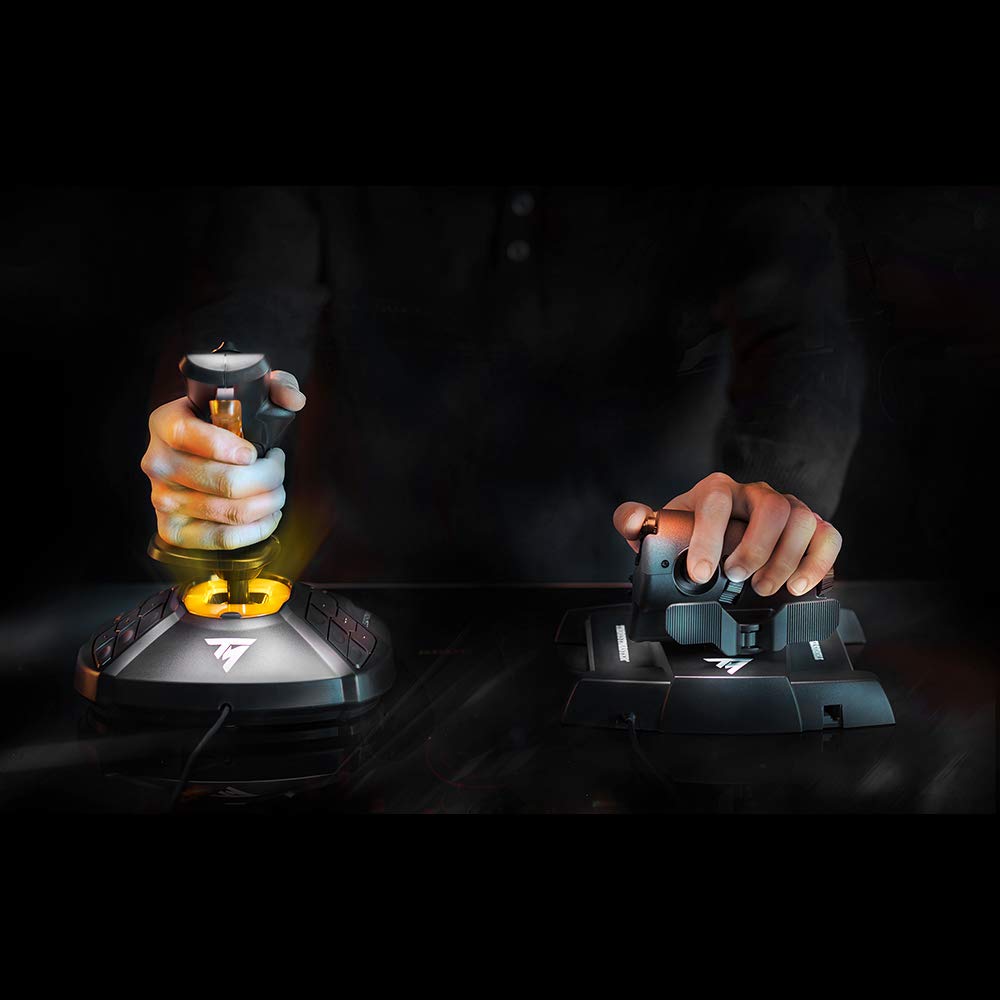
Figure 3: A user's hand on the T.16000M FCS Joystick, demonstrating typical grip during setup or operation.
Instrucțiuni de operare
This section outlines the basic operation of the T16000M FCS HOTAS components.
Funcționarea joystick-ului
- Pitch & Roll: Move the joystick forward/backward for pitch control and left/right for roll control.
- Girare (cârmă): Twist the joystick handle left or right to control the yaw axis (rudder).
- Declanșator: The primary trigger on the front of the stick is typically used for firing weapons.
- Butoane: Utilize the 16 programmable action buttons for various in-game functions such as gear, flaps, targeting, etc.
- POV Hat: The 8-way POV hat switch is commonly used for camera views sau navigare rapidă în meniu.
Funcționarea accelerației
- Thrust Control: Slide the main throttle lever forward and backward to adjust engine thrust. The S.M.A.R.T technology ensures smooth and precise movement.
- Mini-Stick: The push mini-stick on the throttle can be used for precise camera control or strafing in space simulations.
- Switches & Buttons: The 14 action buttons, including 4-way switches and a slider, can be assigned to functions like speed brakes, landing gear, weapon selection, or communication.

Figure 4: A user's hand on the TWCS Throttle, demonstrating the ergonomic design and accessible controls.
Întreţinere
Proper maintenance ensures the longevity and optimal performance of your flight control system.
- curatenie: Use a soft, dry cloth to clean the surfaces of the joystick and throttle. Avoid abrasive cleaners or solvents.
- Protecție împotriva prafului: When not in use, cover the devices to prevent dust accumulation, especially in the throttle's sliding mechanism.
- Organizare de cabluri: Avoid sharp bends or excessive tension on the USB cables to prevent damage.
- Depozitare: Depozitați dispozitivele într-un loc răcoros și uscat, ferit de lumina directă a soarelui și de temperaturi extreme.
Depanare
If you encounter issues with your Thrustmaster T16000M FCS HOTAS, refer to the following common solutions.
- Dispozitiv nerecunoscut:
- Ensure USB cables are securely connected to both the devices and the PC.
- Încercați un alt port USB.
- Reinstall the latest drivers from the Thrustmaster support website-ul.
- Reporniți computerul.
- Buttons/Axes Not Responding:
- Check in your game's control settings if the buttons/axes are correctly mapped.
- Calibrate the devices through Windows Game Controller settings or Thrustmaster's TARGET software.
- Asigurați-vă că nu sunt conectate alte dispozitive de intrare care intră în conflict.
- Throttle Movement Not Smooth:
- Dust or debris might be in the sliding mechanism. Gently clean the throttle track.
- Consider applying a small amount of non-conductive, plastic-safe lubricant (e.g., Nyogel 767A) to the rails if the issue persists and you are comfortable with advanced maintenance.
Specificații
| Numărul de model | 2960778 |
| Dimensiunile produsului | 10.71 x 9.02 x 10.39 inci |
| Greutatea articolului | 4.84 lire sterline |
| Compatibilitate | PC (Windows 10, 8, 7, Vista - 32-bit and 64-bit) |
| Producător | Thrustmaster VG |
| Data primului disponibil | 19 iunie 2016 |
| Data de lansare | 10 octombrie 2016 |
Garanție și suport
For warranty information, technical support, and additional resources, please visit the official Thrustmaster support website. You can find drivers, firmware updates, and FAQs there.
Notă: Termenii specifici ai garanției pot varia în funcție de regiune și de comerciant. Vă rugăm să păstrați dovada achiziției.
Documente conexe - T16000M FCS Hotas
 |
Thrustmaster VIPER TQS: User Manual for PC Flight Simulation Throttle Quadrant Experience the thrill of flight with the Thrustmaster VIPER TQS Throttle Quadrant System. This 1:1 scale HOTAS replica, inspired by the U.S. Air Force VIPER fighter jet, brings authentic aviation controls to your PC cockpit. This manual guides installation, setup, and features. |
 |
Thrustmaster F/A-18C Hornet HOTAS Add-On Grip User Manual Official user manual for the Thrustmaster F/A-18C Hornet HOTAS Add-On Grip for PC. Learn about its features, compatibility, firmware updates, T.A.R.G.E.T. software, and warranty. |
 |
Thrustmaster T.Flight Hotas Neo Instruction Manual Official instruction manual for the Thrustmaster T.Flight Hotas Neo. Learn how to set up, select compatibility modes for PS5, PS4, and PC, and find support resources. |
 |
Manual de utilizare Thrustmaster T.Flight Hotas One: Ghid de instalare și caracteristici Manual de utilizare complet pentru joystick-ul de zbor Thrustmaster T.Flight Hotas One. Aflați cum să instalați, să configurați și să depanați acest controller de simulare de zbor imersiv pentru Xbox Series X|S, Xbox One și jocuri pe PC. |
 |
Thrustmaster HOTAS Warthog Hardware User Manual Comprehensive user manual for the Thrustmaster HOTAS Warthog flight simulation controller, featuring setup instructions, button configurations, and technical specifications for the A-10C replica system. |
 |
Thrustmaster T.Flight Hotas One User Manual - Setup, Features & Support Official user manual for the Thrustmaster T.Flight Hotas One flight stick. Get detailed setup guides for PC and Xbox, explore technical features, troubleshooting tips, and warranty information for an immersive flight simulation experience. |
Ask a question about this manual
Ask about setup, troubleshooting, compatibility, parts, safety, or missing instructions. Manuals+ will review the question and use this page’s manual context to help answer it.