
1. Introducere
The Lenco BT-210 Light is a versatile Bluetooth stereo speaker designed for portable audio playback. It features integrated LED lighting, which can be controlled via a dedicated application, and offers multiple connectivity options including Bluetooth, AUX-in, and USB. This manual provides essential information for the safe and efficient use of your speaker.
2. Informații de siguranță
- Citiți cu atenție toate instrucțiunile înainte de a utiliza dispozitivul.
- Păstrați acest manual pentru referințe viitoare.
- Nu expuneți dispozitivul la ploaie, umezeală sau temperaturi extreme.
- Evitați amplasarea dispozitivului în apropierea surselor de căldură, cum ar fi calorifere, registre de căldură, sobe sau alte aparate (inclusiv ampliificatori) care produc căldură.
- Utilizați numai atașamente/accesorii specificate de producător.
- Deconectați dispozitivul în timpul furtunilor cu fulgere sau atunci când nu este utilizat pentru perioade lungi.
- Nu blocați niciun orificiu de ventilație. Instalați conform instrucțiunilor producătorului.
- Protejați cablul de alimentare să nu fie călcat sau ciupit, în special la prize, prize convenabile și la punctul de ieșire din aparat.
3. Conținutul pachetului
Vă rugăm să verificați dacă toate articolele sunt prezente și în stare bună:
- Lenco BT-210 Light Bluetooth Stereo Speaker
- Cablu de încărcare USB
- AUX-in Cable (3.5mm)
- Manual de utilizare
4. Produs terminatview
Familiarize yourself with the various parts of your Lenco BT-210 Light speaker.
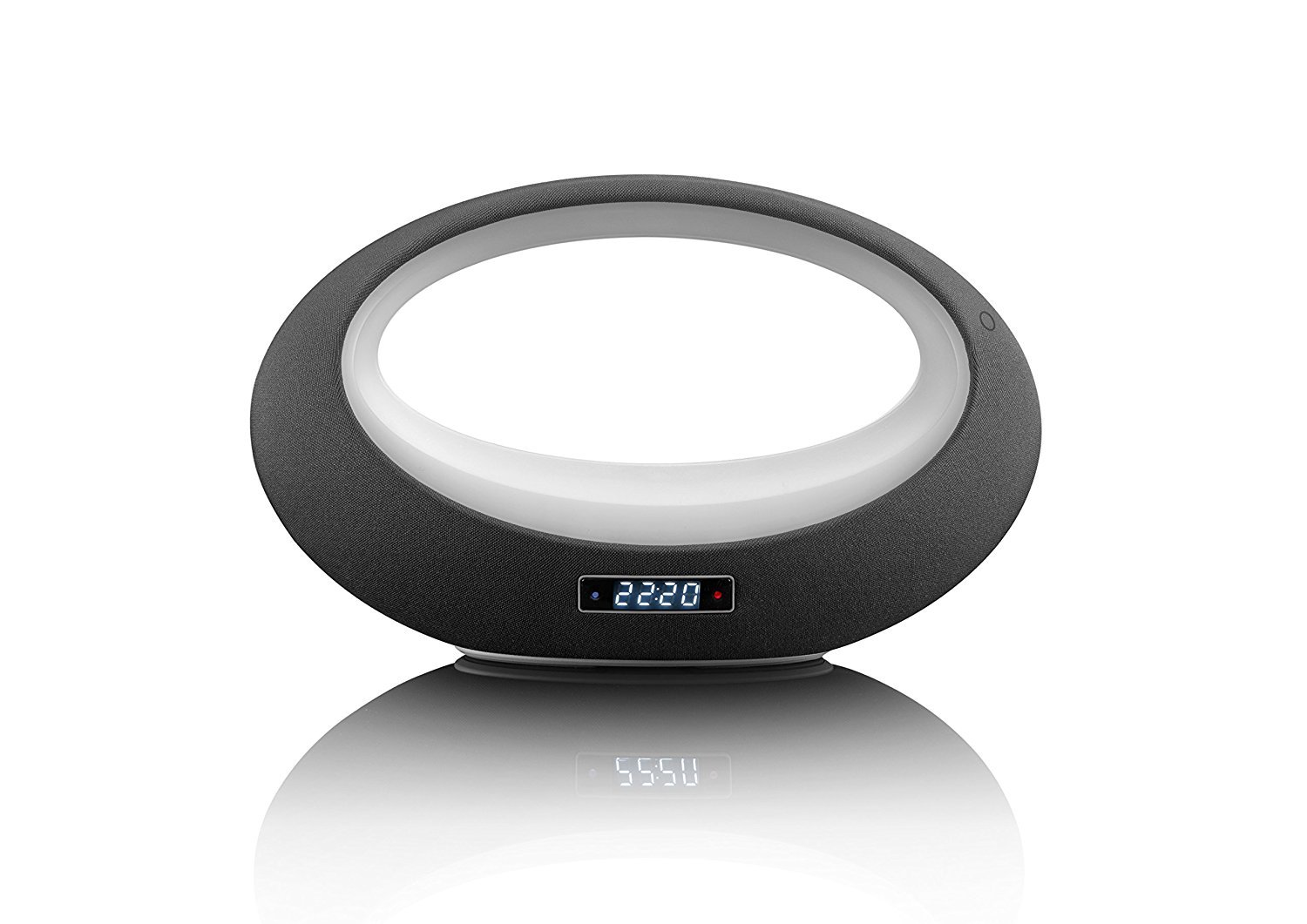
Figura 1: Faţă view of the Lenco BT-210 Light speaker, showing the central LED light ring and the digital display.

Figura 2: Spate view of the Lenco BT-210 Light speaker, illustrating the various input ports and control buttons.
Comenzi și porturi:
- Buton de alimentare: Pornește sau oprește difuzorul.
- Volum sus/jos: Reglează nivelul de ieșire audio.
- Buton Redare/Pauză: Controlează redarea media.
- Butonul de mod: Switches between Bluetooth, AUX, and USB input modes.
- Buton de control al luminii LED: Cycles through LED light modes or turns them off.
- Intrare DC 5V: Pentru încărcarea bateriei interne.
- AUX-in Port (3.5mm): Pentru conectarea dispozitivelor audio externe prin cablu.
- Port USB: Pentru redarea audio de pe dispozitive de stocare USB.
5. Configurare
5.1 Încărcarea difuzorului
- Connect the supplied USB charging cable to the DC 5V input port on the speaker.
- Conectați celălalt capăt al cablului USB la un adaptor de alimentare USB compatibil (nu este inclus) sau la portul USB al unui computer.
- Indicatorul luminos de încărcare se va aprinde. Așteptați aproximativ 3-4 ore pentru o încărcare completă.
- După încărcarea completă, indicatorul luminos se poate schimba sau se poate stinge. Deconectați cablul de încărcare.
5.2 Pornire/Oprire
- Pentru a porni: Press and hold the Power button for a few seconds until the display lights up and you hear an audible prompt.
- Pentru a opri: Apăsați și țineți apăsat din nou butonul de pornire/oprire până când afișajul se stinge.
6. Instrucțiuni de utilizare
6.1 Asociere Bluetooth
- Ensure the speaker is powered on and in Bluetooth mode. If not, press the Mode button until 'Bluetooth' or a similar indicator appears on the display. The LED light will flash, indicating it's in pairing mode.
- Pe smartphone, tabletă sau alt dispozitiv compatibil Bluetooth, activați Bluetooth și căutați dispozitivele disponibile.
- Select "Lenco BT-210 Light" from the list of devices.
- Once paired, the speaker will emit a confirmation sound, and the LED light will stop flashing. You can now play audio from your device through the speaker.
6.2 Mod intrare AUX
- Connect one end of the 3.5mm AUX-in cable to the AUX-in port on the speaker.
- Connect the other end of the cable to the headphone jack or audio output of your external audio device.
- Press the Mode button on the speaker until 'AUX' or a similar indicator appears on the display.
- Redați sunet de pe dispozitivul extern. Reglați volumul atât pe difuzor, cât și pe dispozitiv.
6.3 Redare USB
- Introduceți o unitate flash USB care conține fișiere MP3 fileîn portul USB al difuzorului.
- Press the Mode button on the speaker until 'USB' or a similar indicator appears on the display.
- Difuzorul va începe automat redarea sunetului files from the USB drive. Use the Play/Pause and Volume buttons to control playback.
6.4 Controlul luminii LED
The integrated LED lighting can be controlled directly from the speaker or via a dedicated application (if available). Press the LED Light Control button to cycle through different light modes or to turn the lights off. Refer to the product's official website or app store for information on the companion application for advanced control.
6.5 Controlul volumului
Use the Volume Up (+) and Volume Down (-) buttons on the speaker to adjust the playback volume. For Bluetooth and AUX modes, you may also need to adjust the volume on your connected device.
7. Întreținere
- curatenie: Folosiți o lavetă moale și uscată pentru a curăța exteriorul difuzorului. Nu utilizați agenți de curățare lichizi sau materiale abrazive.
- Depozitare: Când nu este utilizată pentru perioade lungi de timp, depozitați difuzorul într-un loc răcoros și uscat, ferit de lumina directă a soarelui și de temperaturi extreme.
- Îngrijirea bateriei: Pentru a prelungi durata de viață a bateriei, evitați descărcarea completă frecventă a acesteia. Încărcați difuzorul în mod regulat, chiar dacă nu este utilizat.
8. Depanare
| Problemă | Cauza posibila | Soluţie |
|---|---|---|
| Difuzorul nu pornește. | Bateria este epuizată. | Încărcați difuzorul folosind cablul USB furnizat. |
| Nici un sunet. | Volumul este prea mic sau dezactivat. Mod de introducere incorect. | Increase volume on speaker and connected device. Press the Mode button to select the correct input. |
| Asocierea Bluetooth nu reușește. | Difuzorul nu este în modul de asociere. Dispozitivul este prea departe. Interferență. | Ensure speaker is in Bluetooth pairing mode. Move devices closer. Turn off other Bluetooth devices. |
| AUX-in not working. | Cable not connected properly. Incorrect mode. | Check cable connections. Ensure speaker is in AUX mode. |
| Redarea prin USB nu funcționează. | USB drive not formatted correctly or unsupported file tipuri. | Ensure USB drive is formatted to FAT32 and contains MP3 files. |
9. Specificații
| Caracteristică | Caietul de sarcini |
|---|---|
| Marca | Lenco |
| Model | BT-210 Light |
| Culoare | Antracit/Alb |
| Dimensiuni produs (D x L x H) | 18.3A x 29.4L x 11.5Î cm |
| Speaker Output Power (Max) | 6 Watt |
| Putere de ieșiretage | 3 Watt |
| Voltage | 3.7 volți |
| Vol. De intraretage | 5 Volt DC (VDC) |
| Sursa de alimentare | Baterie |
| Tip baterie | Litiu-polimer |
| Durata medie a bateriei | 10 de ore |
| Tehnologia de conectivitate | Bluetooth, AUX, USB |
| Tehnologia comunicațiilor fără fir | Bluetooth |
| Mod ieșire audio | Stereo |
| Dispozitive compatibile | Player MP3 |
| Caracteristici speciale | Bluetooth, Portable, LED Light |
| Metoda de control | Remote Control (implied by app control) |
| Tip de montare | Suport de masă |
10. Informații despre garanție
Lenco products are designed and manufactured to the highest quality standards. This product is covered by a limited warranty against defects in materials and workmanship. The warranty period and terms may vary by region. Please refer to the official Lenco website or your local retailer for specific warranty details and registration information.
11. Suport
For technical support, troubleshooting assistance, or further information about your Lenco BT-210 Light speaker, please visit the official Lenco website or contact their customer service department. Contact details can typically be found on the Lenco website-ul sau în ambalajul produsului.
Website: www.lenco.com