
ACDelco Tools ARM303-4A-340
ACDelco ARM303-4A-340 Digital Torque Wrench User Manual
Model: ARM303-4A-340
Introducere
The ACDelco ARM303-4A-340 is a heavy-duty digital torque wrench designed for high-precision torque and angle measurements. This tool is engineered for professionals requiring exceptional accuracy and reliability in automotive, motorcycle, and industrial applications. It features a clear LCD display, multiple measurement units, and an advanced alert system to ensure precise fastening.

Image: The ACDelco ARM303-4A-340 Digital Torque Wrench, showcasing designul său robust și afișajul digital.
Informații de siguranță
Always observe the following safety precautions when operating the digital torque wrench:
- Read and understand this entire manual before using the tool.
- Wear appropriate personal protective equipment, including eye protection, when operating the wrench.
- Do not exceed the maximum torque capacity of the wrench (250.7 ft-lbs).
- Ensure the wrench is clean and free from oil or grease before use to maintain a secure grip.
- Do not use the wrench as a pry bar or hammer.
- Depozitați cheia în carcasa sa de protecție atunci când nu o utilizați pentru a preveni deteriorarea.
- Keep batteries out of reach of children and dispose of them properly.
Caracteristicile produsului
The ARM303-4A-340 digital torque wrench incorporates several advanced features for precision and ease of use:
- Static Torque Measurement: Provides accurate readings for applied torque.
- Unități de măsură multiple: LCD display shows measurements in Kg-cm, N-m, in-lbs., and ft-lbs.
- Bi-directional Operation: Operates in both clockwise and counterclockwise directions.
- Wide Torque Range: Measures from 12.5 to 250.7 ft-lbs.
- Precizie ridicată: Pre-set accuracy of +/- 1.5% for clockwise and +/- 2.5% for counterclockwise measurements.
- 72-Tooth Ratchet Head: Precision-geared for smooth operation and durability.
- Audible & Visual Alert System: Buzzer and LED flash notifications alert the user when the desired torque is reached.
- Motional Alerting Vibration: Provides tactile feedback upon reaching target torque.
- Design ergonomic: Features an anti-slip industrial-grade grip for comfort and control.

Imagine: Detaliată view highlighting the quick release mechanism, visual LED alerts, audible buzzer, motional alerting vibration, and the LCD backlit display of the ARM303-4A digital torque wrench.
Conținutul pachetului
La deschiderea pachetului, verificați dacă sunt incluse toate următoarele articole:
- ACDelco ARM303-4A-340 Digital Torque Wrench
- Manual de utilizare
- Durable Hard-Shell Case
- Certificate of Calibration (ISO 6789 Standards)
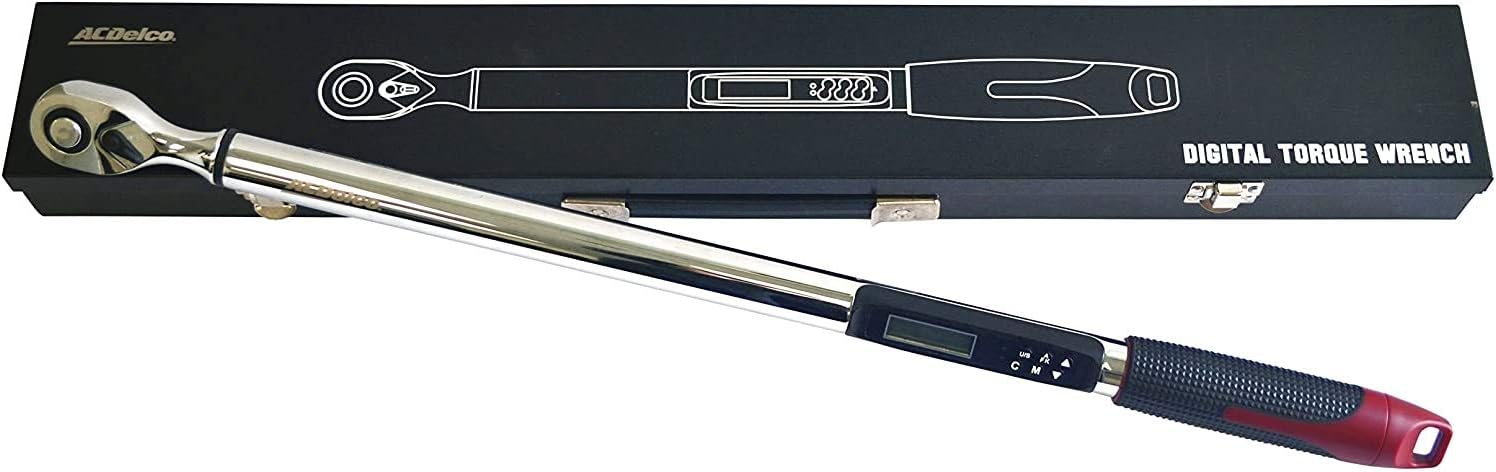
Image: The ARM303-4A-340 digital torque wrench neatly stored within its robust hard-shell case, as received in the package.
Înființat
Instalarea bateriei
The ARM303-4A-340 requires 2 AA batteries (not included) for operation.
- Locate the battery compartment cover, typically at the base of the handle.
- Open the cover by twisting or sliding it according to the markings.
- Introduceți 2 baterii AA, asigurându-vă că polaritatea este corectă (+ și -), așa cum este indicat în interiorul compartimentului.
- Închideți bine capacul compartimentului bateriei.
Pornirea inițială
Press the power button (usually marked 'ON/OFF') to turn on the wrench. The LCD display will illuminate and perform a self-test before showing the current measurement mode.
Instrucțiuni de operare
Pornire/Oprire
Apăsați tasta ON/OFF button to power the wrench on or off. The wrench features an auto-shutoff function after approximately 3 minutes of inactivity to conserve battery life.
Selectarea unității
Apăsați tasta NE (Unit/Setting) button to cycle through the available measurement units: ft-lbs, in-lbs, N-m, and Kg-cm. Select the desired unit before setting the target torque.
Setarea cuplului
To set the target torque value:
- Ensure the wrench is in the desired measurement unit.
- Apăsați tasta M (Mode) button to enter the torque setting mode.
- Utilizați Up şi Jos butoanele săgeată pentru a regla valoarea țintă a cuplului.
- Apăsați tasta M button again to confirm the setting and return to measurement mode.
Measurement Modes (Peak Hold / Track)
The wrench typically offers two measurement modes:
- Modul de urmărire: Displays the real-time torque being applied.
- Mod de menținere a vârfului: Displays the maximum torque value reached during the application.
Cycle between these modes using the appropriate button (refer to the specific button labels on your device, often combined with the 'M' button).
Măsurarea unghiului
For applications requiring torque-plus-angle (TTY) specifications:
- Set the desired torque value first.
- Apăsați tasta A-F-K button (or similar) until the angle degree symbol appears on the display.
- Utilizați Up şi Jos arrow buttons to set the target angle.
- Apply torque until the set torque value is reached, then continue rotating until the set angle is achieved. The wrench will provide alerts for both thresholds.
Aplicarea cuplului
Attach the appropriate socket to the 1/2" drive head. Place the socket onto the fastener. Apply steady, smooth force to the wrench handle. The LCD display will show the real-time torque. When the set target torque is reached, the wrench will emit an audible beep, flash its LED lights, and vibrate.

Image: A user demonstrating the application of the ACDelco ARM303-4A-340 Digital Torque Wrench on a car wheel lug nut, ensuring proper fastening.
Întreţinere
Curatenie
Wipe the wrench clean with a soft, dry cloth after each use. Do not use abrasive cleaners or solvents, as they may damage the finish or electronic components.
Depozitare
Store the digital torque wrench in its original hard-shell case in a dry, temperature-controlled environment. Remove batteries if the wrench will not be used for an extended period to prevent leakage.
Calibrare
The ACDelco ARM303-4A-340 is calibrated to ISO 6789 standards and includes a Certificate of Calibration. For continued accuracy, periodic re-calibration by a certified service center is recommended, especially after heavy use or if the wrench has been dropped.
Depanare
| Problemă | Cauza posibila | Soluţie |
|---|---|---|
| Cheia nu pornește. | Baterii descărcate sau instalate incorect. | Înlocuiți bateriile cu baterii AA noi, asigurându-vă că polaritatea este corectă. |
| Citiri inexacte ale cuplului. | Improper technique; wrench needs re-calibration. | Apply steady, smooth force. Ensure proper grip. Consider professional re-calibration. |
| Afișajul nu funcționează sau pâlpâie. | Low battery; internal connection issue. | Înlocuiți bateriile. Dacă problema persistă, contactați serviciul de asistență pentru clienți. |
| Battery gets stuck in compartment. | Possible internal obstruction (e.g., screw too long). | Carefully inspect the battery compartment for any obstructions. If unable to resolve, contact customer support. |
| Wrench shuts off too quickly. | Auto-shutoff feature activated. | The wrench is designed to shut off after approximately 3 minutes of inactivity. Power on again to resume use. |
Specificații
| Numărul de model | ARM303-4A-340 |
| Dimensiunea capului | 1/2 inch |
| Gama de cuplu | 12.5 până la 250.7 ft-lbs |
| Unități de măsură | ft-lbs, in-lbs, N-m, Kg-cm |
| Accuracy (Pre-set) | CW +/- 1.5%, CCW +/- 2.5% |
| Ratchet Head | 72-tooth, Fixed Ratchet |
| Sursa de alimentare | 2 baterii AA (nu sunt incluse) |
| Greutatea sculei | 6.6 lbs (3.00 kg) |
| Lungimea articolului | 66.7 de centimetri |
| Material | Oțel aliat |
| Termina | Lustruit |
Garanție și suport
Informații despre garanție
The ACDelco ARM303-4A-340 Digital Torque Wrench comes with a 1 ani garanție limitatăAceastă garanție acoperă defectele de materiale și de fabricație în condiții normale de utilizare. Vă rugăm să păstrați dovada achiziției pentru reclamațiile în garanție.
Asistență pentru clienți
For technical assistance, warranty service, or to inquire about re-calibration services, please contact ACDelco Tools customer support. Refer to the contact information provided on the product packaging or the official ACDelco Tools website-ul pentru cele mai recente detalii de asistență.
Ask a question about this manual
Ask about setup, troubleshooting, compatibility, parts, safety, or missing instructions. Manuals+ will review the question and use this page’s manual context to help answer it.