
Introducere
The Jam Audio HMDX HX-P280 is a portable Bluetooth speaker designed for wireless audio streaming. It features two active drivers and two passive radiators for enhanced bass, providing a rich audio experience. This speaker also includes a speakerphone function for hands-free calls and offers multi-language voice prompts for ease of use. Its compact design makes it highly portable, fitting conveniently into a pocket.
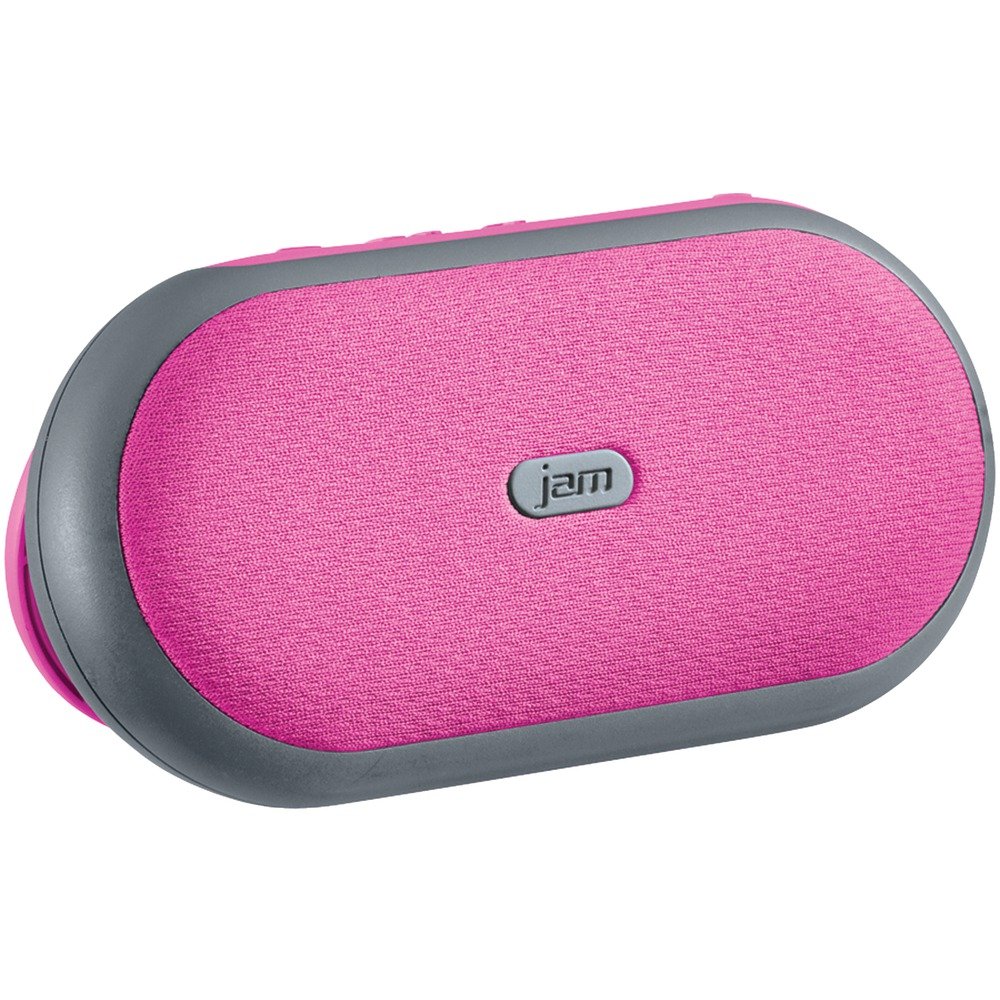
Imaginea 1: Faţă view of the Jam Audio HMDX HX-P280 Bluetooth Speaker. This image displays the compact, rectangular design of the speaker, highlighting its portable nature.
Ce este în cutie
- Jam Audio HMDX HX-P280 Bluetooth Speaker
- Cablu de încărcare USB
- Manual de utilizare (acest document)
Înființat
Încărcarea difuzorului
- Locate the charging port on your HX-P280 speaker.
- Connect the small end of the provided USB charging cable to the speaker's charging port.
- Conectați capătul mare al cablului de încărcare USB la un adaptor de alimentare USB (nu este inclus) sau la portul USB al unui computer.
- Indicatorul luminos de încărcare se va aprinde, de obicei roșu, pentru a arăta că difuzorul se încarcă.
- Once fully charged, the indicator light will change color or turn off. A full charge provides up to 6 hours of playtime.
Asociere Bluetooth
- Asigurați-vă că difuzorul este complet încărcat.
- Press and hold the Power button on the speaker until you hear an audible prompt indicating it is in pairing mode. The Bluetooth indicator light will typically flash rapidly.
- On your smartphone, tablet, or other Bluetooth-enabled device, go to the Bluetooth settings menu.
- Activați Bluetooth dacă nu este deja activat.
- Scan for available devices. You should see "HMDX HX-P280" or a similar name appear in the list.
- Select "HMDX HX-P280" to initiate the pairing process.
- Once paired, you will hear an audible confirmation from the speaker, and the Bluetooth indicator light will typically turn solid blue or flash slowly.
- The speaker can maintain a Bluetooth connection up to 30 feet (9 meters) from your device.
Instrucțiuni de operare
Pornire/Oprire
- To turn on: Press and hold the Power button until the speaker powers on.
- To turn off: Press and hold the Power button again until the speaker powers off.
Redare audio
Once paired, audio from your connected device will stream wirelessly to the HX-P280 speaker. Use the controls on your connected device to manage playback (play, pause, skip tracks) and adjust volume. The speaker itself may have basic touch controls for volume adjustment.
Funcția difuzor
When a call comes in while your phone is connected to the speaker:
- Pentru a răspunde la un apel: Press the Play/Pause button (or a dedicated call button if present) once.
- Pentru a încheia un apel: Press the Play/Pause button (or dedicated call button) once during a call.
- Pentru a respinge un apel: Press and hold the Play/Pause button (or dedicated call button) for a few seconds.
The speaker's built-in microphone allows for hands-free conversation.
Întreţinere
Curatenie
- Use a soft, dry, lint-free cloth to clean the surface of the speaker.
- Nu utilizați agenți de curățare abrazivi, ceară sau solvenți.
- Evitați pătrunderea umezelii în orice deschidere.
Îngrijirea bateriei
- The HX-P280 uses a rechargeable Li-Ion battery.
- Pentru a prelungi durata de viață a bateriei, evitați descărcarea completă frecventă a acesteia.
- Charge the speaker regularly, even if not in use for extended periods, to maintain battery health.
- Păstrați difuzorul într-un loc răcoros și uscat atunci când nu este utilizat.
Depanare
| Problemă | Soluţie |
|---|---|
| Difuzorul nu se pornește. | Ensure the speaker is fully charged. Connect it to a power source using the USB cable and allow it to charge for at least 30 minutes before attempting to power on again. |
| Nu se poate realiza asocierea cu dispozitivul. |
|
| Niciun sunet sau calitate slabă a sunetului. |
|
| Difuzorul nu funcționează. |
|
Specificații
| Caracteristică | Detaliu |
|---|---|
| Numele modelului | HX-P280 Pink |
| Marca | Jam Audio |
| Tehnologia de conectivitate | Bluetooth |
| Tehnologia comunicațiilor fără fir | Bluetooth |
| Gama Bluetooth | Până la 30 de picioare (9 metri) |
| Sursa de alimentare | Alimentat cu baterii (Li-Ion reîncărcabile) |
| Timp de joacă | Până la 6 ore |
| Mod ieșire audio | Stereo |
| Tip de driver audio | Dynamic Driver (2 active drivers & 2 passive radiators) |
| Tip difuzor | Difuzor Bluetooth portabil |
| Caracteristica specială | Portable, Speakerphone Function |
| Metoda de control | Atingere |
| Utilizări recomandate | For Smartphones or Tablets, For Computers, Travel |
| Dispozitive compatibile | Smartphone, Tablet, Bluetooth-enabled devices |
| Culoare | Roz |
| Dimensiunile produsului | 6 x 5 x 2 inchi (15.24 x 12.7 x 5.08 cm) |
| Greutatea articolului | 12.8 uncii (363 grame) |
| Este rezistent la apă | Nu |
| Producător | GEM |
| UPC | 031262070609 |
| ASIN | B01GIH0OOK |
| Data primului disponibil | 2 iunie 2016 |
Garanție și suport
The Jam Audio HMDX HX-P280 Bluetooth Speaker comes with a Garanție limitată. For specific details regarding warranty coverage, duration, and terms, please refer to the warranty card included with your product or visit the official Jam Audio website-ul.
For technical support, frequently asked questions, or to contact customer service, please visit the Jam Audio official support page. Keep your purchase receipt and product model number (HX-P280) handy when seeking support.