
Amazon Basics BSK30BK
Amazon Basics Portable Wireless, 2.1 Bluetooth Speaker (Model BSK30BK)
Manual de instructiuni
Introducere
Mulțumesc pentru achizițieasing the Amazon Basics Portable Wireless, 2.1 Bluetooth Speaker. This manual provides important information regarding the setup, operation, maintenance, and troubleshooting of your new speaker. Please read it thoroughly before use and retain it for future reference.
Produs terminatview
The Amazon Basics Portable Wireless, 2.1 Bluetooth Speaker offers high-quality sound with a portable design. It features Bluetooth connectivity for wireless audio streaming, a 3.5mm aux-in jack for wired connections, and a built-in microphone for hands-free calling.
Conținutul pachetului
- Amazon Basics Portable Wireless, 2.1 Bluetooth Speaker
- Cablu de încărcare USB
- Manual de instructiuni
Componente difuzoare
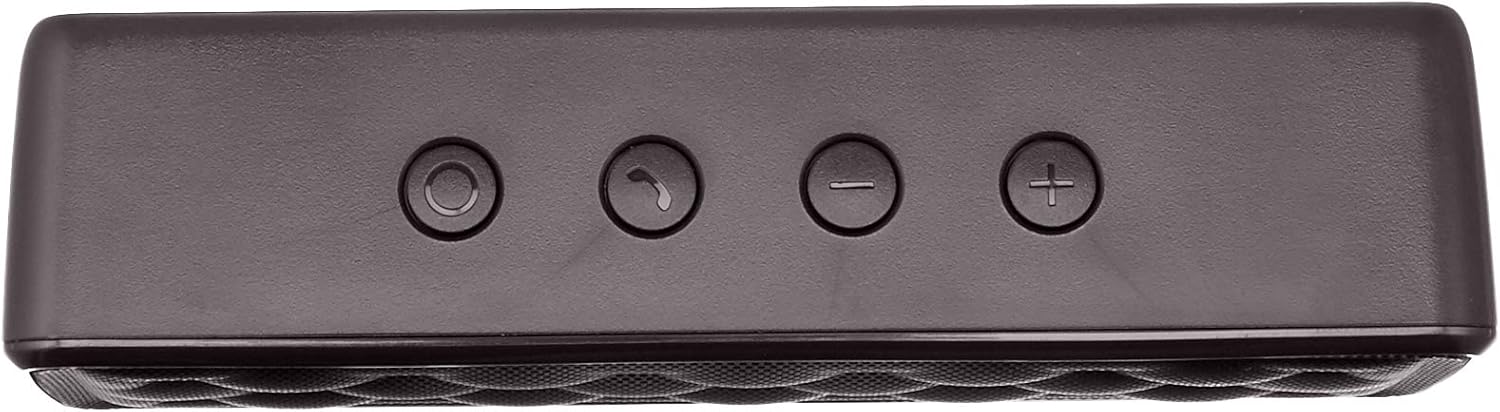


Înființat
1. Încărcarea difuzorului
Before first use, fully charge the speaker. Connect the supplied USB charging cable to the Micro USB port on the speaker and the other end to a USB power source (e.g., computer USB port, USB wall adapter). The charging indicator light will illuminate during charging and turn off when fully charged. A full charge takes approximately 3 hours.
2. Pornire/Oprire
To power on the speaker, slide the ON/OFF switch located on the rear panel to the "ON" position. To power off, slide the switch to the "OFF" position.
Instrucțiuni de operare
Asociere Bluetooth
- Ensure the speaker is powered on and within 33 feet (10 meters) of your Bluetooth-enabled device.
- The speaker will automatically enter pairing mode, indicated by a flashing blue LED light.
- Pe dispozitivul dvs., accesați setările Bluetooth și căutați dispozitivele disponibile.
- Select "Amazon Basics Speaker" from the list.
- Once paired, the blue LED light will stop flashing and remain solid. You can now stream audio wirelessly.
Note: If pairing fails, turn off the speaker and your device's Bluetooth, then repeat the steps. The speaker will attempt to reconnect to the last paired device automatically when powered on.
Redare audio
- Controlul volumului: Use the '+' and '-' buttons on the top panel of the speaker to adjust the volume. You can also control the volume from your connected device.
- Redare/Pauză: Use the controls on your connected device to play or pause audio.
Apeluri fără mâini
When connected via Bluetooth, the speaker's built-in microphone allows for hands-free calling.
- Răspundeți/Terminați apelul: Press the Call/Bluetooth button once to answer an incoming call or end an ongoing call.
- Respinge apelul: Press and hold the Call/Bluetooth button for 2 seconds to reject an incoming call.
- Reapelare: Double-press the Call/Bluetooth button to redial the last number.
Mod de intrare AUX
To connect non-Bluetooth audio devices, use the 3.5mm AUX input jack on the rear panel. Connect one end of a 3.5mm audio cable (not included) to the speaker's AUX port and the other end to your audio device's headphone jack. The speaker will automatically switch to AUX mode when a cable is inserted.

Întreţinere
- Curățați difuzorul cu o lavetă moale și uscată. Nu utilizați substanțe de curățare abrazive sau solvenți.
- Evitați expunerea difuzorului la temperaturi extreme, umiditate sau lumina directă a soarelui.
- Do not immerse the speaker in water. It is not waterproof.
- Depozitați difuzorul într-un loc răcoros și uscat atunci când nu îl utilizați pentru perioade lungi de timp.
Depanare
| Problemă | Cauza posibila | Soluţie |
|---|---|---|
| Difuzorul nu pornește. | Bateria este epuizată. | Încărcați difuzorul folosind cablul USB furnizat. |
| Nu se poate conecta prin Bluetooth. | Bluetooth is off on your device; speaker is out of range; speaker is already paired to another device. | Ensure Bluetooth is enabled on your device. Move the speaker closer to your device (within 33 feet). Disconnect from other devices or restart the speaker to enter pairing mode. |
| Niciun sunet sau volum redus. | Volume is too low on speaker or device; incorrect input mode. | Increase volume on both the speaker and your connected device. Ensure the correct input mode (Bluetooth or AUX) is active. |
| Distorsiunea sunetului. | Volume is too high; speaker is too far from the device. | Reduce the volume on the speaker and/or your device. Move the speaker closer to your device. |
Specificații
| Numele modelului | BSK30BK |
| Tehnologia de conectivitate | Bluetooth, auxiliar |
| wireless Range | Până la 33 de picioare (10 metri) |
| Putere de ieșire difuzor | 2 x 2.5 Watts (5 Watts total) |
| Durata de viață a bateriei | Până la 8 ore (cu o încărcare completă) |
| Timp de încărcare | Aproximativ 3 ore |
| Dimensiuni (L x l x H) | 6.3" x 1.5" x 2.6" (16 cm x 3.8 cm x 6.6 cm) |
| Greutate | 8.1 uncii (0.23 kg) |
| Microfon încorporat | Da |
| Impermeabil | Nu |
Informații despre garanție
This product is covered by a Limited Warranty. For detailed information regarding warranty terms and conditions, please refer to the documentation included with your purchase or visit the Amazon Basics official website-ul.
Asistență pentru clienți
For further assistance, troubleshooting, or product information, please visit the Amazon Basics support page or contact customer service through your Amazon account.
Informații importante privind siguranța
- Nu dezasamblați, reparați sau modificați produsul.
- Keep the product away from water and high humidity.
- Evitați expunerea prelungită la lumina directă a soarelui sau la căldură extremă.
- Nu scăpați și nu supuneți produsul la impacturi puternice.
- Aruncați produsul și bateria acestuia în mod responsabil, în conformitate cu reglementările locale.
Videoclipuri cu produse
No official instructional videos from the seller are available for this product at this time.
Ask a question about this manual
Ask about setup, troubleshooting, compatibility, parts, safety, or missing instructions. Manuals+ will review the question and use this page’s manual context to help answer it.