
1. Introducere
Thank you for choosing the Superfish Smart Timer. This digital timer is designed to automate the on/off cycles of your aquarium lighting and other electrical devices, providing a consistent and stable environment for your aquatic life. Please read this manual carefully before use to ensure proper operation and safety.
2. Instrucțiuni de siguranță
- Always disconnect the timer from the power supply before handling or performing any maintenance.
- This device is designed for indoor use only. Do not expose it to water splashes or high humidity.
- Ensure your hands are dry when plugging in or unplugging the timer.
- Do not exceed the maximum load capacity specified for this timer.
- A nu se lăsa la îndemâna copiilor.
- If the timer appears damaged, do not use it. Contact customer support.
- Do not attempt to open or repair the timer yourself. This will void the warranty.
3. Produs terminatview
The Superfish Smart Timer is a compact digital timer featuring a clear display and intuitive buttons for programming. It allows for precise control over the power supply to connected devices.
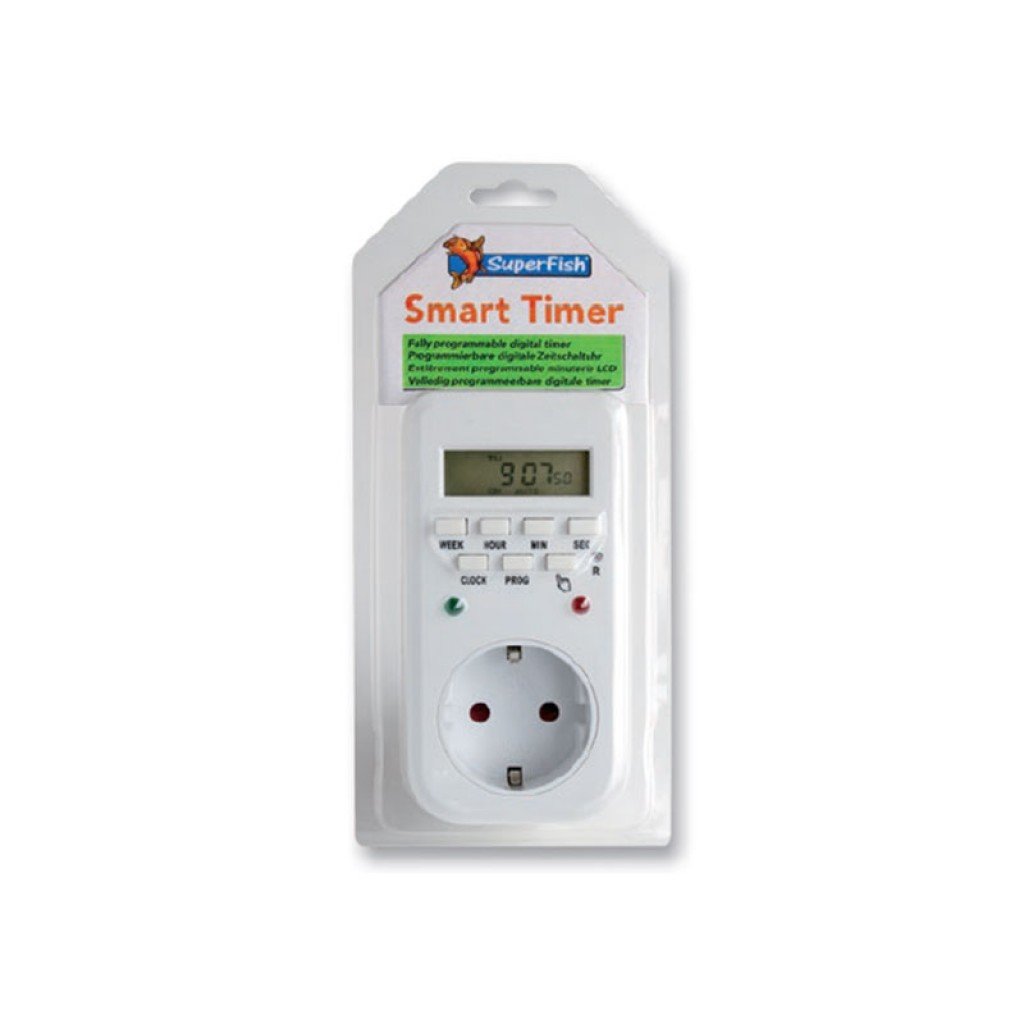
Image 1: Superfish Smart Timer. This image shows the front of the Superfish Smart Timer, highlighting its digital display and control buttons. The timer is designed for easy programming and monitoring of connected devices.
Componentele cheie includ de obicei:
- Ecran digital: Shows current time, program status, and settings.
- Butoane de control: For setting time, programs, and manual override.
- Priză de putere: Where you connect your appliance.
- Priza de alimentare: To connect the timer to a wall socket.
4. Configurare
- Initial Charge (if applicable): If your timer has a built-in battery for memory backup, plug it into a wall socket for at least 30 minutes before first use to charge the internal battery.
- Ștergeți toate setările: Press the "R" (Reset) button with a pointed object (e.g., a pen tip) to clear all previous settings. The display will show "00:00".
- Setați ora curentă:
- Press the "CLOCK" button and hold it.
- While holding "CLOCK", press "WEEK" to set the day of the week.
- While holding "CLOCK", press "HOUR" to set the hour.
- While holding "CLOCK", press "MINUTE" to set the minute.
- Release the "CLOCK" button. The current time is now set.
- Conectați aparatul: Plug the appliance you wish to control (e.g., aquarium light) into the outlet on the Superfish Smart Timer.
- Plug Timer into Wall Socket: Insert the Superfish Smart Timer's plug into a standard wall socket.
5. Operare
5.1 Programarea ciclurilor de pornire/oprire
The Smart Timer allows you to set multiple ON/OFF programs. Follow these steps to program your desired cycles:
- Press the "PROG" button once. The display will show "1 ON".
- Press "WEEK" to select the day(s) for this program (e.g., MO, TU, WE, TH, FR, SA, SU, or combinations like MO-FR, SA-SU, MO-SU).
- Press "HOUR" to set the desired ON hour.
- Press "MINUTE" to set the desired ON minute.
- Press "PROG" again. The display will show "1 OFF".
- Repetați pașii 2-4 pentru a seta ora de oprire dorită pentru primul program.
- Continue pressing "PROG" to cycle through "2 ON", "2 OFF", and so on, up to the maximum number of programs supported by your timer.
- After setting all desired programs, press the "CLOCK" button to return to the current time display.
5.2 Anulare manuală
The "MANUAL" button allows you to override the programmed settings temporarily:
- Press "MANUAL" repeatedly to cycle through modes:
- PE: The connected appliance will remain ON continuously, ignoring programs.
- OPRIT: The connected appliance will remain OFF continuously, ignoring programs.
- MAȘINĂ: The timer will operate according to the programmed ON/OFF cycles. This is the standard operating mode.
- Always ensure the timer is set to "AUTO" for automatic operation.
5.3 Random Function (if available)
Some models may include a "RANDOM" function, which can slightly vary the ON/OFF times to simulate a more natural environment or deter intruders. Consult your specific model's features for activation.
6. Întreținere
- curatenie: Disconnect the timer from the power supply. Wipe the exterior with a soft, dry cloth. Do not use abrasive cleaners or immerse the timer in water.
- Depozitare: Dacă depozitați cronometrul pentru o perioadă lungă de timp, asigurați-vă că este curat și uscat. Depozitați într-un loc răcoros și uscat, ferit de lumina directă a soarelui.
- Baterie de rezerva: The internal battery (if present) is designed for memory backup. If the display becomes dim or resets frequently after power outages, the internal battery may need recharging by keeping the timer plugged in for several hours.
7. Depanare
| Problemă | Cauza posibila | Soluţie |
|---|---|---|
| Afișajul cronometrului este gol. | Fără alimentare. | Check if the timer is properly plugged into a live wall socket. Check the wall socket with another appliance. |
| Aparatul nu se pornește/oprește conform programarii. | Setări incorecte ale programului; Temporizatorul este în modul manual PORNIT/OPRIT; Aparatul nu funcționează. | Review program settings carefully. Ensure the timer is in "AUTO" mode. Test the appliance by plugging it directly into a wall socket. |
| Time or programs reset after power outage. | Internal backup battery low or not charged. | Keep the timer plugged into a live socket for at least 4 hours to fully charge the internal battery. |
| Butoanele nu răspund. | Eroare temporară de software. | Perform a full reset using the "R" button. Re-program all settings. |
8. Specificații
- Model: SF-SMARTIMER
- ASIN: B01CZTS47E
- Greutatea articolului: 349.27 g
- Bateriile necesare: No (internal backup battery for memory, not user-replaceable)
- Asamblare necesară: Nu
- Referință producător: SF-SMARTIMER
- Prima dată disponibilă: 2 decembrie 2022
- Actualizări de software garantate până la: Necunoscut
- Întrerupt de producător: Nu
- Note: Specific electrical ratings (Voltage, Max Load) are typically printed on the device itself. Always adhere to these ratings.
9. Garanție și asistență
Superfish products are manufactured to high-quality standards. For warranty information, please refer to the documentation provided with your purchase or visit the official Superfish webPăstrați dovada achiziției pentru reclamații în garanție.
For technical support or further assistance, please contact your retailer or the Superfish customer service department. Contact details can usually be found on the product packaging or the official Superfish website-ul.
Website: www.superfish.com (Notă: Acesta este un substituent URL, vă rugăm să verificați oficialul real website for Superfish.)

