
1. Introducere
This manual provides essential information for the installation, operation, and maintenance of your Genuine Ford ET4Z-19G490-A Rear View Camera Assembly. This component is an Original Equipment Manufacturer (OEM) part, designed and manufactured to Ford standards for specific vehicle models. Please read this manual thoroughly before proceeding with installation or use.
2. Informații de siguranță
- Deconectați întotdeauna bateria vehiculului înainte de a începe orice lucrare electrică pentru a preveni electrocutarea sau deteriorarea sistemelor vehiculului.
- Asigurați-vă că toate conexiunile sunt sigure și izolate corespunzător pentru a evita scurtcircuitele.
- Refer to your vehicle's service manual for specific wiring diagrams and component locations.
- If you are not comfortable performing the installation, seek assistance from a qualified automotive technician.
- Spatele view camera is an aid and does not replace the driver's responsibility to check surroundings and mirrors before backing up.
3. Conținutul pachetului
Verificați dacă toate componentele sunt prezente înainte de a începe instalarea:
- 1x Ford ET4Z-19G490-A Camera Assembly
If any parts are missing or damaged, do not proceed with installation. Contact your supplier for assistance.
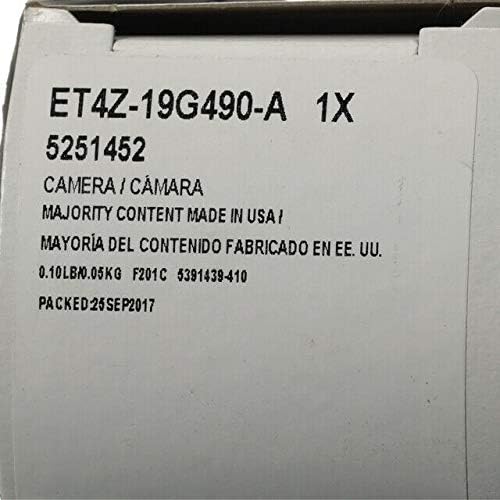
Figure 3.1: Packaging label indicating the ET4Z-19G490-A camera assembly.
4. Instalare
Installation of the Ford ET4Z-19G490-A camera assembly typically involves replacing an existing camera unit. Due to variations in vehicle models and trim levels, specific installation steps may differ. It is highly recommended to consult your vehicle's official service manual or reputable online resources for detailed, vehicle-specific instructions.
Pasi generali de instalare:
- Preparare: Parcați vehiculul pe o suprafață plană, acționați frâna de mână și opriți contactul. Deconectați borna negativă a bateriei vehiculului.
- Acces: Gain access to the existing camera assembly. This often requires removing interior trim panels, tailgate components, or exterior emblems, depending on your vehicle model.
- Disconnect Old Camera: Carefully disconnect the electrical connector and any mounting hardware securing the old camera.
- Install New Camera: Position the new Ford ET4Z-19G490-A camera assembly into the mounting location. Ensure proper orientation (lens facing outwards and downwards for rear view). Secure it with the appropriate mounting hardware.
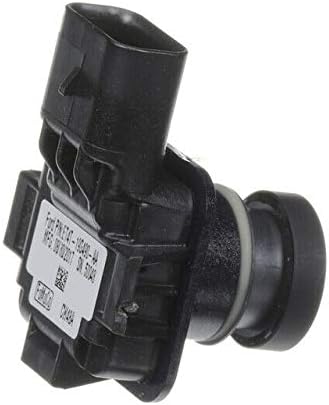
Figura 4.1: lateral view of the camera assembly, highlighting the connector.
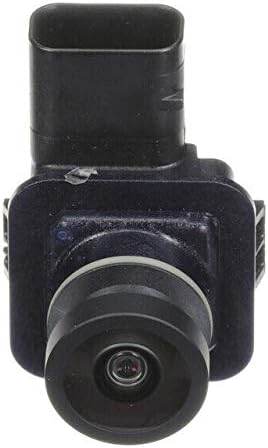
Figura 4.2: Față view a obiectivului camerei.

Figura 4.3: Spate view of the camera assembly with identification label.
- Conectare cablare: Connect the vehicle's wiring harness to the camera's RCA connector. Ensure the connection is firm.
- Funcționalitate de testare: Before reassembling all trim, reconnect the vehicle's battery. Turn the ignition to the 'ON' position (without starting the engine) and shift the transmission into 'REVERSE'. Verify that the camera image appears correctly on your vehicle's display monitor.
- Reasamblare: Once functionality is confirmed, reassemble all removed trim panels and components.
5. Instrucțiuni de utilizare
The Ford ET4Z-19G490-A Rear View Camera Assembly operates automatically in conjunction with your vehicle's transmission system.
- When the vehicle's transmission is shifted into 'REVERSE', the camera will activate.
- The live video feed from the camera will be displayed on your vehicle's compatible monitor.
- Depending on your vehicle's configuration, dynamic or static guidance lines may appear on the display to assist with parking and maneuvering.
- The camera will deactivate when the transmission is shifted out of 'REVERSE'.
6. Întreținere
Pentru a asigura performanța optimă și longevitatea mașinii dumneavoastră din spate view cameră, urmați aceste instrucțiuni simple de întreținere:
- Curățarea lentilelor: Curățați periodic obiectivul camerei cu o lavetă moale,amp cloth to remove dirt, dust, and debris. Avoid abrasive cleaners or materials that could scratch the lens.
- Verificarea conexiunii: If accessible, occasionally check the electrical connections to ensure they remain secure and free from corrosion.
- Factori de mediu: Extreme temperatures, heavy rain, or snow can temporarily affect camera performance. Ensure the lens is clear of ice or snow before use.
7. Depanare
If you experience issues with your Ford ET4Z-19G490-A Rear View Camera, refer to the following troubleshooting guide:
| Problemă | Cauza posibila | Soluţie |
|---|---|---|
| Nu se afișează nicio imagine când se merge cu spatele. | Conexiune electrică slăbită. Siguranță arsă. Faulty camera unit. | Check all electrical connections to the camera and display. Inspect vehicle's fuse box for a blown fuse related to the camera or display. If connections and fuses are good, the camera may require replacement. |
| Imaginea este neclară sau distorsionată. | Lentilă murdară a camerei. Umiditate în interiorul lentilei. Damaged camera unit. | Curățați obiectivul camerei cu o lavetă moale,amp pânză. Allow time for any condensation to dissipate. If persistent, the seal may be compromised. If cleaning does not resolve the issue, the camera may be damaged. |
| Image is upside down or incorrect orientation. | Incorrect camera model for vehicle. Instalare necorespunzătoare. | Verify that the ET4Z-19G490-A is the correct part number for your specific vehicle model and year. Ensure the camera is installed with the correct orientation as per vehicle service manual. |
If troubleshooting steps do not resolve the issue, it is recommended to consult a qualified automotive technician or contact Ford customer support.
8. Specificații
| Caracteristică | Detaliu |
|---|---|
| Numărul de model | ET4Z-19G490-A |
| Producător | Vad |
| Nume tip element | CAMERA ASY |
| Dispozitive compatibile | Monitorizați |
| Tip de instalare | Montare la suprafață |
| Tehnologia senzorilor optici | CMOS |
| Tip de lentile | Unghi larg, fix |
| Tip conector | RCA |
| Format de captură video | MP4 |
| Rezoluție captură video | 720p |
| Greutatea articolului | 16 uncii (aprox. 0.45 kg) |
9. Garanție și asistență
This Genuine Ford Part is covered by a limited warranty. For specific details regarding the warranty period, coverage, and claims process, please refer to the warranty documentation provided with your vehicle or contact an authorized Ford dealership or Ford customer service.
For technical support, installation assistance, or warranty inquiries, please contact your local authorized Ford dealership or visit the official Ford website pentru resurse de asistență pentru clienți.


