
1. Introducere
The Santamedical SM-150BL Fingertip Pulse Oximeter is designed for non-invasive spot-checking of arterial hemoglobin oxygen saturation (SpO2) and pulse rate. This device is suitable for use at home, in sports, and during recreational activities such as mountain climbing or high-altitude activities. It is intended for adults and pediatric patients.
This manual provides essential information for the correct operation and maintenance of your pulse oximeter. Please read it thoroughly before use.
2. Informații de siguranță
Please observe the following safety precautions to ensure proper use and to prevent damage to the device or injury to the user:
- Nu utilizați pulsoximetrul într-un mediu RMN sau CT.
- Nu utilizați dispozitivul într-o atmosferă explozivă.
- Acest dispozitiv nu este destinat monitorizării continue.
- Do not use the device on an infant or neonate.
- Avoid placing the oximeter on the same arm as a blood pressure cuff or other monitoring device.
- Ensure the finger is clean and dry before use. Nail polish or artificial nails may affect accuracy.
- Keep the device away from dust, vibration, corrosive substances, explosive materials, high temperatures, and moisture.
- Scoateți bateriile dacă dispozitivul nu va fi folosit pentru o perioadă lungă de timp.
- Consult a medical professional for interpretation of results. This device is for informational purposes and not a substitute for professional medical advice.
3. Produs terminatview
The Santamedical SM-150BL Fingertip Pulse Oximeter features a compact design with an easy-to-read LED display. Key components are labeled below:

Figura 1: Labeled components of the Santamedical SM-150BL Pulse Oximeter. This image shows the device from the front-right, highlighting the finger opening, single operation button, battery cover, lanyard loop hole, and the digital display indicating average heart rate, blood oxygen saturation level, and a heart rate bar graph.
- Finger Opening: Unde se introduce degetul pentru măsurare.
- Operare cu un singur buton: For turning the device on and off, and changing display modes.
- Capacul bateriei: Protejează compartimentul bateriei.
- Heart Rate Bar Graph: Visual representation of pulse intensity.
- Lanyard Loop Hole: Pentru atașarea șnurului inclus.
- Display LED: Shows SpO2 percentage, pulse rate (BPM), and pulse bar graph.
4. Configurare
4.1 Instalarea bateriei
The device requires two AAA batteries (included). Follow these steps to install them:
- Slide the battery cover off the back of the device.
- Insert two AAA batteries into the compartment, ensuring the polarity (+/-) matches the diagrams inside the compartment.
- Glisați capacul bateriei înapoi în poziție până când se fixează cu un clic.

Figura 2: Battery compartment of the pulse oximeter with the cover removed, showing where to insert two AAA batteries.
4.2 Atașarea șnurului
To attach the included lanyard for portability, follow these steps:

Figura 3: Instructions for attaching the lanyard to the pulse oximeter.
- Insert the thin loop end of the lanyard through the lanyard loop hole on the device.
- Thread the main strap of the lanyard through the loop you just created.
- Pull the strap firmly until the lanyard is securely attached to the device.
5. Funcționare
5.1 Luarea unei măsurători
To obtain an accurate reading, follow these steps:
- Deschide clamp al oximetrului.
- Insert one of your fingers (preferably the index finger) into the rubber opening of the oximeter, ensuring your nail is facing upwards towards the display.
- Eliberați clamp. The device will automatically turn on and begin measuring.
- Țineți mâna nemișcată în timpul măsurării. Mișcarea poate afecta precizia.
- Read the SpO2 and pulse rate values displayed on the screen.
- Dispozitivul se va opri automat după aproximativ 10 secunde de inactivitate.

Figura 4: Proper finger placement in the pulse oximeter for measurement.
5.2 Afișează informații
The LED display shows the following information:
- SpO2: Blood Oxygen Saturation Level, displayed as a percentage (de exemplu, 98%).
- PRbpm: Pulse Rate, displayed in beats per minute (BPM).
- Grafic cu bare al pulsului: A vertical bar graph indicating the strength of the pulse signal.
- Indicator baterie: Afișează durata de viață rămasă a bateriei.
6. Întreținere
Proper maintenance ensures the longevity and accuracy of your pulse oximeter.
- curatenie: Clean the surface of the device with a soft cloth dampened with 70% isopropyl alcohol. Do not immerse the device in liquid.
- Dezinfectare: After each use, clean the finger contact area with a soft cloth dampcu 70% alcool izopropilic.
- Depozitare: Store the device in a cool, dry place, away from direct sunlight, extreme temperatures, and moisture. Remove batteries if storing for extended periods.
- Înlocuire baterie: Înlocuiți bateriile când pe afișaj apare indicatorul de baterie descărcată.
7. Depanare
If you encounter issues with your pulse oximeter, refer to the table below for common problems and solutions:
| Problemă | Cauza posibila | Soluţie |
|---|---|---|
| Afișajul arată „Degetul afară” sau nicio citire. | Finger not properly positioned or too small/large. | Re-insert finger correctly, ensuring it covers the sensor. Try a different finger. |
| Display is unstable or inaccurate. | Patient movement, nail polish, or weak signal. | Remain still. Remove nail polish. Ensure finger is warm. |
| Dispozitivul nu pornește. | Bateriile sunt descărcate sau introduse incorect. | Verificați polaritatea bateriilor. Înlocuiți bateriile dacă este necesar. |
| Indicator baterie descărcată. | Bateriile sunt slabe. | Înlocuiți cu baterii AAA noi. |
Dacă problema persistă după ce încercați aceste soluții, vă rugăm să contactați serviciul de asistență pentru clienți.
8. Specificații
The technical specifications for the Santamedical SM-150BL Pulse Oximeter are as follows:
| Caracteristică | Detaliu |
|---|---|
| Numele modelului | SM-150BL |
| Interval de măsurare (SpO2) | 35%~100% |
| Interval de măsurare (frecvența pulsului) | 25 BPM ~250 BPM |
| Accuracy (SpO2) | ±2% (70-100%), unspecified below 70% |
| Precizie (ritmul pulsului) | ±2 BPM or ±2% (whichever is greater) |
| Tip de afișare | LED digital |
| Cerințe de putere | 2 baterii alcaline AAA de 1.5 V |
| Consumul de energie | Mai puțin de 30mA |
| Oprire automată | După 10 de secunde de inactivitate |
| Dimensiunile produsului | 3.5 x 1 x 2 inci (aproximativ) |
| Greutatea articolului | 3.2 uncii (inclusiv bateriile) |
| Temperatura de operare | 5°C până la 40°C (41°F până la 104°F) |
| Temperatura de depozitare | -10°C până la 50°C (14°F până la 122°F) |
| Umiditatea de funcționare | 15% până la 80% fără condensare |
| Umiditatea de depozitare | 10% până la 93% fără condensare |
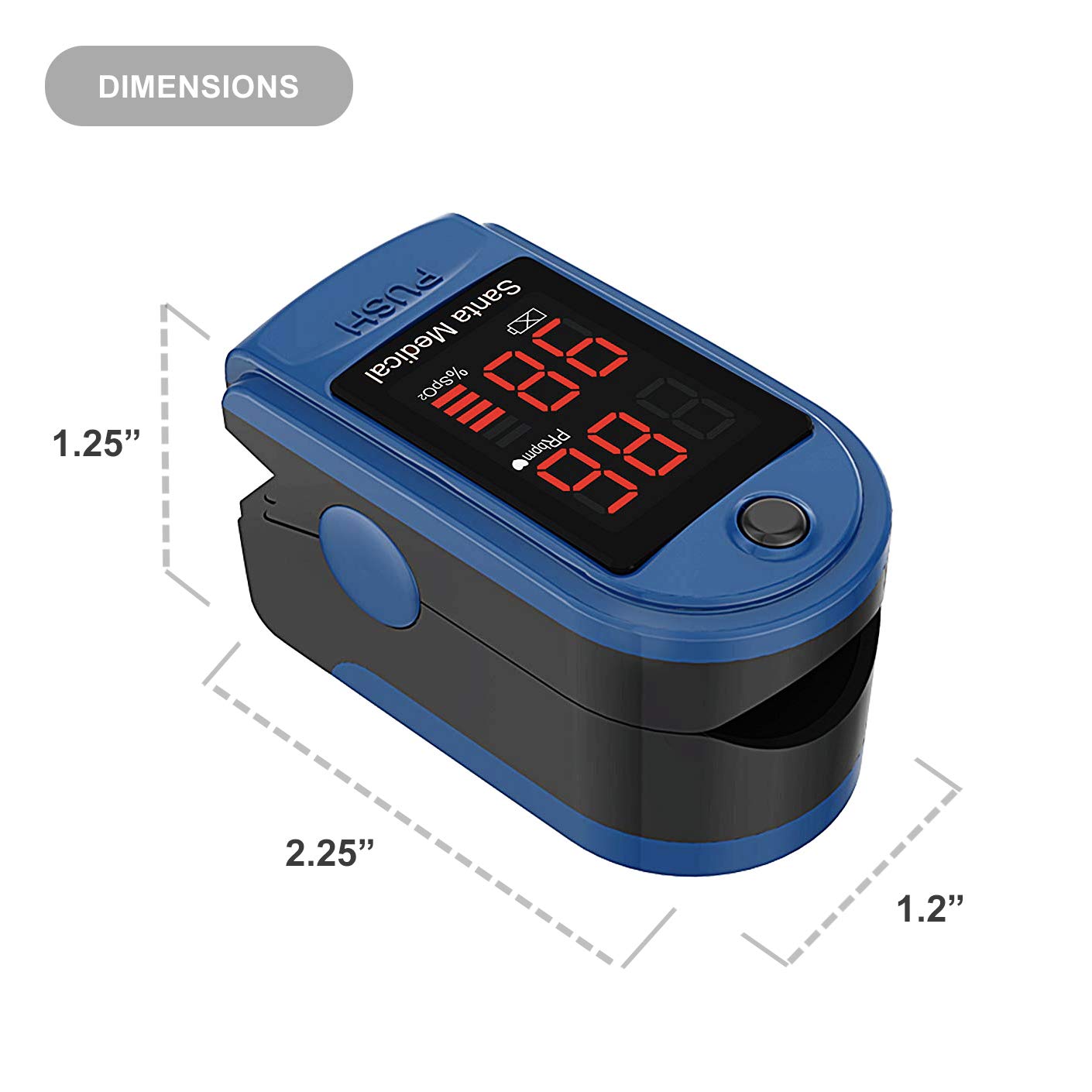
Figura 5: Dimensions of the Santamedical SM-150BL Pulse Oximeter.
9. Garanție și asistență
The Santamedical SM-150BL Fingertip Pulse Oximeter comes with a 1-year warranty from the date of purchase. This warranty covers manufacturing defects and ensures the device functions as intended under normal use.
For warranty claims, technical support, or any questions regarding the product, please contact Santamedical customer service. Refer to the packaging or the official Santamedical website pentru informații de contact.


